What Is an ATS Resume: Master the System in 2026
Discover what is an ats resume and why it's vital for your job search in 2026. Our guide explains how ATS works and how to format your resume to pass the
An ATS resume is a document built for two readers at once, the software that parses it and the recruiter who eventually reviews it. In a market where about 98% of Fortune 500 companies use ATS software and keyword filters are used in screening at 99.7% in one 2025 benchmark, the safest resume is the one that a machine can read cleanly and a human can still trust. [^1]
You can do everything right from your side, polish every bullet, and still hear nothing back. That silence often has less to do with your background and more to do with whether your resume was understood by the system that saw it first.
A good ATS resume isn't soulless. It's structured, searchable, and easy to read in a plain hiring workflow, while still sounding like a real professional document. The trick is learning how to satisfy the software without flattening your experience into a keyword dump.
Table of Contents
- Your Resumes First Hurdle The Applicant Tracking System
- How an ATS Reads Your Resume
- Common Reasons Resumes Fail the ATS Scan
- Crafting Your ATS-Friendly Resume Step by Step
- Beyond Parsing The Difference Between Readable and Ranked
- Putting It All Together A Final Checklist
Your Resumes First Hurdle The Applicant Tracking System
If your resume looks polished to you but still disappears into silence, the problem may be the first screen it has to pass. The application may never reach a recruiter if the system cannot read it clearly or match it to the role.
The most common first gate is the Applicant Tracking System, or ATS. It works like a digital sorting desk for the hiring team, collecting resumes, separating them into fields, and helping recruiters decide what gets reviewed first. University of Illinois Chicago's resume guide says the ATS reads, ranks, and scores qualifications against the job description. Reports compiled from industry research estimate that about 98% of Fortune 500 companies use ATS software, and recruiters commonly use keyword filters in screening, with one 2025 benchmark putting keyword-filter use at 99.7%. ScoutApply's ATS resume statistics makes the scale clear.
Practical rule: if your resume is hard for software to parse, it starts at a disadvantage before a person ever opens it.
An ATS-friendly resume uses standard headings, clear structure, and wording that matches the role you want. The goal is not to strip away personality, it is to make sure the system can extract the right information without confusion. Creative formatting can look appealing on screen, but if the software cannot sort your experience cleanly, the recruiter may never see the strongest parts.
That creates the balancing act. The resume has to satisfy parsing software first, then still read naturally for a human recruiter who wants a quick, convincing snapshot of your value. If the document is stuffed with keywords, it may look unnatural to the person making the hiring decision. If it is too stylized, the ATS may misread it before that person gets a chance.
How an ATS Reads Your Resume
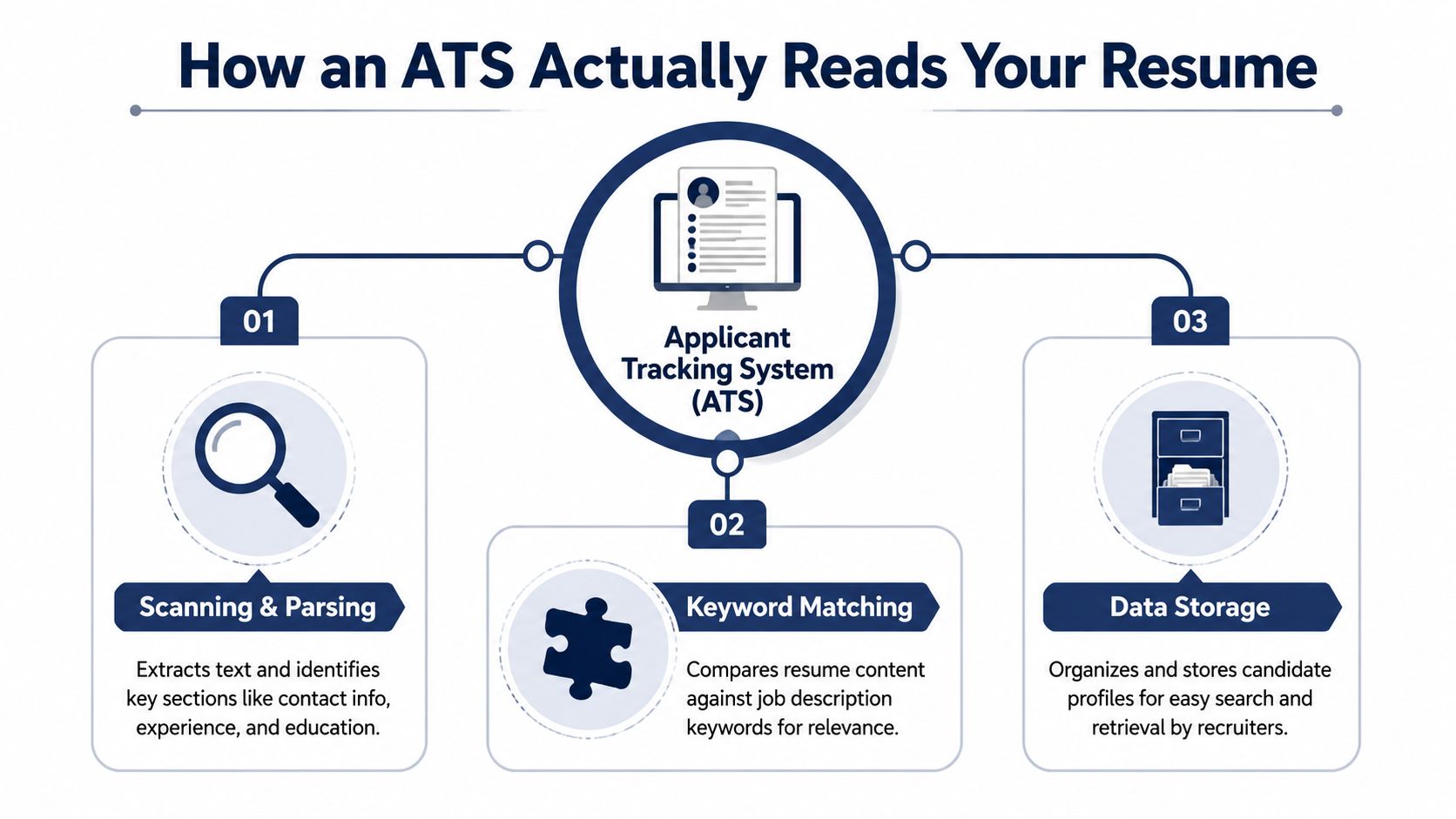
An ATS begins by pulling text from your resume and placing it into fields such as contact details, work history, education, and skills. The process is less like reading a story and more like sorting a form. If the information is easy to isolate, the system can compare it quickly. If the layout is confusing, pieces of your experience can get misplaced.
Scanning first, meaning later
MyPersonalRecruiter's ATS parsing overview says the system works best with a single-column layout, standard section labels such as Work Experience, Education, and Skills, plus body-text contact details and a text-based file format like .docx or a clean PDF.
That matters because the software is not reading your resume the way a human does. It does not pause for tone or admire a strong sentence. It tries to identify where each piece of information belongs so it can store and compare it cleanly.
Why structure changes what gets seen
When the ATS cannot recover text accurately, the recruiter may never see the information you thought was obvious. Tables, graphics, text boxes, icons, and content hidden in headers or footers can create extraction problems because the system may not map those elements into the right database fields. Indeed's ATS overview describes ATS software as scanning for essentials such as job titles, education history, contact information, and relevant keywords.
The resume that looks elegant to you can still look incomplete to parsing software.
That is the key shift to keep in mind. An ATS resume is a data document first, and a presentation document second. Once the software can read the fields correctly, the human recruiter can judge the story you are telling.
Common Reasons Resumes Fail the ATS Scan
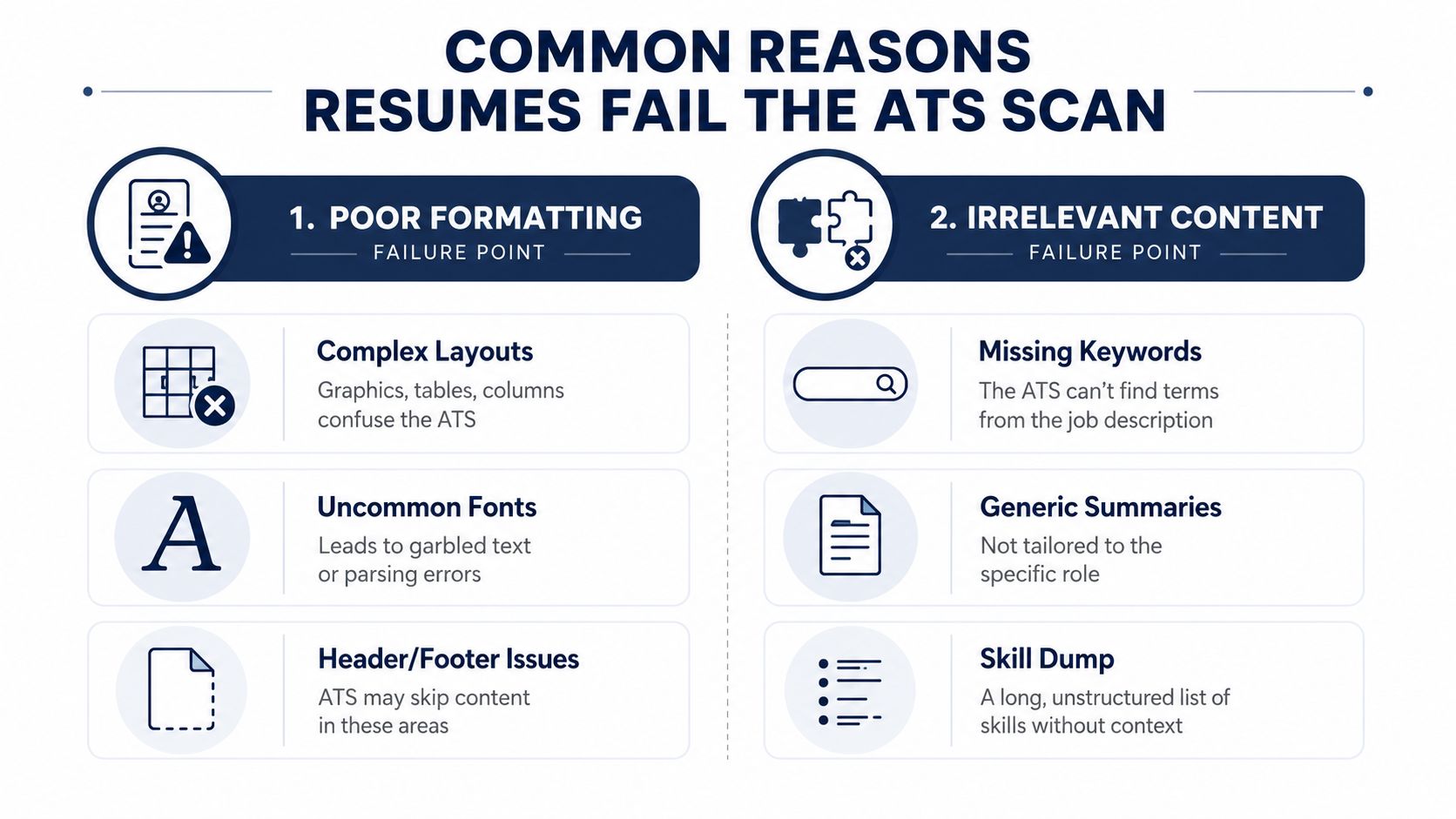
Resumes usually fail for two broad reasons, broken formatting or weak content alignment. The frustrating part is that both can happen even when the candidate is qualified.
Poor formatting breaks parsing
A flashy template can look polished in a portfolio, but ATS software is less forgiving. Complex layouts, columns, text boxes, decorative graphics, and unusual font choices can scramble how the system reads the page. When that happens, your contact details may be separated from your name, or your work history may land in the wrong order.
Header and footer placement can also create trouble. If key details sit in those areas, the ATS may skip them entirely or treat them as low-priority content. That's why a clean, plain structure usually beats a clever one.
Weak content misses the match
Formatting alone won't save a resume that doesn't speak the job's language. If the posting asks for a specific skill, tool, or responsibility and your resume uses vague wording instead, the ATS may not see enough relevance to move you forward.
Multiple industry summaries cite a long-running benchmark that roughly 75% of resumes are rejected before a human recruiter ever sees them, and another dataset reported that 43% of applicants submit resumes that do not closely match the job description enough to pass keyword filters. CVCraft's ATS statistics roundup helps explain why generic summaries and skill dumps often miss the mark.
Useful test: if a recruiter removed the job title from your resume and compared it to the posting, would the overlap still be obvious?
The point isn't to stuff your resume with every buzzword you can find. It's to make sure your real experience is described in the language employers already use, so the ATS can recognize it without guesswork.
Crafting Your ATS-Friendly Resume Step by Step
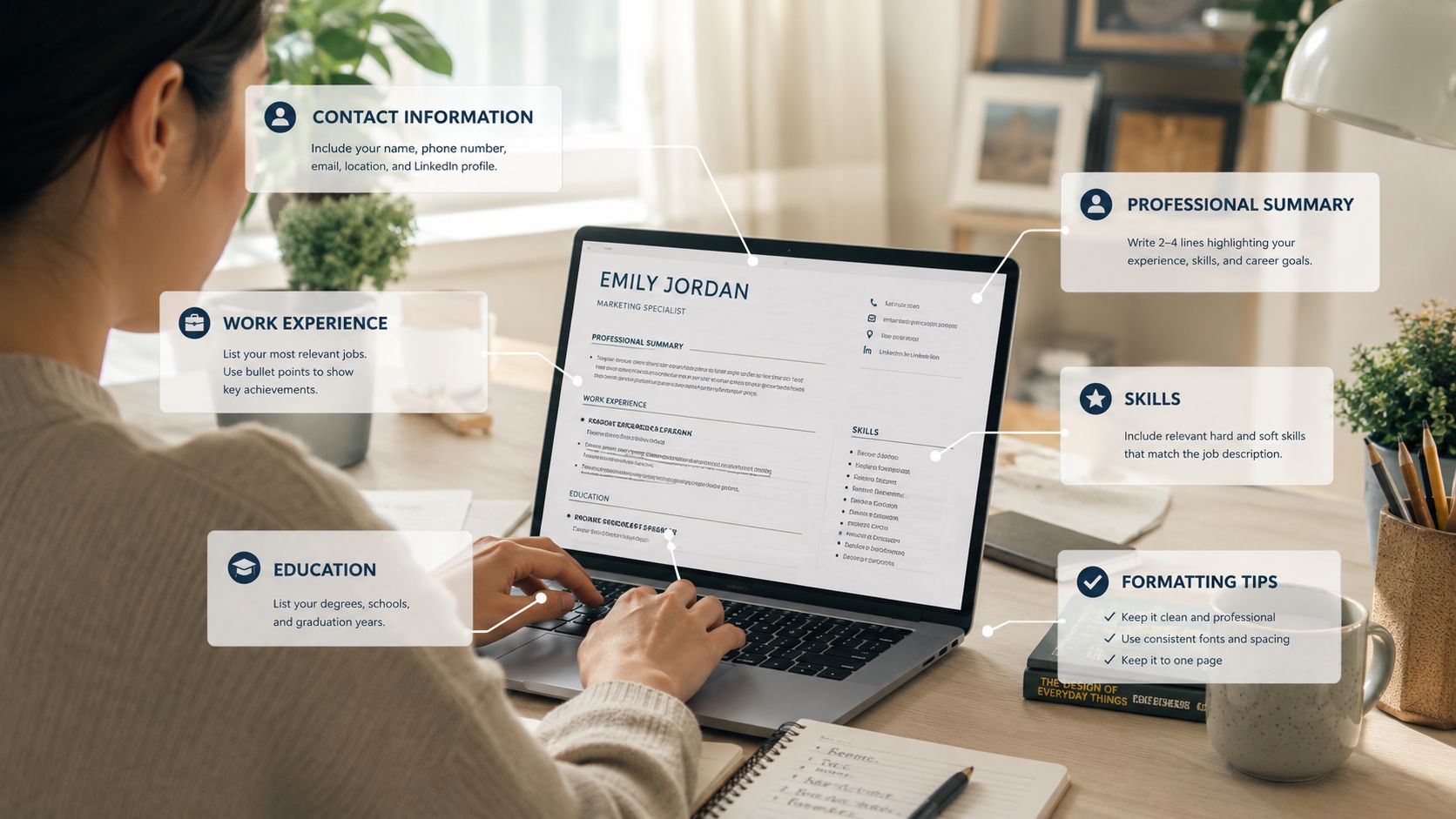
A strong ATS resume starts with structure, then earns its way through content. If you want a fast sanity check, this ATS-friendly resume guide is a useful reference point for layout decisions and keyword alignment.
Start with a clean structure
Use a single-column layout so the resume flows in the order you want it read. Keep the section labels conventional, such as Professional Experience, Education, and Skills, because standard headings are easier for software to classify than clever alternatives.
Save the file in a text-based format the system can read. A clean .docx file is often the safest choice, and a text-based PDF can work as well when the formatting stays simple. The goal is not visual drama, it's recoverable text.
Then match the job language
The most important performance mechanism of an ATS resume is keyword alignment with the target job description, because ATS platforms compare the parsed text against role criteria before ranking candidates. ResumeOptimizerPro's ATS guide recommends using exact job-title, skill, and responsibility phrases inside context-rich bullets, not as a detached keyword pile.
Read the job posting slowly and mark the recurring terms. Look for the skills, tools, certifications, and responsibilities that show up more than once, then weave those phrases into your summary, skills section, and work bullets where they fit. If the role says “project coordination” and your resume says only “managed tasks,” the match weakens.
Here's a simple editing rhythm that helps:
- Mirror the title carefully: Use the industry-standard title when your experience already supports it.
- Weave in role language naturally: Put the phrase in a bullet that proves you used it.
- Trim generic claims: Replace vague statements with specific responsibilities from the posting.
Check context before you submit
ATS systems reward resemblance, but they also look for relevance in context. A word sitting alone in a skill list is weaker than that same word appearing inside a sentence that shows how you used it.
The safest habit is to ask whether each bullet would make sense to a recruiter who knows the role. If the answer is yes, you're moving in the right direction. If the wording feels copied in from somewhere else, keep refining it until it sounds like your actual work.
Beyond Parsing The Difference Between Readable and Ranked
A resume can be readable and still not be competitive. That distinction confuses a lot of job seekers, because getting through the parser feels like the whole battle, when it's really only the first one.
Parsing gets you into the system
Independent guidance on ATS behavior shows that systems first extract fields and then rank resumes against the job description, which means formatting fixes alone do not guarantee visibility. Resume.io's ATS resume template guide makes that split clear. Your resume can be perfectly legible to the software and still rank too low for a recruiter to notice.
That's why a clean layout is necessary but not sufficient. Parsing is about being understood, ranking is about being preferred. Those are related, but they're not the same.
Ranking depends on fit signals
When the ATS compares your resume to the job description, it's looking for the clearest match it can find. That match comes from consistent language, relevant experience, and a resume that tells the same professional story as the posting.
This is also why a resume shouldn't be reduced to a keyword checklist. Recruiters need evidence, not just overlap. If your resume says you handled tools, led projects, or supported teams, the details around those claims are what make the profile feel credible.
For a deeper practical example of tailoring, this resume-to-job-description guide is worth keeping handy when a role seems close but not exact.
Bottom line: the best ATS resume is not the one with the most buzzwords, it's the one that proves the right fit in plain, searchable language.
That's the balancing act. You're writing for software that scores pattern match, and for a recruiter who wants a believable, relevant professional story.
Putting It All Together A Final Checklist
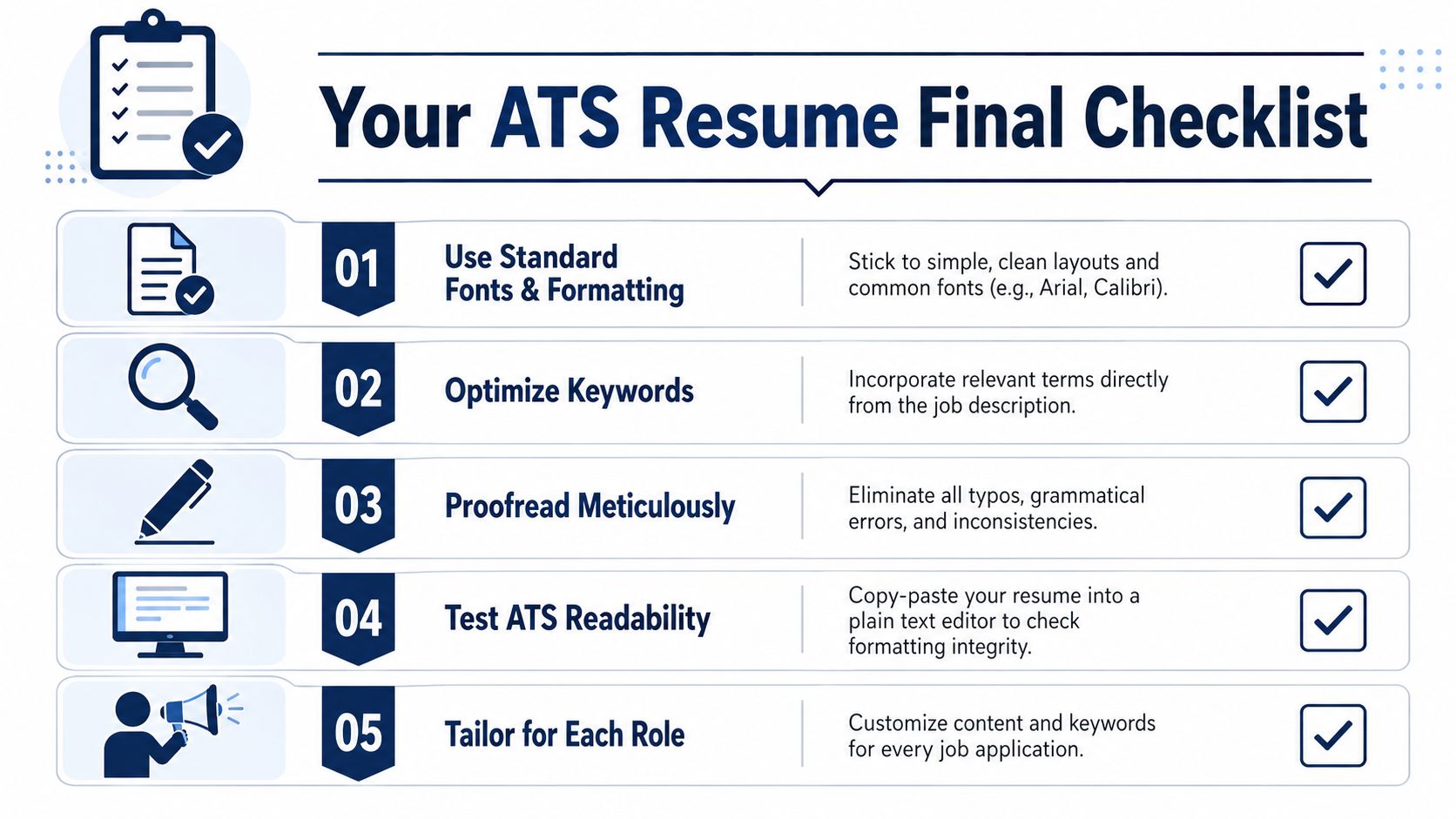
Before you apply, run the resume through a simple final check. This ATS resume checker is a good way to spot parsing and keyword issues before a recruiter does.
- Use Standard Fonts and Formatting: Keep the layout simple, the headings clear, and the body text easy to parse.
- Optimize Keywords: Pull relevant terms directly from the job description and place them naturally in context.
- Proofread Meticulously: Typos and inconsistencies can weaken both the ATS match and the human impression.
- Test ATS Readability: Paste the resume into plain text to see whether the structure still holds together.
- Tailor for Each Role: Adjust summary language, skills, and experience bullets for every application.
If your resume passes those five checks, it's doing its job well. It's speaking to the software without sounding robotic, and it's still giving a recruiter a clear reason to keep reading.
If you want help turning your current resume into something that fits the job you're chasing, GetTheCall can do that work with you. It helps you tailor your resume to the role, surface the right keywords, and export a submission-ready version fast. Visit GetTheCall and start with a resume that's built to get seen.