Types of Resume Formats and How to Choose the Right One
Compare the main types of resume formats including chronological, functional, hybrid, and ATS-optimized layouts, with tips to pick the best one
You're staring at a blank resume document, switching between a polished two-column template and the plain file your friend insists recruiters prefer. Your experience hasn't changed, but the way you arrange it can change what a hiring team notices first, what an applicant tracking system extracts, and whether a person ever sees the document.
The types of resume formats are more than design choices. They're different ways of telling your career story. Most job seekers should begin with reverse chronological, but a hybrid structure can make more sense for a career pivot, while a skills-focused format may suit a narrower set of situations. The right decision depends on your work history, target role, and whether the document remains clear to both software and people.
Table of Contents
- Why the Format You Pick Matters More Than You Think
- The Three Foundational Resume Formats Explained
- Chronological vs Functional vs Combination at a Glance
- How an ATS Reads Your Resume
- Matching the Right Format to Your Career Stage
- Turning Any Format Into an ATS-Optimized Variant
- Common Misconceptions About Resume Formats
- Choosing Your Format and Verifying It Before You Apply
Why the Format You Pick Matters More Than You Think
Two candidates can have similar qualifications and receive different results because their resumes present information in different orders. One may lead with a recent role, recognizable job titles, and achievements that match the vacancy. The other may place those details inside columns, graphics, or broad skill categories that make the same experience harder to find.
After you click submit, an ATS typically extracts text and organizes it into fields such as contact details, job titles, employers, dates, skills, and education. The system may compare that information with the job description before a recruiter reviews the application. If the file loses dates, headings, or keywords during extraction, a strong background can become difficult to evaluate.
A recruiter then makes a quick first pass. They usually want to identify your current or most recent role, your professional direction, and evidence that you can handle the target position. A hiring manager may read more later, but only if the resume makes it through the earlier checks.
Practical rule: Choose a format that makes your strongest evidence easy to locate without asking the reader to decode your layout.
That's why format choice is structural rather than decorative. A restrained, single-column resume can communicate progression clearly, while an attractive design can create confusion if its text order doesn't survive parsing. The safest starting point is the format employers already understand, then a deliberate adjustment when your career story needs one.
The Three Foundational Resume Formats Explained
The modern resume approach rests on three foundational formats, chronological, functional, and combination. Each one answers a different question for the reader: Where have you worked? What can you do? Or how do your skills connect to your work history?
Chronological format
A chronological resume is best understood as a timeline diary. It lists your employment history in reverse chronological order, with your most recent position first, followed by earlier roles. A typical order is contact information, summary, skills, work experience, education, and optional certifications or projects.
The recruiter's eye moves from your latest job downward. This makes progression, continuity, role changes, and recent responsibilities easy to follow. The UC Davis resume format guidance describes chronological resumes as centered on employment history, with achievements placed beneath each position.
Functional format
A functional resume works like a skills showcase. Instead of making the job timeline the main event, it groups evidence under areas such as project coordination, customer support, data analysis, or team leadership. Employer names and dates may appear later in a shorter employment section.
This approach can foreground transferable abilities, particularly when your previous titles don't resemble the role you want. The trade-off is immediate: readers may have to work harder to connect each achievement to a specific employer and period of employment. A skills-first document can also prompt questions about what happened between roles.
Combination format
A combination, or hybrid, resume serves a mixed menu. It begins with a summary of relevant competencies and achievements, then preserves a clear, dated work history below. The top half answers, “What can this person contribute?” The lower half answers, “Where and when did they build that capability?”
This structure suits candidates who need to emphasize transferable expertise without removing their employment timeline. It can be especially useful for mid-career professionals, career changers, and applicants with varied experience. The Open Oregon technical writing resource explains the combination format as a compromise between skills emphasis and dated employment history.
Chronological ordering remains the recruiter default across North America, the UK, and much of Western Europe. Functional and combination formats are alternatives for specific career narratives, not replacements for the baseline.
Chronological vs Functional vs Combination at a Glance
The differences become easier to judge when the formats sit beside one another. The table below focuses on how each structure works in practice, including the risk it creates for ATS review.
Chronological vs Functional vs Combination Resume Formats
| Format | Structure | Best For | Key Strengths | Main Weaknesses | ATS Compatibility |
|---|---|---|---|---|---|
| Chronological | Skills or summary followed by work experience listed newest to oldest | Stable work history and clear career progression | Familiar, easy to scan, preserves dates and role sequence | Gaps and unrelated experience are more visible | High, especially in a simple single-column layout |
| Functional | Skills grouped by category, with a brief employment list | Selective career pivots or situations where specific capabilities matter more than timeline | Highlights transferable skills and relevant abilities | Can obscure context, reduce trust, and make dates harder to interpret | Lower, because limited chronology and unusual grouping can confuse parsers |
| Combination | Skills summary near the top followed by dated work history | Mid-career pivots, diverse experience, and leadership applications | Balances targeted skills with visible employers and dates | Can become repetitive or crowded if both sections repeat the same evidence | Moderate to high, provided the dated timeline remains clear |
For a steady career path, chronological usually wins because it gives the reader the information they expect in the order they expect it. A candidate moving into a new function may gain more from a combination format that connects transferable skills to actual roles. Functional resumes can spotlight capability, but they're the format most likely to create doubts for recruiters and parsing systems when they minimize employment context.
The key distinction isn't whether one format is attractive. It's whether the structure helps a reader verify your claims quickly. If a hybrid resume still shows employers, job titles, and dates clearly, it can preserve much of the confidence created by chronological ordering.
How an ATS Reads Your Resume
Suppose your resume looks polished on screen, but the application system places a job title under the wrong employer. A recruiter may see a document that appears incomplete even though your experience is relevant. An Applicant Tracking System extracts text, assigns it to fields, and searches for job titles, skills, education, employers, and dates. It may compare those fields with the vacancy before a recruiter reviews the application.
A single-column layout gives the parser one clear path through the page. Two columns can cause it to read the sidebar before the main content or merge lines from separate areas. Tables, text boxes, headers, footers, icons, and graphics create the same risk because the visual layout may differ from the underlying text order.
Available benchmark guidance reports about 97% extraction accuracy for reverse-chronological layouts, with lower performance for complex designs in an independent ATS format guide. Another parsing benchmark reports about 95% accuracy for single-column layouts and 42% for multi-column formats, while advising against tables, text boxes, headers, footers, and graphics (ATS Verification parsing benchmark).
| Layout Choice | File Type | Parser Accuracy |
|---|---|---|
| Reverse chronological, simple structure | Text-based document | About 97% extraction accuracy |
| Single-column layout | Text-based document | About 95% parsing accuracy |
| Multi-column layout | Text-based document | About 42% parsing accuracy |
File type affects the result as well. A text-based PDF contains selectable characters that software can process. An image-based PDF or scan may have no usable text layer. Guidance commonly recommends .docx and text-based PDF, with .docx often treated as the safest default when the employer gives no format instructions (JobLeads ATS resume guidance).
Run the finished document through an ATS resume checker to see whether headings, dates, and sections are recognized. Use the result as a diagnostic, not a promise. A resume can parse correctly and still leave a recruiter unsure what value you offer.
Matching the Right Format to Your Career Stage
Format selection becomes less confusing when you start with your current situation instead of a template gallery. Ask which part of your background needs the most attention, recent progression, transferable capability, or strategic scope.
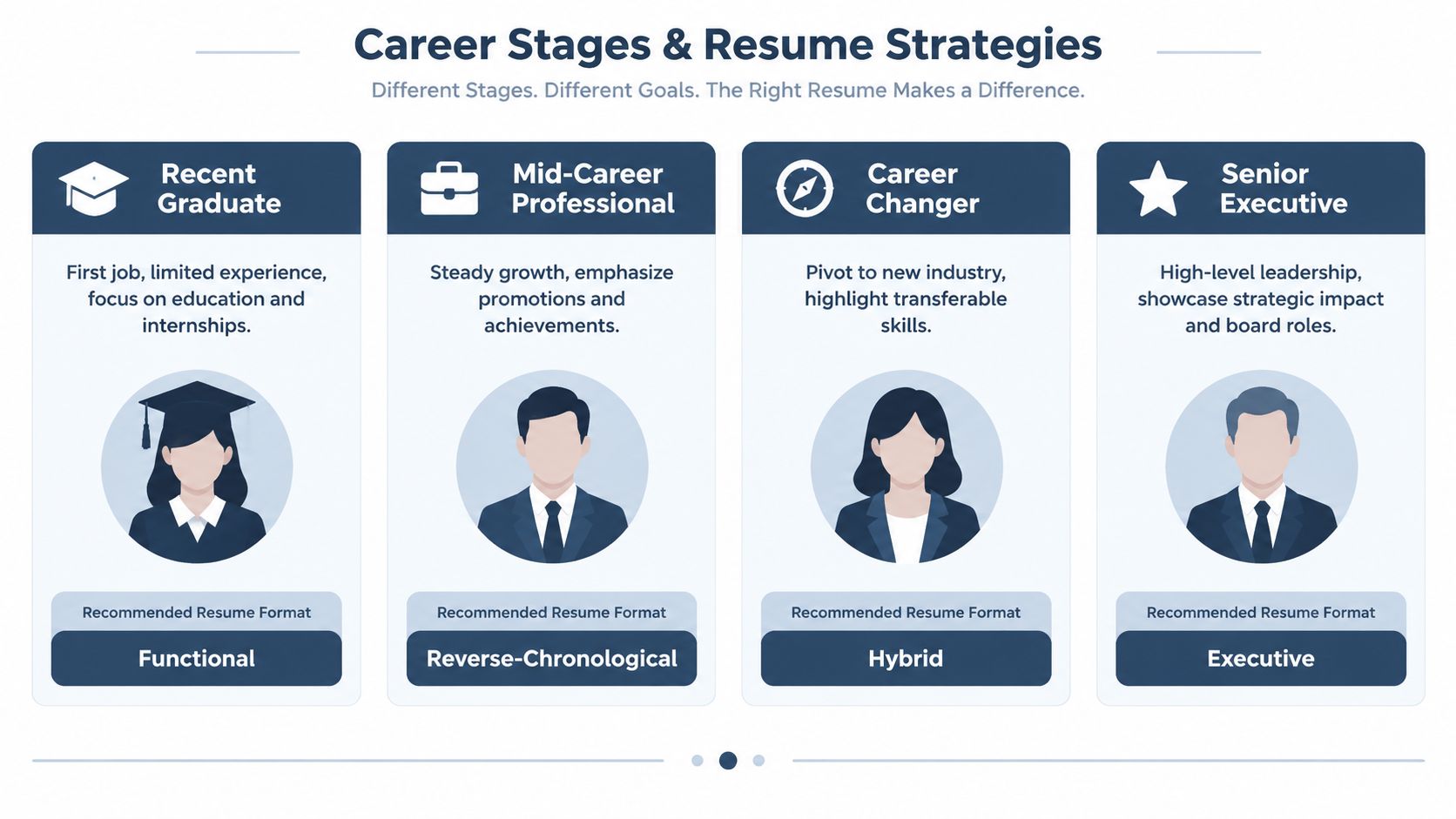
First job or recent graduate
Use a chronological or combination format with education, internships, projects, volunteer work, and part-time roles presented clearly. If your formal employment history is limited, a combination structure can move relevant projects or skills higher without pretending they were jobs.
The trade-off is that a functional format may seem tempting because it fills space with skills, but employers still need context. Connect each project or achievement to a course, organization, internship, or role.
Steady mid-career professional
Choose reverse chronological when your roles show consistent growth in the target field. Put the most relevant achievements under each position, and use the summary and skills sections to align the document with the vacancy.
This format makes promotions and increasing responsibility easy to verify. It also exposes gaps or unrelated periods, so explain significant transitions briefly rather than trying to bury them inside broad skill categories.
Career changer
A combination format usually provides the strongest balance. Lead with transferable skills that match the new function, then show the employment history that proves where you developed them.
For example, someone moving from operations into project coordination might foreground scheduling, stakeholder communication, process improvement, and reporting, then connect those capabilities to specific jobs. The resume should make the pivot understandable, not hide the previous career.
Senior leader
Use a hybrid or executive-style chronological structure that emphasizes scope, strategic decisions, leadership, and board or advisory responsibilities while retaining a credible timeline. Senior candidates need room to show influence beyond a list of tasks, but the reader still needs to understand how the career developed.
Someone returning after a career gap can still use chronological ordering. Reframe the summary around current strengths, include relevant learning or projects, and give the timeline enough context to avoid unexplained ambiguity. Format choice should foreground the right story, not conceal the facts.
Turning Any Format Into an ATS-Optimized Variant
The format you choose still needs a plain, readable foundation. A hybrid resume can be ATS-friendly, but only when the skills summary sits above a recognizable employment timeline. A functional resume carries more risk, so preserve employer names, job titles, and dates wherever possible.
Start with the file. Use .docx as the safest baseline when the employer doesn't provide different instructions. Use a text-based PDF when preserving formatting matters and the posting accepts it. Don't submit a scanned or image-based resume because the system may have nothing selectable to extract.
Keep the document to one column, align text to the left, and use readable standard fonts such as Arial, Calibri, or Times New Roman. Conventional headings such as Experience, Education, and Skills help software recognize sections. Custom labels may look distinctive, but they can make mapping less reliable.
Remove elements that hide information
Avoid design features that separate words from their natural reading order:
- Text boxes: Place important content directly in the document body.
- Headers and footers: Keep contact information and key details in the main text area.
- Images and icons: Write out information instead of representing it visually.
- Tables and columns: Use spacing and headings to create hierarchy.
- Decorative dividers: Let white space and standard formatting separate sections.
The ATS-friendly resume guide offers a practical reference for checking layout and section structure. You can also test your file by copying its contents into a plain-text editor. If the sequence becomes scrambled, dates detach from employers, or headings disappear, revise the original before applying.
A human reviewer should still find the document comfortable to read. ATS safety isn't an excuse for dense paragraphs or vague bullets. Use clear spacing, relevant keywords, and concrete evidence, then verify that the plain-text version preserves the same story.
Common Misconceptions About Resume Formats
A functional resume doesn't automatically make an employment gap disappear. It may move attention toward skills, but recruiters can still view the missing timeline as a question, and some ATS systems may struggle with the structure. If you need a skills-led approach, keep a concise employment history visible and explain transitions with transparency.
Visual polish also has limits. Color blocks, icons, sidebars, and two-column templates can look impressive in a design preview, yet they may disrupt text extraction or force a recruiter to search for basic facts. A clean layout isn't boring when it helps someone find your title, employer, dates, and relevant achievements quickly.
A resume should reduce the reader's effort, not test their ability to interpret your design.
Another common belief is that every resume must fit on one page. That rule can be useful for someone with limited experience, but it shouldn't force a senior professional to delete relevant leadership scope, or an academic researcher to remove important work. The better test is whether every section supports the target role and whether the document remains easy to scan.
The opposite mistake is keeping everything. A long timeline with unrelated duties can bury the evidence that matters. Use the format to control emphasis, not to preserve every detail from your working life.
Finally, “modern” doesn't mean visually elaborate. A modern resume can be a simple, text-based document with strong hierarchy, strategic language, and a clear progression. Creativity belongs in the way you frame relevant achievements, not in features that software may fail to read.
Choosing Your Format and Verifying It Before You Apply
Use this decision checklist before opening a template.
- Review your trajectory. If your recent roles show steady growth in the target field, start with reverse chronological.
- Identify the story problem. If the target role differs from your previous function, use a combination structure to lead with transferable skills while keeping the timeline visible.
- Preserve evidence. For gaps, freelance work, projects, caregiving periods, or varied employment, provide enough context for a person to understand the sequence.
- Simplify the layout. Use one column, standard headings, left-aligned text, and selectable text.
- Follow the posting. If the employer requests .docx, send .docx. If it accepts PDF, use a text-based PDF that has been tested.
- Match the language. Compare your skills, job titles, and achievements with the target description, using accurate terms that reflect your actual experience.
Run the file through a parser checker and inspect the extracted text. Confirm that your name and contact details appear correctly, each job remains connected to its employer and dates, and the headings are recognizable. Then ask a friend, mentor, or career coach to read it quickly and explain what role they think you're pursuing.
Tailoring should happen after you select the structure, not instead of selecting one. Adjust the summary, skills, and achievement bullets for each application, while keeping the underlying format stable enough for both ATS review and human scanning. A resume tailoring guide can help you connect the document to the specific vacancy.
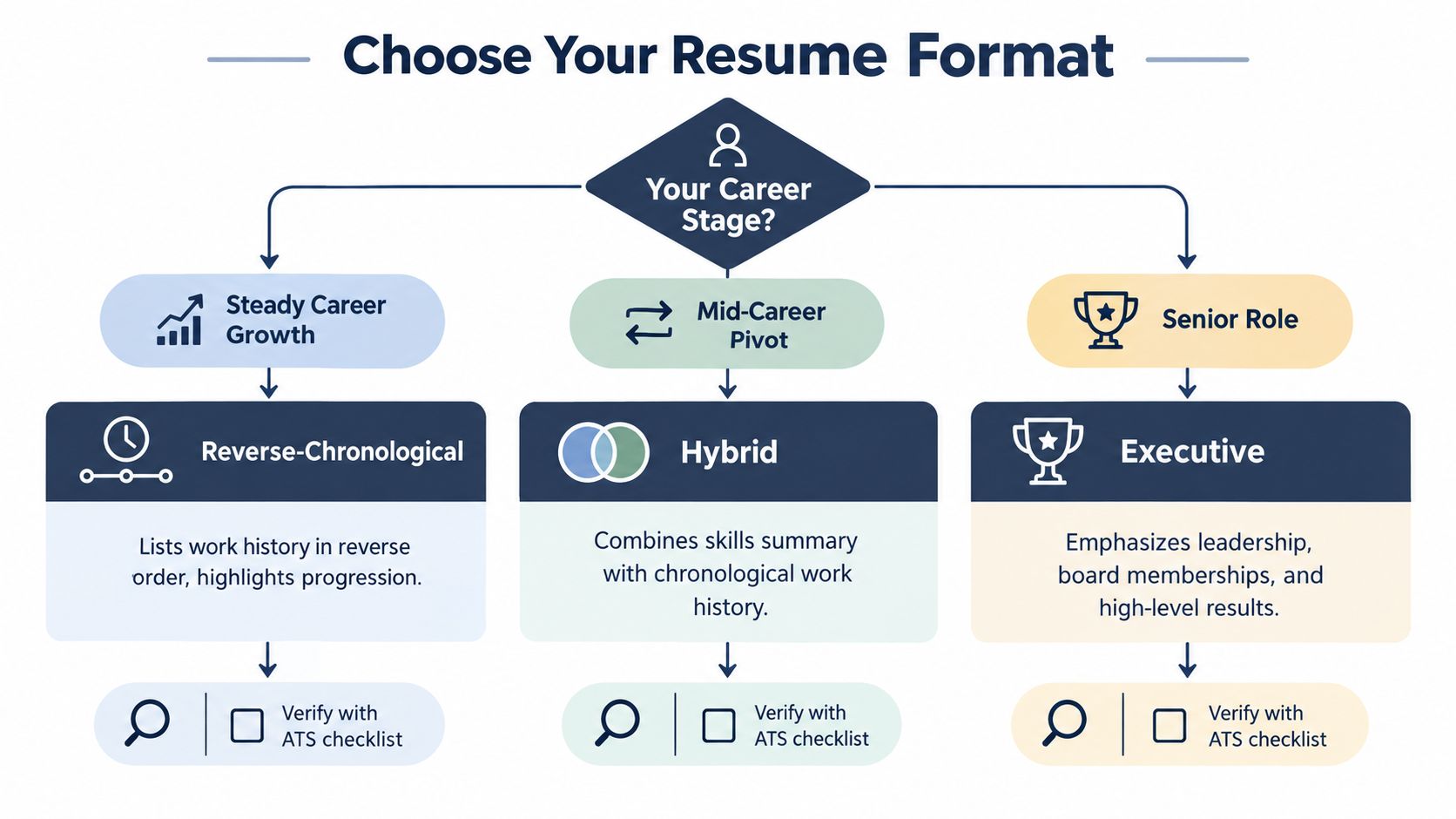
For most job seekers, the answer is straightforward: choose reverse chronological, keep it single-column, and tailor the content. Choose hybrid when transferable skills need a stronger opening, but never remove the dated work history that gives those skills credibility.
GetTheCall turns a LinkedIn profile or existing résumé into an ATS-optimized, job-specific PDF, using the experience you provide and aligning it with a target job listing. Visit GetTheCall to import your background, compare it with a role, and create a resume you can verify before applying.