Scan Job Description for Keywords
Scan job description for keywords. Learn how to scan a job description for keywords the smart way. A practical 2026 guide to extracting, prioritizing, and using

You've found a job posting that looks promising, but it's also a dense block of responsibilities, qualifications, tools, and polished company language. You read it once, highlight almost everything, and still can't tell which terms belong in your resume.
That's a common problem. A job description isn't a checklist where every phrase deserves equal space. It's evidence about what the employer needs most, what the ATS may search for, and what a recruiter will expect you to prove. Learning to scan a job description for keywords means weighing those signals, not stuffing your resume with every phrase you can find.
Table of Contents
- When a Posting Feels Like a Wall of Words
- Reading the Job Description the Right Way
- Sorting Keywords Into Must-Have and Nice-to-Have
- Manual Scan Versus Tool-Assisted Scan
- A Worked Example From Posting to Keyword List
- Anchoring Keywords in Proof a Recruiter Trusts
- A Repeatable Workflow Before You Hit Apply
When a Posting Feels Like a Wall of Words
Maya, a mid-career project coordinator, has saved a 900-word job posting for a role she wants. The opening sounds exciting, but the posting quickly blends project delivery, stakeholder communication, software requirements, leadership expectations, and company values into one long stream. She knows she should tailor her resume, yet she has no reliable way to decide which words matter.
At this point, applicants often take one of two unhelpful paths. Some copy the posting into a generic skills section. Others guess, choosing familiar synonyms and hoping the recruiter or software will understand. Both approaches can produce an application that sounds busy but doesn't clearly match the role.
A more useful approach is to turn the posting into a ranked, copy-ready keyword list. You'll read it twice, extract terms manually or with a tool, sort them by importance, and connect the strongest terms to evidence from your own work.
Practical rule: A keyword matters more when it appears repeatedly, sits near the role's core responsibilities, or describes a skill you'd use immediately.
This method works whether you've never used an ATS before or you've customized hundreds of applications. Applicant tracking systems commonly reduce resumes to searchable text and may sort candidates using job titles, qualifications, education, and technical skills, which makes the employer's wording worth examining closely. Coursera's overview of resume keywords also recommends matching relevant language in the summary, skills, and experience sections.
That doesn't mean every phrase deserves a place in your resume. The purpose of the scan is to uncover the posting's strongest signals, including obvious hard skills and quieter clues about seniority, tools, autonomy, work environment, and collaboration. Once you can see those layers, tailoring becomes a focused editing task rather than a guessing exercise.
Reading the Job Description the Right Way
Don't begin by highlighting every attractive word. Use a two-pass read so you understand the posting before deciding what belongs in your resume.
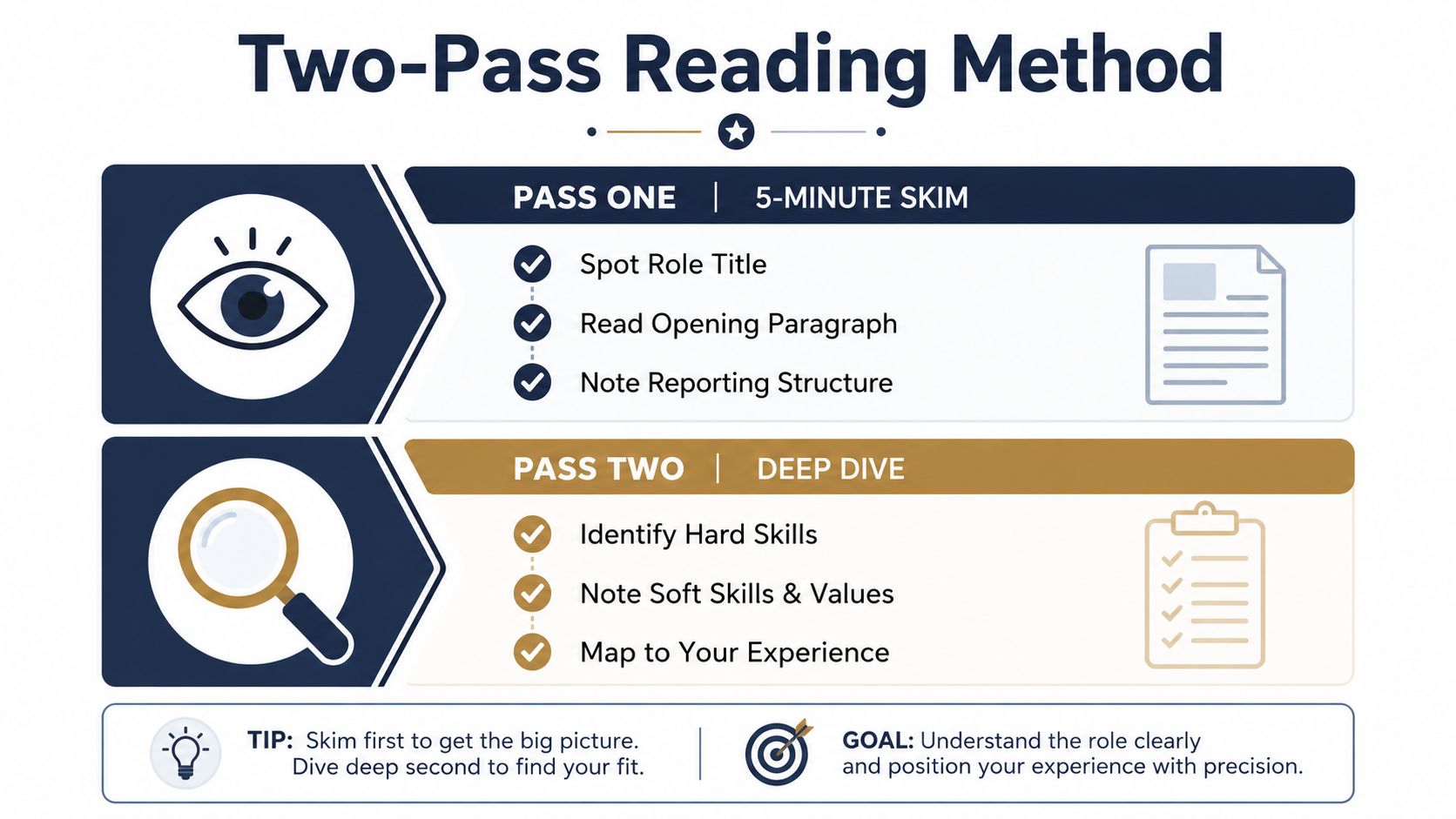
Pass one builds the map
Spend roughly five minutes locating the posting's main parts:
- Role title: Record the exact title because it frames the search and gives you the role's language.
- Opening paragraph: Look for the employer's short description of the team, purpose, and central problem.
- Responsibilities: Note what the person will do regularly, especially the first few duties.
- Requirements: Identify qualifications presented as necessary rather than optional.
- Preferred sections: Separate bonus skills, certifications, and experience from core expectations.
- Reporting structure: Notice who the role supports, manages, or partners with.
This skim prevents a common mistake: treating a company's values statement as equally important as a technical requirement.
Pass two finds the signals
Read slowly and annotate in three layers.
First, mark hard skills. Highlight repeated nouns and technical phrases, especially terms that appear at least twice across responsibilities and requirements. Tools, methodologies, certifications, platforms, and role-specific processes usually deserve close attention.
Next, capture context clues. Words such as fast-paced, cross-functional, and regulated environment don't always function as ATS filters, but they tell you how to frame your accomplishments. A regulated setting may call for evidence of documentation and compliance. Cross-functional work may require examples involving several teams.
Finally, circle seniority signals. Verbs such as own, drive, partner with, mentor, and lead reveal the level of autonomy expected. “Support reporting” and “own reporting” describe different scopes of responsibility, even when they involve the same tool.
For a more detailed tailoring process, use this guide to tailoring a resume to a job description. The key is to avoid treating your annotations as a finished keyword list. At this stage, you're collecting evidence. Ranking comes next.
Sorting Keywords Into Must-Have and Nice-to-Have
A long posting can contain dozens of relevant phrases, but your resume has limited space and human readers have limited attention. Sort terms using frequency, placement, and centrality rather than intuition alone.
Three tiers make the decision easier
| Signal | Tier 1 (Must-Have) | Tier 2 (Strong-to-Have) | Tier 3 (Nice-to-Have) |
|---|---|---|---|
| Frequency | Appears across multiple sections | Appears once in an important sentence | Appears in a bonus or culture statement |
| Placement | Title, opening, responsibilities, and requirements | Required qualifications line | Preferred, plus, or bonus section |
| Role connection | Directly tied to the work you'll inherit | Useful tool, certification, or methodology | Helpful preference or broad working style |
Tier 1 terms usually appear in both the responsibilities and requirements sections. They may also appear in the title or opening paragraph, or connect directly to the first responsibilities a new hire would take on. These belong in your summary, skills section, and experience bullets when they accurately describe your background.
Tier 2 terms can include a tool named once in a required qualification, a domain-specific process, or a certification that supports the role. They're important, but they shouldn't displace stronger evidence of the main work.
Tier 3 terms often appear under “preferred,” “plus,” or “bonus.” Repeated soft skills such as “team player” and broad culture language may help you sound aligned, but they rarely deserve the same treatment as a required technical skill.
Consider this short example:
Sample posting: “Manage paid search campaigns and report performance in Google Analytics. Experience with SQL is required. Familiarity with Tableau is a plus. We value a collaborative team.”
A sensible sort would be:
- Tier 1: Paid search campaigns, Google Analytics, SQL
- Tier 2: Performance reporting
- Tier 3: Tableau, collaborative team
Tableau could move upward if the role's responsibilities depend on it. That's why sorting requires judgment, not just counting appearances.
A common error is promoting every soft skill to Tier 1. The result is a resume filled with “collaborative,” “organized,” and “results-driven,” while the core tools and hard skills are difficult to find. Independent ATS guidance reports that hard skills are commonly weighted more heavily than soft skills, reinforcing the value of giving technical requirements clearer treatment. The ATS statistics and keyword-matching guidance from Jinx Apply places hard-skill weighting at 2 to 3 times that of soft skills and advises paying close attention to exact job-description language.
Manual Scan Versus Tool-Assisted Scan
A manual scan and a tool-assisted scan solve different problems. Manual work helps you understand the role. Software helps you check your memory and identify gaps.
For a manual scan, copy the posting into a document and highlight noun phrases, tool names, certifications, and repeated terms. Circle variations, then use Ctrl+F to locate every instance of a phrase. If the posting uses both “stakeholder management” and “stakeholder engagement,” record both before deciding whether one is the employer's preferred wording.
A tool-assisted scan can be faster with long postings. A keyword extractor, AI resume builder, or ATS scanner may return a ranked list, identify missing terms, and compare your resume against the posting using a match score. One published keyword matcher describes a workflow that compares the job description and resume, identifies missing keywords, and categorizes those terms so you can decide where they belong. The ResumeFast keyword matcher reflects that extract, compare, and rewrite process.
| Factor | Manual Scan | Tool-Assisted Scan |
|---|---|---|
| Understanding | Builds a feel for the role's priorities and tone | Gives a structured output quickly |
| Synonyms | Lets you notice related wording and meaning | May separate variants or miss context |
| Long postings | Takes more time and concentration | Processes large text more efficiently |
| False positives | Easier to ignore generic words | May rank common terms too highly |
| Resume check | Requires side-by-side review | Can flag missing terms and formatting issues |
| Best use | First read and final judgment | Verification and focused revision |
A practical hybrid is simple. Read the posting manually first so you know what the employer is asking for, then use a scanner to verify that you haven't omitted a critical term or weakened the exact phrase. GetTheCall can parse a job listing, surface role-specific skills and keywords, compare them with your existing resume, and update a live match score as you edit through its ATS resume checker.
Treat a score as a diagnostic, not a verdict. One current description of resume-role matching recommends keeping the score above 65%, while another matching tool reports a 0 to 100% comparison against a specific posting. The 1MillionResume explanation of match scoring shows why these scores are useful for spotting gaps, but they can't decide whether your examples are convincing.
A Worked Example From Posting to Keyword List
Use this sample posting for a mid-level Digital Marketing Manager role. It's written in the style of a real listing so you can see how the raw language becomes a usable keyword list.
The sample posting
Role overview
We're looking for a data-driven Digital Marketing Manager to lead acquisition programs and improve campaign performance across paid and organic channels. This role partners with sales, product, and creative teams.
Responsibilities
- Lead SEO strategy and organic growth initiatives.
- Manage campaign reporting in Google Analytics 4.
- Build SQL queries to evaluate customer and channel data.
- Design and analyze A/B testing for landing pages and email campaigns.
- Coordinate cross-functional collaboration with sales, product, and creative teams.
- Present performance insights to senior stakeholders.
Requirements
- Experience managing digital marketing programs.
- Strong knowledge of Google Analytics 4, SEO, SQL, and A/B testing.
- Demonstrated stakeholder management and performance reporting skills.
- Ability to work in a cross-functional environment.
Preferred qualifications
- Experience with Tableau.
- Familiarity with marketing automation platforms.
- Background in B2B demand generation.
First pass identifies the obvious skills
Start with the technical terms:
- Google Analytics 4
- SEO
- SQL
- A/B testing
- Digital marketing programs
- Performance reporting
These terms are visible in both the responsibilities and requirements. They're likely to matter more than a broad phrase such as “data-driven,” because the posting gives them a direct connection to the work.
Second pass captures the human signals
Now mark the phrases that describe how the work gets done:
- Cross-functional collaboration
- Stakeholder management
- Present performance insights
- Partner with sales, product, and creative teams
- Lead SEO strategy
The verbs matter. Lead and present suggest ownership and communication, not just technical execution. Your resume should therefore show decisions, influence, and the audience for your analysis.
Third pass removes noise
Merge duplicates without deleting useful variants. “Google Analytics 4” and “GA4” can appear together once if your experience supports both. “A/B testing” and “experimentation” may be related, but don't replace the exact posting term unless experimentation is the language you used.
The finished list can look like this:
| Tier | Keywords | Source in Posting |
|---|---|---|
| Core Requirements | Digital marketing programs, SEO, Google Analytics 4, SQL, A/B testing | Responsibilities and requirements |
| Important Skills | Performance reporting, stakeholder management, cross-functional collaboration | Requirements and team expectations |
| Preferred Credentials | Tableau, marketing automation platforms, B2B demand generation | Preferred qualifications |
| Bonus Terms | Data-driven, acquisition programs, organic growth initiatives | Role overview and responsibilities |
You can paste this list into a skill matrix, then map each term to a resume location. For example, Google Analytics 4 may belong in the skills section and an experience bullet, while stakeholder management needs a concrete example involving a decision or deliverable.
A job-listing template can help you practice the same extraction process on different roles. For comparison, review this example of a senior full-stack engineer listing, then focus on how technical requirements, responsibilities, and preferred qualifications are separated.
Anchoring Keywords in Proof a Recruiter Trusts
A keyword by itself proves almost nothing. Recruiters and hiring managers want to know what you did with the skill, how broad the work was, and what changed because of it.
Compare these two bullets:
- Weak: Experienced in Salesforce.
- Stronger: Managed 1,200+ accounts in Salesforce, shortening the sales cycle by 18%.
The second version gives the software context, scale, and an outcome. The figures in that example are illustrative, so replace them with your own verified results rather than borrowing them.
Use a simple evidence pattern
A useful drafting structure is:
Action verb + keyword + scope + number
The number might describe revenue, volume, time, budget, audience size, conversion, delivery speed, or another result you can support. If you don't have a defensible metric, use scope instead, such as the number of campaigns, regions, stakeholders, reports, or systems involved.
Here are sample rewrites based on the worked posting:
Before: Used Google Analytics 4 to track campaigns.
After: Analyzed Google Analytics 4 campaign data across paid and organic channels, translating performance trends into recommendations for sales and product teams.Before: Worked on SEO.
After: Led SEO improvements across priority landing pages, coordinating content and technical updates to strengthen organic acquisition.Before: Did A/B testing.
After: Designed A/B testing for landing pages and email campaigns, documenting test hypotheses, audience segments, and decisions from the results.
The final examples should reflect your actual experience. Don't claim SQL because it appears in the posting if you haven't used it, and don't turn light exposure into ownership. Exact wording can help software categorize your background, but credibility determines whether a human keeps reading.
Research coverage also points to this tension. One 2025 analysis reported a 94% ATS pass rate for exact-match hard skills compared with a 31% human interview rate, while action verbs and scale-oriented language produced stronger recruiter engagement despite lower ATS matching. The analysis of ATS and human screening supports a practical conclusion: use keywords to make your experience findable, then use proof to make it persuasive.
A Repeatable Workflow Before You Hit Apply
Run the same sequence each time so tailoring doesn't become an improvisation exercise.
Start with the posting
- Complete the first pass. Mark repeated hard-skill terms, tools, certifications, and role-specific nouns.
- Complete the second pass. Note context such as cross-functional work, regulated environments, pace, ownership, mentoring, and leadership.
- Sort the terms. Use frequency, placement, and connection to core responsibilities to separate must-haves from supporting and bonus language.
- Choose your scan method. Use manual review for a short posting or when the role is unfamiliar. Add a tool when the posting is long or you want a structured gap check.
- Map keywords to resume locations. Put primary terms in the summary, skills section, and experience bullets where they're truthful and relevant.
- Anchor priority terms in proof. Add scope, outcomes, tools used, decisions made, or other evidence that demonstrates real work.
- Run a final comparison. Check your resume against the original posting and review the match score after focused edits, rather than rewriting everything at once.
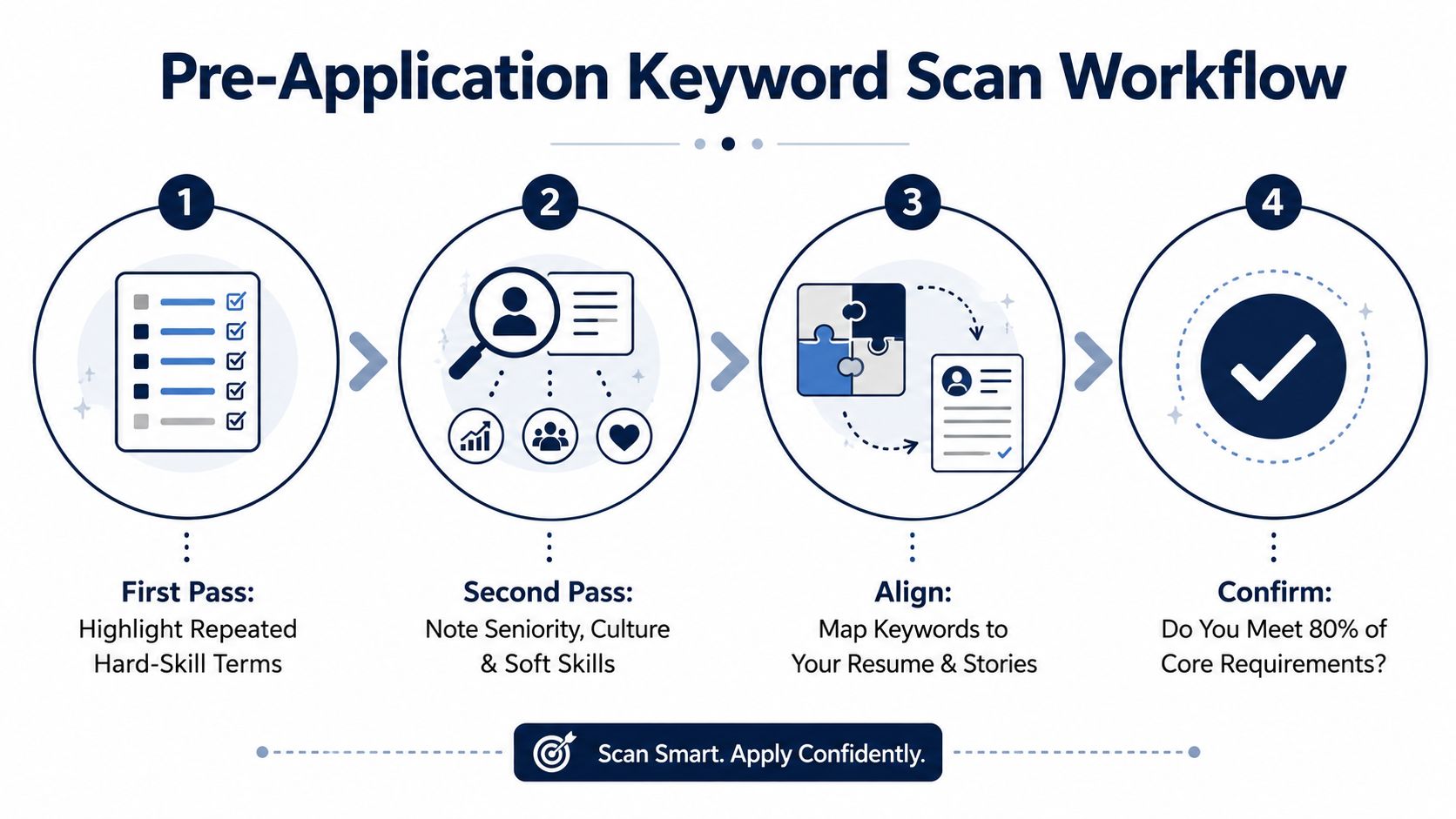
Use this pre-application check
- Top-tier coverage: The most important hard skills and role language appear where your experience supports them.
- Proof attached: Priority keywords appear in accomplishment bullets, not only in a detached skills list.
- Truth preserved: You haven't added tools, certifications, or responsibilities you can't explain in an interview.
- Parsing protected: Headings, dates, titles, and skills remain clear for plain-text extraction.
- Human read completed: The resume sounds like a qualified person, not a pasted job description.
- Score interpreted carefully: A match score helps reveal omissions, but it isn't a substitute for judgment.
The wider ATS picture is more nuanced than the usual pass-or-fail warning. Recent independent coverage says 92% of confirmed cases did not involve ATS auto-rejection based on resume content, suggesting that many systems support recruiter search and ranking rather than automatically rejecting every resume with a missing keyword. The coverage of ATS scanners and human recruiters is a useful reminder to optimize for both stages.
The goal isn't a perfect score. It's a credible match between the posting's language and documented proof of your work. Scan the description, weigh the evidence, make the important terms easy to find, and leave the reader with a clear reason to call you.
GetTheCall can turn a LinkedIn profile or existing resume into a job-specific, ATS-optimized PDF, parse the target listing, suggest revisions based on your actual experience, and show a live role match score as you edit. Visit GetTheCall to scan your next posting and build a focused application without inventing skills or starting from a blank page.