Resume Template for Teaching Position: What to Use in 2026
Find the right resume template for teaching position in 2026. Learn which sections to include, ATS-safe wording, and real examples that get interviews.
You've spent hours polishing a teaching application, uploaded the resume, and clicked submit. Then two worries arrive at once: an applicant tracking system may screen you out before a person reads the file, or a hiring manager may open it and see a generic page that looks like every other candidate.
A strong resume template for a teaching position solves both problems. It organizes your credentials, grade-level experience, instructional methods, platforms, and student outcomes so software can parse them and a principal can understand your fit quickly. The right template isn't decoration. It's a practical information system for a crowded hiring process.
Table of Contents
- What a Teaching Resume Template Has to Actually Do
- The Core Sections Every Teaching Resume Needs
- ATS-Safe Format and Layout Choices for Teachers
- Wording That Matches the Job Description
- Real Before-and-After Bullet Examples
- Two Angles Most Teaching Templates Get Wrong
- Your Pre-Submit Checklist and Tool Shortcut
What a Teaching Resume Template Has to Actually Do
A principal opens your resume while an applicant tracking system scans the same file. The system extracts text, identifies headings, compares terms with the vacancy, and may rank or filter the application. The reviewer looks for your license, subject expertise, classroom experience, and proof of student impact. Indeed's explanation of automated screening explains how screening software reads, indexes, and matches resume information to job-posting keywords.
Your template must serve both readers. Use a reverse-chronological format that puts your latest school, role, and certification first. This approach aligns with teacher-resume guidance from Enhancv's history teacher resume guide and the University of San Diego's teacher resume guidance. Keep a new teacher's resume to one page in most cases. Experienced educators can usually use two pages. Set margins between 0.8 and 1.5 inches and use 10–12 point type so the document remains readable.
Build for the first skim
Within the top half of the page, answer the questions a school will ask first:
- Which subject and grade band do you teach?
- Do you hold the authorization required for this jurisdiction?
- Which instructional methods, platforms, and systems do you use?
- What outcomes can you verify?
- Have you served learners like those in this role?
Place an ESL endorsement, special education authorization, QTS status, or state license near your name or in a clearly labeled certification section. Use the jurisdiction's own terminology. A recruiter should not have to search below unrelated coursework to confirm eligibility.
Your teaching philosophy belongs in the evidence, not in a long opening paragraph. Show differentiated instruction, classroom management, assessment, inclusion, and student engagement through specific actions and results.
Treat every line as searchable evidence
A weak template gives equal visual weight to every detail. A useful one prioritizes eligibility, role fit, and evidence. Use standard headings such as Professional Summary, Certifications, Teaching Experience, Education, and Skills so screening software can classify your content and reviewers can skim it quickly.
Write bullets that show action, context, method, and relevance. Replace “Responsible for lesson planning” with “Planned differentiated math lessons aligned to state standards for a fifth-grade class and used formative assessment to regroup learners.” Add an appropriate, verifiable result when one exists. If standardized test data does not apply, use another measure, such as completed work, assessment evidence, attendance, participation, or documented progress. Never manufacture a score to make a bullet look stronger.
The Core Sections Every Teaching Resume Needs
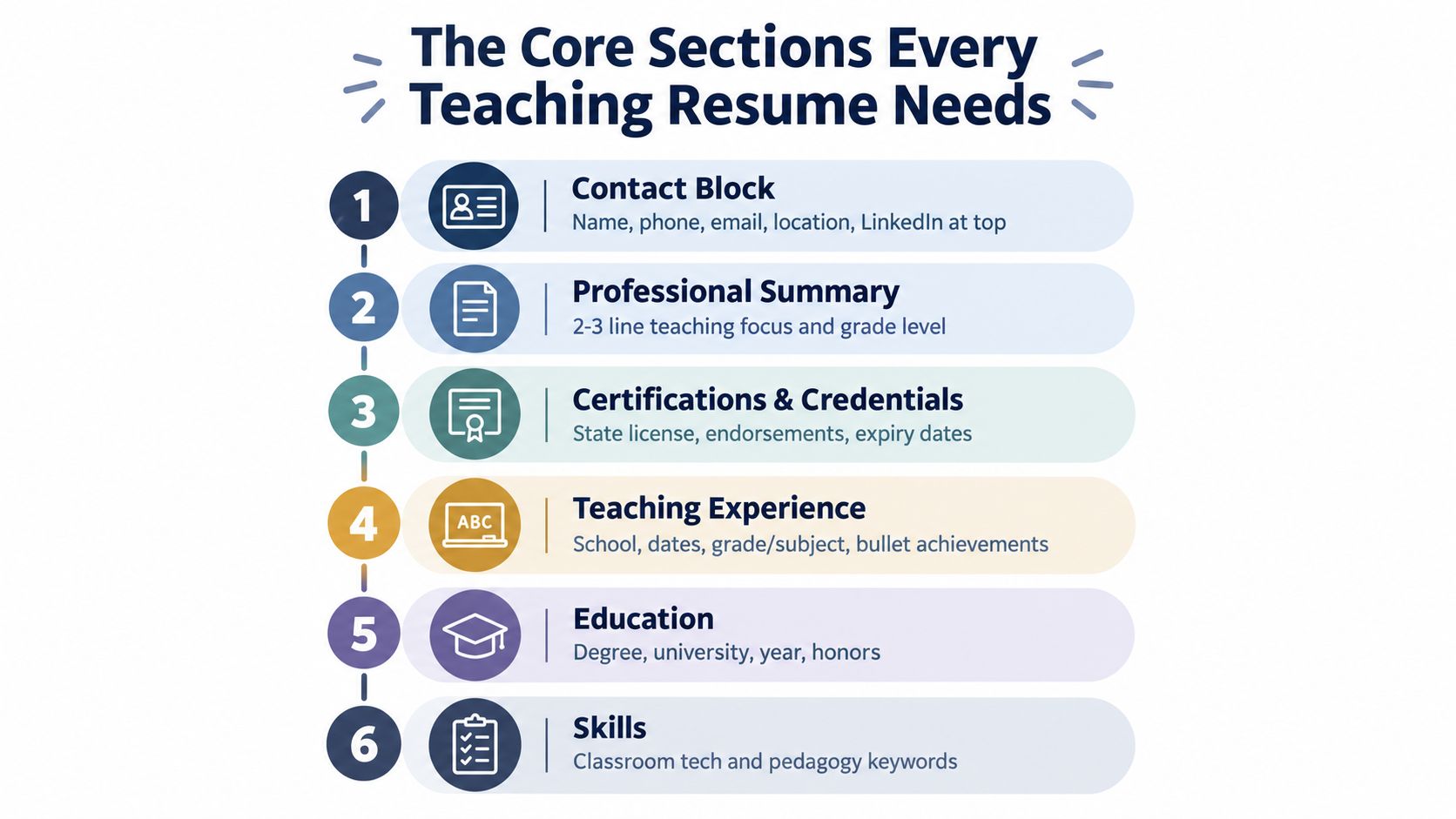
A school hiring team should confirm your eligibility, teaching fit, and evidence without hunting through the page. Build the resume in that order, using familiar headings and specific language.
Start with the contact block
Use your name, phone number, email address, location, and LinkedIn profile in plain text. Add a portfolio, professional website, or classroom-video link only when it supports the application and is easy to access.
Put relevant authorization beside your name or in a clearly labeled section near the top. Write “California Multiple Subject Credential,” “QTS-qualified secondary science teacher,” or the exact local equivalent. Match the jurisdiction's terminology and the vacancy's wording.
Write a focused summary
Name your subject, grade band, and two distinguishing strengths. New teachers should draw evidence from student teaching, practicum work, tutoring, or another instructional setting.
Weak: “Passionate educator seeking an opportunity to help students succeed.”
Stronger: “Elementary teacher focused on upper-primary mathematics and literacy, with strengths in differentiated instruction, family communication, and Google Classroom-supported assessment.”
Put credentials high on the page
Create a separate Certifications and Credentials section near the top. Include the exact license or registration name, jurisdiction, endorsement area, and status. Add ESL or ELL authorization, special education credentials, IEP or 504 familiarity, and required examinations when they apply.
Credential placement affects screening. A recruiter should see immediately whether your authorization covers the advertised subject and grade band.
Make experience the evidence center
List roles in reverse-chronological order. For each position, show the school, location, dates, grade or subject, and bullets built around action + context + outcome.
Use the duties that accurately describe your work, including lesson planning, curriculum development, classroom management, differentiated instruction, assessment, parent communication, and education technology. The University of San Diego guide also identifies classroom and instructional capabilities as relevant teacher-resume content.
Replace “Responsible for lesson planning” with “Planned differentiated math lessons aligned to state standards for a fifth-grade class and used formative assessment to regroup learners.” Add a verifiable result when one exists. If standardized test data does not apply, cite completed work, assessment evidence, attendance, participation, or documented progress. Never invent a score.
Finish with education and skills
List degrees, institutions, dates, honors, practica, student teaching, and relevant coursework when they strengthen your candidacy. Group skills into instructional methods, platforms, and compliance areas, rather than creating an undifferentiated list.
Useful terms may include Google Classroom, Canvas, Nearpod, MTSS, RTI, PBIS, standards-based grading, IEP, 504, and standards alignment. Include only systems you have used or can discuss accurately.
Practical rule: Put information the school must verify near the top, then use experience bullets to prove you can apply it.
Add a selected accomplishments section for curriculum projects, grants, leadership, professional development, or published student work only when it supplies evidence missing from the main sections.
For further examples of classroom capabilities, compare the teacher resume skills guidance from Monster.
ATS-Safe Format and Layout Choices for Teachers
A district recruiter should see your certification, license area, and classroom experience before decorative design. Use a single-column, reverse-chronological resume so applicant tracking systems and reviewers read dates, headings, roles, and credentials in a predictable order. Follow this teacher-focused ATS resume guide for standard headings, job-specific terms, and outcome-based bullets.
Set 0.75-inch margins, choose one readable serif or sans-serif font, and keep body text at 10.5 to 11 point. Use headings such as Summary, Certifications, Experience, Education, and Skills. Keep an early-career resume to one page and a mid-career resume to no more than two pages, unless the employer requests a curriculum vitae.
Choose a plain .docx when the portal accepts it. Submit a text-based PDF when PDF is required. Scanned PDFs, image-heavy files, text inside graphics, and unusual font encoding can hide credentials or bullets during parsing.
| Format Choice | ATS-Safe Default | Risky Alternative to Avoid |
|---|---|---|
| Page structure | One column with clear sections | Two columns, tables, or text boxes |
| Contact details | Plain text in the document body | Header, footer, icons, or embedded graphics |
| Typography | One readable font at 10.5 to 11 points | Decorative fonts or very small text |
| Headings | Summary, Certifications, Experience, Education, Skills | “My Journey” or other creative labels |
| File type | Plain .docx when accepted, text PDF when required | Scanned or image-based PDF |
| Length | One page early career, two pages mid career | Crowded pages or unnecessary length |
Avoid tables for layout, logos, profile photos, skill bars, icons, and decorative lines. They may look polished in Word but can separate labels from their content in the text parser. Review the ATS-friendly resume guide before exporting, then copy the extracted text to confirm that headings, dates, certifications, and bullets remain in the correct order.
Formatting has one job: keep evidence findable. Use the page to prove instructional skill, credential fit, and results, not graphic design ability.
Wording That Matches the Job Description
Generic teacher language weakens both ATS matching and human review. “Supported student learning” says almost nothing about your classroom. Replace it with the job description's exact language when that wording truthfully reflects your experience.
Forbes Advisor's ATS guidance recommends using terms from the posting instead of relying only on synonyms. Districts may treat differentiated instruction, inquiry-based learning, IEP implementation, PBIS, and Google Classroom as separate requirements. Match the term, then prove it in a bullet.
Build a keyword bank
Review similar postings from the district or school type you want. Mark repeated terms and sort them into four groups:
| Keyword Group | Terms to Mirror | Resume Placement |
|---|---|---|
| Instructional methods | Differentiated instruction, scaffolded learning, project-based learning, inquiry-based learning | Summary, skills, experience |
| Standards and compliance | Common Core, state standards, IEP, 504, MTSS, RTI | Credentials, skills, experience |
| Classroom management | Restorative practices, PBIS, trauma-informed teaching | Summary, skills, experience |
| Tools and platforms | Google Classroom, Canvas, Schoology, Seesaw, Smartboard, Zoom | Skills and achievement bullets |
Place the exact term in the most visible relevant section, then show how you used it. A skills block packed with keywords cannot compensate for vague experience bullets. Credential names also need the jurisdiction's wording when the posting specifies a state license, endorsement, or compliance framework.
Front-load each bullet
Begin with an action verb and the role-specific term. “Implemented differentiated instruction in a fifth-grade mathematics classroom” is stronger than “Worked with students using various approaches.” It identifies the practice immediately for the parser and the reviewer.
Replace “helped students learn” with the district's wording. If the posting requests “standards-aligned lesson planning,” use that phrase when accurate. If it requests “family engagement,” describe parent communication, conferences, progress updates, or multilingual outreach with the same language.
For a posting requesting “project-based learning and Google Classroom,” compare these versions:
- Weak: “Helped students complete group assignments using technology.”
- Mirrored: “Designed project-based learning units for middle school science and managed submission, feedback, and revision through Google Classroom.”
The stronger bullet names the method, subject, platform, and instructional work. It also gives the reviewer evidence to discuss, rather than a broad claim about technology use. For a repeatable tailoring process, use this guide to tailor your resume to the job description.
Real Before-and-After Bullet Examples
A bullet earns space when it shows what you did, where you did it, and what changed. Use the action + context + metric formula, but don't force a metric you can't verify. The examples below use the supplied evidence patterns, including class size, service volume, assessment results, and progression measures.
New teacher
Before: Student teaching in a fifth-grade classroom.
After: Planned and delivered daily math lessons aligned to CCSS for 28 fifth-graders during a 16-week student teaching placement, with 92% of students scoring proficient or above on the unit assessment.
Why it works: the bullet names the grade, subject, standards framework, placement context, class size, duration, and result. It also gives the hiring manager a clear interview path. Be prepared to explain how proficiency was defined and how the assessment was administered.
Mid-career teacher
Before: Responsible for department curriculum.
After: Led a six-person ELA department in adopting a standards-based grading framework, cutting late grading turnaround from nine days to three days across 22 sections.
The stronger version replaces ownership language with leadership, names the instructional system, and gives the result and scope. If you used a platform such as Canvas or Google Classroom to manage grading, include it only when it was part of the work.
Career switcher
Before: Managed projects and clients.
After: Designed and facilitated 40+ adult training sessions annually on data systems, translating technical workflows into step-by-step instruction for non-technical staff.
This bullet doesn't pretend corporate training is classroom teaching. Instead, it translates relevant experience into instructional language: designed, facilitated, explained, sequenced, and adapted learning. Add a platform or method from the target posting if you used one, such as Zoom, project-based learning, or differentiated instruction.
International applicant
Before: Taught English in Vietnam.
After: Delivered communicative, student-centered English instruction to 120+ learners across four proficiency levels using TBLT and TPR methodologies, with 100% of placement-test takers advancing one CEFR level after one term.
The revised bullet clarifies the subject, instructional approach, learner range, volume, and outcome. International applicants should also translate credentials into the language of the target jurisdiction. A school needs to understand not only where you taught, but whether your training and authorization align with its hiring rules.
Evidence beats enthusiasm. “Passionate,” “dedicated,” and “student-focused” are useful only when your bullets show the actions behind them.
For early years, arts, special education, counseling, or substitute teaching, use evidence that fits the work. Examples include rubric growth, completed projects, attendance patterns, intervention participation, IEP goal mastery, behavior incidents, family engagement activity, lesson completion, or class size. Only use figures you can verify, and explain the measurement if an interviewer asks.
Two Angles Most Teaching Templates Get Wrong
A school reviewer should identify your authorization and instructional evidence within seconds. Templates often bury credentials in a short line and replace student impact with vague claims. That creates two problems: the school cannot confirm hiring eligibility quickly, and the resume offers no proof when standardized test results do not apply to the subject or role.
Credential specificity by jurisdiction
“Teaching Credential” says too little. Place a dedicated Credentials block near the top. State the full credential name, issuing jurisdiction, authorization area, and current status.
For a U.S. applicant, use a structure such as:
- California Clear Credential, Multiple Subject with EL Authorization
- License or certificate number, if requested
- Issuing date and expiration date
- Special education, ESL, ELL, or subject endorsements
- Praxis or state examination information when relevant
International applicants should name the original qualification and state the equivalency pathway. Depending on the target market, that may include U.S. equivalency through WES or ECE, a state-approved program, UK QTS, Australia's AITSL provisional registration, or equivalent local approval. Use the target jurisdiction's wording where it applies, so a recruiter can understand how your training and authorization fit its hiring rules.
Evidence when test scores don't apply
If Praxis or another examination is irrelevant, remove the empty results section. Never invent a score. Add a compact Selected Results block with three defensible lines, such as rubric growth, attendance shifts, or IEP goal mastery rates. For early years, arts, special education, counseling, or substitute teaching, use evidence suited to the work, including completed projects, intervention participation, behavior incidents, family engagement activity, lesson completion, or class size.
A single-page template can show both priorities without crowding:
- Put the credential line directly below the contact block.
- Use a two-line summary naming subject, grade band, and instructional strengths.
- Add three selected-results lines before reverse-chronological experience.
- Place detailed coursework and older activities below the main evidence.
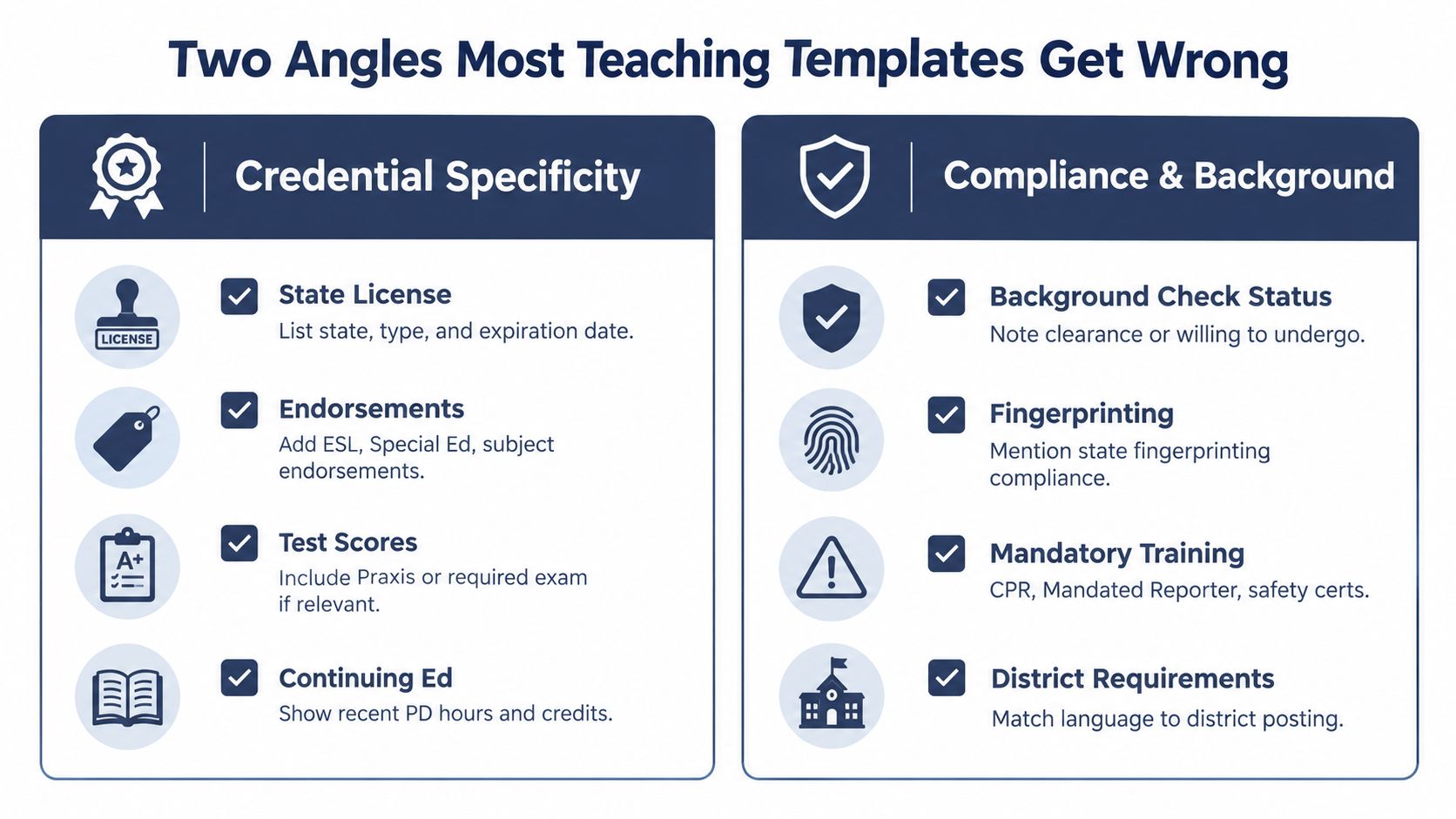
Include background checks, fingerprinting, mandatory training, and district requirements when the posting or jurisdiction expects them. State each item's status accurately. Only claim clearances, endorsements, or approvals you hold, and use figures you can verify and explain in an interview.
Your Pre-Submit Checklist and Tool Shortcut
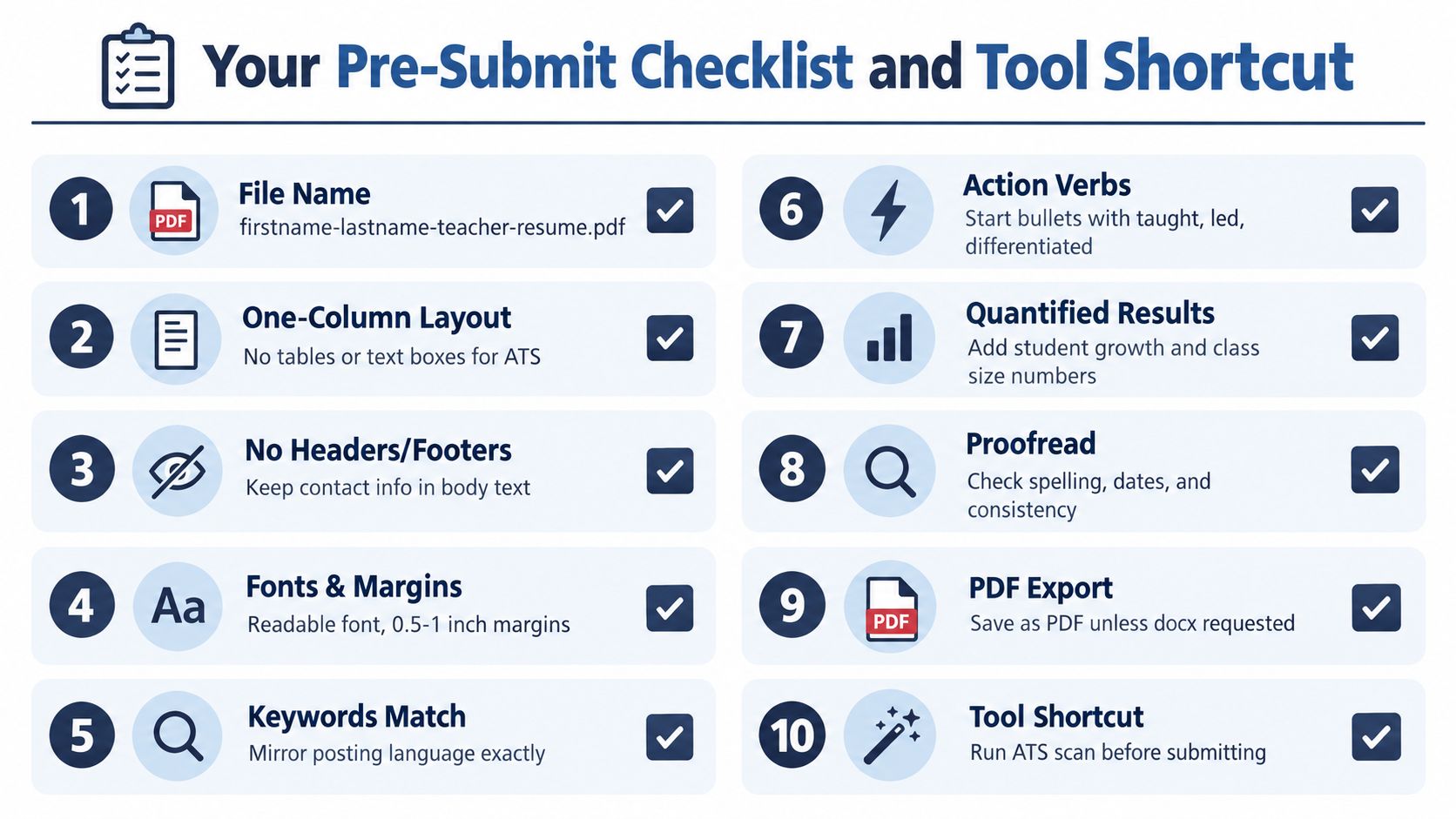
Before uploading, run this focused review:
- Name the file: Use
firstname-lastname-teacher-resume.pdf. - Check the layout: Keep one column, readable typography, and consistent margins.
- Remove fragile elements: Delete tables, text boxes, decorative columns, headers, and footers containing contact details.
- Match keywords: Compare the posting's responsibilities, skills, education, credential, and jurisdiction-specific language with your resume.
- Strengthen bullets: Start with verbs such as taught, led, designed, differentiated, assessed, or implemented. State the setting, action, and result in each bullet.
- Add evidence: Use class size, student growth, assessment results, service volume, completed projects, or another outcome you can verify. Do not force test scores into roles where they do not apply.
- Check credentials: Confirm that licenses, endorsements, background checks, fingerprinting, training, and district requirements are listed accurately.
- Proofread aloud: Check spelling, dates, capitalization, and consistent terminology.
- Export correctly: Save as PDF only when accepted or required. Use
.docxwhen requested.
Word or Google Docs gives you control and easy editing without a required subscription. Builder tools such as ResumeBuilder, Jobscan, and Teal may provide keyword scoring, parsing previews, and role-specific templates, but subscription requirements or export limits can affect your final file.
Draft in a controlled document, then run a final scan with the GetTheCall ATS resume checker. Review every suggested change yourself, especially credential names, grade bands, subject terms, and evidence. Automated matching cannot verify whether a clearance or result is accurate.
GetTheCall can import an existing resume or LinkedIn profile, analyze a target teaching job, align verified experience with the posting's keywords, and provide a role-match score before submission. Visit GetTheCall to review a cleaner, job-specific application.