Resume Matching with Job Description: 2026 Guide
Learn resume matching with job description: sort must-haves, map real proof, rewrite bullets, and use a live score before you submit.

You've found a job you could do, uploaded the resume you polished last month, and reached the same uncomfortable pause: should you send it as it is, or rewrite it again? The posting mentions onboarding, stakeholder updates, and process improvement. Your resume describes customer support, team training, and fixing recurring problems. The overlap is real, but it isn't obvious yet.
Resume matching with job description requirements is a translation task, not a reinvention task. You choose the experience that matters for this opening, make the connection visible, and leave unsupported claims out. A match score can help you inspect that work, but only if you can see the evidence behind it.
Table of Contents
- Why a Generic Resume Loses the First Screen
- Priority Signals Inside One Job Listing
- How to Match Your Resume to the Listing
- Rewrite Bullets That Prove the Overlap
- Treat the Match Score as an Edit Loop
- Tips for Gaps and Transferable Work
- Check the Fit Before You Submit
Why a Generic Resume Loses the First Screen
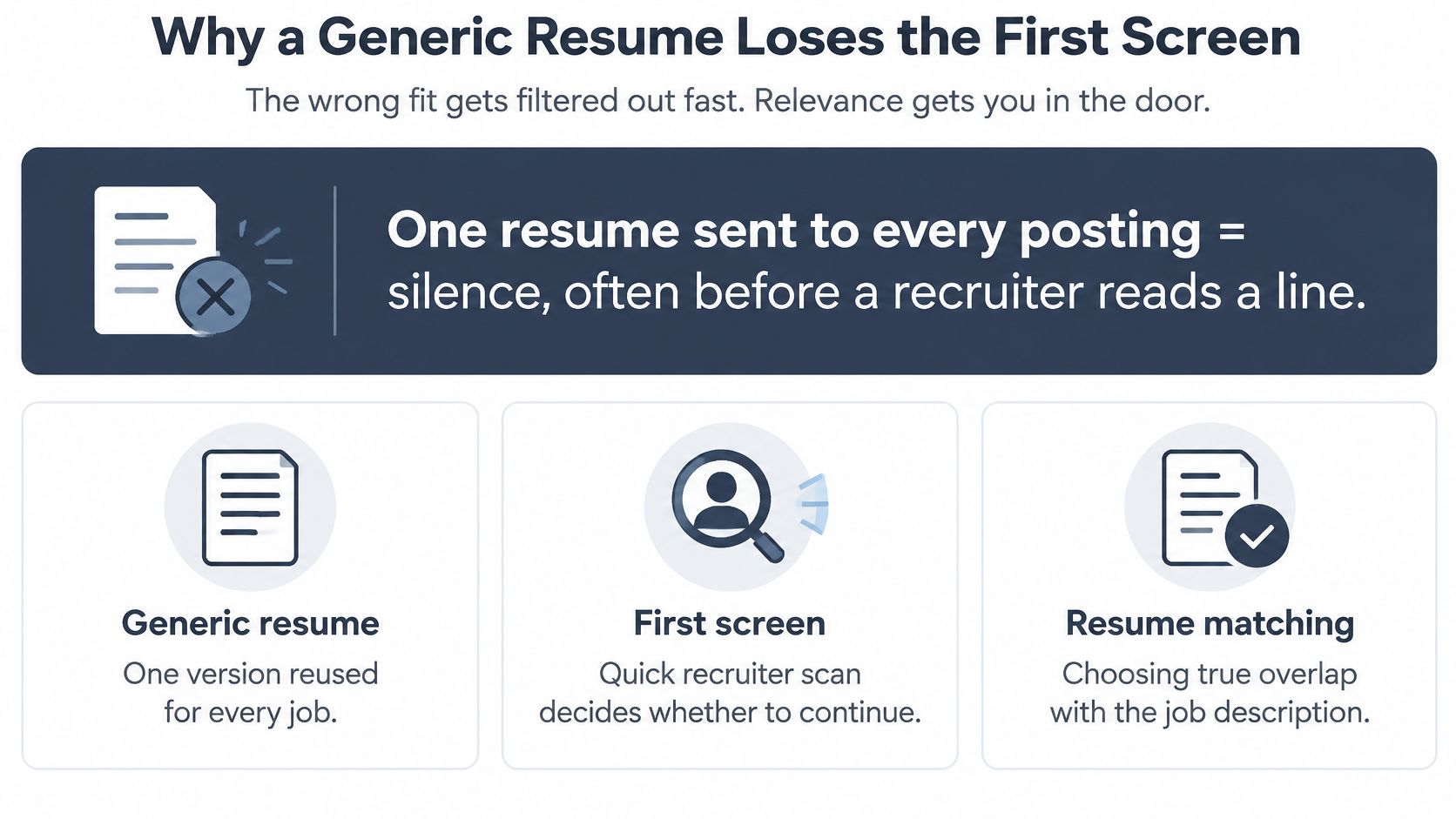
The resume written once and sent everywhere usually describes a whole career rather than a particular hiring need. A support lead might give equal space to complaint handling, staff scheduling, training, and account onboarding. For an implementation opening, that puts the most relevant work in competition with everything else.
The result can be silence, sometimes before a recruiter reads a line. But silence alone doesn't reveal whether software filtered the application, a recruiter preferred another candidate, or the employer changed its plans.
Resume matching means choosing true work and describing it in the posting's language. It doesn't mean pasting the listing into a skills block, inflating a title, or adding software you've never used.
The distinction matters when one document must serve both an automated screen and a busy person.
Why employers screen before they read closely
A 2026 academic study in The Review of Economic Studies cites a 2021 survey in which 94% of employers surveyed in the United States, United Kingdom, and Germany used automated tools to filter or rank candidates, with corporate postings receiving an average of 250 applications; the study's participating firm received approximately 200 applications per opening, and applicants selected by its two models were eventually hired at rates of 32% and 27%, compared with 10% for applicants selected by human recruiters.
Those figures don't prove that keywords get people hired. The models could evaluate qualifications, experience, and other signals. They do explain why employers use screening systems to decide where recruiters should spend limited attention.
For the support lead, a focused rewrite might bring account onboarding into the summary and move the setup-checklist accomplishment above complaint handling. The person hasn't changed. The order and explanation have.
Rewrite the evidence, not your identity
Separate two questions before editing:
- Can the document be read? Use the ATS-friendly resume guide to check structure and formatting.
- Does the document show relevant work? Give the employer clear evidence for the responsibilities in this particular opening.
A useful working pass includes a priority sort, a six-step match, defensible bullet rewrites, a score loop, and a way to explain experience from a different career path.
Practical rule: Make the relevant evidence easier to find. Don't make yourself sound like someone else.
No alignment method promises an interview. It can make your application clearer, not control the employer's decision.
Priority Signals Inside One Job Listing
Before rewriting a sentence, mark the listing against this table. Treat the filter-use figures as survey findings and the other entries as editing priorities, not measured rejection rates.
What to mirror from a job listing
| Signal | Recruiter filter use | Where it appears | Put on the resume |
|---|---|---|---|
| Required skills | 76.4% filtered by skills | Skills and requirements blocks | Exact skill names you have used, inside a task |
| Job title | 55.3% filtered by title | Title and opening summary | Closest true title, never a borrowed one |
| Repeated tools | Often grouped with skills | Early requirements | Tool name plus the work it supported |
| Core responsibilities | High priority when repeated | Middle of the posting | An outcome for each duty you have done |
| Preferred qualifications | Lower priority than must-haves | Labeled preferred or plus | Include only when they are true |
| Education, license, or certification | May be a knockout question | Requirements footer | Exact credential, or leave the gap visible |
In Jobscan's 2025 survey of 384 recruiters, 76.4% said they filtered candidates by skills, while 55.3% filtered by job title. That's a reason to examine skills carefully, not permission to rename your previous jobs.
Mark the work before the adjectives
Read the posting once for the work you'd do during your first months. Would you resolve support tickets, maintain financial models, coordinate launches, or build production software? Write that function in plain language.
Read it again with a highlighter and sort the requirements:
- Must-have: Explicit requirements, repeated essential skills, and anything tied to a knockout question.
- Preferred: Qualifications introduced as preferred, a plus, or nice to have.
- Scenery: Culture descriptions and adjectives such as dynamic or passionate that don't identify a demonstrable capability.
Repetition is a priority clue, not proof that every repeated phrase is mandatory. A required license can matter even if it appears only once. Read the employer's wording before deciding which category applies.
For a concrete practice listing, use the Spotify Senior Fullstack Engineer listing. Separate the function, technical requirements, and seniority signals rather than treating every sentence as an equally valuable keyword.
Pair every phrase with proof
Build a working list with the posting phrase on the left and your evidence on the right. As a practical editing limit, keep it to roughly eight to twelve phrases. This is a manageable shortlist, not an ATS threshold.
Say the posting requires a reporting tool you've used. Don't stop at putting its name in Skills. Add the task it supported, such as maintaining the weekly service dashboard.
Now consider a preferred certification you don't hold. Leave it off. Studying toward it is different from earning it, and the resume should preserve that distinction.
Equivalent descriptions don't need to appear side by side. Managing a small team and leading that team aren't separate accomplishments merely because the verbs differ.
A blank proof cell is useful information. It identifies either adjacent experience worth examining or an honest gap, not a word you need to invent.
How to Match Your Resume to the Listing
Work on one opening at a time, with the complete posting beside your current resume. Save a separate draft so you don't accidentally carry one employer's priorities into another application.
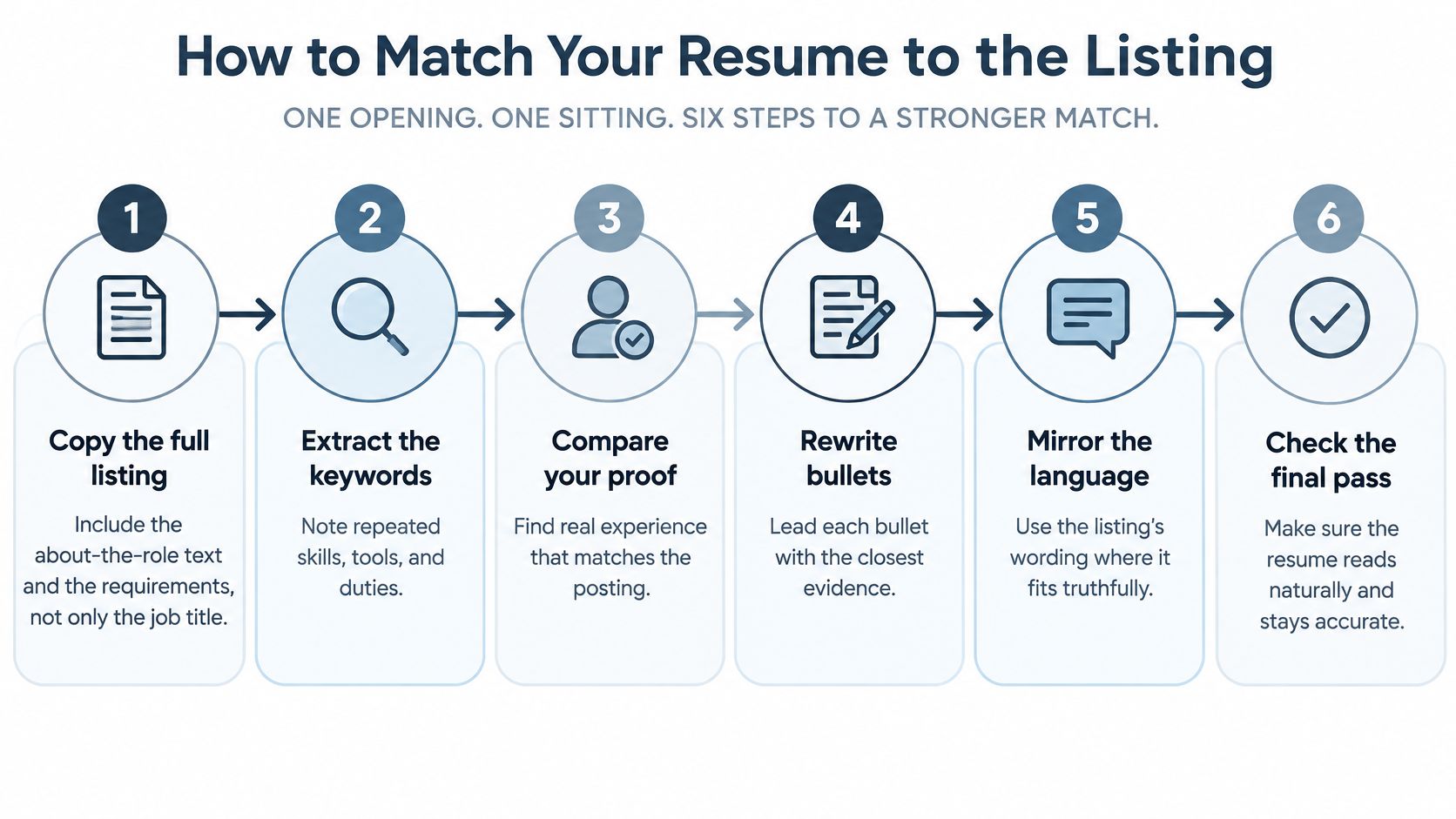
Use this visual as a reminder of the overall pass.
Run the evidence pass
Copy the full listing. Include the about-the-role text, responsibilities, requirements, and application questions where available. This keeps the actual work visible alongside the qualifications. The likely slip is copying only the title and matching yourself to a broad occupation rather than this vacancy.
Mark the priorities. Apply the must-have, preferred, and scenery categories, then stop when you have a manageable working list. Limiting the list forces you to choose what deserves prominent space. Don't let a memorable culture slogan displace a required capability.
Record the employer's wording. List skills first, then tools, then the verbs attached to important outcomes. Preserve specific technical names when they accurately describe your experience. The mistake is collecting adjectives instead of identifying work someone could ask you to demonstrate.
Classify your evidence. Mark each phrase as exact experience, adjacent experience, or a genuine gap. Add a project, task, or accomplishment beside the first two categories. Don't turn adjacent experience into direct experience by dropping the context, such as presenting internal staff training as enterprise client implementation.
These categories should remain visible in your notes even after you polish the document. Otherwise, a smooth rewrite can conceal the distinction you originally understood.
Turn the proof into a readable document
Rewrite the summary and strongest bullets. As a working target, use a short, two-line summary and revise the top four to six bullets. Connect the posting's verb with a scope, result, or before-and-after change you can defend. Avoid matching a different seniority: helping a project lead coordinate delivery isn't the same as owning the entire program.
Reorder, export, and check. Put relevant skills first, use standard headings, and export a simple text-based PDF unless the application requests another format. Run the check against this exact posting, then edit only where existing proof needs clearer expression. The common slip is polishing the design before resolving missing evidence or burying a must-have inside a dense paragraph.
The order reflects how systems handle applications. Workday's explanation of applicant-tracking systems describes parsers extracting education, skills, and work history into structured profiles, with modern systems potentially recognizing equivalent wording and comparing experience with job requirements rather than counting repeated keywords.
That means translation matters more than repetition. A natural-language system may recognize managing a team and leading the same team as equivalent statements. You don't need duplicate bullets to cover both verbs.
For an additional walkthrough, use the video alongside your draft.
Before leaving the document, select and copy its text into a plain-text editor. Check that headings, dates, employers, and bullets appear in a sensible order. This is a practical readability check, not a guarantee that every employer's parser will behave identically.
Stop when the next tweak would introduce a claim you wouldn't make in an interview. An accurate draft with a visible gap is better than a polished draft that requires an explanation later.
Rewrite Bullets That Prove the Overlap
A strong matched bullet gives the employer something to inspect. It names an action, identifies what you worked on, and shows a result or concrete scope. It doesn't merely announce that you possess a desirable skill.
The examples below are hypothetical. Their numbers illustrate how to use records from your own work, not benchmarks or results you should copy.
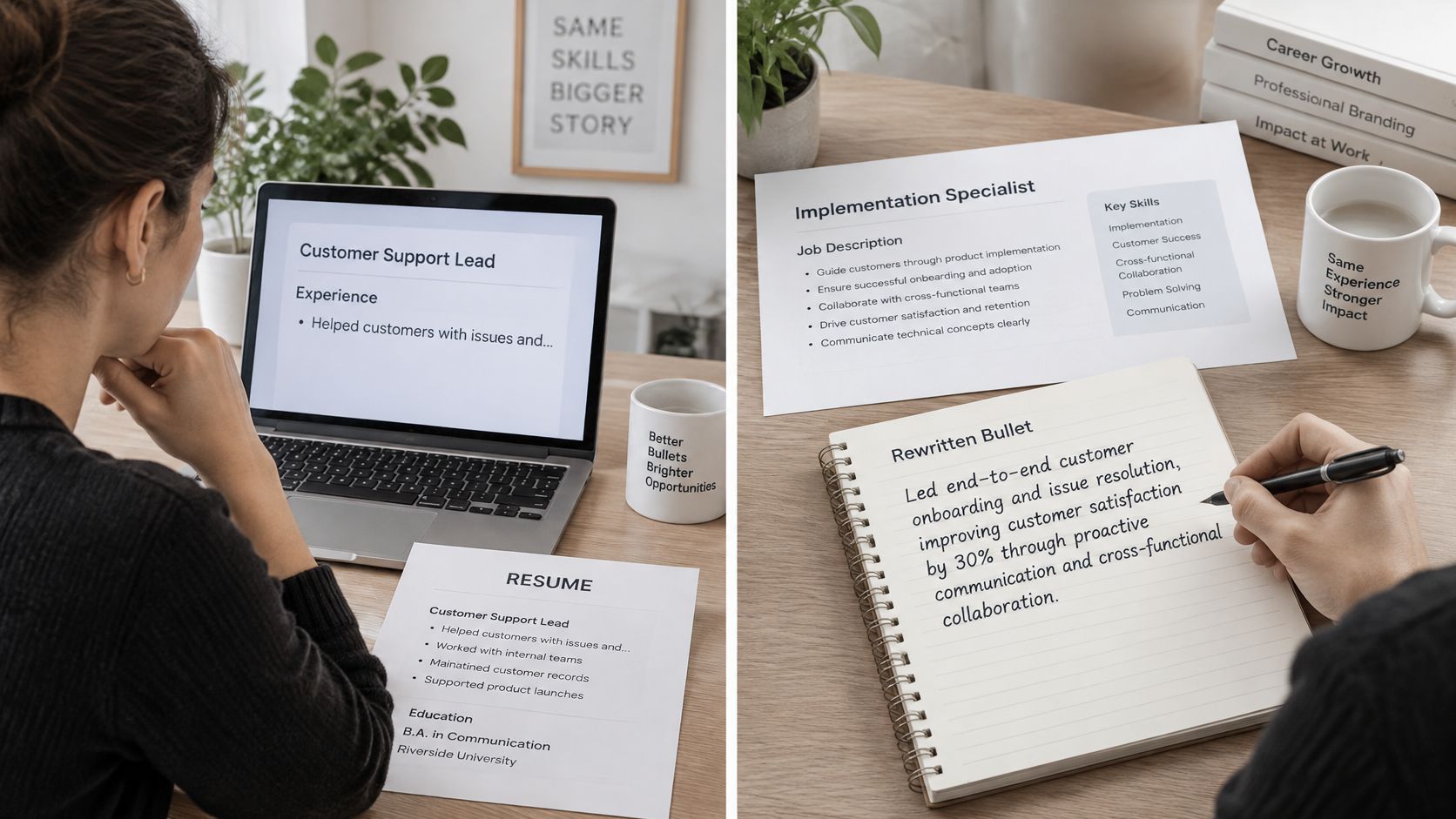
A support lead applying to implementation work
Before
Helped customers with issues and trained new hires.
Matched version
Guided onboarding for 40 accounts after launch, cutting repeat tickets by 18 percent by rewriting the setup checklist.
The decisive change is specific, checkable evidence. The revised line connects onboarding with account scope and an observable outcome. It also explains what the applicant changed instead of presenting the improvement as an unexplained success.
This bullet is defensible only if the applicant guided those accounts, revised the checklist, and can support the ticket comparison. If the result wasn't measured, replace the percentage with a concrete description of the checklist and the setup problems it addressed.
Keep the original support title. The bullet demonstrates relevant implementation work without pretending the applicant already held the target job.
The useful distinction is between refining the explanation and changing the underlying experience.
A retail supervisor applying to operations coordination
Before
In charge of the shop floor and schedules.
Matched version
Built weekly schedules for a team of 12 and kept overtime under 5 percent during peak season.
Here, the defensible improvement is operational scope. The reader can see scheduling responsibility, team size, and a labor-control measure. The applicant should be able to explain how overtime was calculated and what decisions they personally made.
If someone else controlled staffing budgets, narrow the wording. Building schedules within an approved staffing allocation is credible evidence without implying budget ownership.
A summary needs the same discipline. Replace Hardworking professional seeking growth with a compact, evidence-led version. For a hypothetical applicant, that could read:
Retail supervisor with four years of experience coordinating staffing and daily store operations. Builds weekly schedules and resolves coverage gaps within approved labor allocations.
The reusable pattern is posting verb + work performed + people or process affected + result or concrete scope. Not every bullet needs a percentage. A named deliverable, responsibility boundary, or verified project size can do the job.
Watch for distortions that make a rewrite less believable:
- Borrowed title: Replacing your actual position with the target title.
- Unproven tool: Adding software because it appears in the listing.
- Empty adjectives: Calling work strategic or cross-functional without naming the decision, participants, or event.
Choose the weakest bullets in the top half of your resume and apply the pattern once. Keep each revision only if you can explain where every claim came from.
Treat the Match Score as an Edit Loop
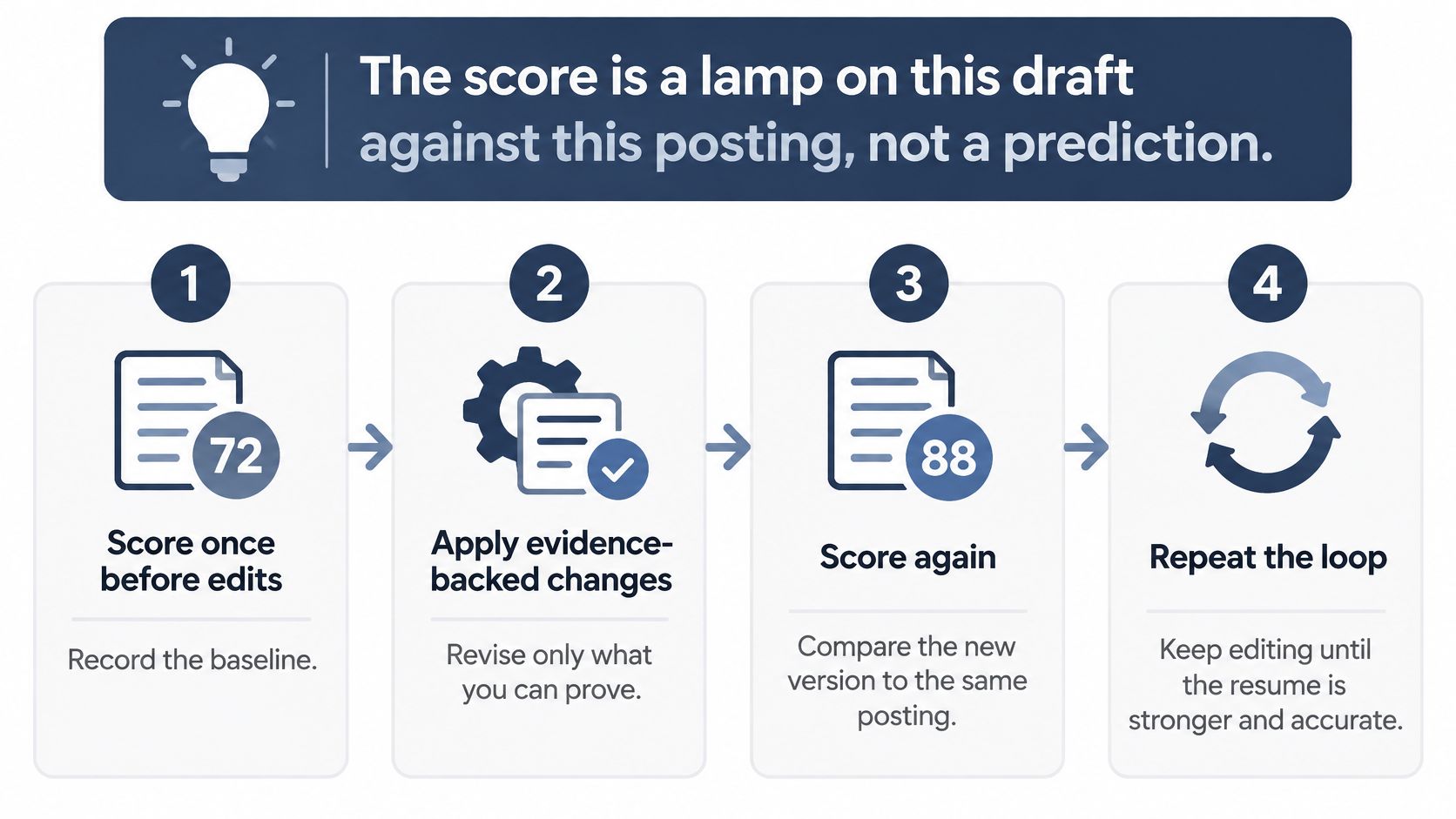
The score is a lamp on this draft against this posting, not a prediction. Use it to locate unclear or unsupported requirements, not to calculate your chance of an offer.
Start with a baseline, make evidence-backed edits, and compare the explanation after the next run. Keep a short note of what changed so an unexplained increase doesn't become your reason for trusting the draft.
The loop should remain simple enough to audit.
Use bands as prompts, not hiring thresholds
The bands below are an illustrative editing guide, not validated cutoffs or a universal scoring standard. Tools calculate scores differently, so inspect the supporting explanation before applying the suggested next move.
What to do with a role-match score
| Score band | What it usually means within this editing guide | Next edit |
|---|---|---|
| Under 50 | Several must-haves are missing or buried | Map three gaps to real proof or treat the role as a stretch |
| 50 to 70 | Overlap exists but the wording does not | Rewrite the top bullets into the posting verbs |
| Above 70 through 85 | Relevant overlap is clear but presentation needs work | Fix order and clarity, then stop adding synonyms |
| Above 85 | Strong overlap across must-haves | Do a human honesty pass and submit rather than chase 100 |
A trustworthy check should reveal which resume statement supports each requirement, whether that support is exact or adjacent, and where there's no support at all. Ignore advice to paste the same keyword repeatedly.
EEOC testimony on AI selection safeguards recommends job-related assessment content, evidence that scores predict relevant performance, and consistent results across repeated assessments. A resume tool's score alone doesn't establish that it meets those standards.
Inspect fairness as well as relevance
A high score can conceal biased or context-blind screening. A Brookings analysis of AI resume-screening bias reports that identical qualifications received different evaluations depending on gender- and race-associated names, with men's names favored 51.9% of the time and women's names 11.1% across 27 tests of three language models.
Before trusting a score change, identify what caused it. Clearer evidence of a required responsibility is useful; a jump associated with a name, school prestige, or fashionable phrasing isn't stronger proof of capability.
- Record the run: Note the version, change, and stated reason for movement.
- Question unexplained shifts: Compare the requirement-level explanations, not just the total.
- Keep human judgment: Read for accuracy, context, and a believable account of your work.
If the next edit isn't something you'd say aloud about your own experience, don't make it.
Tips for Gaps and Transferable Work
Your last title may not resemble the title on the posting. That's common for career switchers, parents returning to paid work, immigrant professionals with unfamiliar credentials, and applicants whose relevant experience sits outside a conventional progression.
The rule is straightforward: prove equivalence, don't borrow the job. Show the employer where your experience connects and where you'd still need to learn.
Make the bridge visible
Translate duties into relevant outcomes. Running the weekend roster can demonstrate schedule coverage and labor coordination. Claim cost control only if you tracked or influenced costs, rather than assuming every scheduling task produced savings.
Separate direct from adjacent skills. Keep those labels in your working notes. Training colleagues on an internal system can support learning facilitation, but it doesn't automatically establish experience leading external customer implementations.
Preserve seniority. Describe the decisions you owned and the people you supported. A coordinator doesn't become a director because the opening uses that title, and contributing to a project doesn't establish executive accountability.
Clarify unfamiliar credentials. Add a short, accurate explanation of the subject or qualification type. Don't declare equivalence to a local license or degree unless that equivalence has been formally established.
Handle gaps neutrally. Keep dates clear and add a short phrase such as career break for caregiving if it helps explain the timeline. You don't owe the reader a paragraph of apology or sensitive personal detail.
A study catalogued by the University of Illinois on hidden biases in AI hiring identifies career gaps and keyword usage as factors that can alter outcomes even after personal information is removed. That's a reason to make relevant context explicit, not to disguise your history.
Keep an honest evidence ledger
Use a paper check before accepting polished wording:
| Exact match | Transferable evidence | Genuine gap |
|---|---|---|
| Work you've performed in the required context | Related work with an explainable connection | A requirement you can't yet support |
Only the first two columns should generate experience statements. Keep the original context visible in transferable examples so the employer can judge the connection.
Be cautious about treating elaborate wording as an improvement. A plain description that explains your contribution is more useful to a human reader than a dense paragraph of terms that obscures it.
The aim is a reader who can see the bridge, not a machine that can't see the stretch.
You can still apply with a gap. The decision depends on whether it's a learnable part of the role or the central capability the employer needs immediately.
Check the Fit Before You Submit
Put the proof list beside the final draft and any match explanation. Submit when your strongest relevant evidence is easy to find, remaining blanks are preferred items or gaps you understand, and you can explain every bullet aloud.
Choose a closer opening when the blanks cover the core work and the only apparent way to improve the match is to invent experience. A cleaner sentence can clarify a qualification; it can't create one.
Make a final submission pass
Set aside a short, focused session, such as twenty minutes, to finish the document:
- Confirm the facts: Check dates, titles, credentials, tool names, and ownership of results.
- Read for relevance: Compare the summary with the posting's opening paragraph.
- Inspect the file: Export a clean, text-based PDF, unless another format is requested, and check the exported version rather than only the editor.
- Choose the right attachment: Send the reviewed file, not a designed image or an older draft.
GetTheCall offers a way to run this pass without retyping your career history. You can tailor a resume to a specific listing for free, bringing your real experience and the exact posting so we can help match the language, prioritize evidence, and review fit; our free ATS resume checker compares a draft with a specific role.
Our AI reads the listing's skills and keywords and recommends revisions drawn only from your real experience. The resume changes only when you integrate a reviewed draft, and you must verify every resume, recommendation, score, and generated statement before relying on or sharing it.
No tool, including ours, promises an interview or compatibility with every ATS. The useful outcome is narrower: one listing, one truthful resume, submitted because you reviewed the match rather than hoped for it.
Bring your existing resume or LinkedIn profile and the exact opening to GetTheCall to tailor your resume for free. Use the suggested revisions to put relevant evidence first, then check every line before you apply.