Resume Match Score: What It Means and How to Raise It
Learn what a resume match score actually measures, how it's calculated, and the practical moves you can make to raise yours before you apply.
You've just uploaded your resume, pasted in a job description, and clicked “scan.” A percentage appears, perhaps 58%, perhaps something higher. Then you're left wondering what the number really means and whether you should rewrite the entire document.
Don't treat that percentage as a verdict on your career. A resume match score is a diagnostic signal. It can show that your resume is missing the language, skills, or structure a particular screening system may look for. It can't tell you whether you're capable of doing the job, whether a recruiter will like your progression, or whether the employer has already chosen an internal candidate.
The practical approach is simple: use the score to find gaps, fix the gaps you can support candidly, and then judge the resume as a human document.
Table of Contents
- What a Resume Match Score Actually Tells You
- How Most Calculators Decide Your Number
- Why a High Score Still Does Not Guarantee an Interview
- A Practical Workflow to Raise Your Match Score
- Fixes That Move the Score the Fastest
- Building a Repeatable Pre-Apply Routine
What a Resume Match Score Actually Tells You
A resume match score measures how closely your resume reflects one specific job description. A resume checker, applicant tracking system, or job platform parses both documents, compares their language and signals, and converts the result into a percentage.
The number can reflect:
- Keyword overlap, including skills, software, certifications, and responsibilities
- Title proximity, or how closely your current or recent role resembles the target title
- Skills alignment, especially for hard skills and role-specific tools
- Experience relevance, including seniority, industry, and related responsibilities
- Formatting parseability, meaning whether the system can read your document correctly
A score of 70% does not mean you are 70% qualified. It means the tool found a particular degree of textual alignment with the posting. Another platform may return a different result because its parser, scoring model, or weighting differs.
What the score can see
The score can reveal that a posting repeatedly uses “SQL” while your resume says only “data analysis.” It can flag a request for Salesforce when your document mentions only CRM software. It can also expose a two-column layout that causes the parser to scramble your text.
Those findings give you specific edits to evaluate. Add a term only when it accurately describes your experience, and fix formatting when the system cannot read information you already included.
A 2026 ATS research summary found that 98.4% of Fortune 500 companies use applicant tracking systems to screen resumes, the average match score in a sample of 944 resumes was 57.6%, and 72% of resumes scored below a 70% pass threshold, while only 1.9% reached an 85% or higher “excellent” score (ATS research summary). These figures support using scoring tools as diagnostics. They point to common alignment gaps, but they do not establish a universal hiring standard.
What the score ignores
A parser cannot reliably measure your judgment, the scale of your work, or whether an achievement makes sense in context. It also cannot distinguish between a skill copied into a sidebar and that same skill used to solve a difficult business problem.
Practical rule: Treat the score like a spell-checker flag. It can catch something you missed, but it is not a grade on your career.
Use an ATS resume checker to find missing terms and parsing problems, then review the document as a recruiter would. Your resume must answer one question quickly: “Can this person credibly do this job, and can I see the evidence?”
How Most Calculators Decide Your Number
A resume can contain the right experience and still receive a weak match score if the calculator cannot connect that experience to the posting. Most scoring engines compare both documents in layers. Their formulas differ, but the core method is usually a weighted overlap model.
One technical explanation describes a process that extracts roughly 30 to 60 items from a job description, gives greater weight to hard skills and certifications, then divides matched weighted requirements by the total weighted requirements (weighted resume match model). That distinction matters. A simple keyword count may reward a resume for repeating minor phrases while overlooking a missing certification or core tool.
The four signals that usually matter
Keyword overlap measures exact or closely related terms shared by your resume and the posting. The terms may cover software, methodologies, certifications, industry language, and responsibility phrases. A keyword factor can account for roughly 40% to 50% of a platform-specific calculation in that model, but proprietary tools vary.
Title alignment checks whether your recent title resembles the employer's target title. “Marketing Manager” may align more directly with “Demand Generation Manager” than “Marketing Specialist.” The title helps establish proximity, though it does not prove seniority or capability.
Skills coverage checks whether required hard skills appear in recognizable locations, including the skills section, summary, and experience bullets. A skill listed without context may help the counter. A skill demonstrated through an accomplishment gives a recruiter stronger evidence.
Experience relevance weighs role level, years, industry signals, and responsibilities. A system may treat “managed a sales team” as a closer match for a leadership role than “supported sales operations,” even when both resumes mention the same CRM.
| Scoring Input | Typical Weight | What It Measures |
|---|---|---|
| Keyword overlap | Roughly 40% to 50% in one weighted model | Exact and related terms for skills, tools, and requirements |
| Title alignment | Varies by platform | Proximity between your recent title and the target title |
| Skills coverage | Varies by platform | Presence and context of hard skills from the posting |
| Experience relevance | Varies by platform | Role level, responsibilities, and related background |
Parsing comes before scoring
The calculator can only score text it successfully extracts. A 2026 compatibility study based on 2,417 anonymized scans found formatting issues in 62% of resumes, with an average score of 58 out of 100. It also found that two-column layouts appeared in 38% of resumes and had a 31% parsing failure rate (resume compatibility study).
Those findings make formatting a diagnostic priority. A parser may read your contact details, skills, and work history in the wrong order, or miss text placed inside graphics and tables. A low score can therefore reflect unreadable structure rather than weak qualifications.
Test the document in an ATS resume checker, then compare the results with the actual posting. Use resume tailoring guidance to decide which missing terms belong in your resume and which do not. The score is useful when it points to a specific repair. Treating it as an abstract target leads to keyword stuffing and weaker evidence.
Why a High Score Still Does Not Guarantee an Interview
A high resume match score can improve your chances of clearing an automated screen, but it can't promise an interview. The score is tied to a platform, a job description, and a scoring recipe. It isn't a universal measure of candidate quality.
Independent coverage notes that identical resumes can produce score spreads of 15 to 20 percentage points across tools, because each system weights keywords, titles, and context differently (why ATS matches don't ensure job offers). A resume that scores strongly in one checker may look merely adequate in another. That disagreement doesn't necessarily mean either tool is broken. They may be measuring different forms of alignment.
The human review still decides
Recruiters and hiring managers consider information that match engines handle poorly:
- Whether your recent work resembles the employer's actual problem
- Whether your career progression makes sense
- Whether your achievements show scope and judgment
- Whether the document is easy to scan
- Whether your claims sound credible and specific
A 90% score isn't a callback. It can mean you mirrored the posting effectively, but it can also mean your resume contains a dense list of matching terms with little evidence behind them. Conversely, a lower score may hide a strong candidate whose experience uses adjacent language or whose accomplishments need better framing.
Enterprise ATS platforms may organize and rank applications, but recruiters make the final decisions. They also weigh referrals, applicant volume, compensation fit, location, availability, and internal priorities. A scoring engine doesn't know which candidate a hiring manager already discussed with the team.
Ask a better question than “How do I reach 90%?” Ask, “After the keyword math, does this still read like a strong human answer to the role?”
Use an ATS-friendly resume guide to protect the document's structure, then edit for evidence and clarity. The score should support your judgment, not replace it.
A Practical Workflow to Raise Your Match Score
Start with the rule that protects your credibility: never invent experience to chase a number. If you haven't used a tool, held a responsibility, or earned a certification, don't imply that you have. A keyword that gets you through an initial filter can expose you during the interview.
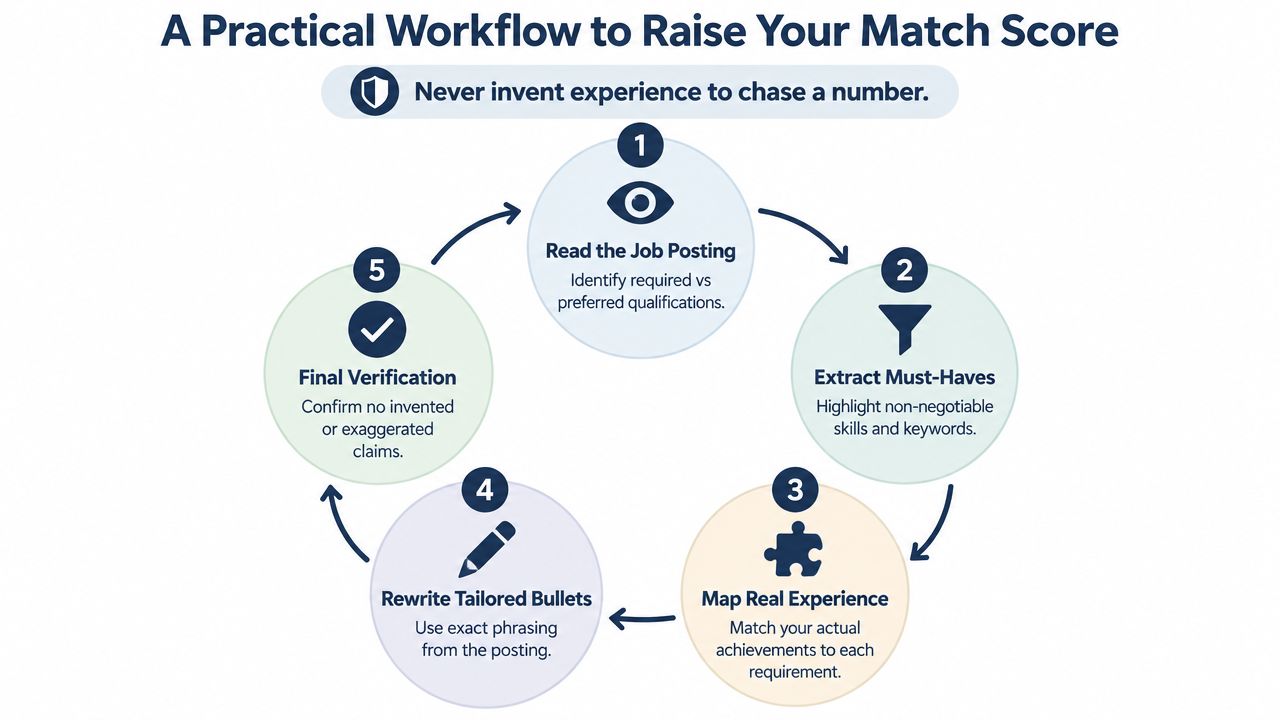
1. Read the posting for requirements
Don't begin with your resume. Read the job description and separate must-have requirements from preferred qualifications, responsibilities, and cultural language. Look for repeated nouns and phrases, especially when a long paragraph buries a requirement that appears nowhere else.
Highlight tools, certifications, role names, business functions, and deliverables. “Build dashboards in Power BI” is more useful than a vague phrase such as “support data-driven decisions.”
2. Extract the terms that matter
Create a short list of required skills and role-specific language. Group synonyms carefully. “Customer relationship management” and “CRM” may refer to the same capability, but don't assume every parser handles them identically.
Prioritize terms that appear in required qualifications, technical responsibilities, or repeated sections. Ignore generic words such as “team player” unless the posting gives them a specific context you can demonstrate.
3. Map every requirement to real evidence
For each important requirement, identify an actual project, achievement, tool, or responsibility from your background. If you can't find evidence, decide whether the requirement is genuinely missing or merely described differently.
Career switchers should be strategic here. You may not have held the exact target title, but you may have managed the same process, used the same tools, or delivered a comparable outcome in another function.
4. Rewrite the bullets, not just the skills list
Replace generic verbs with the specific action, tool, and outcome already present in your history. “Responsible for reports” becomes “Built monthly revenue reports in Power BI for regional sales leaders,” if that statement is accurate.
Use the employer's phrasing naturally. Put an important skill in a bullet that proves you used it, rather than hiding every term in a dense skills block. The resume should show both what you did and how the target requirement appears in that work.
5. Re-score and verify
Run the revised resume through the same checker, then inspect the document as plain text. Confirm that the parser reads the sections in the right order and that every added claim is defensible.
The final test is verbal. If you can't explain a line clearly in an interview, remove it or rewrite it. A score increase that creates an awkward or exaggerated resume is a bad trade.
The video below can help you visualize the tailoring process before you make your edits.
Fixes That Move the Score the Fastest
If you have limited time, fix the problems that can block accurate parsing before polishing wording. A resume with a distorted structure or no evidence of a required tool will lose value faster than one with an ordinary summary.
As noted above, formatting can depress the score before keyword edits matter. A 2026 ATS resume study found formatting issues in 62% of submitted resumes, with an average job-specific score of 58 out of 100, and reported that two-column layouts were linked to parsing failures (ATS resume study). Treat structure as a practical requirement, not a design preference.
Prioritize the edits this way
First, make the target title clear. If your official title is obscure but your responsibilities match the target role, clarify the function without falsifying your record. “Operations Analyst, Supply Chain” can work if it accurately describes the position. Do not turn “Coordinator” into “Director.”
Second, add the most important missing hard skills in context. Choose skills you genuinely have, then place them in bullets that show how you used them. A 2026 keyword roundup reported that resumes with 70% or higher keyword match received interview requests at 3.2 times the rate of resumes below 50%, while keywords in achievement bullets passed ATS scoring 2.7 times more effectively than terms listed only in a skills section (2026 resume keyword statistics). Use those figures as direction, not as a promise.
Third, replace weak verbs. “Helped,” “worked on,” and “responsible for” conceal ownership. Name the action, tool, and result when your experience supports them. “Responsible for reports” is weaker than “Built monthly revenue reports in Power BI for regional sales leaders,” provided that statement is accurate.
Fourth, remove graphics, tables, and decorative columns. Keep the information in a plain reading order. If the parser cannot extract it sensibly, visual polish is working against you.
Fifth, standardize headings. Use familiar labels such as Experience, Education, Skills, and Certifications. Clear headings help both software and human reviewers find the information quickly.
| Fix | Effort | Likely effect |
|---|---|---|
| Correct an unreadable layout | Moderate | Can materially improve a score when parsing fails |
| Add missing hard skills to relevant bullets | Short to moderate | Often improves keyword alignment |
| Align the target role title honestly | Short | Can improve title proximity |
| Rewrite weak bullets with action and outcome | Moderate | Improves evidence and contextual relevance |
| Standardize headings and remove decorative elements | Short | Reduces parser confusion |
The final column stays qualitative because the result depends on the starting document and the target posting. No reputable tool can promise the same lift for every resume.
Avoid shortcuts that damage credibility. Do not copy the job description sentence by sentence, inflate your title, or add unrelated certifications only because they appear in the posting. Textual overlap is useful only when the resume still reflects work you can explain in an interview.
Building a Repeatable Pre-Apply Routine
Tailoring works best as a routine, not as a frantic rewrite after every rejection. Before each application, spend a focused block of time checking the posting, the parser, the content, and the final file.
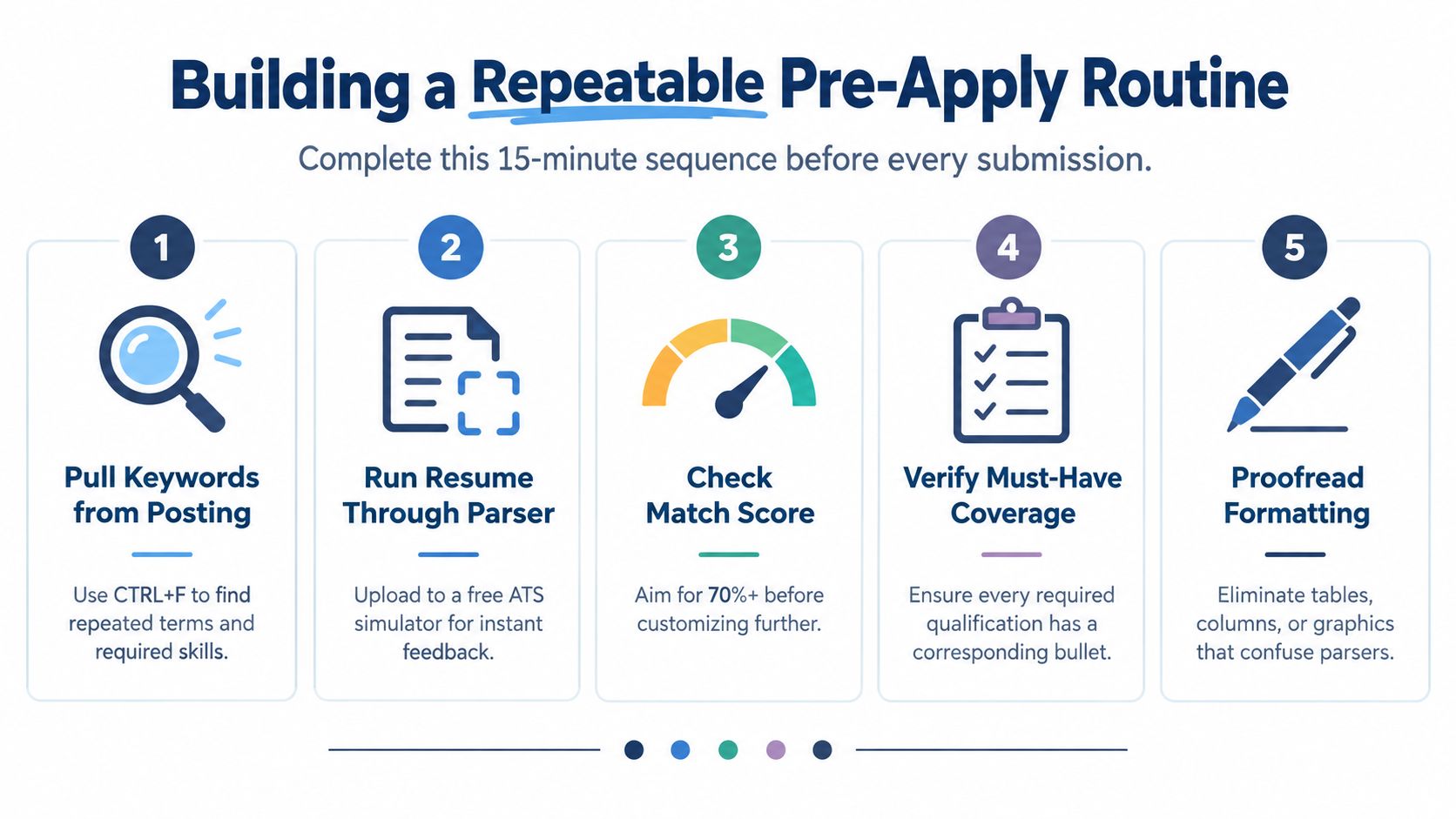
Run this sequence before submitting
- Pull keywords from the posting. Use your browser's find function to locate repeated terms, required skills, tools, and certifications.
- Run the resume through two different match tools. Look for gaps that appear consistently rather than obsessing over one platform's exact percentage.
- Apply targeted edits. Add only the requirements supported by your real background, and place them where the experience is visible.
- Read the resume aloud. Awkward phrasing, keyword stuffing, and exaggerated claims become obvious when spoken.
- Save a role-specific copy. Name the file for the target position so you don't accidentally submit yesterday's version to today's employer.
This routine guards against two opposite mistakes. Under-tailoring leaves relevant experience invisible, while over-tailoring makes the document sound artificial and fragile. Consistency matters more than perfection on a single application.
A resume match score can help you decide whether the wording is aligned, but your final review should confirm that the document is accurate, readable, and specific. The right version is the one you can defend without memorizing a script.
Put a recurring calendar reminder in place: “Before every application, check keywords, parsing, evidence, tone, and file name.”
GetTheCall turns an existing LinkedIn profile or resume into a job-specific ATS-ready document, with job-listing analysis, customized rewriting, and a live role match score that updates as you edit. If you want a faster way to diagnose gaps before applying, visit GetTheCall and run your resume against the role you're targeting.