Resume Keywords List: 2026 ATS Guide by Role
Use this resume keywords list to pass ATS filters in 2026. Find categorized keywords by function and seniority, with tailoring tips and real examples.
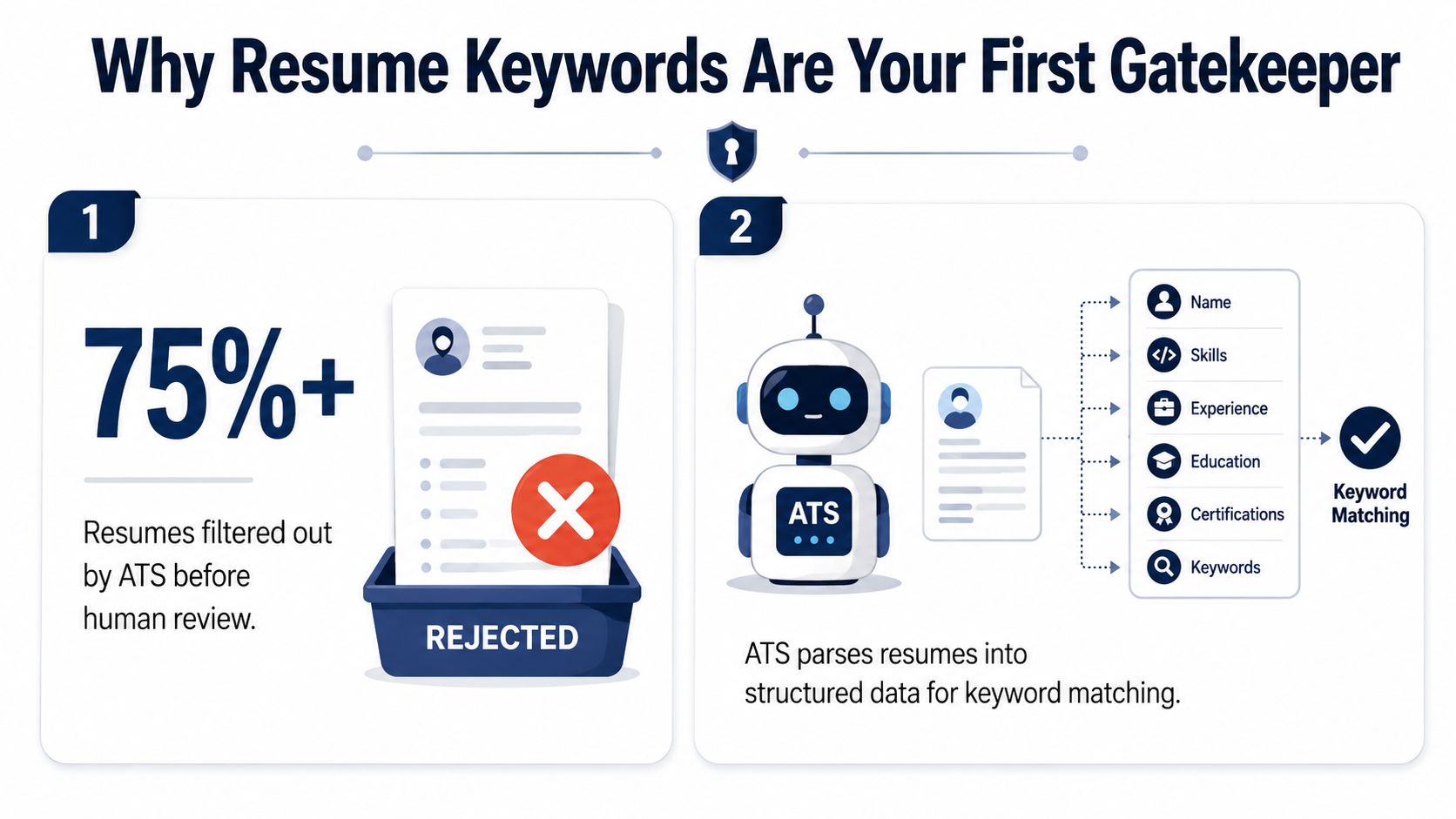
A strong résumé can still disappear before a recruiter reads it. A 2026 independent review reported that applicant tracking systems automatically discard 75–80% of applications before human assessment, and a cited analysis of more than 1,000 declined applications connected 60% of automatic rejections to semantic inconsistencies rather than missing qualifications. The review points to a practical conclusion: your résumé needs to use the employer's language as accurately as it represents your experience.
That's why a resume keywords list shouldn't be a random collection of buzzwords. It should be a role-specific map of skills, tools, certifications, responsibilities, and methods, adjusted for your seniority and supported by evidence. The guide below shows how to build that map, place it naturally, and test whether your résumé can survive both automated parsing and human review.
Table of Contents
- Why Resume Keywords Determine Whether You Get Seen
- How to Extract Must-Have Keywords from Job Postings
- Keyword Differences by Seniority Level
- Where to Place Keywords in Your Resume
- Resume Keywords List for Technology and Engineering Roles
- Resume Keywords List for Business and Operations Roles
- Resume Keywords List for Creative and Marketing Roles
- Common Keyword Mistakes That Hurt Your Application
- ATS-Friendly Formatting That Supports Keyword Parsing
- Your Pre-Submission Keyword and Format Checklist
Why Resume Keywords Determine Whether You Get Seen
Applicant tracking systems convert résumé text into fields such as job titles, employers, dates, skills, education, and certifications. They compare those fields with the job description, then rank applications by apparent relevance. In high-volume hiring, that ranking can decide whether a recruiter opens your document.
The 75–80% automatic discard range reported in the 2026 independent ATS review makes keyword alignment a screening concern, not a visual preference. The review also cited a 2025 analysis of more than 1,000 declined applications, linking 60% of automatic rejections to semantic inconsistencies. A candidate might have the right capability, yet “managed projects” may not match a posting that repeatedly uses “project management.”
Literal matching still matters
Modern ATS platforms may assess meaning and context, but exact wording still affects results. Jobscan's guidance on resume keywords recommends taking important terms from the posting and using them naturally in the summary, skills, and experience sections because software may not recognize every synonym.
Three separate checks shape your visibility:
- Parsing asks whether the system identifies the text correctly.
- Matching asks whether your wording corresponds to the employer's requirements.
- Ranking asks how closely the full résumé aligns with the role.
A polished résumé can still miss a required tool, certification, method, or industry term. Keyword strategy means describing genuine qualifications in the employer's professional language. It does not mean hiding terms in white text or filling the document with every possible variation.
The recruiter still needs proof
Keywords attract attention. Context builds credibility.
“Python” in a skills block may help a parser, but a bullet describing how you used Python on a project gives the recruiter evidence behind the claim. The same principle applies across seniority levels. A mid-level résumé may pair a tool with an assigned deliverable, while a senior résumé should connect that tool to decisions, scope, or business outcomes.
Connect each important term to a responsibility, deliverable, decision, or result. That structure addresses both screening stages: it helps the ATS identify relevant language and gives the reviewer a reason to trust it.
How to Extract Must-Have Keywords from Job Postings
A useful resume keywords list begins with the roles you want, not a generic online list. Collect 5–20 comparable job postings, following ResumeAdapter's role-specific keyword guidance, and review them as a group. One posting may use unusual wording. Terms repeated across several postings provide a clearer view of what employers expect for that function and seniority level.
Build the source set first
Select postings with similar titles, responsibilities, and seniority. Save the complete descriptions, including requirements, preferred qualifications, tools, and duties. Review more than the skills section. Employers may place important terms in the opening summary or in lines such as “you will be responsible for.”
Sort the language into four categories:
- Technical skills, such as SQL, financial modeling, SEO, or user research.
- Tools and platforms, such as Salesforce, Figma, SAP, Jira, or Google Analytics.
- Credentials and methods, such as PMP, Scrum, Lean, or industry licenses.
- Responsibilities and domain language, such as go-to-market strategy, variance analysis, or incident response.
Organize these categories by function before judging priority. A technology posting may emphasize tools and technical methods, while an operations posting may place greater weight on forecasting, compliance, or process improvement. Senior postings often add terms connected to scope, governance, strategy, and leadership.
Separate strong signals from background noise
Compare how frequently each term appears across the postings. Language repeated throughout the set deserves priority. Terms appearing in a substantial portion of postings are strong signals, while isolated phrases may matter only for a specific employer or specialty.
This comparison reduces guesswork. A repeated hard skill usually deserves a prominent place in your résumé. A generic phrase such as “works well with others” needs less attention than “cross-functional collaboration” when target employers consistently use that wording.
Practical rule: Use the employer's exact phrase when your experience supports it. Add a familiar abbreviation after the full term when both forms may appear in job postings.
Map every term to evidence
Create a working sheet with three columns: keyword, evidence, and résumé location. For “forecasting,” the evidence might be a budget model or planning process. For “Kubernetes,” it might be production deployment experience. For “stakeholder management,” it could be executive updates, client governance, or vendor coordination.
Remove terms you cannot defend. Review terms you possess but have not yet documented, then place them where the evidence is clearest. For a practical method of turning extracted terms into customized sections, use this guide to tailoring a résumé to a job description.
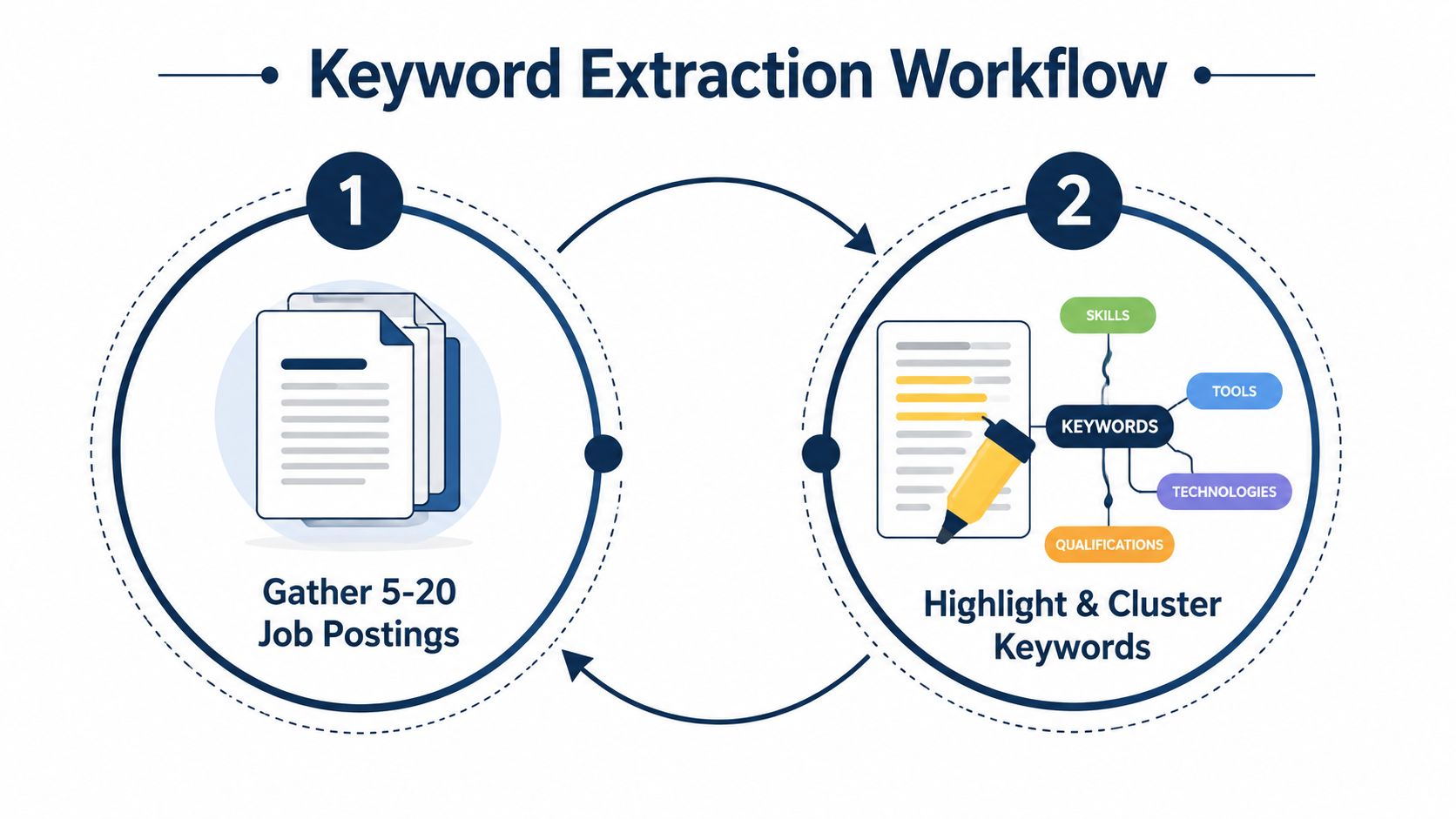
The workflow is repeatable: gather comparable postings, highlight recurring language, group related terms, and connect each important keyword to a real accomplishment. Use the final list to guide edits by function and seniority, rather than copying every phrase into the résumé.
Keyword Differences by Seniority Level
The same function can require a different vocabulary at different career stages. A mid-level marketing manager is usually evaluated on execution, channel fluency, and reliable delivery. A senior director is evaluated on strategic direction, commercial judgment, organizational influence, and the ability to connect marketing activity with business priorities.
| Seniority Level | Keyword Focus | Example Keywords | Common Mistakes |
|---|---|---|---|
| Mid-level marketing manager | Campaign execution and channel ownership | Campaign management, A/B testing, Google Analytics, email marketing, paid social, content marketing | Listing strategy without showing hands-on delivery |
| Senior director of marketing | Enterprise strategy and organizational leadership | Revenue attribution, go-to-market strategy, cross-functional leadership, brand portfolio, executive reporting, marketing operations | Repeating channel tasks without showing strategic scope |
Mid-level language should show control of execution
A mid-level résumé can use terms such as campaign management, A/B testing, Google Analytics, content marketing, and marketing automation when those terms reflect actual work. The bullet should show what you owned, which channel or tool you used, and what changed as a result.
“Managed marketing campaigns” is too thin because it doesn't identify the method, audience, platform, or responsibility. “Managed paid social and email campaigns, coordinated creative testing, and reported channel performance through Google Analytics” gives the ATS more relevant language and gives the recruiter a clearer picture of your contribution.
Senior language should show leverage
At senior level, “project management” and “team leadership” often sound underspecified. They describe activities, but not the scale or strategic consequence of the work. Senior résumés need terms such as revenue attribution, go-to-market strategy, cross-functional leadership, executive communication, and portfolio planning when those concepts are part of the candidate's experience.
Audit your résumé by asking whether each bullet reflects execution or organizational impact. If a document targeting a director role is filled with “created,” “scheduled,” and “managed campaigns,” it may be capping perceived seniority even when the person has led major decisions. Replace task-only wording with language that explains how you set direction, influenced functions, allocated resources, or connected work to business goals.
The goal isn't to inflate your title. It's to make the scope of your decisions visible.
Where to Place Keywords in Your Resume
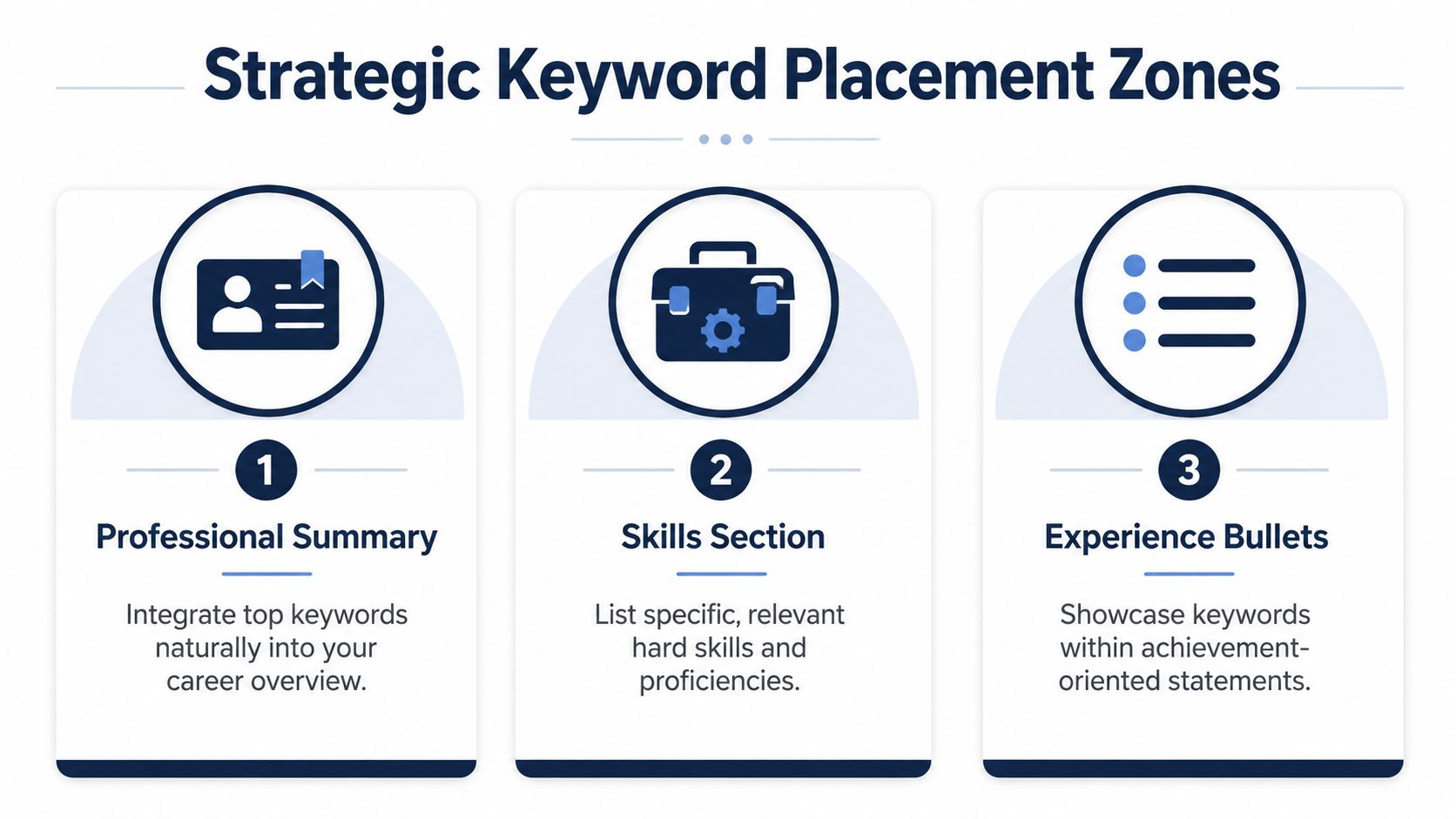
Keyword placement works best when your résumé presents the same professional story in three places. The summary establishes role fit, the skills section makes key terms easy to scan, and experience bullets prove you applied those skills. Use the summary for identity, skills for coverage, and bullets for evidence.
Start with the summary
A generic opening such as:
Results-driven professional with strong communication skills and a history of success in fast-paced environments.
could describe almost anyone. A targeted version might read:
Marketing manager specializing in go-to-market strategy, campaign management, paid social, A/B testing, and Google Analytics, with experience coordinating cross-functional launches and translating performance data into channel decisions.
The targeted version gives an ATS recognizable terms and gives the recruiter an immediate role identity. It also connects the keywords to responsibilities, rather than presenting unsupported abilities.
Make the skills section easy to parse
Use a standard heading such as Skills or Technical Skills. Group related terms instead of creating a dense tag cloud:
- Marketing: Go-to-market strategy, campaign management, content marketing, conversion rate optimization
- Analytics: Google Analytics, A/B testing, attribution, performance reporting
- Platforms: HubSpot, Salesforce, Google Ads, Meta Ads
- Collaboration: Cross-functional collaboration, stakeholder management, executive reporting
Spell out acronyms once when both forms may appear in your target postings. For example, write pay-per-click advertising (PPC) or search engine optimization (SEO).
Prove the terms in experience bullets
A keyword-stuffed bullet might say:
SEO, Google Analytics, HubSpot, PPC, content marketing, campaign management, lead generation.
It lists relevant language but provides no responsibility or evidence. A stronger version is:
Built an SEO content strategy, tracked organic performance in Google Analytics, and coordinated HubSpot campaigns to support B2B lead generation.
The terms now appear in a sentence a human can understand. Add quantified results only when you have verified figures from your own work. Otherwise, describe the deliverable, scope, or decision without inventing an outcome.
Certifications, projects, volunteer work, and relevant coursework can reinforce keywords when they provide credible evidence. Keep them tied to the target role rather than using them as storage space for unrelated terms.
Resume Keywords List for Technology and Engineering Roles
Technology résumés need specificity. “Technical background” tells a recruiter almost nothing, while a precise combination of language, platform, methodology, and responsibility can quickly establish fit. Use a term only where your experience supports it, especially for production systems, security controls, regulated environments, and architecture decisions.
| Sub-Function | Keyword | When to Use | Sample Bullet |
|---|---|---|---|
| Software engineering | Python | Use when you built, automated, analyzed, or maintained work with Python | Developed data-processing scripts in Python to support repeatable internal workflows. |
| Software engineering | RESTful APIs | Use when designing, integrating, or testing service interfaces | Integrated RESTful APIs with application services and documented request and response behavior. |
| Software engineering | Unit testing | Use when writing or maintaining automated tests | Added unit testing coverage for application logic and reduced reliance on manual verification. |
| Data science | SQL | Use when querying, transforming, or validating structured data | Wrote SQL queries to prepare datasets for analysis and reporting. |
| Data science | Data visualization | Use when turning analysis into dashboards or stakeholder-facing reporting | Built data visualizations that helped business partners interpret operational trends. |
| DevOps | CI/CD pipelines | Use when owning automated build, test, or deployment workflows | Maintained CI/CD pipelines that connected source control, automated testing, and deployment steps. |
| DevOps | Infrastructure as code | Use when provisioning or managing infrastructure through configuration | Applied infrastructure as code practices to make environment configuration repeatable. |
| DevOps | Kubernetes | Use when operating containerized workloads or cluster deployments | Supported containerized services running on Kubernetes and documented deployment procedures. |
| Cloud engineering | AWS, Azure, or Google Cloud | Use only for platforms you've actually used | Deployed application components in AWS and coordinated configuration changes with development teams. |
| Cybersecurity | SIEM | Use when monitoring, investigating, or escalating security events | Reviewed alerts in a SIEM environment and documented investigation findings for escalation. |
| Cybersecurity | Vulnerability assessment | Use when identifying, prioritizing, or remediating weaknesses | Performed vulnerability assessments and tracked remediation work with system owners. |
| Product engineering | Agile and Scrum | Use when participating in defined delivery ceremonies and iteration cycles | Delivered features through Agile development practices and collaborated in Scrum planning and reviews. |
| Hybrid roles | Technical requirements | Use for solutions architecture, technical product, or implementation work | Translated customer needs into documented technical requirements for engineering review. |
| Hybrid roles | Systems integration | Use when connecting platforms, services, or business processes | Coordinated systems integration requirements between customer workflows and platform capabilities. |
Replace low-signal claims
“Problem-solving” is too broad on its own. Replace it with the problem type and technical action, such as incident response, root-cause analysis, performance optimization, or requirements analysis, if those terms describe your work.
Likewise, “coding” is weaker than naming the language, framework, testing practice, or architecture pattern involved. Agile and Scrum can help when they describe how you delivered work, but they shouldn't substitute for the actual technical contribution.
For hybrid technology roles, bridge engineering and business language deliberately. Technical requirements, systems integration, API strategy, product discovery, solution design, and stakeholder management can connect a technical background with customer, product, or operational responsibilities.
Resume Keywords List for Business and Operations Roles
Business and operations keywords become useful when they clarify the work behind a broad title. “Operations professional” is vague. Process improvement, forecasting, P&L management, vendor management, and variance analysis tell the reader what kind of decisions you make and where you create value.
| Sub-Function | Keyword | When to Use | Sample Bullet |
|---|---|---|---|
| Project management | Risk management | Use when identifying, tracking, or mitigating delivery risks | Maintained a risk management process that documented dependencies, owners, and mitigation actions. |
| Project management | Stakeholder engagement | Use when coordinating clients, executives, vendors, or internal teams | Led stakeholder engagement across operations and finance to align project decisions with business requirements. |
| Operations | Process improvement | Use when redesigning workflows, controls, or service delivery | Applied process improvement methods to simplify an internal intake workflow and clarify ownership. |
| Operations | Lean | Use when applying Lean principles to reduce waste or improve flow | Used Lean practices to examine handoffs and remove unnecessary process steps. |
| Operations | Six Sigma | Use when applying structured quality or defect-reduction methods | Used Six Sigma analysis to investigate recurring process defects and support corrective action. |
| Supply chain | Vendor management | Use when managing supplier performance, contracts, or relationships | Managed vendor management activities, including service reviews, issue escalation, and documentation. |
| Supply chain | Inventory planning | Use when forecasting demand or coordinating stock decisions | Supported inventory planning by reviewing demand information and communicating replenishment needs. |
| Finance | P&L management | Use when owning or influencing profit-and-loss performance | Supported P&L management through budget reviews, expense tracking, and business-partner reporting. |
| Finance | Forecasting | Use when preparing forward-looking financial or operational projections | Prepared forecasting inputs and discussed changes in assumptions with functional leaders. |
| Finance | Variance analysis | Use when comparing actual performance with budget or forecast | Conducted variance analysis to explain differences between planned and actual expenses. |
| Human resources | Talent acquisition | Use when sourcing, interviewing, or coordinating hiring processes | Supported talent acquisition through candidate screening, interview coordination, and hiring-manager communication. |
| Human resources | Employee relations | Use when handling workplace concerns, investigations, or policy questions | Managed employee relations cases with careful documentation and consistent policy application. |
| People leadership | Mentoring | Use when developing colleagues without overstating formal management responsibility | Provided mentoring to new team members on systems, processes, and role expectations. |
Match the dialect to the industry
“Stakeholder management” can mean client governance in consulting, executive alignment in internal operations, or supplier coordination in procurement. Keep the phrase when the posting uses it, then clarify the stakeholder group in the bullet.
Business keywords also transfer into technology-adjacent roles. Roadmap planning, requirements gathering, process improvement, data analysis, vendor management, forecasting, risk management, and cross-functional collaboration can support applications for business analyst, technical program manager, implementation, and operations roles. The transferable term matters only when your examples show how you used it.
Resume Keywords List for Creative and Marketing Roles
Creative and marketing résumés need a balance between craft and commercial context. A portfolio may show the visual result, but the résumé should identify the methods, platforms, audiences, and decisions behind the work.
| Sub-Function | Keyword | When to Use | Sample Bullet Point |
|---|---|---|---|
| Content marketing | Editorial calendar | Use when planning content production across channels or contributors | Managed an editorial calendar that coordinated briefs, reviews, publishing, and channel distribution. |
| Content marketing | SEO content strategy | Use when shaping content around search intent, structure, and organic visibility | Developed an SEO content strategy around audience needs, topic priorities, and on-page optimization. |
| Brand | Brand voice development | Use when defining or applying language standards | Led brand voice development and translated messaging principles into practical content guidance. |
| Digital marketing | Paid social | Use when managing paid campaigns on social platforms | Managed paid social campaigns and collaborated with creative partners on audience and message testing. |
| Digital marketing | Programmatic advertising | Use when working with automated display or media buying systems | Supported programmatic advertising activity through campaign setup, audience coordination, and performance review. |
| Digital marketing | Conversion rate optimization | Use when improving landing pages, journeys, or conversion paths | Applied conversion rate optimization principles to landing-page content and user journeys. |
| Design | Design systems | Use when creating reusable components, standards, or libraries | Contributed to design systems that improved consistency across digital product experiences. |
| Design | Figma | Use when designing, prototyping, or collaborating in Figma | Created interface concepts and prototypes in Figma for stakeholder review. |
| Design | Motion graphics | Use when producing animated visual content | Produced motion graphics for digital campaigns and social storytelling. |
| Communications | Crisis communications | Use when supporting urgent, sensitive, or reputation-related messaging | Supported crisis communications by preparing coordinated messages and approval materials. |
| Communications | Media relations | Use when working with journalists, press materials, or media inquiries | Managed media relations activities, including press materials, outreach, and response coordination. |
| Communications | Stakeholder engagement | Use when communicating with internal or external groups around change or reputation | Planned stakeholder engagement communications for a cross-functional initiative. |
Find the overlap
Some keywords travel between functions. A/B testing can describe marketing experiments or product experience testing. Stakeholder management can strengthen operations, communications, consulting, and product applications. Conversion rate optimization, data analysis, content strategy, and user research may also appear in hybrid roles.
Use the version that matches the posting. A creative portfolio should mirror the résumé's terminology in project descriptions, so a recruiter sees the same story across both materials. If the résumé says “design systems,” the relevant portfolio project should explain the component library or design standard rather than using unrelated creative language.
Generic claims such as “creative thinker” or “team player” don't distinguish a candidate. Replace them with brand voice development, art direction, content operations, user research, or another defensible specialty.
Common Keyword Mistakes That Hurt Your Application
Keyword optimization fails when candidates treat the résumé as a container for words instead of a record of work. The most common problems are easy to identify during an honest audit.
Mistake one, relying on generic phrases
“Team player,” “results-driven,” “hard worker,” and “excellent communicator” carry little signal without a specific setting. Replace them with the activity that demonstrates the quality:
- Generic: Results-driven professional with strong communication skills.
- Stronger: Prepared executive readouts, coordinated cross-functional decisions, and documented customer escalations.
Mistake two, copying language you can't support
Mirroring a job posting is useful only when the term describes your actual background. Adding “Kubernetes,” “P&L management,” or “crisis communications” without evidence may improve a superficial match while creating an obvious credibility problem in an interview.
Use the exact phrase when it's accurate, then connect it to a project, responsibility, certification, or accomplishment. LinkedIn's resume keyword guidance similarly emphasizes standard headings, specific tools, and terms that are demonstrable in your background.
Mistake three, hiding or stuffing keywords
White text, metadata tricks, footer keyword blocks, and long strings of repeated terms are poor substitutes for relevant experience. They can damage readability and make the document look manipulative.
- Weak: Python, Python, Python, SQL, SQL, data, analytics, problem-solving.
- Better: Used Python and SQL to prepare datasets and support recurring analytical reporting.
Mistake four, ignoring context
A skills list that says “Salesforce” but never shows what you did in Salesforce leaves a credibility gap. Add a bullet describing pipeline management, reporting, lead routing, or another genuine use.
Mistake five, skipping variations that matter
Some employers use an acronym, others spell out the term. Write both when space allows, such as pay-per-click advertising (PPC). Don't replace the exact posting language with a personal synonym just because it sounds more elegant.
ATS-Friendly Formatting That Supports Keyword Parsing
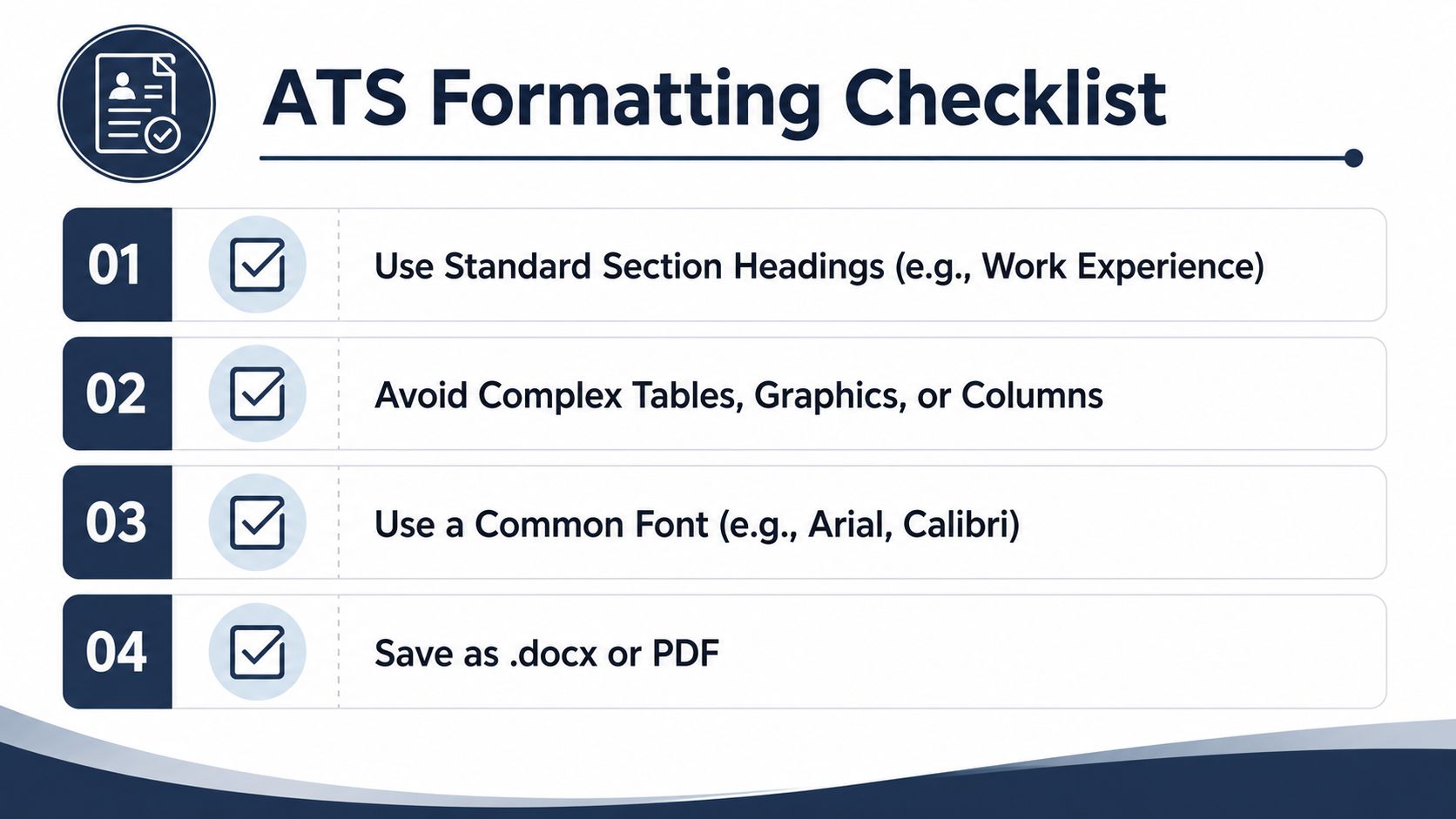
Keywords only help when the ATS can extract them. Use familiar headings such as Work Experience, Skills, Education, Certifications, and Projects. “My Journey” may look distinctive to a reader, but it gives the parser less information about the section's purpose.
Choose a single-column layout for the main content. Keep dates, job titles, skills, and bullets out of tables, text boxes, graphics, headers, and footers. Arial or Calibri, standard bullet points, and consistent spacing make the file easier to read and process.
Choose a readable file
Submit a text-based PDF when the application accepts it, or use DOCX when the portal requests that format. An image-based PDF stores a picture instead of selectable text, so keyword extraction can fail. This ATS-friendly résumé guide recommends checking the finished résumé in a plain-text editor.
Run the check before applying:
- Copy the complete résumé.
- Paste it into a plain editor.
- Confirm that the name, dates, titles, bullets, and section order remain intact.
- Search for the important keywords.
- Repair missing or scrambled text before exporting again.
A polished design can still parse poorly if visual elements disrupt the text layer. Use the ATS-friendly résumé guide for a practical formatting review, then inspect the file yourself.
Your Pre-Submission Keyword and Format Checklist
Use the same short review before every application. The point isn't to chase a perfect score. It's to catch preventable mismatches while the job description is still in front of you.
Keyword alignment
- Exact terms: Confirm that the most important skills, tools, certifications, and responsibilities from the posting appear in your résumé when they apply.
- Three-zone coverage: Check the summary, skills section, and experience bullets for the role's core language.
- Evidence: Make sure every significant technical or functional keyword connects to a real task, project, certification, or result.
- Seniority fit: Remove execution-only wording if you're targeting a senior role, and avoid overstating strategic scope if you're applying at mid-level.
Formatting integrity
- Standard headings: Confirm that the document uses recognizable headings such as Work Experience and Skills.
- Simple structure: Check for a single-column layout and remove tables, graphics, text boxes, and essential information in headers or footers.
- Text layer: Copy the résumé into a plain editor. If names, dates, bullets, or keywords disappear, the file isn't ready.
- File format: Submit a readable PDF or the format required by the employer.
Final validation
- Parser check: Run the file through an ATS simulator or keyword checker and review which terms it detects.
- Human check: Read the document aloud. If a bullet sounds like a keyword list, rewrite it as an accomplishment or responsibility.
- Truth check: Delete every term you couldn't explain clearly in an interview.
- Version check: Confirm that the file name, target title, employer name, and keywords belong to this application.
You can use the GetTheCall ATS résumé checker as one validation option, alongside a plain-text copy test and your own review. Save this checklist as a bookmark, then run it before each submission instead of relying on memory.
GetTheCall can import a LinkedIn profile or existing résumé, analyze a target job listing, align verified experience with required keywords, and provide a live role-match score before export. Visit GetTheCall to tailor your next résumé, check its ATS readability, and create a job-specific PDF without inventing skills or experience.