Resume Keywords for ATS: How to Find and Use Them Well
Learn how resume keywords for ATS work, how systems parse them, and how to match job listing terms to your real experience without keyword stuffing.
You've done the work, you know you can do the job, and you've sent the application with care. Then there's silence. If that pattern feels familiar, you're not alone, and it doesn't always mean a person read your resume and said no. Often, software sorted it first.
Table of Contents
- Why Resume Keywords Decide Who Gets Seen First
- What ATS Keywords Are and Why They Exist
- How ATS Software Parses and Matches Your Keywords
- Pulling Role-Specific Keywords From a Job Listing
- Mapping Keywords to Real Experience Without Stuffing
- Comparing Manual Tailoring With Tools Like GetTheCall
- Testing Your Resume Against One Real Job Listing
Why Resume Keywords Decide Who Gets Seen First
Think of a strong candidate named Maya. She's run reports, cleaned messy data, and helped a team spot problems earlier. She finds a data analyst role that fits her well, sends a resume written in her previous employer's language, and hears nothing.
She tries again for a similar role. Same quiet inbox. It's easy to assume she's not qualified, but that may not be what's happening at all.
The First Reader May Not Be a Person
In many hiring pipelines, an applicant tracking system, or ATS, collects and organizes your resume before a recruiter looks at it. That system turns your document into searchable information. A recruiter can then search for people using words tied to the open role.
That's why resume keywords for ATS screening matter so much. They're like the labels on a file folder. If the label doesn't match what someone searches for, a good file can stay in the cabinet, unseen.
The stakes aren't small. A Harvard Business School and Accenture study summarized in resume statistics coverage reported that more than 90% of employers use screening software to make an initial cut, and 88% of employers believed qualified, high-skilled candidates were screened out because they didn't match exact job description criteria.
For middle-skilled candidates, that reported figure rose to 94%. The same coverage notes an estimated approximately 27 million people in the United States in this hidden worker population, people who are qualified but overlooked by conventional screening.
Keywords Aren't a Trick
You don't need to game anything here. You need to translate. Your past employer may have called your work reporting. The new employer may call it business intelligence, dashboards, or data analysis.
Your experience doesn't change when you tailor a resume. The words you use to make that experience findable do.
That's the honest goal. You'll learn what keywords are, how software reads them, how to pull the right terms from one listing, and how to connect each term to something you did. You'll also see where the line sits between helpful wording and a claim you can't support.
If you're nervous, start small. One role, one resume, a few careful changes. Clarity beats a pile of buzzwords every time, for the software and for the person who reads your resume next.
What ATS Keywords Are and Why They Exist
A library catalog helps here. A great book on a shelf isn't findable because it's great. It's findable because the catalog lists its title, author, and subject in consistent words that a librarian or reader can search.
Your resume works in a similar way once it enters an ATS. The system stores your application as searchable information, then matches that information against terms tied to a vacancy. If your words and the employer's words line up, you're easier to retrieve.
The visual below captures that catalog idea, a person organizing records so someone else can find the right item later.

What Counts as a Keyword
An ATS keyword is a job-related word or phrase that a system or recruiter searches for to judge fit. It's not a magic word, and it doesn't prove you're good at the work by itself.
Common keyword types include these:
- Job titles: The name of the role or a closely related role you've held, written plainly and truthfully.
- Technical skills and tools: Software, methods, equipment, or platforms named in the vacancy, such as a database language or design program.
- Certifications and education: Credentials, licenses, degrees, and named courses the employer asks for.
- Experience terms: Responsibilities and tasks drawn from the vacancy description, such as forecasting, onboarding, or quality testing.
These terms usually come straight from the job posting. That matters because employers write postings in their own vocabulary, even when two companies describe nearly the same work in different ways.
Why This Became the Normal Path
Online recruiting changed the volume of applications employers handle. Reading every resume line by line, in order, became hard to sustain, so employers leaned on systems that could collect, organize, and search applications at scale.
A 2024 academic review of ATS history and use reports that fewer than 300 companies used ATS software when the technology was first introduced in 1995, while ATS is now used by most employers to collect, organize, parse, and screen résumés.
That shift created two common failure points for applicants. One is formatting that prevents accurate parsing. The other is a keyword mismatch between your resume and the employer's stated requirements.
So a keyword is best understood as evidence of fit expressed in the employer's language. The word gets you found. The evidence around the word gives a recruiter a reason to keep reading.
How ATS Software Parses and Matches Your Keywords
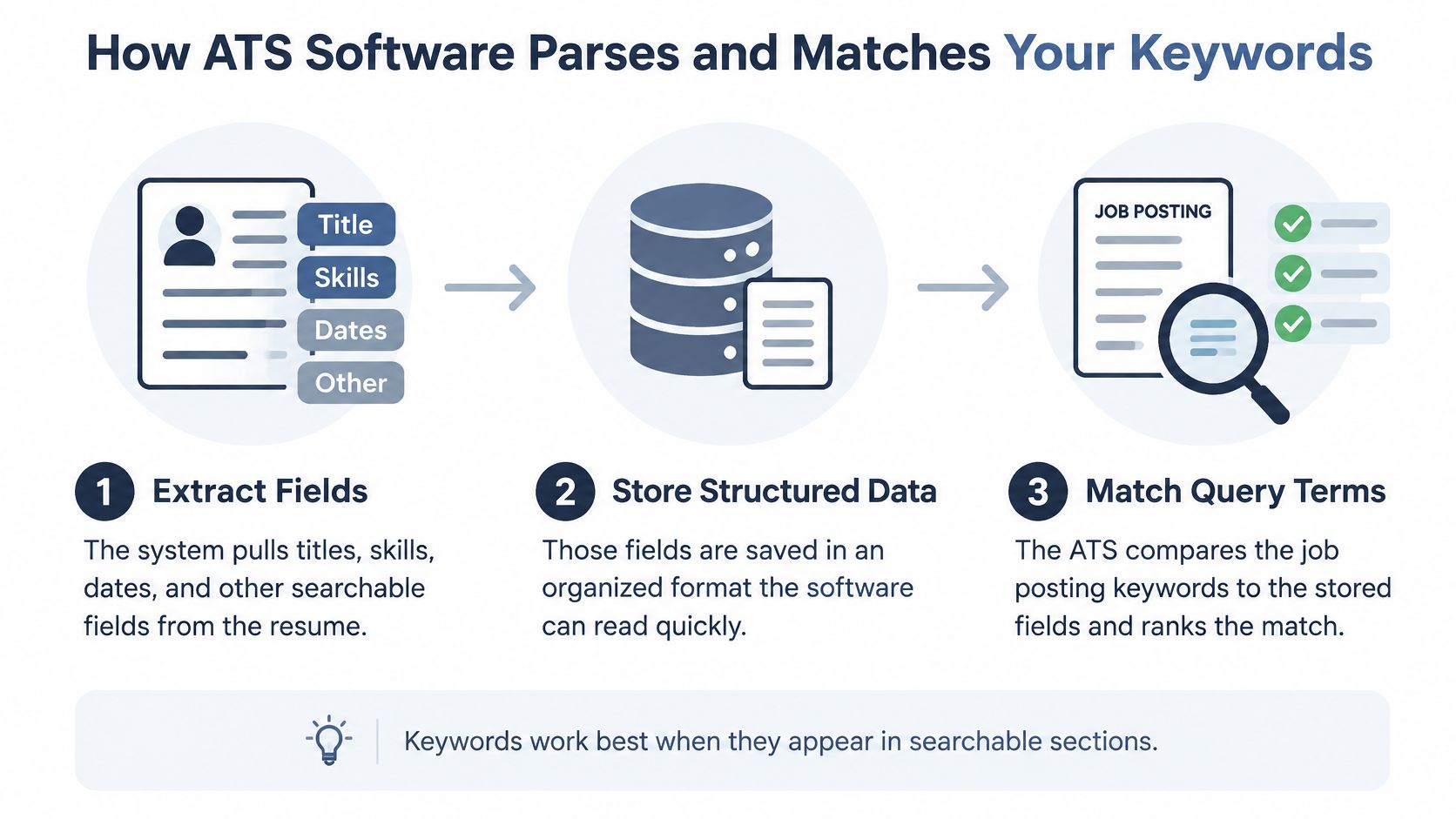
Parsing sounds technical, but the idea is simple. The software reads your document, pulls out pieces of information, and files those pieces where they belong. Your name goes in one field, your job titles in another, your skills, dates, and education in others.
Once your resume becomes structured data, a recruiter or a configured filter can query it. They search for terms linked to the vacancy, and the system returns resumes that contain matching, readable text.
This process view shows the three basic stages, from extraction to matching.
Where a Good Resume Can Go Invisible
A resume can be relevant and still be hard to find. If the parser can't extract a skill, the skill may as well not be there for search purposes. Text inside a graphic, a header, a text box, or a decorative label is at risk, because some systems don't read those areas reliably.
The same problem happens with vocabulary. SHRM's guidance on building an HR resume and career identifies four practical keyword classes, hard skills and technologies, soft skills, credentials, and geographic terms such as cities or ZIP codes, and recommends presenting both acronyms and full names because recruiters may search either form.
That last point trips up many people. If a posting says Customer Relationship Management and you only write CRM, a search for the long form may miss you. If you only write the long form, a search for CRM may miss you instead.
- Write both forms once: Use a format like Customer Relationship Management (CRM) where it applies, then use the short form naturally after that.
- Keep terms in body text: Put important skills in your summary, skills section, and experience bullets, not only in a header or sidebar.
- Use standard section labels: Clear labels like Experience, Education, and Skills help the parser file information correctly.
If you're rebuilding your base document, a plain, well-structured guide to building an ATS-friendly resume can help you set up those sections before you tailor for a specific role.
The short video below walks through the same idea from the employer's side, which can make the search process feel less mysterious.
The practical lesson is steady and unglamorous. Keywords need to exist in plain, parseable body text to be retrieved at all. Design can help a human reader, but it shouldn't hide the words the system needs to find you.
Pulling Role-Specific Keywords From a Job Listing
Don't start by rewriting your resume. Start by reading the listing like a map. You're looking for the employer's own names for the work, the tools, and the proof they want to see.
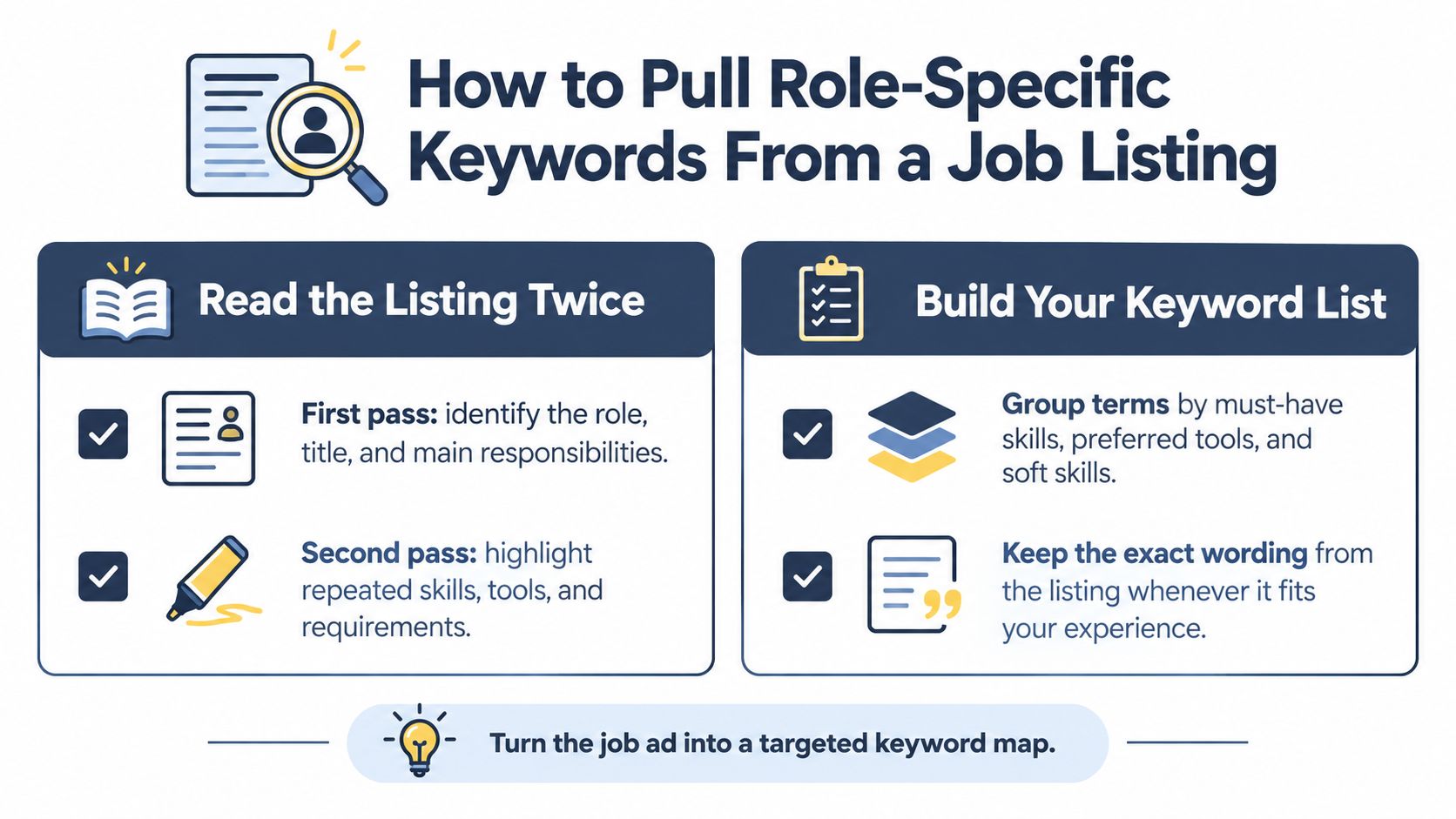
Read the posting twice, with a different job each time. The first pass gives you the story of the role. The second pass gives you the vocabulary.
A Two-Pass Way to Read Any Posting
On your first read, note the job title, the team, and the main responsibilities. Ask yourself what this person will do each week. Don't highlight yet, just understand the shape of the job.
On your second read, highlight repeated nouns and qualification phrases. Tools, certifications, methods, and named responsibilities deserve your attention, especially when the posting repeats them in both the duties and the requirements.
The checklist below turns that two-pass read into a working list you can keep beside your resume.
Sorting What You Find
Next, sort your highlighted terms into the four classes you saw earlier. Hard skills and technologies come first, then credentials, then soft skills, then geographic terms if location matters for the role.
Then split that sorted list into two groups. Must-have terms are requirements the posting states directly or repeats. Nice-to-have terms are preferences, bonuses, or tools mentioned once in passing.
Take a data analyst posting as an example. Your must-have group might include SQL, data analysis, and a named dashboard tool. Your preferred group might include a second tool, a specific industry background, or presentation experience.
A marketing coordinator posting might sort differently. Hard skills could include email marketing, social media scheduling, and a named content platform. Soft skills could include stakeholder communication and cross-team coordination, which you'll still need to show with evidence later.
- Keep the employer's exact wording: Copy the phrase as written into your working list, so you don't drift into a synonym by accident.
- Note repetition without obeying it blindly: A repeated phrase signals priority for the employer, not an instruction to repeat it on every line of your resume.
- Mark what you can prove: Put a check beside terms you can support with real work, study, volunteering, or projects.
If you want to practise on a real example, compare your method against a sample role listing with structured requirements and see which terms you'd place in each group.
Finish with one clean checklist. Title terms at the top, must-haves next, preferred terms after that, and a small note beside each item showing where your evidence will go. That single page keeps tailoring focused, and it stops you from stuffing in every word you highlighted.
Mapping Keywords to Real Experience Without Stuffing
A list of keywords is not a resume. It's raw material. The work is translation: turning each requirement into a true sentence about what you've done and what changed because you did it.
Use a simple pattern for every important term: Requirement, verified experience, measurable outcome. If a keyword can't survive that pattern, it shouldn't go in as a claim.
Turning a Requirement Into Evidence
Take SQL. Writing SQL in a skills list tells a search system the word exists. Writing that you built SQL queries to clean sales records for a weekly report tells a recruiter how you used it, and the result, even a simple one about time saved or errors reduced, gives the claim weight.
Stakeholder management works the same way. The phrase alone is vague. A stronger bullet names the stakeholders, the action you took, and the outcome, such as aligning a product and support team on a launch checklist so fewer questions reached customers unanswered.
| Job listing term | Verified experience to describe | Measurable outcome to state |
|---|---|---|
| SQL | The queries, reports, or data checks you actually built or ran | A result you can support, such as faster reporting or fewer manual corrections |
| Stakeholder management | The people or teams you coordinated and the decision or plan you moved forward | A visible outcome, such as an agreed timeline or a smoother handoff |
| User Experience (UX) | Research, testing, or design work you did on a real product or project | An observed change, such as clearer task completion in testing |
Spreading Terms Where They Belong
Don't park every keyword in one block and hope for the best. SHRM guidance on keywords for landing the right job recommends distributing relevant terms across the summary, competencies, employment descriptions, achievement statements, education, affiliations, and volunteer sections rather than concentrating them in a keyword block.
That spread helps both readers. The system finds the term, and the person finds it inside a believable story. A term in an accomplishment is both searchable and evidentiary, while an isolated list gives little proof of proficiency.
A useful test: Read the bullet out loud. If you'd struggle to explain it in an interview, the wording needs to come back closer to what you actually did.
Handling Synonyms and Acronyms Honestly
Equivalent experience often arrives wearing different words. You may say data analysis while a posting says analytical modelling. A research paper on ATS keyword limitations notes that traditional keyword rules can miss that semantic relationship, so a careful equivalence is better than hoping the system connects the dots.
Where your experience matches, use the employer's exact phrase once, then support it with your own accurate variants, tools, and outcomes. For example, analytical modelling (data analysis, forecasting, statistical modelling) only works if those activities describe work you've really done.
Acronyms follow the same careful habit. The University of Maryland University Career Center resume guide recommends using both forms, such as User Experience (UX), and drawing qualifications from employment, internships, class projects, student organizations, or military experience when they're genuine.
If you're working through this translation step by step, a walkthrough on tailoring a resume to a job description pairs well with the evidence pattern above.
The line is clear once you see it. Helpful wording makes true experience easier to find. An unsupported keyword may raise a surface match, but it damages trust the moment a recruiter reads closely or asks you about it.
Comparing Manual Tailoring With Tools Like GetTheCall
You can absolutely do this work by hand. Plenty of people do, and a careful manual pass teaches you a lot about how employers describe your field. The question is what the process costs you across many applications.
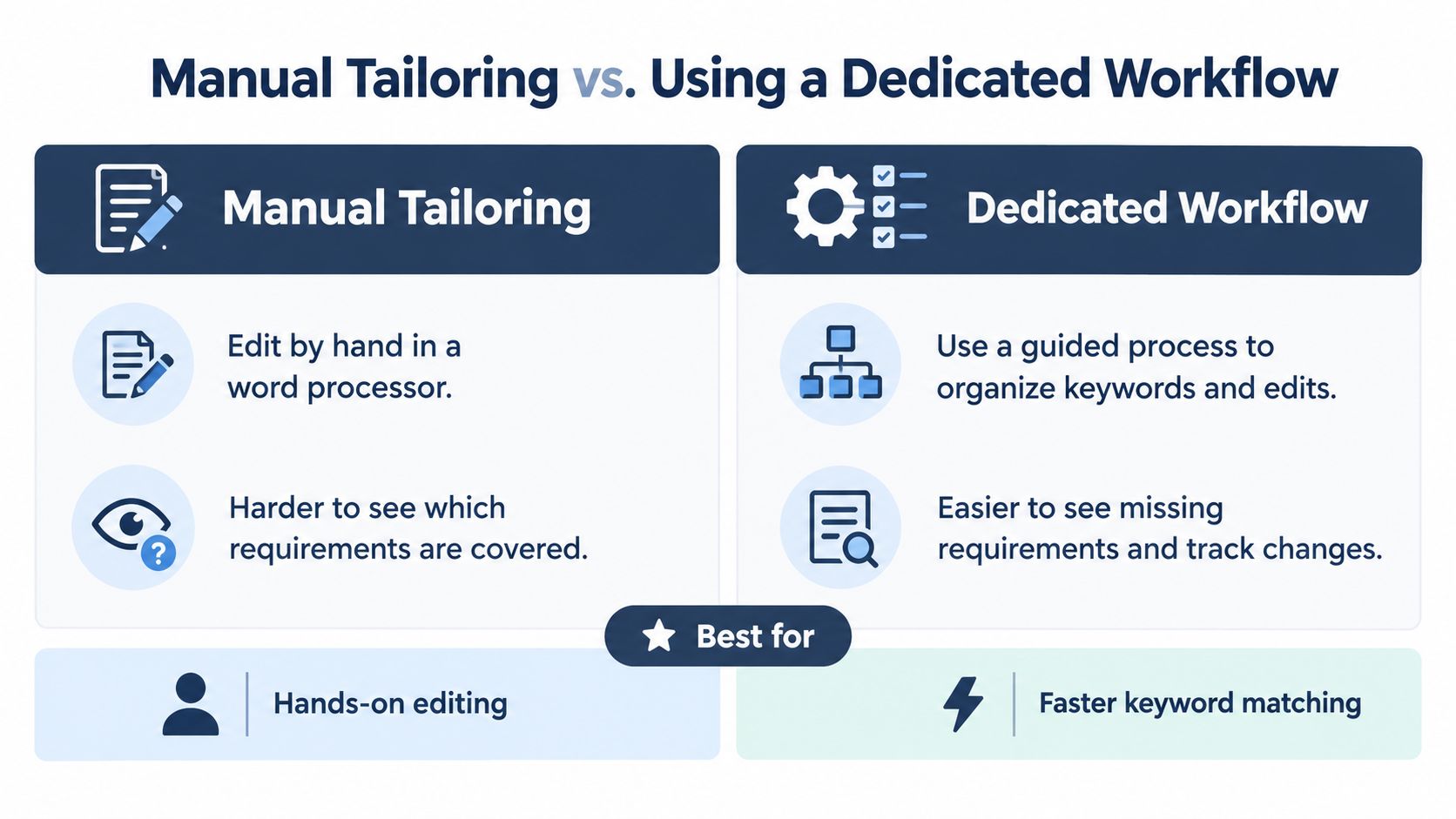
Manual tailoring usually means a job posting in one window and a word processor in another. You highlight, rewrite, save a new version, and try to remember which requirements you've covered and which ones you haven't.
What Changes With a Dedicated Workflow
The comparison below sets the two approaches side by side, so you can judge by effort and visibility rather than by promises.
Think about four practical criteria as you compare:
- Coverage you can see: Can you tell at a glance which must-have requirements appear in your resume and which are still missing?
- Time per application: Does each new role mean starting the highlighting and rewriting process from the beginning?
- Repeat design work: Are you recreating the same resume in different layouts, then fixing formatting drift each time?
- Copy and paste errors: Do old job titles, dates, or claims from a previous version slip into the next one unnoticed?
A dedicated workflow tries to reduce that friction. With GetTheCall, you can import a LinkedIn profile URL or upload a PDF, DOC, or DOCX file, and it can parse a job listing URL to identify required skills and keywords for that target role.
From there, it generates resume content mapped to the role using your own experience. A live ATS Role Match score updates as you edit, so you can see coverage change while you work rather than guessing after you export.
It also offers 20 or more professionally designed templates, PDF export ready for ATS submission, and a free ATS resume checker for parsing and keyword issues. The Pro option is a 30-day pass for unlimited tailoring and scores, with no auto-renewal.
Where Your Judgment Still Runs the Show
No tool knows which project you're proudest of, which result you can explain in detail, or which suggested phrase overstates your role. Those calls stay with you, and they should.
Use any workflow, manual or guided, as a coverage check and a drafting aid. Then slow down for the evidence pass. Read each bullet, ask whether it's true, and keep the wording you'd be comfortable defending with a story in an interview.
If you apply to one role a month, manual tailoring may suit you fine. If you're applying widely, a structured workflow can save repeat effort while you keep control of the final claims.
Testing Your Resume Against One Real Job Listing
Pick one listing you want. Not a dream job far outside your experience, and not a random posting you'd never accept. One real opening makes the test honest, and honest feedback is what teaches you the method.
You'll need your current resume, the posting, and your sorted keyword checklist. Give yourself one focused sitting. You're checking retrievability, evidence, and readability, in that order.
Running the Check Step by Step
- Confirm each must-have term appears: Go down your checklist and find each term in your resume. If a term is missing and you can support it truthfully, add it through the requirement, experience, outcome pattern.
- Check where the terms sit: Make sure important words live in selectable body text, not only in a graphic, header, or footer.
- Check both acronym forms: Where a credential or tool has a long form and a short form, confirm both appear at least once if they apply.
- Read for evidence: Every strong claim should point to real work. Soften or remove anything you can't explain.
Formatting deserves its own careful look at this stage. Guidance from the U.S. Department of Labor Veterans Employment and Training Service resume guide advises using terminology from the target posting in achievement statements, submitting the file type the posting requests, avoiding important information in headers or footers, and keeping layouts simple and left-aligned because most ATS tools can't read non-text content.
A plain-text test shows you what the parser likely sees. Copy your resume text into a plain document and read it top to bottom. Dates should stay intact, job titles should stay readable, and section labels should still make sense without the design.
The Social Security Administration Work Incentives Planning and Assistance guidance likewise advises avoiding pictures, tables, columns, text boxes, and other graphic elements, using fonts such as Calibri, Arial, Helvetica, Georgia, or Times New Roman with body text between 10 and 12 points, and saving as PDF or DOCX rather than image formats.
A match score is a diagnostic light, not a verdict. It can show you a missing term. It can't promise an interview.
Reading the Results With Calm Expectations
If you use a score, treat it as a prompt for questions. Which must-have term is absent? Which keyword appears without evidence? Which bullet repeats a phrase so often that it stops sounding like you?
ATS behavior varies across systems, and recruiter search habits vary too, so no single score guarantees selection. That's not a reason to ignore the check. It's a reason to use it for coverage and parsing problems, then trust your own reading for truth and tone.
Save two things when you finish. Keep the PDF you'll submit, and keep a short note of which listing you prepared it for, which terms you emphasized, and whether you heard back. Over a few applications, those notes show patterns a single rejection never will.
Fairness is worth keeping in mind here too. A Purdue-linked study of résumés in an ATS context found that including pronouns for transgender and gender-nonconforming applicants could cause a résumé to be treated as containing noise, which is a reminder that a resume can parse cleanly and still face an imperfect system. Keep essential identity and accessibility information in clear plain text, avoid decorative elements that hide it, and keep a plain-text version ready for systems that parse poorly.
A few focused, honest edits to one resume will teach you more than a dozen generic rewrites. Run the test, learn what it shows you, and repeat the method for the next opening. You've got a process now, and a process is much kinder than guesswork.
Pick one real listing this week and run the evidence check above, then visit GetTheCall to import your LinkedIn profile or existing resume, parse that same listing for required keywords, and watch your live role match score change as you edit. You'll export a clean, ATS-ready PDF built from your own experience, with the claims still yours to approve.