LinkedIn to Resume Converter: A Practical 2026 Guide
LinkedIn to Resume Converter. Turn your LinkedIn profile into an ATS-ready resume in minutes. This 2026 guide walks through importing, tailoring, scoring
You've opened a promising job listing, your LinkedIn profile is reasonably current, and your résumé is sitting in a folder with a filename you haven't touched since your last search. Then the applications begin. One employer emphasizes product strategy, another wants stakeholder management, and a third prioritizes a tool you've used but barely mention in your résumé. By the third application, the writing isn't the hard part. Keeping the content, keywords, dates, and formatting consistent is.
A LinkedIn to resume converter can remove much of that mechanical work. It can import your career history, turn structured profile information into a résumé, compare the draft with a specific job listing, and show where the document needs attention. It can't decide which accomplishment best proves your value, and it shouldn't invent experience you don't have. The practical advantage comes from using automation for extraction and feedback, then applying human judgment where context matters.
Table of Contents
- Why Most Job Seekers Need a LinkedIn to Resume Converter in 2026
- Cleaning Up Your LinkedIn Profile Before You Import
- Importing Your Profile and Parsing the Target Job Listing
- Reading the ATS Match Score and Knowing What to Trust
- Tailoring Bullets and Sections to the Target Role
- Picking a Template That Parses Cleanly and Still Looks Human
- Exporting the PDF Submitting and Fixing What Still Goes Wrong
Why Most Job Seekers Need a LinkedIn to Resume Converter in 2026
Maria has been searching for work for three weeks. Her LinkedIn profile includes her latest responsibilities, but her résumé still describes an older version of her career. She has 12 browser tabs open with job listings, each using slightly different language for work she knows how to do. Her first application took an hour. By the third, she was changing bullets quickly and postponing the formatting cleanup.
That process creates two practical problems. Maria keeps rebuilding the same career history, and she changes content without a dependable way to check whether the document still matches the role. A LinkedIn to resume converter gives her a maintained source of experience and a working draft for each opening, rather than making her start from a blank page.
The automation should stop short of making every judgment for her. Maria keeps the converter's extracted dates and titles, but rewrites the top two bullets herself to show stakeholder management through a specific launch example. She then checks the live match score to see whether the stronger evidence improved alignment. That decision point matters more than accepting every generated sentence.
The hiring process makes this workflow practical. A widely cited 2026 ATS summary reports that 98% of Fortune 500 companies use applicant tracking software, while 75% of résumés are rejected before a recruiter sees them. Those figures appear in Apply Mate's ATS statistics summary. Results still depend on the employer's system, the job, and the document, but wording and formatting can determine whether a recruiter reads the application.
The workflow multiplier, not the magic writer
LinkedIn is a high-volume application channel. A 2026 report cited by AI Resume Guru's resume statistics article says that more than 9,000 job applications are submitted on LinkedIn every minute, or about 12.9 million per day. That volume supports a profile-to-résumé workflow, but it does not justify careless automation.
A converter handles repetitive work that is easy to verify:
- Extraction: It pulls roles, dates, skills, education, and contact details into a structured draft.
- Standardization: It places information under recognizable headings and applies consistent date formatting.
- Comparison: It checks the draft against the language in a target job listing.
- Iteration: It lets you revise the document while showing whether the changes improve role alignment.
Customized content still matters more than exporting a file. The same ATS summary reports an interview conversion rate of 4.23% for customized résumés versus 2.07% for generic résumés across 139,927 applications. The source presents this as evidence that customization can roughly double the chance of reaching the interview stage, not as a promise for every applicant.
Practical rule: Use the converter to remove copying, formatting, and first-draft friction. Keep the final decisions about relevance, truth, tone, and emphasis for yourself.
A LinkedIn profile is a broad career record. A résumé is an application document for a particular opening. The converter earns its place by connecting those formats, while live match feedback shows where human editing can improve the result.
Cleaning Up Your LinkedIn Profile Before You Import
Treat LinkedIn as raw material, not as a finished résumé. Whatever the converter imports will become the foundation of the draft, so vague descriptions and outdated roles travel forward unless you remove them first.
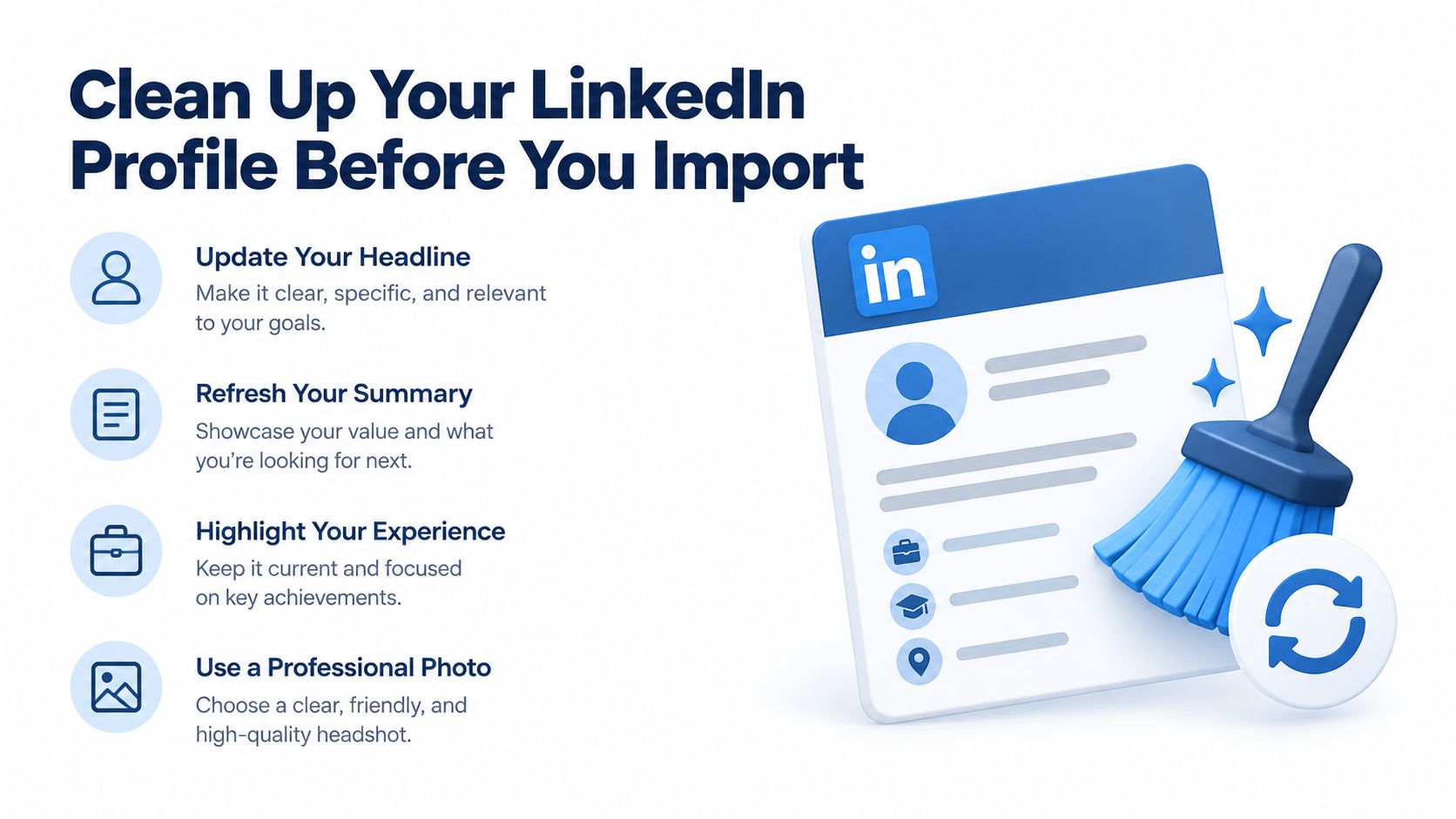
Start with the headline. A headline such as “Professional at Company” gives a converter little useful direction. A target-oriented version can combine the role you want with a relevant discipline, such as product operations, customer success, or B2B demand generation. Keep it accurate, but make it searchable in the same language employers use.
The About section needs a different treatment. Write it in the first person and explain the problems you solve, the environments where you've worked, and the scope of your contribution. You can include measurable outcomes when you have verified them, but don't force unsupported figures into the profile just because a template asks for them.
Clean the source before the import
Review each experience entry with a skeptical eye. Normalize internal titles into recognizable industry terms where the change remains truthful, then replace phrases such as “responsible for sales” with an action, the work performed, and the verified result. A bullet can be concise without being empty.
Remove stale positions that no longer represent your direction. Review skills that are irrelevant or unsupported, and rewrite descriptions copied directly from old job advertisements. A profile that contains contradictions, filler, or several competing career narratives will produce a résumé with the same problems.
Use this short checklist before connecting a profile or pasting its content:
- Headline: Does it reflect the target role and field?
- About: Does it sound like a person explaining their value?
- Experience: Are titles, dates, and achievements accurate and consistent?
- Skills: Are the listed skills relevant to the roles you're pursuing?
- Contact information: Is the email address current and placed where it can be imported?
The ATS-friendly résumé guidance from MyPerfectResume describes the fields ATS software commonly scans, including skills, certifications, education, employers, job titles, work history, and action verbs. Those fields deserve attention before the import, not only after the first generated draft.
Ten focused minutes spent correcting the source usually beats a long cleanup session after the converter has propagated weak wording across the document. For more practical guidance on preparing and tailoring the source material, see GetTheCall's résumé guides.
A profile importer is not a fact checker. It can preserve your information, but it won't know that an old title was an internal grade, that a skill was only used briefly, or that a bullet describes a team result rather than your personal contribution. Make those distinctions clear before importing.
Importing Your Profile and Parsing the Target Job Listing
The process has two inputs, and each one serves a different purpose. Your LinkedIn profile supplies the verified career history. The job listing defines the language and priorities that the résumé needs to address.
Start with the profile
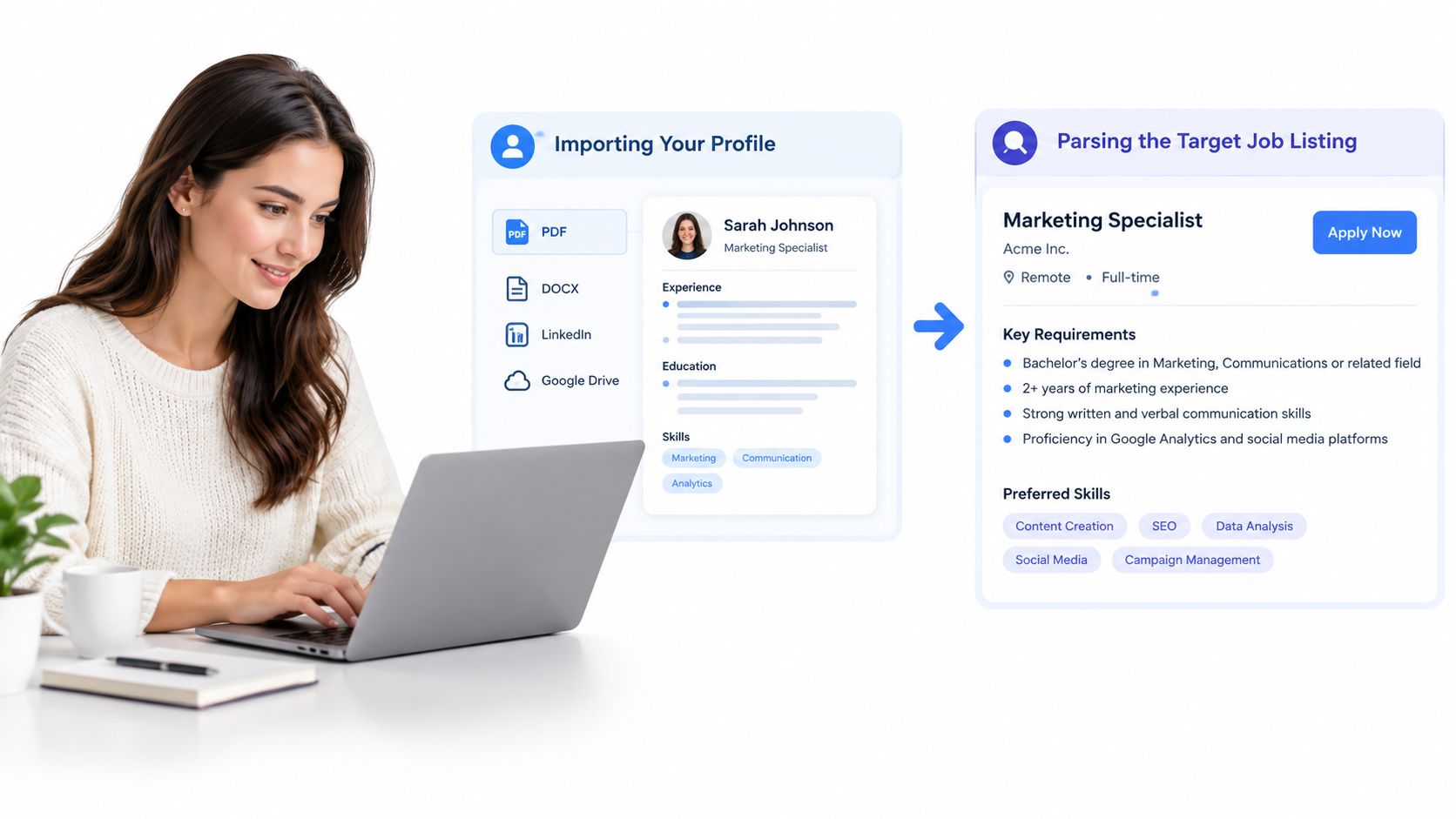
Choose the import method supported by the tool. You may paste a public profile URL, connect through an authorized account flow, or provide an existing résumé for extraction. LinkedIn also supports résumé uploads through its Job Application Settings, and public guides document profile export and Save to PDF workflows, as described by Resumonk's LinkedIn import help.
Don't accept the first parsed result without checking it. Look for missing positions, titles that have been shortened incorrectly, dates that use inconsistent formats, and skills that have been placed under the wrong role. Confirm that the imported contact information is complete and that the most relevant experience appears in the right order.
A good importer gives you a structured draft rather than a decorated copy of your profile. It should separate experience, education, skills, certifications, and summary content so you can edit each part independently.
Then parse the vacancy
Paste the complete target listing into the job parser, or provide the listing URL if the tool supports it. The parser should do more than collect frequent words. It should distinguish the job title, required skills, preferred skills, experience expectations, education signals, responsibilities, and recurring nouns that reveal how the employer describes the work.
Look for those extracted terms in a side panel or role-mapping view. A useful interface shows whether a requirement is supported by your experience, appears only in your skills section, or is absent from the draft. It should also show which profile section is supplying the match, because a keyword in a skills list carries less context than the same term in a credible accomplishment.
The efficient pattern is to import and clean your profile once, then parse each job listing separately. Your base résumé remains stable, while the emphasis, ordering, summary, and selected bullets change for each application.
Correct the parser instead of obeying it blindly
Parsers can merge two requirements, mistake a heading for body text, or treat an employer's preferred qualification as mandatory. When that happens, edit the extracted requirement manually and compare it with the original listing. Don't add a term merely because the tool flags it if the term doesn't describe your experience.
Keep the original job listing beside the parser during review. The parser is a reading aid, not the authority. Your responsibility is to preserve the employer's meaning while ensuring that the résumé uses accurate language a screening system can recognize.
Reading the ATS Match Score and Knowing What to Trust
A live ATS match score is useful when you treat it as a diagnostic signal, not a hiring prediction. Most tools derive their score from some combination of keyword overlap, section coverage, title alignment, and the apparent relevance or recency of experience. The exact formula differs between products, and no score can reproduce the judgment of a recruiter.
Suppose your first draft receives a low role-match result. The report shows that the target listing repeatedly asks for stakeholder management, roadmap planning, and a particular analytics platform, while your profile describes the same work using broader language. You revise the relevant experience bullets, move supported skills into visible sections, and clarify the context. The score rises because the document became easier to match, not because you added random terms.
That distinction matters. A score can detect that a résumé contains a phrase, but it can't reliably determine whether you used the phrase accurately, whether the achievement is impressive in its field, or whether your level of ownership matches the position.
What the score can reveal
Use the feedback to inspect three areas:
- Keyword coverage: Are important skills, certifications, tools, and job functions missing from the draft?
- Section coverage: Are those terms located in Experience, Skills, Summary, or another section the parser can read?
- Context and recency: Does the document connect the skill to relevant work, rather than placing it in an unsupported keyword list?
A 2026 ATS study across 2,417 anonymized scans reported an average job-specific match score of 58 out of 100. It also reported formatting issues in 62% of résumés, enterprise ATS platforms failing to parse nearly 1 in 4 résumés correctly, and an average of 54% of job-description keywords missing from résumés. These findings appear in the ATSChecker research on ATS résumé scans. They describe datasets and system behavior, not a universal pass mark.
Where human judgment must overrule the tool
Never stuff a résumé with every flagged term. If a listing asks for a certification you don't hold, a platform you've never used, or an industry background you can't support, leave it out. A higher score built on false claims creates a credibility problem during interviews.
The score also can't see narrative quality, seniority, domain context, or whether your most persuasive accomplishment is buried under less relevant material. A lower score can be a prompt to refine the target role or explain transferable experience, not an instruction to rewrite your career history beyond recognition.
The ATS résumé checker is most useful when you make one defensible edit at a time, watch what changes, and then read the document as a human. A live score should help you ask better questions: Which requirement is unsupported? Which relevant experience is too vague? Which phrase is present but lacks evidence?
Tailoring Bullets and Sections to the Target Role
Once the score identifies gaps, edit the résumé at bullet level. Start with the Experience section because it carries the evidence recruiters need, then review Skills and Summary for alignment. The aim isn't to repeat the listing. It's to describe your actual work in language that makes the connection obvious.
Take a generic bullet such as “Led product initiatives.” It tells the reader almost nothing about the initiative, the people involved, the business result, or the tools and decisions that made the work meaningful. A stronger version might say, “Led cross-functional product launches, coordinating engineering, design, sales, and customer feedback from discovery through release.” Add a verified business outcome if you have one.
The wording should change only as far as the facts support it. “Supported roadmap planning” shouldn't become “owned product strategy” unless you genuinely held that responsibility. Career switchers especially need this discipline because transferable skills can be presented clearly without being relabeled as experience they haven't had.
Tailoring Pass Before vs After
| Original LinkedIn Bullet | Tailored Resume Bullet |
|---|---|
| Led product initiatives | Led cross-functional product launches from discovery through release, aligning engineering, design, sales, and customer feedback |
| Responsible for customer relationships | Managed customer relationships by resolving escalations, coordinating internal teams, and identifying expansion opportunities |
| Worked on marketing campaigns | Planned and delivered multi-channel campaigns, using performance data to refine messaging and channel allocation |
| Helped improve operations | Improved operational workflows by documenting handoffs, clarifying ownership, and reducing avoidable rework |
Run the edit in two passes. The first pass addresses missing but truthful role language, section placement, and the order of experience. The second pass strengthens outcomes, scope, decisions, and evidence. Combining both passes too early often produces polished sentences that still omit the facts a hiring manager needs.
Give the top of the résumé a job-specific order
Review the first group of bullets under the most relevant roles. Put the accomplishments that answer the listing's main requirements first. If the employer emphasizes customer retention, don't lead with an internal reporting task just because it was recent. If the role prioritizes cross-functional delivery, make that contribution visible before routine administration.
Don't paste the LinkedIn About section into the résumé unchanged. LinkedIn can carry a broader professional narrative, while the résumé needs a tighter argument for one opening. Use the About section as source material, then rewrite the summary around the target role and the evidence that supports it.
The guide to tailoring a résumé to a job description reflects this distinction. A customized document should sound like you, but it should make the employer's priorities easy to find.
Picking a Template That Parses Cleanly and Still Looks Human
Template choice is an ATS decision before it's a design decision. A résumé can look impressive in a browser and still fail when software reads columns, headers, icons, or text boxes in the wrong order.
The safest design usually has one clear reading path. Use recognizable headings such as Experience, Education, Skills, and Certifications. Keep dates consistent, place contact information in the document body, and use whitespace, typography, and hierarchy to create polish instead of decoration.
Template Comparison ATS Safety vs Visual Polish
| Template Type | ATS Parsing Safety | Visual Polish | Best For |
|---|---|---|---|
| Single-column | High when headings and dates are standard | Clean and restrained | Early-career applicants, career switchers, and most general applications |
| Two-column | Moderate, depending on reading order and implementation | Compact and visually structured | Senior individual contributors with substantial skills, publications, or speaking experience |
| Hybrid | Variable, because sidebars and split sections can confuse parsers | Flexible and modern | Applicants who have tested the exported file in the target application system |
A 2026 analysis of more than 1,000 rejected résumés reported a 4% parsing failure rate for plain DOCX versus 18% for PDF. It also reported 93% parsing accuracy for single-column layouts versus 86% for two-column layouts. The findings, including the warning that 25% of ATS systems failed to parse contact information in headers or footers, are summarized by OneHour Digital's ATS filtering analysis.
The same source associated photos and graphics with an 88% rejection rate in its analysis. That doesn't mean every employer rejects a résumé with a graphic, but it does make decorative elements a poor trade for applications processed by ATS software.
Before exporting, remove or inspect:
- Text boxes: Move their content into ordinary document text.
- Icons: Spell out phone, email, and location details.
- Skill bars: Replace visual ratings with plain skill names.
- Header graphics: Keep identity details in the main body.
- Tables: Use normal paragraphs when the information needs to be parsed in sequence.
- Split columns: Check that the reader encounters sections in the intended order.
A human-friendly résumé doesn't need to look plain. A clear font, consistent spacing, restrained color, and strong section hierarchy can make a single-column document feel deliberate without asking an ATS to interpret a visual layout.
Exporting the PDF Submitting and Fixing What Still Goes Wrong
Exporting is a quality-control step, not a button you press at the end. First, choose the file type based on the application's instructions and the parser's behavior. The evidence above shows that plain DOCX can parse more reliably than PDF in some ATS environments, so PDF shouldn't be an automatic choice just because it locks typography. If the employer requests PDF, use a text-based PDF. If the portal specifies DOCX, follow that requirement.
Give the file a clear name that identifies you and the target role, such as FirstName-LastName-Product-Manager-Resume.pdf. Avoid decorative symbols, vague names such as final-final.pdf, and filenames that expose internal notes. Then open the exported file and inspect every page at normal zoom.
Look for missing bullets, unexpected page breaks, altered dates, hidden text boxes, merged columns, and stray icons. Copy a section of the exported document into a plain-text editor if you want a quick reading-order check. If the text appears scrambled there, the ATS may struggle with it too.
Submit with a paper trail
Upload the file through the employer's application portal, or attach it to an application email when the employer permits that route. After submission, record the role, submission time, requisition ID if available, and the version of the résumé you used. A screenshot of the parsed fields can help you identify whether the portal imported your contact details, employment dates, and section headings correctly.
Troubleshoot recurring failures with a short pre-submit review:
- The score drops after export: Compare the editable draft with the exported text. Remove unsupported layout elements and test a plain version.
- The file exceeds the upload limit: Compress the document carefully, remove unnecessary embedded media, and preserve selectable text.
- Two-column bullets split across pages: Switch to a single-column layout or move the affected content into the main reading flow.
- A background image becomes résumé content: Delete the image and recreate the visual effect with text formatting.
- Dates appear in the wrong order: Use one written date format throughout and confirm the parsed employment sequence before submitting.
A reliable converter automates parts of this checklist, but the final inspection still belongs to the applicant. The document has to survive three readers: the parser, the recruiter scanning for relevance, and the hiring manager deciding whether the evidence fits the role.
GetTheCall turns a LinkedIn profile or existing résumé into an ATS-optimized, job-specific PDF, then analyzes the target listing and provides a live role-match score as you edit. Visit GetTheCall to import your career history, tailor the document to a real vacancy, and check the exported résumé before you submit.