Job Description Keywords: What They Are and How to Use Them
Learn what job description keywords are, why they matter for ATS and recruiters, and how to extract and map them to your résumé in 2026.

You tailor your résumé for a role, submit it, and then watch the application sit untouched for weeks. You know you can do the work, yet the employer may never see the evidence because your résumé uses different words from the job posting.
That's where job description keywords matter. They help applicant tracking systems and recruiters connect your experience to the employer's stated needs. The process isn't about copying an entire posting or stuffing a skills section with buzzwords. It's about identifying the most important language, ranking it, and attaching each term to proof from your work.
Table of Contents
- What Job Description Keywords Actually Are
- How to Read a Job Posting Like a Recruiter
- Manual Extraction Versus Automated Parsing
- The Four Keyword Buckets You Should Always Map
- Placing Keywords in Context, Not in a List
- Why Recruiters and ATS Both Reward Mirrored Language
- Common Mistakes That Quietly Kill Match Scores
- Your 30-Minute Keyword Routine Before You Apply
What Job Description Keywords Actually Are
A qualified project coordinator might read a posting and see familiar work: scheduling, vendor communication, status reporting, and cross-functional coordination. Their résumé, however, might say “organized team activities” and “worked with suppliers.” The employer's posting asks for project coordination, vendor management, and cross-functional collaboration. The candidate has relevant experience, but the wording doesn't make that experience easy to find.
Job description keywords are the specific, role-related words and phrases an employer uses to describe the work, qualifications, tools, and credentials it needs. They can include a job title, hard skill, software platform, certification, industry term, or responsibility. These words act as operational signals, not decorative language.
Applicant tracking systems and similar hiring systems are now a foundational part of recruiting in major markets. One 2026 ATS statistics summary reports that 99.7% of recruiters use filters in an ATS or similar system, while a Coursera guide to résumé keywords cites approximately 97.8% of Fortune 500 companies using an ATS and/or recruiting management system. Recruiters can search, sort, and prioritize applicants by skills, job titles, certifications, education, and experience.
Where the important terms hide
Start with three areas:
- The title: “Senior Project Coordinator” signals the role family and level.
- The requirements: Tools, credentials, education, and must-have abilities often appear here.
- The day-to-day work: Responsibilities reveal the verbs and outcomes the person will handle.
A posting might use “manage project timelines” in the responsibilities and “project management experience” in the requirements. Those related phrases deserve attention because they connect a task to a broader qualification.
Working definition: A keyword earns its place on your résumé when it accurately names something the employer needs and sits beside evidence that you've done it.
That definition protects you from two common errors. You shouldn't ignore the employer's wording, but you also shouldn't add a term just because it appears in the advertisement. If you can't support the keyword through experience, education, certification, or honest current training, leave it out.
How to Read a Job Posting Like a Recruiter
Recruiters don't read every line with equal weight. They look for the role's identity, the hard filters, and the responsibilities that define success. You can use the same order.
Take a sample posting for a Project Coordinator:
Project Coordinator, Operations Department, reporting to the Director of Operations. Coordinate project timelines, maintain project documentation, schedule stakeholder meetings, and support vendor communication. Required: project coordination experience, Microsoft Excel, status reporting, and cross-functional collaboration. Preferred: Asana experience and CAPM certification.
Begin with the posting's identity
Read the title, department, and reporting line first. The title tells you the role family and seniority. The department adds context. A Project Coordinator in operations may need vendor and process language, while one in marketing may need campaign and content terms.
Next, read the requirements section. Underline concrete nouns such as project coordination, Microsoft Excel, status reporting, and cross-functional collaboration. Tool names, certifications, and qualifications usually deserve more attention than broad phrases such as “fast-paced environment.”
Read the responsibilities twice. On the first pass, mark every specific phrase. On the second, look for terms that appear in both the requirements and responsibilities. In this example, project coordination and stakeholder-related work connect the employer's formal requirements with daily tasks.
Separate required language from preferred language
Words such as required, must have, and essential belong in your primary keyword bank. Terms introduced by preferred, bonus, plus, or nice to have form a secondary bank.
That distinction matters because you have limited space and attention. A missing must-have can create a serious gap, while a preferred term may strengthen an already credible application without replacing core evidence.
| Reading Zone | What to Look For | How to Treat the Keywords |
|---|---|---|
| Title and header | Job title, level, department | Mirror the accurate title in the summary when appropriate |
| Requirements | Skills, tools, education, certifications | Rank these as primary or secondary requirements |
| Responsibilities | Actions, scope, stakeholders, outcomes | Map them to experience bullets |
| Repeated language | Terms appearing across sections | Treat repeated terms as higher-signal priorities |
A practical scanning order works for almost any posting: title first, requirements second, responsibilities third, repeated phrases fourth, preferred qualifications last. This keeps the keyword bank focused instead of turning every word in the advertisement into a résumé target.
Manual Extraction Versus Automated Parsing
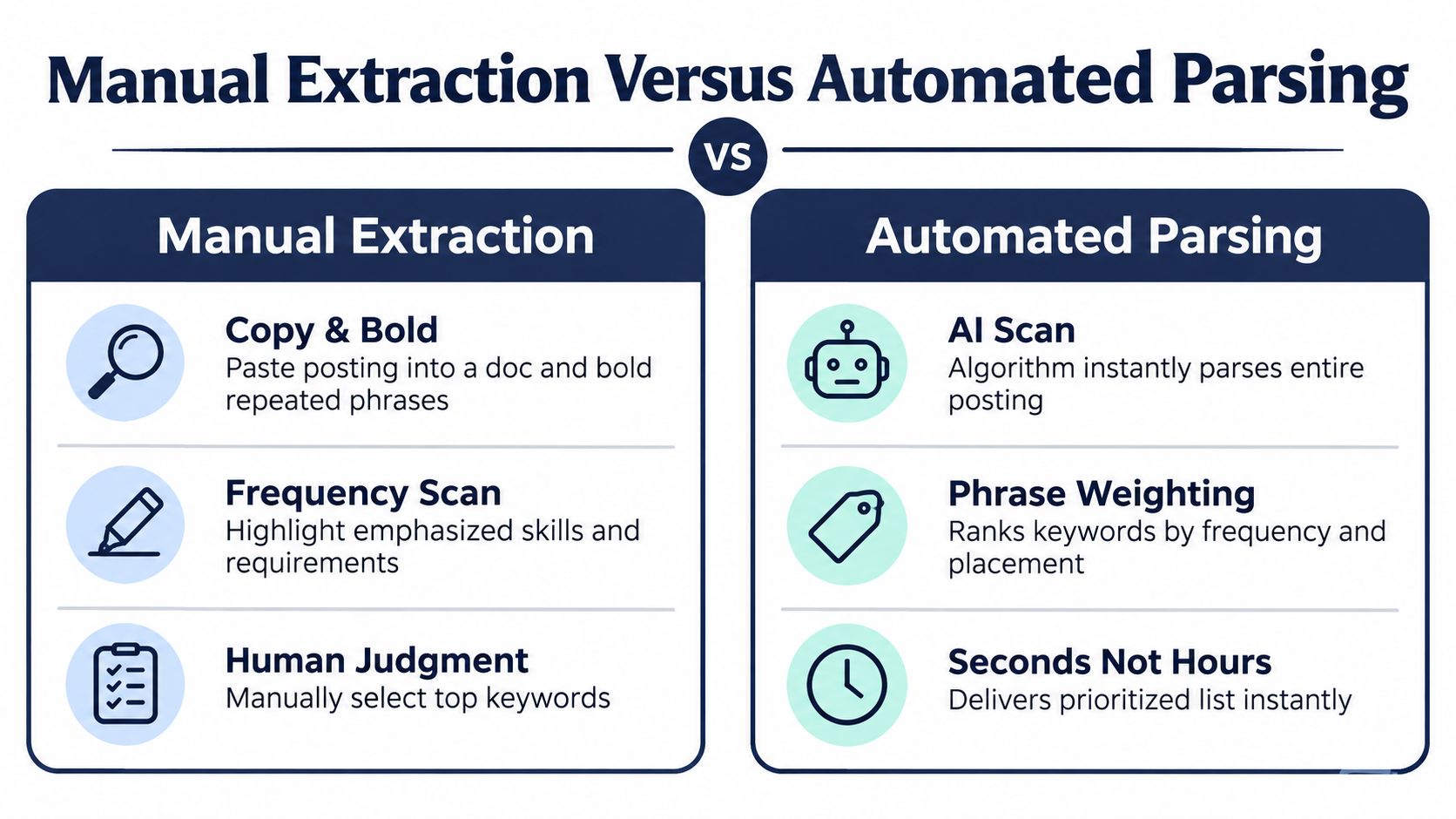
Manual extraction gives you judgment. Automated parsing gives you speed. A strong workflow uses both.
For a manual first pass, copy the job posting into a document. Bold repeated phrases, named tools, certifications, job titles, and responsibility verbs. Then sort the terms into four loose groups: hard skills, role responsibilities, tools and platforms, and certifications or qualifications.
The manual process is useful because you can notice meaning that a counter misses. “Coordinate launch activities” may appear once, but it can still describe the central responsibility of the role. A human can also recognize that “customer relationship management” and “CRM” may refer to the same capability, then decide whether the résumé should include both forms.
What automated tools actually do
A résumé scanner or keyword tool breaks text into tokens and phrases, checks frequency, and compares the posting with your résumé. That's helpful for a long advertisement or when you're reviewing several similar roles. It can quickly flag missing terms and show whether your draft reflects the posting's vocabulary.
However, automated parsing doesn't understand importance perfectly. It may treat a one-time buzzword like a central qualification. It can also miss synonyms, hyphenated forms, abbreviations, or differences in wording. A tool might identify “stakeholder-management” and “stakeholder management” as separate strings even though a recruiter sees the relationship immediately.
Use automation for the first pass, not the final decision.
You can paste a listing into an ATS checker or résumé builder, then review the suggested terms yourself. For guidance on document structure and parsing, see this ATS-friendly résumé guide. The final keyword bank should reflect the employer's priorities, your actual background, and the evidence you can explain in an interview.
The Four Keyword Buckets You Should Always Map
A wall of job-posting text becomes easier to use when you sort it into four buckets. The categories overlap sometimes, but they give every term a destination.
Hard skills are technical capabilities such as SQL, contract negotiation, patient triage, financial forecasting, or data analysis. These terms often describe what you can perform, not merely how you work.
Role-level responsibilities show scope and ownership. Phrases such as “own the pipeline,” “manage a team of five,” “present to executives,” “coordinate project timelines,” and “lead vendor reviews” tell the reader what level of responsibility the employer expects.
Tools and platforms identify the systems you're expected to use. Examples include Salesforce, HubSpot, AWS, Tableau, Jira, Microsoft Excel, and Workday. Put the exact platform name in your skills section when accurate, then demonstrate how you used it in experience bullets.
Certifications and credentials include PMP, SHRM-CP, AWS Solutions Architect, degrees, licenses, and other formal qualifications. Treat required credentials separately from preferred ones, and use the full name when the posting uses it.
| Keyword Bucket | Example From Posting | Map to Résumé Section | Sample Bullet |
|---|---|---|---|
| Hard skills | SQL and data analysis | Skills, summary, experience | Analyzed customer data with SQL to identify recurring churn patterns |
| Role responsibilities | Present to executives | Summary and experience | Presented quarterly performance findings to executive leadership |
| Tools and platforms | Tableau | Skills and experience | Built Tableau dashboards for operational reporting and stakeholder reviews |
| Certifications and credentials | PMP certification | Certifications, summary | PMP-certified project professional supporting cross-functional delivery |
Build the bank around evidence
For every primary term, write a short evidence note beside it. “Tableau” might connect to a dashboard project. “Vendor management” might connect to contract renewals. “Executive presentations” might connect to quarterly business reviews.
This prevents the keyword bank from becoming a shopping list. It also makes drafting faster because you're not asking, “Where can I force this term?” You're asking, “Which real accomplishment proves this requirement?”
The ATS keyword guidance from TailorForge recommends giving priority to nouns and noun phrases in the title, opening paragraph, and must-have sections, especially when terms recur across the posting. That's a useful ranking principle, but evidence remains the deciding test.
Placing Keywords in Context, Not in a List
A skills list can confirm that you know a tool. An experience bullet can show what you did with it. Recruiters need both, but the second carries more meaning.
Consider this weak version:
AWS, EC2, infrastructure management, cost optimization, cloud operations
It contains relevant terms, yet it doesn't show ownership, method, or result. A stronger version connects the tool to action and outcome:
Reduced AWS infrastructure costs by 18 percent by rightsizing EC2 instances and negotiating reserved capacity.
That example comes from the editorial method used here, not from a reported case study. Its value is structural. It shows how a keyword becomes persuasive when it appears with a clear verb, a specific application, and a result.
Why context helps both readers
An ATS can detect the term AWS, but surrounding words help establish relevance. “Managed AWS infrastructure,” “monitored AWS workloads,” and “migrated services to AWS” communicate more than a detached platform name.
Recruiters also make a quick judgment about credibility. A list says you claim familiarity. A bullet says how you used the skill and what happened because of your work. The LinkedIn guidance on résumé keywords similarly emphasizes placing exact job-description language naturally within experience and achievements.
Use this placement hierarchy:
- Summary: Put the role title and a small number of central requirements near the top.
- Skills section: Provide a clean, searchable list of tools and capabilities.
- Experience bullets: Prove the most important terms through action and results.
- Education and certifications: State credentials exactly and clearly.
Try one rewrite now. Find a bullet that says “managed reports” or “worked with customers.” Add the employer's exact keyword, name the action you performed, and connect it to an outcome. If the bullet still sounds vague, the missing piece is probably evidence rather than another keyword.
For a practical workflow that turns a general résumé into a role-specific version, use this guide to tailoring a résumé to a job description. Tailoring works best when every added phrase describes something you can defend.
Why Recruiters and ATS Both Reward Mirrored Language
Mirroring language isn't deception. It's translation.
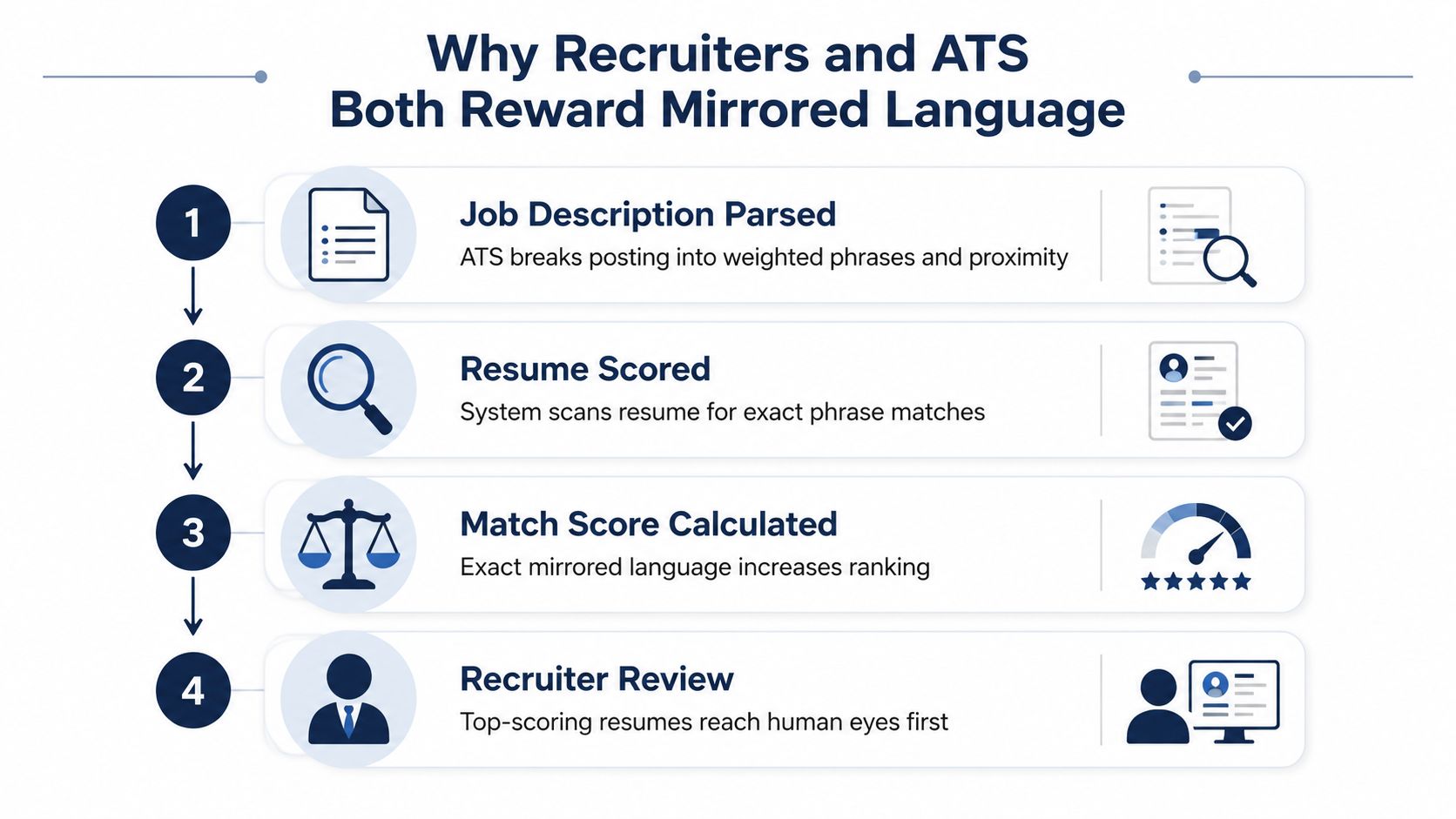
An ATS compares résumé text with the parsed job description. Systems and workflows may consider exact phrases, placement, repetition, and relationships between terms. The ATS statistics report from Jinx Apply says recruiters filter by résumé skills 76.4% of the time, education 59.7%, job titles 55.3%, certifications and licenses 50.6%, and years of experience 44%. These fields are often connected to the language used in the posting.
Recruiters use the same language for a different reason. The hiring manager wrote the description to define the work. When a résumé uses that vocabulary accurately, a recruiter can identify fit without translating “supported client accounts” into “customer relationship management” or “prepared reports” into “business intelligence reporting.”
A simple test helps: if someone read only your résumé, would they recognize the language of the posting? If not, your experience may be relevant but hard to retrieve.
Match the employer without pretending
Suppose the posting asks for project management, while your résumé repeatedly says “managed projects.” Those phrases describe related work, but the exact noun phrase may be easier for a search system and recruiter to find. You can write, “Provided project management for product launches,” if that accurately describes your responsibility.
The ResumeAdapter ATS statistics report reports that the average résumé contains only 48% of the keywords in the target job description, leaving an average unoptimized résumé missing 52% of those keywords. The same report says résumés with a 60% or higher keyword match receive interview requests at roughly three times the rate of résumés below a 40% match, and that tailoring can raise response rates by 78% compared with sending the same résumé to every role.
Treat those figures as a reason to inspect your wording, not as a guarantee. A high match doesn't replace qualifications, and a lower match doesn't prove you're unsuitable. It does show why accurate mirrored language can determine whether your relevant experience reaches human eyes.
Common Mistakes That Quietly Kill Match Scores
A strong résumé can lose visibility through small wording and formatting choices. The mistakes are usually subtle because the document still looks polished to the person who wrote it.
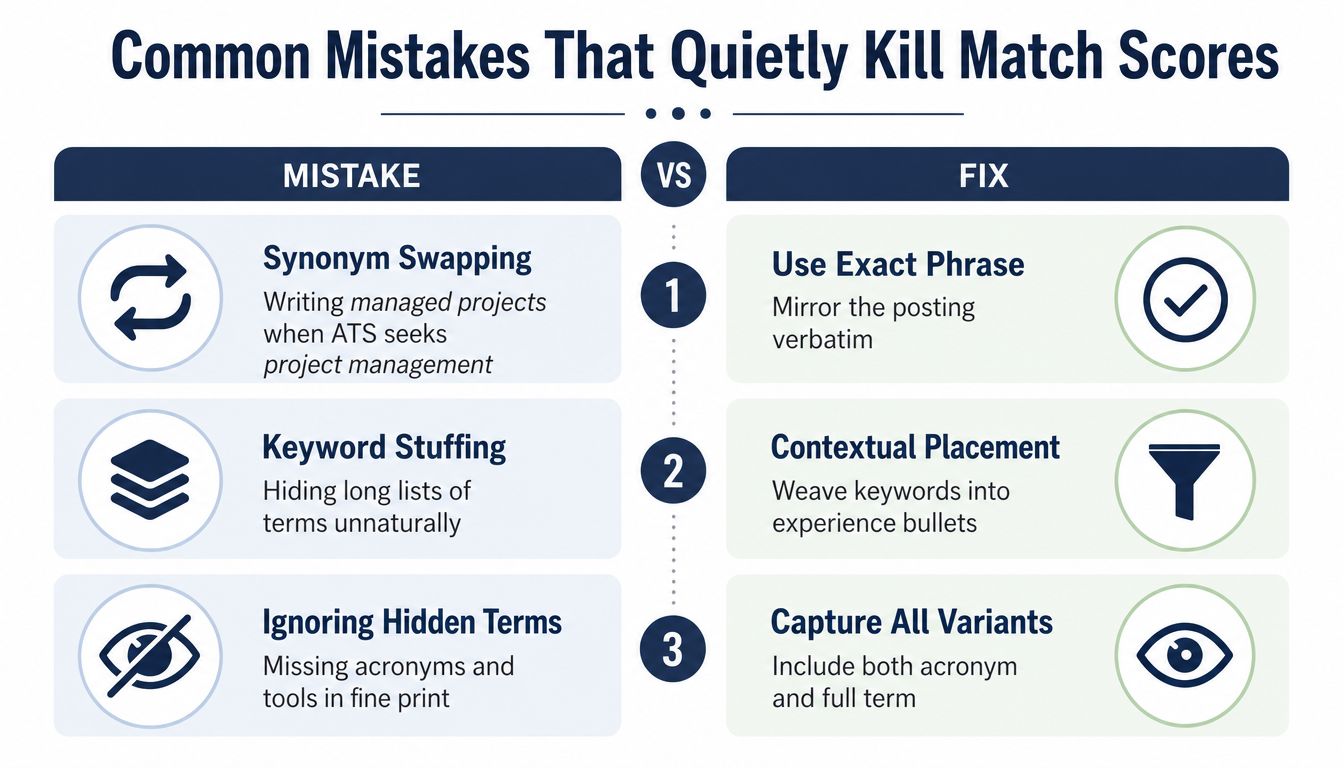
Synonym swapping is one example. You write “managed projects,” while the posting asks for “project management.” A recruiter may understand the connection, but an automated search may not treat every variation equally. The safer approach is to use the exact phrase where it truthfully describes your work, then keep your natural wording elsewhere.
Keyword stuffing creates the opposite problem. A dense skills block listing fifteen tools may contain matches but offer no evidence of use. Recruiters can see the padding, and a parser still can't tell which tool was central to your work.
Complex formatting can hide content from a parser. A report from OneHour Digital on ATS filtering cites a plain DOCX parsing failure rate of 4% versus 18% for PDF, and reports 93% parsing accuracy for single-column résumés compared with 86% for two-column layouts across 1,000 rejected résumés tested in major ATS platforms. Because file-handling results vary by system, use a clean, text-based layout and follow the employer's requested format.
Replace each mistake with a working habit
- Mirror exact phrases: Use the posting's wording for accurate skills, titles, tools, and credentials.
- Attach terms to proof: Place important keywords inside experience bullets with an action and outcome.
- Choose a clean layout: Avoid text boxes, decorative images, dense tables, and multi-column structures when parsing reliability matters.
- Watch the verbs: If the posting says “build,” “lead,” or “analyze,” reflect the matching form when it truthfully describes your work.
- Capture variants carefully: Include an acronym and full term when both may be searched, such as “Customer Relationship Management (CRM).”
The point isn't to follow rigid rules for their own sake. It's to remove avoidable friction. A résumé that parses cleanly and uses recognizable language gives your actual experience a better chance to do its job.
Your 30-Minute Keyword Routine Before You Apply
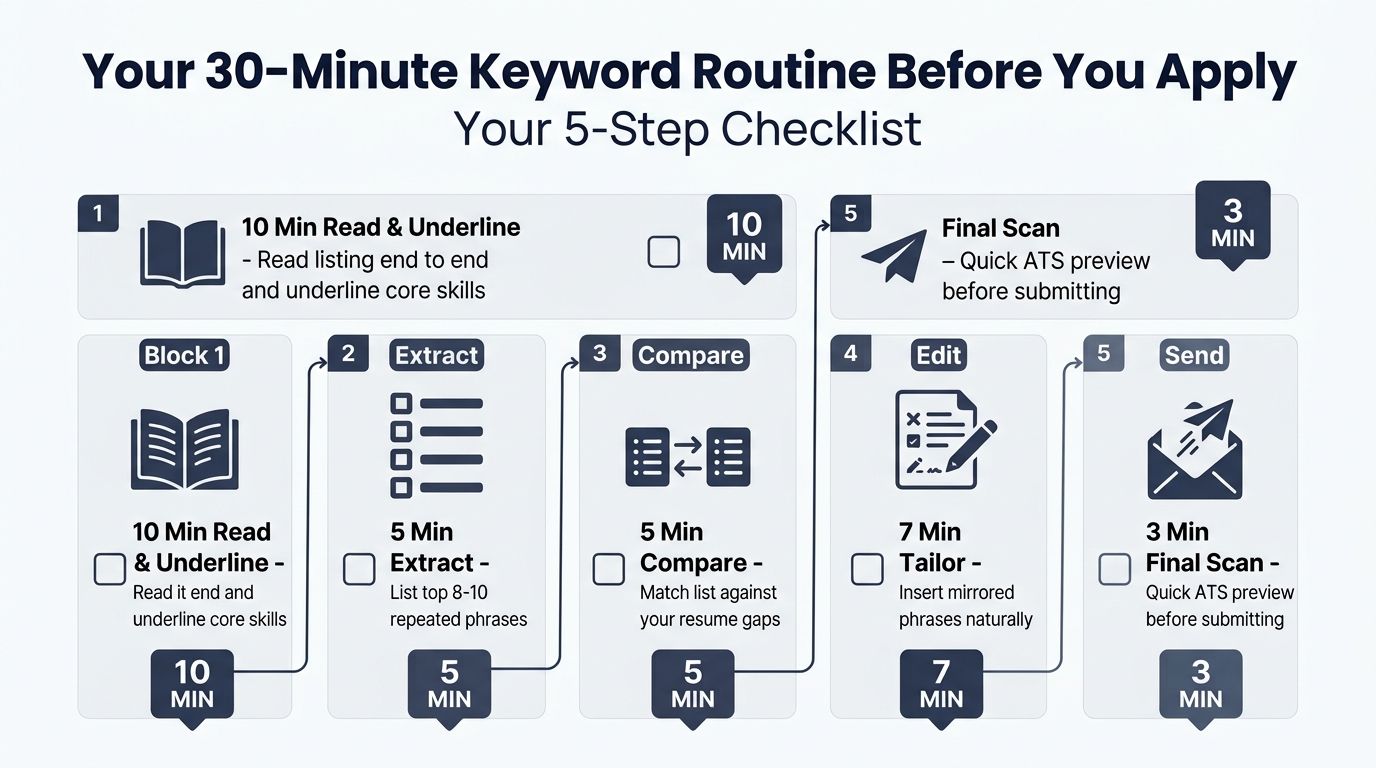
Tailoring doesn't need to become an exhausting rewrite every time. A repeatable routine helps you focus on the highest-value terms and make deliberate changes without turning your résumé into a copy of the posting.
Ten minutes to read and underline
Read the job description from beginning to end. Underline the title, must-have skills, named tools, credentials, repeated terms, and responsibilities that match your background. Don't start by editing your résumé. First, understand what the employer is asking for.
Five minutes to extract
Paste the posting into an ATS simulator or résumé builder and review the suggested keyword list. Compare its output with your own notes. Keep terms that are both relevant to the role and supported by your experience, then separate critical requirements from nice-to-have language.
Ten minutes to map evidence
Open your résumé and connect every primary keyword to a real bullet, qualification, or credential. Strengthen the summary and skills section, but spend most of this time improving experience bullets. A term should appear where the reader can see what you did with it.
Three minutes to check the top of the page
Confirm that the most important role title and core requirements appear early enough to find easily. Check that the document remains readable, uses a single-column structure when appropriate, and contains no hidden text or decorative element that could interrupt parsing.
Two minutes to save the pattern
Add the strongest terms and evidence notes to a personal keyword bank. The bank isn't a reusable block to paste into every application. It's a record of recurring role language and the accomplishments that support it, which helps you tailor faster next time.
You can use an ATS résumé checker to review parsing and keyword alignment before submitting. The mindset matters more than the tool: you're not gaming a filter, you're translating your past work into the language the employer expects. Practice this routine on your next promising role, then refine one summary, one skills group, and two experience bullets before you apply.
GetTheCall turns a LinkedIn profile or existing résumé into a job-specific, ATS-optimized PDF, analyzing the target listing, aligning your real experience with required keywords, and showing a live role-match score as you edit. Visit GetTheCall to compare your résumé with a target posting and build a cleaner, evidence-based application.