How to Optimize Your Resume for Applicant Tracking Systems
Learn how to optimize your resume for applicant tracking systems with formatting, keywords and bullet edits that pass ATS parsing and boost match scores.
You can have the right experience, the right qualifications, and a résumé that looks polished on screen, yet still receive a rejection before a recruiter reads a word. The problem usually isn't that your career is weak. It's that the system handling your application can't reliably read the document or connect your experience to the role.
Learning how to optimize your résumé for applicant tracking systems means solving two separate problems in the right order. First, make the file machine-readable. Then, align its language with one specific job description. Keyword stuffing can't rescue a résumé whose columns scramble the reading order, and a clean layout can't compensate for missing role-specific evidence.
Table of Contents
- Why Great Résumés Still Get Rejected Before a Human Sees Them
- Make Your Résumé Machine Readable Before You Add Keywords
- Mirror the Job Description Without Keyword Stuffing
- Rewrite Bullets and Sections That Prove Role Fit
- Tailor Faster With a Repeatable Workflow and Live Feedback
- Your Next Application Ready to Pass the ATS and Impress the Reader
Why Great Résumés Still Get Rejected Before a Human Sees Them
A candidate applies for a project manager position with a résumé built in a polished design template. The document has a sidebar for skills, a separate column for dates, and visual icons beside contact details. To the candidate, the information is obvious. To an applicant tracking system, the text may arrive in an unexpected order, with a job title detached from its employer or a skills section omitted entirely.
That is the first ATS problem, parsing. The system extracts text and tries to place it into fields such as name, contact information, experience, education, and skills. If the layout interrupts that extraction, the system may create an incomplete or scrambled candidate record.
The second problem is matching. Once the ATS has extracted the content, it compares the résumé with the job posting. A strong general résumé may describe “customer relationship management,” while the posting specifically asks for Salesforce. Those ideas may be related to a human reader, but the document still needs clear, truthful signals that connect the candidate's experience to the employer's wording.

Treat the résumé as a translation
ATS screening is common in large hiring markets. A separate 2026 résumé statistics report found that 97.8% of Fortune 500 companies had a detectable ATS in 2025, compared with 97.4% in 2023, while recruiters spent about 7.4 seconds on an initial review and 75% of résumés were filtered out before human review. Those figures are reported in the recruiter screening behavior statistics report.
That doesn't mean you should write for a robot and ignore people. It means your résumé has to translate your background into recognizable signals before a recruiter can assess the argument you're making. A résumé is not an autobiography. It's a focused case for why your verified experience fits one opening.
Practical rule: Fix readability before wording, then fix role alignment before visual polish.
The encouraging part is that this process is measurable. You can export a plain-text version, inspect what the system extracts, map the posting's requirements to actual evidence, and use a live score to identify gaps. You don't need to invent experience. You need to present the experience you have in a structure and vocabulary the hiring process can recognize.
Make Your Résumé Machine Readable Before You Add Keywords
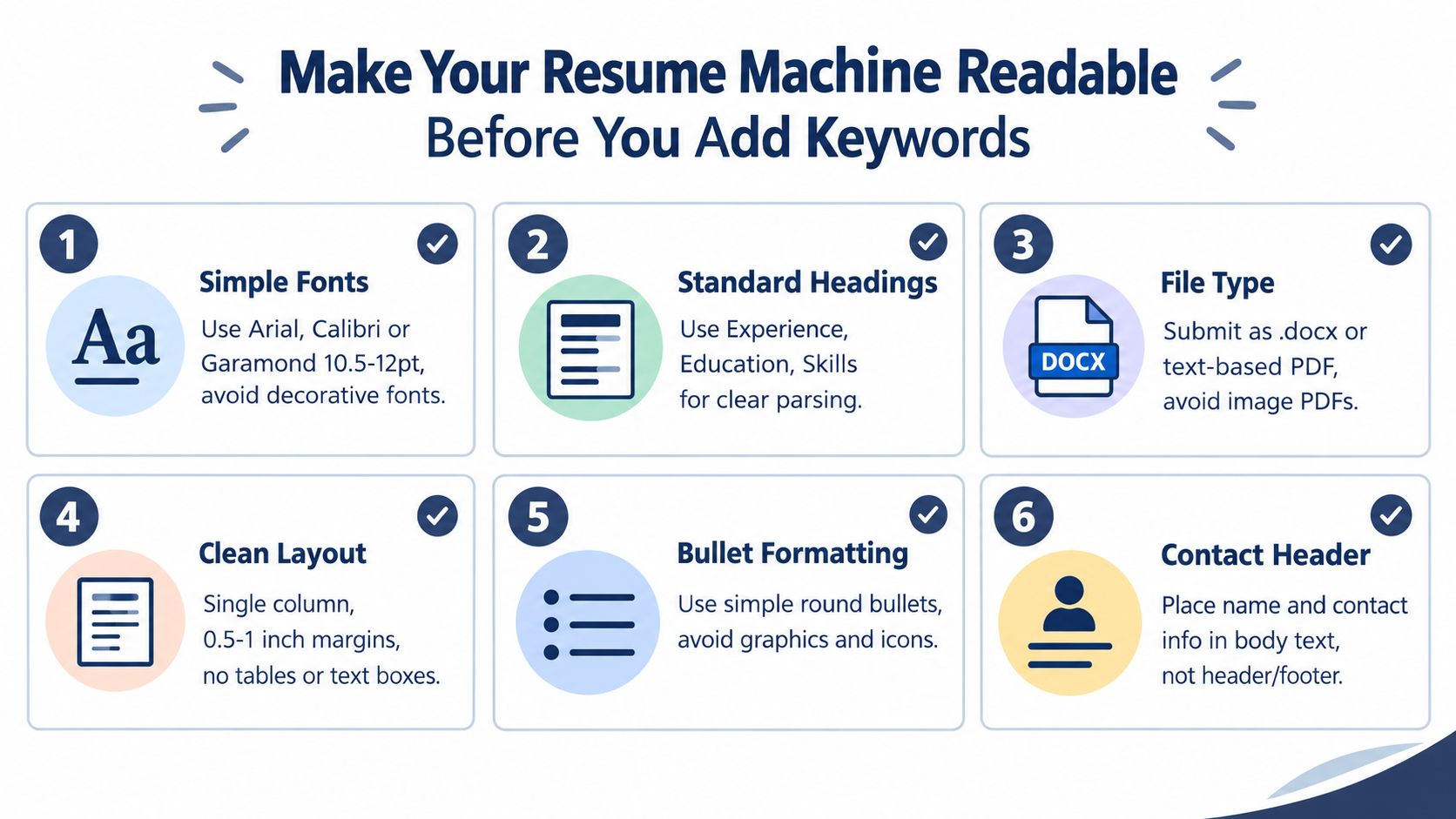
A résumé can't match a job posting if the ATS can't identify its contents. Start with a plain, selectable-text foundation, even if you later add restrained visual styling for human readers.
Build the document around predictable structure
Use a single-column layout with standard section headings such as Experience, Education, and Skills. Keep margins between 0.5 and 1.0 inches, a mechanical recommendation from this ATS formatting guide. Choose ordinary fonts such as Arial, Calibri, or Garamond at a readable standard size, and keep dates, job titles, and employer names consistently positioned.
Remove tables, text boxes, sidebars, decorative icons, charts, logos, and graphics. Place your name, email address, phone number, and location in the main body rather than relying on a header or footer. A parser should encounter your contact details as ordinary text, not as objects positioned outside the document's main reading stream.
For file type, follow the application's instructions. A 2026 résumé formatting guide recommends a text-based PDF when the employer requests or accepts PDF, DOCX when the portal specifically asks for it, and avoiding JPEG or PNG files because image formats aren't parseable. Another ATS format analysis reported a 4% parsing failure rate for plain DOCX, compared with 18% for PDF, and 93% parsing accuracy for single-column résumés, compared with 86% for two-column layouts. Treat those results as a reason to prioritize simple structure, not as permission to ignore an employer's file requirement.
See what the machine sees
A useful self-test is simple:
- Save a copy of the résumé as plain text.
- Open the text file and check the reading order.
- Confirm that your name, email, phone, Experience, Education, and Skills appear cleanly.
- Look for missing bullets, merged dates, broken characters, or headings in the wrong place.
- Recheck the plain-text output after every meaningful formatting change.
A two-column résumé might appear visually like this:
| Left column | Right column |
|---|---|
| Skills | Experience |
| Certifications | Education |
A text extraction may instead produce “Skills Experience Certifications Education” before mixing the content underneath. That confusion can detach a certification from the candidate or place a recent job below an older one.
For a practical check, use the GetTheCall ATS résumé checker or another parser that lets you inspect extracted content, not just a decorative score.
A short video can also help you recognize layout choices that look attractive but create extraction risk:
One 2026 benchmark found that 45.7% of résumés showed multi-column or table artifacts, 18.8% never produced a usable candidate record, and 9.4% had no cleanly extractable name. The same benchmark placed 19.4% of résumés below a blended ATS score of 70, a band associated with sections being dropped or scrambled. You can review the methodology in the ATS résumé parsing benchmark. The practical conclusion is straightforward: prove that the document survives extraction before spending time on keyword edits.
Mirror the Job Description Without Keyword Stuffing
Once the file parses correctly, read the job description twice. The first pass tells you what the employer wants. The second pass turns that information into an editing plan.
Mark four kinds of language:
- Required capabilities: skills the posting treats as essential.
- Tools and systems: named platforms, software, frameworks, or methods.
- Responsibilities: the work the successful hire will perform.
- Role signals: the exact job title, department language, and seniority cues.
Then map every important requirement to something you've done. If you can't support a term with real experience, don't add it because it appears in the posting. ATS optimization is translation, not invention.
Use coverage instead of repetition
Independent ATS research reported average job-specific match scores around 57.6 out of 100, with 72% of résumés below the 70% threshold and only 1.9% reaching 85% or higher. Those figures appear in the TalentTuner ATS research. The useful lesson isn't to repeat a keyword until the score rises. It's to cover the required concepts in the sections where a recruiter expects to find them.
A project manager posting may mention roadmap planning, stakeholder communication, risk management, and Jira. Put the most important skills in the summary only if they describe you, then demonstrate them in Experience bullets and group supporting tools in Skills. Repeating “project management” throughout every line makes the document harder to read and doesn't prove fit.
| Job Requirement | Where to Show It | Example Phrasing |
|---|---|---|
| Roadmap planning | Summary and Experience | “Built quarterly product roadmaps with engineering and sales stakeholders.” |
| Risk management | Experience | “Maintained risk registers and coordinated mitigation plans across active projects.” |
| Jira | Skills and Experience | “Tracked sprint work and dependencies in Jira.” |
| Stakeholder communication | Summary and Experience | “Presented delivery status, risks, and decisions to senior stakeholders.” |
| Required certification | Certifications and relevant summary | “Project Management Professional, if currently held.” |
Decide what deserves space
Mid-career candidates often have more relevant experience than they can fit comfortably. Career switchers face the opposite challenge, their strongest evidence may come from adjacent work rather than a matching title.
Use the posting's priorities to decide what stays prominent. Preserve achievements that demonstrate the target role's responsibilities, rewrite adjacent work using accurate transferable language, and omit detail that doesn't support the application. A sales operations analyst moving into business analysis might emphasize requirements gathering, reporting, process documentation, and stakeholder communication, but shouldn't claim formal business analyst experience if that title or responsibility wasn't part of the job.
For a systematic method of extracting and mapping requirements, use this guide to tailoring a résumé to a job description. The best keyword plan is short enough to use, evidence-based enough to defend, and selective enough to keep the résumé readable.
Rewrite Bullets and Sections That Prove Role Fit
Generic bullets describe activity. Strong bullets connect activity to the capability the employer needs.
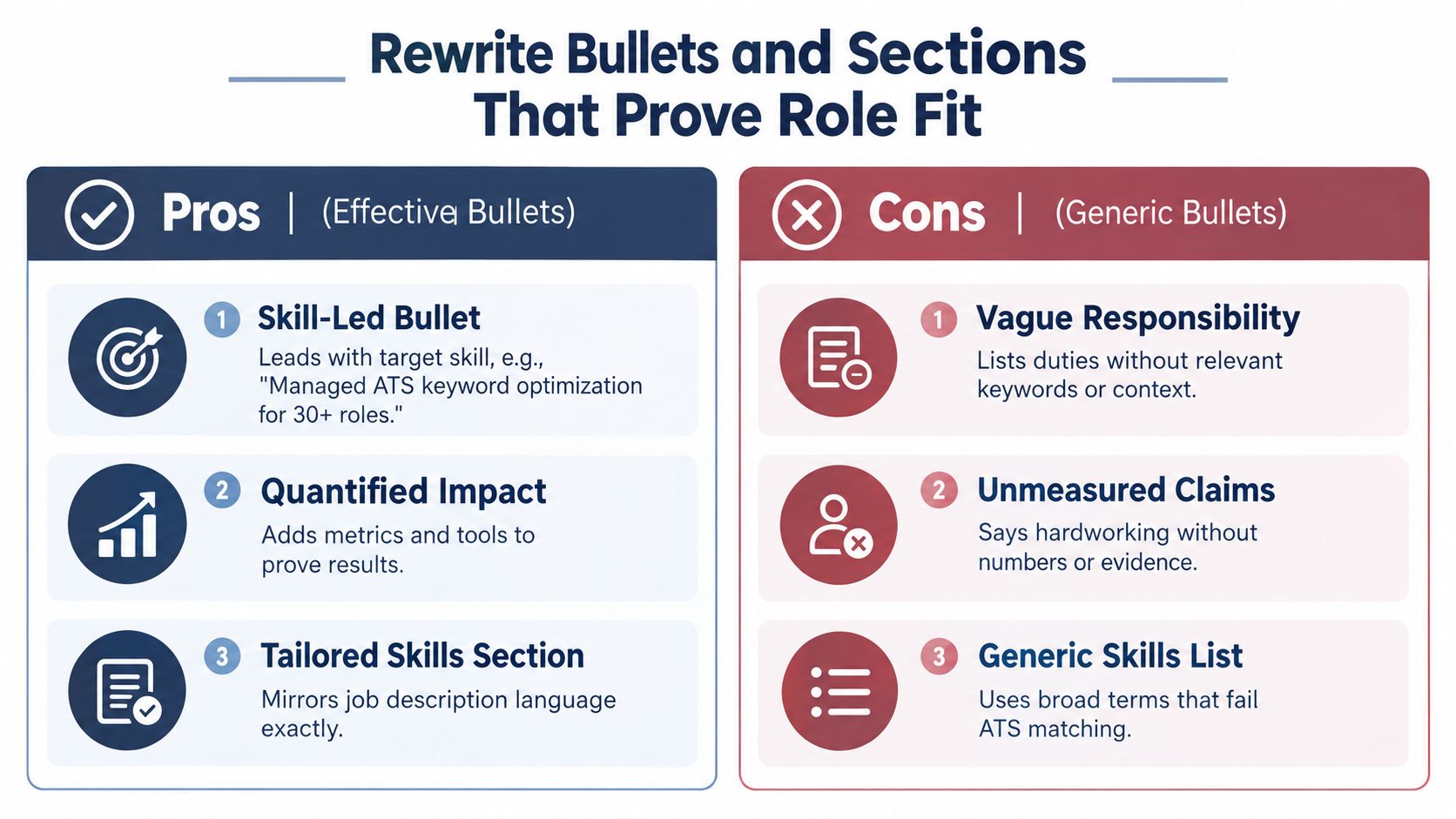
Start with the target skill, name the context, identify the tool or method when relevant, and finish with the result or scope you can verify. You don't need a number for every bullet. You do need enough detail for a recruiter to understand what you owned and why it mattered.
Improve the opening signal
Your headline and summary should identify the role you're pursuing without pretending to hold a title you never held. Compare:
- Generic headline: “Experienced professional seeking new opportunities”
- Focused headline: “Operations Analyst | Process Improvement | SQL Reporting”
The second version gives the ATS and the recruiter clear role signals. It also creates a useful boundary for the rest of the document. Every section should support that positioning.
A project manager's summary could shift from “Organized professional with strong leadership skills” to “Project manager with experience coordinating cross-functional launches, maintaining delivery plans, and managing stakeholder updates across technical and business teams.” The revised version uses recognizable responsibilities without making unsupported claims.
Turn duties into evidence
For a project manager:
- Weak: “Responsible for managing projects and communicating with teams.”
- Stronger: “Managed cross-functional project plans, coordinated sprint dependencies, and communicated delivery risks to internal stakeholders.”
For an analyst:
- Weak: “Created reports for management.”
- Stronger: “Built recurring SQL reports and presented operational trends to managers, supporting decisions about staffing and workflow priorities.”
For a career switcher:
- Weak: “Helped customers and solved problems.”
- Stronger: “Analyzed recurring customer issues, documented process improvements, and partnered with operations teams to reduce avoidable escalations.”
The stronger versions don't invent results. They make the work legible by naming the task, setting, and relevant capability. If you have a verified outcome, include it. If you don't, describe the scope and decision supported instead of adding a made-up metric.
Writing test: If a bullet could appear unchanged on five unrelated résumés, it probably needs a specific tool, responsibility, audience, or outcome.
Organize Skills, Education, and Certifications
Create a dedicated Skills section with categories that match the target role, such as Analytics, Project Management, Platforms, or Languages. Use the employer's terminology where it accurately reflects your background. “Customer relationship management” and “CRM” can coexist when both are relevant, but a list of every tool you've ever opened weakens the signal.
Put certifications in a clearly labeled section and spell out the credential accurately. Don't list a certification you haven't earned, and don't imply proficiency from a short exposure. Education should remain easy to extract, with the institution, qualification, and dates presented as ordinary text.
When you need a role-specific starting point, a Google-focused résumé resource can help you think about how the target employer's language should influence your emphasis. The finished document still needs to reflect your own history, not a borrowed profile.
Gaps can be handled with a brief explanation when context matters, such as “Career break for family care” or “Independent study in data analysis.” Never replace a gap with a fictional consulting engagement. Accuracy protects you when a recruiter asks follow-up questions.
Tailor Faster With a Repeatable Workflow and Live Feedback
Deep tailoring takes time, and most candidates can't rewrite a résumé from scratch for every application. HR Dive reported in 2026 that 68% of candidates spend less than 30 minutes tailoring a résumé per application, a behavior discussed in this résumé tailoring research. The practical response isn't to abandon tailoring. It's to define the smallest set of edits that materially improves alignment.
Use a minimum viable edit loop
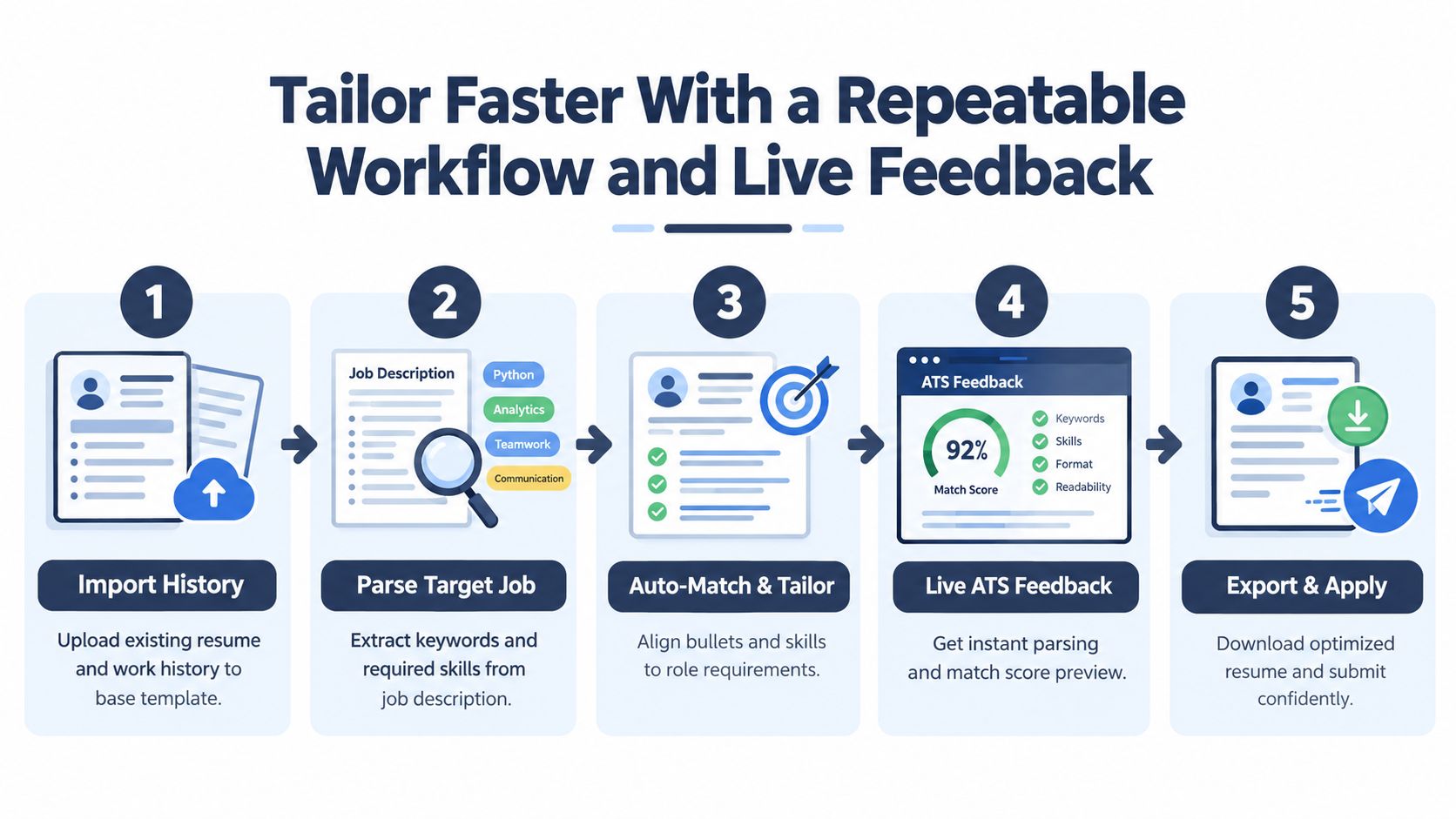
Keep a master document containing your complete, verified career history. For each opening:
- Import or copy the target job description.
- Extract the required skills, responsibilities, tools, and title language.
- Select the experience bullets that prove the highest-priority requirements.
- Rewrite the summary, headline, Skills section, and selected bullets.
- Run a parsing check and a role-match score.
- Fix missing evidence or unclear sections, then rescore.
- Export the format requested by the employer and inspect the plain-text output.
The live score should guide decisions, not replace judgment. If a score rises because you repeated a term in an awkward skills block, the edit probably isn't helping a human reader. If it rises after you clarify a real responsibility in Experience, that's a more trustworthy improvement.
Choose the depth of tailoring
For an entry-level application, focus on the summary, Skills section, education, projects, and the most relevant experience. For a mid-career role, prioritize the recent positions and remove older detail that doesn't support the target. For an executive application, align the leadership scope, operating context, strategic responsibilities, and outcomes while keeping the document easy to extract.
A good-looking résumé can still fail parsing. A 2026 ATS study of 2,417 anonymized scans reported formatting issues in 62% of submitted résumés, average role-match scores of 58 out of 100, and parsing failures for nearly one in four résumés on enterprise ATS platforms. The study identified two-column layouts as the top formatting error, appearing in 38% of résumés, and linked them to a 31% parsing-failure rate. These findings are available in the 2026 ATS résumé study.
Before you submit: Open the exported file, select all text, copy it into a plain-text editor, and confirm that the reading order still makes sense.
A tool such as GetTheCall can import a LinkedIn profile or existing résumé, parse a target job listing, suggest evidence-based rewrites, and show a live ATS Role Match score as you edit. That kind of feedback is useful when you're applying at volume, provided you review every suggestion against your actual experience and the employer's file instructions.
Your Next Application Ready to Pass the ATS and Impress the Reader
ATS optimization works best when you remember the two jobs. Machine readability determines whether the system can extract your information. Role matching determines whether the extracted information clearly answers the posting. Neither job replaces the other.
Before exporting, run a final check:
- Structure: Confirm a single-column layout, standard headings, ordinary text, and readable margins.
- Extraction: Verify that your name, contact details, Experience, Education, and Skills appear in the correct order.
- Alignment: Check that each major requirement has truthful evidence somewhere in the résumé.
- Language: Use the job description's terminology naturally, without repeating terms that your experience can't support.
- File type: Follow the employer's instructions, then inspect the exported version as plain text.
- Human review: Read the document quickly and ask whether the target role is obvious immediately.
If your résumé passes the parsing check but the role-match signal remains weak, revise the evidence and wording rather than changing the design. If the match looks strong but extracted text is missing or scrambled, return to the layout. That diagnosis prevents wasted effort.
You don't need a perfect résumé before you apply. You need a reliable document, a defensible alignment plan, and a feedback loop that shows which changes improve readiness. Start with the next job posting, not with a blank page, and let its requirements determine what deserves attention.
GetTheCall helps you turn an existing résumé or LinkedIn profile into a job-specific, ATS-ready document by extracting the target listing, aligning your verified experience, and providing live match feedback. Visit GetTheCall to check your résumé and prepare a version for your next application.