How to Make Resume ATS Friendly in 2026
Learn how to make resume ATS friendly with clear steps, smart keywords, and parsing-safe formatting. Land more interviews in 2026.
You've probably done this already. You find a role that fits your background, spend an hour polishing your résumé, hit Apply, and hear nothing. Then you start wondering if your experience was too weak, your résumé wasn't flashy enough, or someone internal already had the job.
Sometimes the answer is much more boring. Your résumé didn't read cleanly in the company's applicant tracking system, or it never matched the language that system was using to rank candidates.
That's why learning how to make a resume ATS friendly matters now. This isn't résumé trivia. It's a basic application skill. Independent 2026 reporting says about 98% of Fortune 500 companies use an ATS in some form and that the median ATS compatibility score on first submission is 52/100, with 44% of resumes scoring below 50 and 28% below 40 (ATS usage and compatibility findings). In other words, a lot of capable people are losing before a recruiter even gets a clean read.
Table of Contents
- What ATS Friendly Really Means
- Why Most Résumés Fail the ATS
- Reading the Job Description Like a Parser
- Formatting Your Résumé for Clean Parsing
- Tailoring Bullets and Sections to the Role
- Design Choices That Still Pass the ATS
- Pitfalls to Avoid and a Final Checklist
What ATS Friendly Really Means
You apply to a role you can do in your sleep. The recruiter never calls. Not because your background was weak. Because the system read your résumé badly, filed key details in the wrong places, or failed to connect your experience to the job description.
That is what ATS-friendly means in practice. Your résumé needs to survive two readers. Software reads it first. A human judges it second.
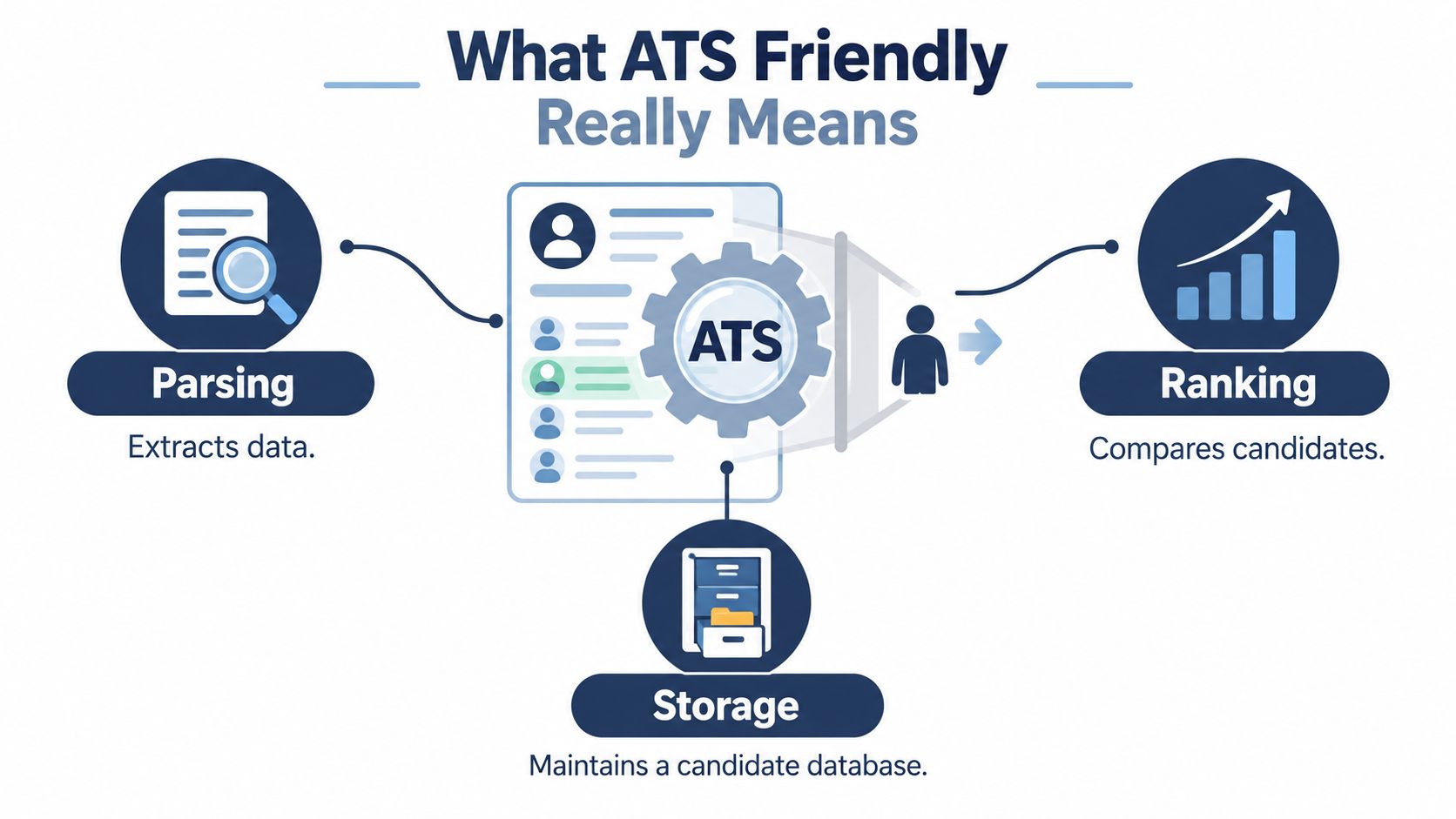
What an ATS is actually checking
An applicant tracking system stores applications, pulls information out of them, and helps recruiters search, sort, and rank candidates. It is not trying to admire your layout. It is trying to identify standard fields and match your résumé to the role.
Read that again, because applicants get sloppy.
An ATS cares about two things:
- Can it parse the document cleanly? It needs to recognize your name, contact info, job titles, employers, dates, education, certifications, and skills.
- Does the content match the target role? It looks for the same concepts, terms, and requirements that appear in the job description.
That second point gets missed all the time. ATS-friendly does not just mean clean formatting. It also means writing with the logic of the job posting in mind.
If the posting says “SQL,” “data visualization,” and “stakeholder reporting,” and your résumé says “database work,” “dashboards,” and “cross-functional updates,” a recruiter may understand the match. A parser may not score it the same way. You do not fix that by stuffing keywords. You fix it by using the employer's language where it fits your experience.
ATS-friendly means readable to a parser and persuasive to a recruiter
A good résumé does two jobs at once. It gives the software clear inputs. It gives the recruiter fast proof.
That means your résumé should be:
- Easy to parse
- Easy to search
- Aligned to the job description
- Easy for a recruiter to skim after the system processes it
This is the right standard. Not “plain.” Not “ugly.” Not “written for robots.”
Written clearly wins.
Treat the job description like a map of how the company will sort candidates. The ATS is usually looking for patterns the employer already defined: job titles, hard skills, tools, certifications, and responsibilities. Your résumé should reflect those patterns in plain language, with clean structure, so the system can classify you correctly and the recruiter can confirm the match fast.
A simple rule works here: if a parser cannot label your experience accurately, you become harder to find. If it can label it but cannot see role alignment, you become easy to ignore.
That is the whole game. Clean extraction. Clear relevance.
Why Most Résumés Fail the ATS
A candidate applies to 40 jobs, gets silence, and assumes the market is broken. Often, the résumé is the problem.
ATS failures usually happen for one of two reasons. The system cannot extract the information cleanly, or it extracts it and still does not see a strong match. Those are different failures, and they need different fixes.
Two ways a résumé gets filtered out
| Failure Type | What Causes It | What the ATS Sees |
|---|---|---|
| Parsing Problems | Columns, tables, headers, footers, text boxes, icons, custom fonts, image-based PDFs | Jumbled sections, missing contact info, broken dates, lost keywords |
| Language Problems | Generic bullets, weak job titles, missing required skills, vague duties, no role alignment | A readable résumé with low relevance to the target role |
Analysts at ATS Checker found formatting issues in 62% of submitted resumes, and average job-specific match scores were 58 out of 100 in their ATS resume study benchmarks. That split matters. A résumé can be readable and still rank badly. It can also be relevant and still get mangled on intake.
Parsing failures happen before judgment
If the parser cannot tell where your title ends, where your employer begins, or which date belongs to which role, you do not have a résumé problem. You have a data extraction problem.
That usually comes from design choices people copy from portfolio sites, Canva templates, or old executive résumé samples. Two columns break reading order. Tables split context. Icons replace searchable text. Headers and footers hide information in places some systems ignore.
A parser does not admire design. It labels fields.
That is the angle job seekers miss. The ATS is not reading for nuance first. It is trying to classify your document into buckets like title, employer, skills, dates, education, and location. If that structure breaks, your experience turns into messy candidate data, and messy data does not rank well.
Language failures are ranking failures
Now assume the résumé parses perfectly. You still lose if your wording does not match the job's logic.
If a posting is screening for “customer onboarding,” “Salesforce,” and “cross-functional coordination,” a résumé that says “client intake,” “CRM platform,” and “worked with other teams” may be true but still weaker in search, matching, and recruiter skim. The problem is not honesty. The problem is translation.
Researchers at Apply Mate reported higher interview rates for customized resumes than untailored ones in their analysis of 139,927 applications, and they also found that many resumes miss a large share of the keywords used in the target posting (resume tailoring and keyword coverage data). That gap is why broad, generic résumés underperform even when the candidate is qualified.
The real reason strong candidates get ignored
Plenty of qualified applicants are not losing because they lack experience. They are losing because their résumé is written from memory instead of from the job description.
A parser rewards exact, recognizable signals. A recruiter rewards fast proof. If your document gives neither, you disappear twice. First in the system. Then in the shortlist.
Reading the Job Description Like a Parser
You find a job that fits. You have the experience. You send the same résumé you used last week with a few quick edits. Then nothing happens.
That miss usually starts here. Candidates read the posting for inspiration. The ATS reads it like a requirements file. You should too.
A good posting tells you what the system will try to match and what the recruiter wants to confirm fast. Your job is to pull out the exact signals, rank them, and map each one to proof from your background.
Separate screening terms from supporting terms
Start by marking the language in the posting by function, not by vibe.
- Screening terms. Tools, platforms, certifications, degrees, years of experience, industry terms, and job titles
- Work terms. The actions the person will perform in the role
- Preference terms. “Preferred,” “nice to have,” “bonus,” or secondary tools
A parser does not read like a person. It looks for repeated, recognizable terms that can be indexed and matched. If the posting says “HubSpot,” “email campaign reporting,” and “project coordination,” those exact phrases deserve attention. If they are true for you, they should appear in your résumé in plain language.
Build a keyword matrix before you edit a single bullet
Random rewriting wastes time. Build a simple matrix first.
| Requirement | Posting Phrasing | Your Evidence |
|---|---|---|
| Email marketing | “Support email campaign execution” | Built and scheduled lifecycle emails for product launches |
| Analytics | “Track campaign performance and reporting” | Prepared weekly campaign reports using platform dashboards |
| Cross-functional work | “Coordinate with sales and design teams” | Partnered with sales and creative on launch assets |
| CRM | “Experience with HubSpot preferred” | Used HubSpot for campaign lists and lead tracking |
| Content operations | “Manage content calendar” | Owned monthly publishing calendar for blog and social posts |
This shows you three things fast. What you can mirror directly. What needs a stronger example. What does not belong because you cannot back it up.
If you want a step-by-step version of this process, read this guide on how to tailor your resume to a job description.
Read for repetition, then read for hierarchy
Repeated terms usually matter more than isolated ones. A phrase in the title, summary, responsibilities, and qualifications is rarely accidental. It is often a core match signal.
Hierarchy matters too. Terms in the job title, required qualifications, and the first few bullets usually carry more weight than a throwaway line near the bottom. A parser may count occurrences. A recruiter will notice emphasis. You need to satisfy both.
A quick sample with a Marketing Coordinator posting
Say the posting uses these phrases:
- “Manage content calendar”
- “Coordinate email campaigns”
- “Use Google Analytics to report performance”
- “Support cross-functional campaign execution”
- “Experience with Canva preferred”
Now convert that into résumé language only when it is true:
- Use Marketing Coordinator or an honest close variant near the top if it matches your target role.
- Include Google Analytics, email campaigns, and content calendar management in your skills section or experience bullets.
- Replace weak filler like “helped with marketing tasks” with proof tied to campaign execution, reporting, and coordination.
- Treat Canva as secondary if the posting labels it preferred. Include it if you have it, but do not let a bonus tool crowd out the core terms.
Synonyms are where strong applicants lose ground. “Client intake” may be accurate. If the posting says “customer onboarding” and that is also accurate, use the employer's phrasing. You are not changing the truth. You are translating your experience into the terms the system and recruiter already use.
Formatting Your Résumé for Clean Parsing
Once your keyword map is clear, make the document easy for software to read. This part isn't creative. Good. It shouldn't be.
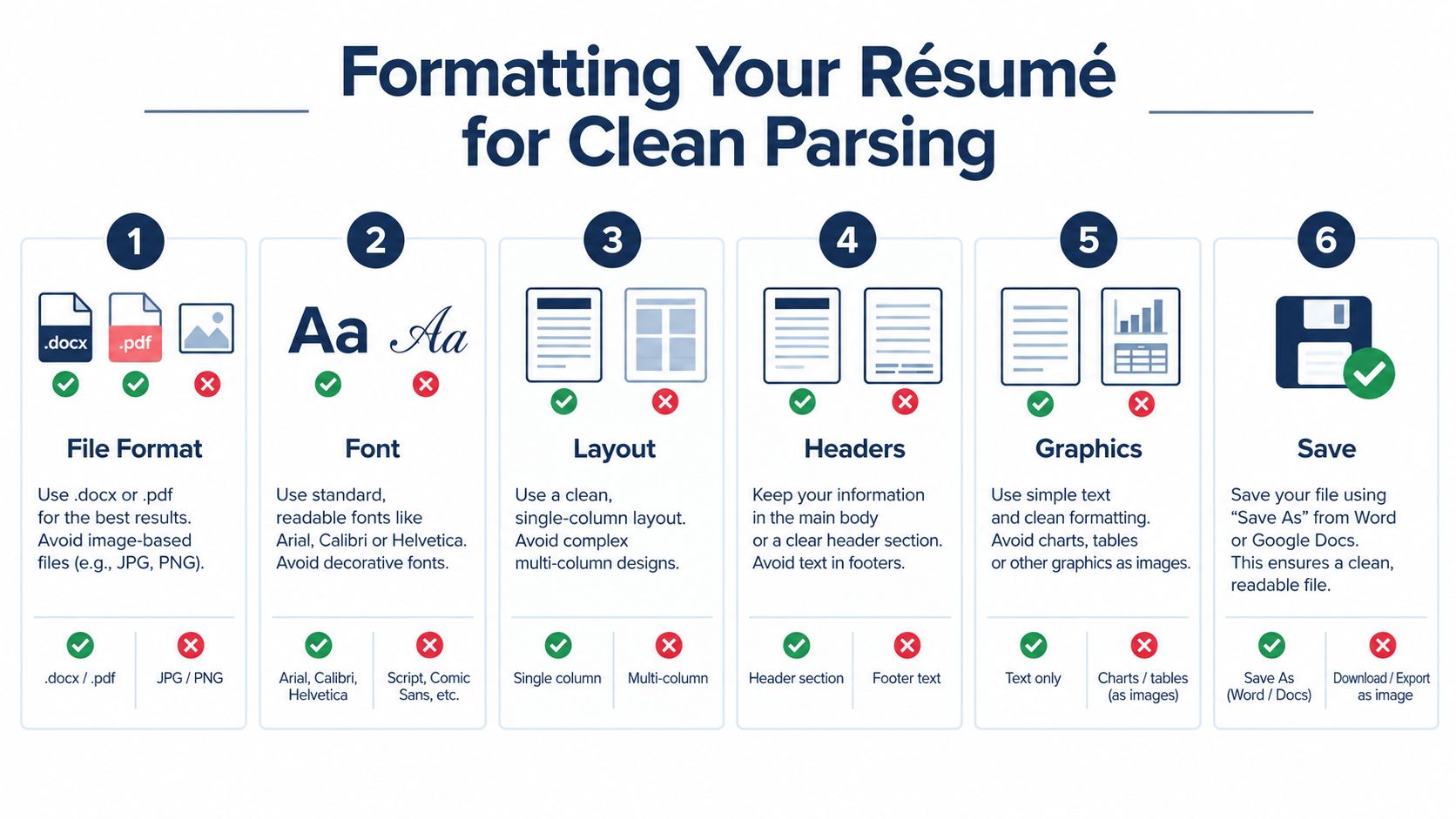
Use the safest layout
Independent guidance recommends a practical baseline: keep the file in a text-based format, avoid tables, and don't place contact data in headers or footers. It also recommends using a single-column layout with standard sections like Work Experience, Skills, and Education so parsers can extract content reliably (Forbes guide to ATS-friendly resume structure).
That means:
- Use one column
- Keep contact info in the main body
- Stick to standard section names
- Avoid text boxes, tables, and graphics
A 2026 ATS-friendly format guide also recommends using ATS-safe fonts such as Arial, Calibri, Georgia, or Times New Roman at 10 to 12 pt, with margins between 0.5 and 1 inch, and says the safest default is a .docx file unless the job posting specifically requests PDF (ATS-safe formatting rules and file guidance).
Follow a plain formatting checklist
Use this structure:
- Header in body text with your name, phone, email, LinkedIn, city
- Professional Summary if it adds clear role alignment
- Work Experience
- Skills
- Education
- Certifications if relevant
Skip these:
- Fancy icons
- Headshots
- Charts or skill bars
- Decorative initials
- Footer contact details
Here's a good visual walkthrough if you want to sanity-check your structure before submitting:
Test before you apply
Save the file, then re-import it into a parser-style tool and inspect what comes out. An ATS resume checker can help flag broken sections, weak keyword alignment, and formatting issues before you send the file.
Also do one low-tech test. Copy all text from the résumé and paste it into a plain text editor. If section order breaks, dates disappear, or bullets turn into junk characters, fix the file.
Watch for small formatting glitches too:
- Smart quotes can convert oddly between tools
- Special symbols can get stripped out
- Unusual bullets can break into nonsense characters
- Scanned PDFs are a hard no
Tailoring Bullets and Sections to the Role
You found a role that fits. You send the same résumé you used last week, swap the title at the top, and hope the system connects the dots. It usually does not. The parser is looking for direct matches in wording, skills, and scope. The recruiter who opens the file right after wants proof that you did this kind of work, not something vaguely adjacent.
Your job is to translate real experience into the language the posting uses. Read the job description like a parser would. Pull out the repeated nouns, verbs, tools, and responsibilities. Then rebuild your top third and your bullets so those signals show up fast and clearly.
Rewrite for match, not for drama
If the posting asks for “cross-functional product launches,” do not hide that work under “assisted with various marketing initiatives.” That wording is accurate and useless.
Here's the kind of rewrite that works:
| Generic Bullet | Revised Bullet |
|---|---|
| Helped with product marketing materials and team coordination for launches | Coordinated cross-functional product launch materials with sales, design, and product teams to support go-to-market execution |
| Managed emails and reports for campaigns | Executed email campaigns and prepared performance reporting using platform analytics |
| Worked on customer communications | Supported customer onboarding communications and lifecycle content updates |
The stronger version does three things. It uses the employer's language. It keeps the claim honest. It gives both the ATS and the recruiter concrete terms to latch onto.
Do not stop at keywords alone. Match the level of ownership too. If the role asks for “led,” and you only supported, say supported. If you owned the work, say that plainly.
Adjust the sections people skim first
The first scan is brutal. Systems weigh early content heavily, and recruiters do the same with their eyes.
Fix the top of the résumé first:
- Headline alignment: Use the target job title or the closest accurate version of it.
- Skills ordering: Put the tools, platforms, and methods from the posting near the top, using the same phrasing where it fits your background.
- Bullet order: Put the most relevant proof first under each job, not the task you spent the most time on.
- Summary restraint: Add a summary only if it sharpens fit with specific role language, domain experience, or required tools.
If you want a concrete example, this resume adapted for Google-style applications shows how to shift emphasis and wording for a specific employer without turning the document into fiction.
The cleanest customized résumé still loses if the bullets stay vague. Specific verbs, named tools, and exact role language beat filler like “responsible for” every time.
Use tools to find gaps, not create fake ones
After each edit, compare the résumé against the posting again. Do not ask, “Did I add enough keywords?” Ask, “Did I show evidence for the requirements that matter most?”
That is where a parser-style check helps. GetTheCall is one option. It compares a target job listing against your imported résumé or LinkedIn profile and shows where coverage is strong, weak, or missing.
Use that feedback to make better decisions. Rewrite an existing bullet if the experience is there. Move a relevant skill higher if it is buried. Leave a requirement out if you have not done it.
One more rule. Numbers still matter because recruiters trust specifics. Add real metrics when they prove scope, speed, ownership, output, or results. Keep them honest.
Design Choices That Still Pass the ATS
You don't have to choose between “plain and safe” or “pretty and broken.” You can have a résumé that looks clean and still parses correctly. But you need to earn the design choices, not start with them.
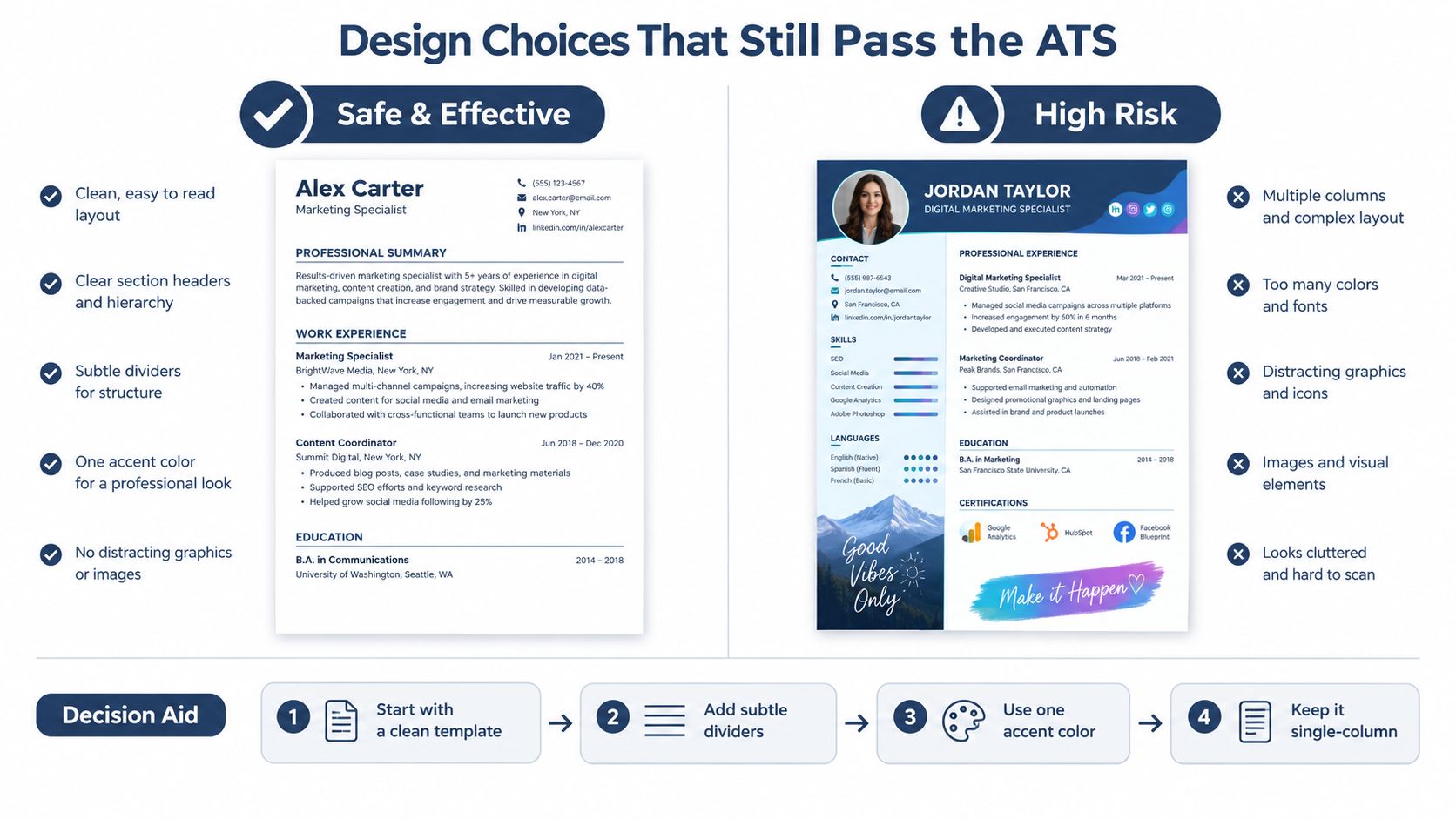
Safe polish versus risky design
Here's the line I use.
Safe design usually includes:
- Single-column structure
- Consistent spacing
- Thin dividers
- One restrained accent color
- Readable typography
Risky design usually includes:
- Infographic elements
- Skill bars
- Multiple columns
- Large icons
- Decorative sidebars
- Text embedded in graphics
The layout can look modern without becoming fragile. That's the sweet spot.
When design helps and when it hurts
A subtle template can help in roles where presentation matters and the parsing rules are looser. Creative marketing, content, brand, or design-adjacent roles may tolerate more visual polish if the file still parses cleanly.
Corporate, finance, operations, legal, and many tech roles usually reward safer formatting. Their systems and reviewers often care more about clarity and compatibility than visual personality.
Keep the design only if every section still imports correctly and every important keyword remains visible as text.
The practical sequence is simple:
- Start with an ATS-safe template.
- Add light styling only after the structure is stable.
- Test the file again.
- Remove anything that interferes with parsing.
That's how you keep a résumé professional without turning it into either a gray wall of text or a parser disaster.
Pitfalls to Avoid and a Final Checklist
The most frustrating résumé mistakes are the quiet ones. They don't look dramatic. They just lower your odds without warning you.
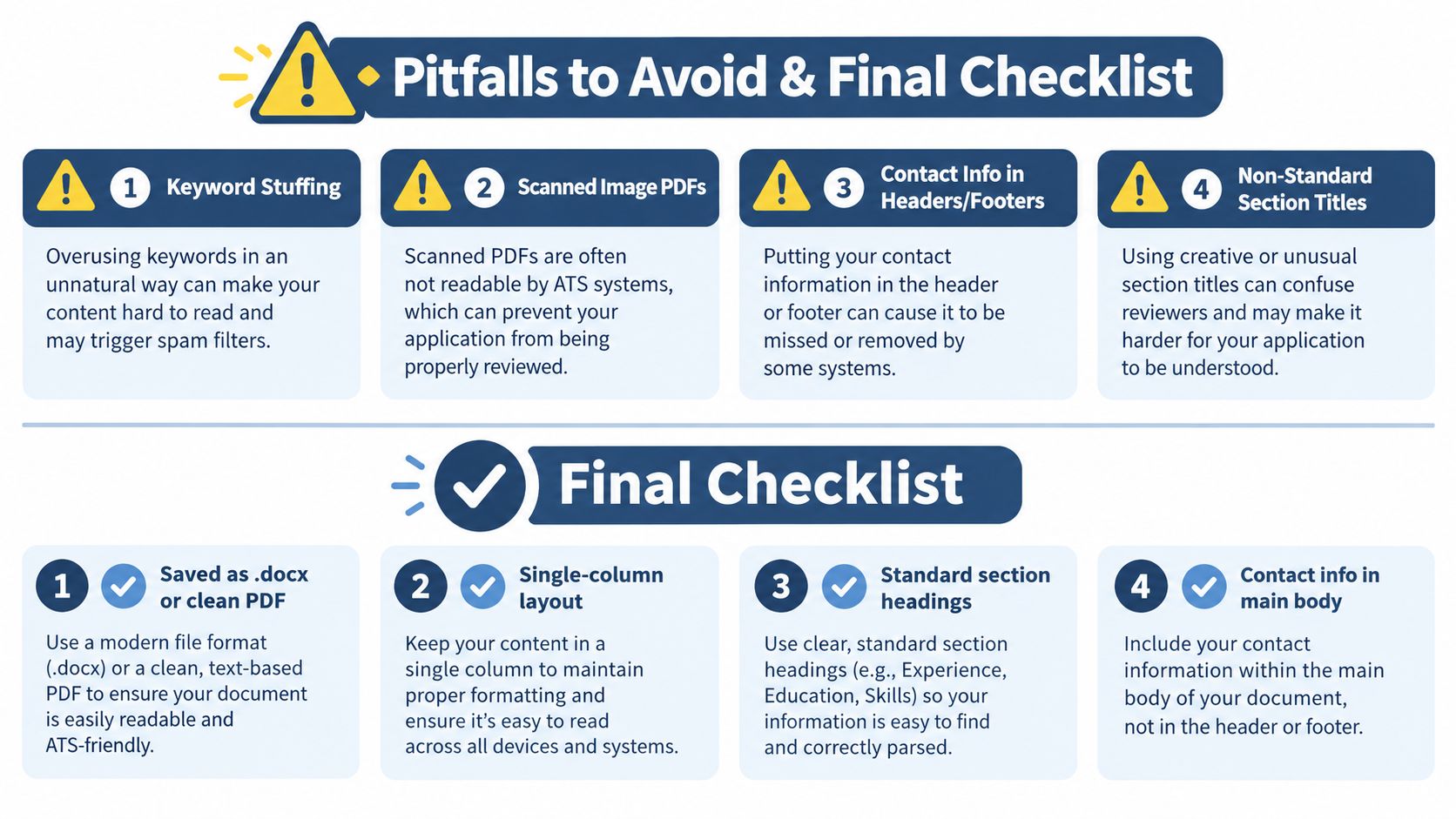
Mistakes that get people screened out
Skip these completely:
- Invisible keyword stuffing: White text packed with terms is obvious, sloppy, and not worth the risk.
- Scanned image PDFs: If the file is basically a picture, parsing can fail badly.
- Header or footer contact info: Some systems ignore it.
- Inconsistent date formats: Keep dates easy to recognize and consistent across roles.
- Cute section titles: “Where I've Been” is not better than “Work Experience.”
- Graphics-heavy single-column layouts: Single-column alone doesn't save a résumé if text is trapped in visual elements.
A five-minute self-audit
Before you apply, do this fast check:
- Paste the job description into a document and bold every requirement you meet.
- Confirm each of those requirements appears somewhere in your résumé in clear language.
- Save or paste your résumé as plain text and verify headings, dates, titles, and contact details still read correctly.
- Review your keyword match in an ATS checker or your own matrix.
- Read the bullets one more time for tense, clarity, and proof.
Final checklist
Use this as your short submission filter:
- File format: Save as .docx unless the posting asks for PDF.
- Contact placement: Keep email, phone, and LinkedIn in the main body.
- Layout: Use one column and avoid tables or text boxes.
- Headings: Stick to Work Experience, Education, Skills, and similar standard labels.
- Keyword coverage: Mirror the posting's actual language where it truthfully applies.
- Bullet quality: Lead with relevant accomplishments, not vague duties.
- Proof points: Add real outcomes, scope, tools, or ownership wherever you can support them.
If you remember one thing, remember this. The best ATS-friendly résumé is not the prettiest one or the most keyword-stuffed one. It's the one a parser can read cleanly and a recruiter can understand quickly.
If you want help turning an existing résumé or LinkedIn profile into a cleaner, job-specific version, GetTheCall gives you an ATS checker, job-description parsing, and a live match score so you can see where your résumé is strong and where it's still missing the role's language. It's built for exactly the problem this article covers: getting your résumé readable, relevant, and ready to submit without rebuilding it from scratch every time.