Date on Resume: How to Format It for 2026
Get the correct date on resume format for every section, and learn how to handle gaps consistently in 2026.
You're updating your resume for a role that interests you. The work history is ready, the bullets are stronger, and then your cursor stops beside one job title. Should you write a full day, only the year, or leave the date off entirely?
That small choice affects how clearly a recruiter can follow your experience and how easily an applicant tracking system can extract your timeline. A reliable date on resume system should answer four questions without forcing the reader to investigate: when did the role begin, when did it end, is it ongoing, and how does it fit with everything else on the page?
The practical answer is simple. Use month and year for work experience, write Present for an ongoing role, handle gaps thoroughly, and apply one consistent format across the document. That approach supports both human scanning and automated parsing, just as careful tailoring supports the rest of your application. You can connect the finished document to the target role with this guide to tailoring your resume to a job description.
Table of Contents
- The Moment You Start Wondering About the Date on Your Resume
- The Month-Year Format That Works Almost Everywhere
- Writing Present for the Job You Are Still Doing
- Handling Gaps Without Hiding Them
- Dates in Education, Certifications, and Volunteer Work
- Keeping Every Date on the Page Consistent
- Your Final Date Audit Before You Hit Submit
The Moment You Start Wondering About the Date on Your Resume
The moment usually arrives after the difficult work is done. You've rewritten “managed projects” into something specific, checked your contact details, and chosen the jobs that matter. Then you reach the employment line and hesitate over a date.
One applicant types the exact start and end days because precision feels responsible. Another writes only the years because a shorter timeline feels cleaner. Both choices can create unnecessary friction. Day-level detail adds visual noise and can make the entry harder for software to interpret, while year-only ranges hide how long someone held a position.
A recruiter reading 2022–2024 can't tell whether the job lasted most of that period or only a brief part of it. An ATS may also have less usable information for understanding sequence, progression, and continuity. Modern guidance has moved toward month-year dates because they provide enough detail to establish the timeline without turning a resume into a personnel record. Jobscan's resume-date guidance describes the current preference for formats such as Month YYYY or MM/YYYY and explains why year-only entries can create ambiguity.
Dates tell the story behind the bullets
Your dates don't compete with your achievements. They give those achievements context. A promotion makes more sense when the reader can see the period before and after it. A recent certification looks different from an old one. A current role needs a clear endpoint so nobody mistakes it for an abandoned entry.
That's why hiding dates usually creates a larger problem than the one you're trying to avoid. If a recruiter sees an unexplained jump, they may form their own interpretation. A transparent timeline gives you control over the story and leaves less work for the reader.
Practical rule: Treat every date as part of your professional narrative, not as decoration at the edge of the page.
The rest of your resume should follow the same principle. Use a dating system that is precise, readable, and repeatable. Once the structure is right, you can focus attention where it belongs, on the evidence that you can do the job.
The Month-Year Format That Works Almost Everywhere
Use Month YYYY as your default for work experience. It identifies when each role began and ended without adding day-level detail that rarely helps a hiring decision. This dating system gives recruiters a readable timeline and gives an ATS consistent date information to parse.
Convert exact dates into month and year:
- Too detailed:
03/15/2021 - 07/04/2024 - Preferred:
Mar 2021 – Jul 2024
The preferred version is faster to scan and presents two clear date tokens. Guidance from Resume Worded on resume date formats supports month-and-year granularity and cautions against day-level detail, which can add parsing noise without improving your application.
Choose one month style
Your resume can use any of these readable systems:
Jan 2021 – Jul 2024January 2021 – July 202401/2021 – 07/2024
Choose abbreviated months followed by a four-digit year for the cleanest default. Jan 2021 is compact, familiar, and visually balanced beside a job title. Full month names work too. Numeric dates are acceptable when you apply the same format everywhere and the document remains easy for an ATS to read.
Consistency matters more than personal preference. Do not mix Jan 2021 with 01/2021, or March 2022 with Mar 2023. Apply one dating grammar across experience, education, certifications, and volunteer work. A recruiter should never have to guess whether different formats represent different levels of precision.
Keep the range explicit
Give every completed role both endpoints:
Mar 2021 – Jul 2024
For a current role, show the start month and use Present as the endpoint:
Mar 2021 – Present
Keep dates close to the employer and role details. Avoid placing them in sidebars, decorative graphics, or unusual text boxes, where an ATS may separate them from the relevant entry. Indeed's resume advice on dates recommends keeping the company, title, location, and employment dates together.
Use the three-letter month and four-digit year when you need a final rule. It keeps work-history dates clear, consistent, and machine-readable.
Writing Present for the Job You Are Still Doing
Your current job needs an end marker, even though it hasn't ended. Write Present.
A clean entry looks like this:
Marketing Manager, Acme Co.
New York, NY | Mar 2022 – Present
Current, Now, Today, and To Present appear in templates, but they don't communicate as consistently. Present is the most direct option because it tells the reader that the employment continues at the time of application. ATS Verification's guidance on current roles specifically recommends using Present rather than Now or Today.
Avoid open-ended date lines
Leaving the end date blank is a mistake. A blank can look like an omission, a formatting failure, or an unfinished entry. It also gives an automated system less information to anchor the role.
Typing today's date creates a different problem. Your resume may circulate later, making the document appear outdated or suggesting that the role ended on the date you prepared the file. A future month is worse because it can make the timeline look inaccurate or confuse parsing.
Use the actual start month and Present:
Mar 2022 – Present
That line remains accurate when you reuse the resume across months. You don't need to update it every time you submit an application, and the reader immediately understands that you're still employed.
Make the layout easy to scan
Keep the date on the same line as the role or employer, or place it flush right in a clearly associated column. Don't bury it in a footer or separate sidebar. ATS systems and recruiters should be able to connect the dates to the correct job without guessing.
For a current position, the goal isn't cleverness. It's clarity. State when the role began, state that it continues, and use the same structure for every other entry.
Handling Gaps Without Hiding Them
A gap doesn't automatically weaken a resume. An unexplained gap creates more concern because it leaves the reader to fill in the missing story.
Short breaks between roles usually don't need their own entry. If one position ended in May 2022 and the next began in September 2022, the two lines can show:
May 2020 – May 2022Sep 2022 – Present
That sequence is readable without adding a label for every week between jobs. The dates establish the interval, and your interview can provide context if the employer asks.
Give longer breaks a clear name
A longer career break deserves more deliberate treatment. Parenting, study, a sabbatical, health recovery, relocation, or a layoff can all be represented. You have two practical options.
Option one, add a gap entry. Use a straightforward label and a short explanation:
Career Break, Family CareJun 2022 – Aug 2023
Managed family responsibilities while maintaining professional development through relevant coursework and industry reading.
Only include activities that are true. Don't turn a personal period into a fictional job.
Option two, let the surrounding roles carry the timeline. This can work when the break is easy to understand from the dates and doesn't need further explanation. The key is to avoid compressing or altering employment dates to make the gap disappear.
Let the reader see the sequence
For a gap spanning a substantial period, keep the dates visually prominent. Flush-right dates help the eye trace the chronology from one role to the next. If a period covers 2020 to 2022, show it as 2020 – 2022 when that's the most accurate information available, rather than pretending those years never happened.
Use the most precise date information you have. If you know the months, use them. If an older period is documented only by years, don't invent months to make the formatting look uniform.
A dated explanation looks more trustworthy than a timeline with a conspicuous hole.
Your resume doesn't need to defend every transition in detail. It does need to present an honest sequence. Clear dates reduce ambiguity, and a short, factual gap entry gives you language you can expand on during an interview.
Dates in Education, Certifications, and Volunteer Work
Supporting sections shouldn't all use identical dating rules. They should use a consistent visual style while matching the level of detail the credential requires.
| Resume section | Recommended date detail | Example |
|---|---|---|
| Certifications and short courses | Month and year | Completed Jul 2024 |
| Older degrees | Year can be enough | Graduated 2018 |
| Volunteer work | Match employment style | Sep 2019 – Present |
Certifications and short courses benefit from month-year dates because recency matters and the learning period may be brief. A hiring manager evaluating a technical credential needs to know whether it's recent, current, or from an earlier stage of your career. Use the same month style you chose for work history.
Education can stay simpler
For degrees, year-only dating is commonly acceptable unless the employer specifically asks for more detail. Openet's guidance on graduation dates recommends including the graduation year and avoiding exact day-level information unless it's requested or relevant.
An education entry might read:
Bachelor of Science in Business Administration, State UniversityGraduated 2021
If you're still enrolled, use a clear expected-completion label:
Expected 2025
Don't present an expected graduation year as completed. That small distinction protects your credibility and tells the reader exactly where you stand.
Volunteer work should look like work
Volunteer roles are experience. Format them so they align with your paid employment entries:
Volunteer Coordinator, Community Food NetworkSep 2019 – Present
An ongoing volunteer commitment should use Present, just as an ongoing paid role does. A finished role should have a closed month-year range. Matching the structure makes the entire resume easier to scan and helps the reader understand that you've treated each experience consistently.
The visual rules can stay parallel even when the date granularity differs. Use the same capitalization, separator, alignment, and spacing throughout. The content determines whether year-only is appropriate, not a desire to make every section look mechanically identical.
Keeping Every Date on the Page Consistent
A recruiter shouldn't have to decode your personal date system. Audit the document as if you were reading it quickly for the first time.
Run this consistency checklist
- Separator: Use an en dash between date ranges, such as
Mar 2021 – Jul 2024. Don't use slashes or commas in a month-year range. - Month styling: Capitalize month names consistently.
Mar 2021is clean; don't mix it withMARCH 2022unless the whole resume uses abbreviated all-caps styling. - Alignment: Place dates flush right opposite the role or employer line when the layout allows it. The reader should be able to scan the chronology vertically.
- Parallel structure: Use
Presentfor current roles and a closed month-year pair for completed roles. Don't placeMar 2021besideMarch 2022if both entries are supposed to follow the same format. - Export quality: Open the final PDF and inspect every date. Copying content from Word into a PDF can alter an en dash into a hyphen, shift right-aligned text, or split a date across lines.
Use this exact visual checklist as a final reminder:
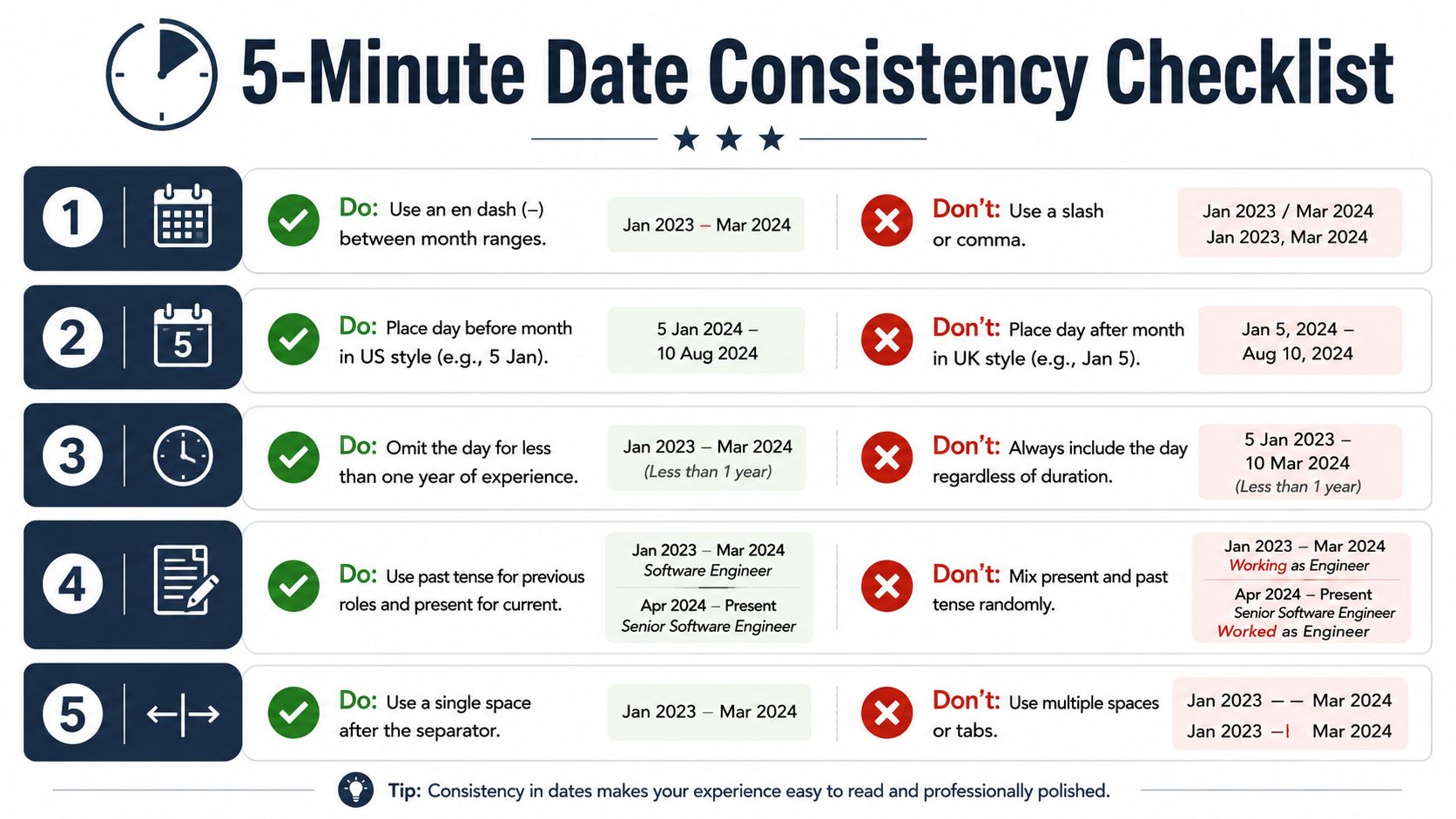
The infographic includes useful layout checks, but apply them alongside the month-year standard described above. In particular, don't add day-level dates to ordinary work history just because a template includes them. Month-year remains the cleaner default for employment entries.
For an ATS-oriented review of the broader file, use this guide to an ATS-friendly resume. The important principle is consistency, not decoration. A resume that uses one dating system everywhere looks deliberate, while mixed separators, inconsistent month names, and broken alignment signal that the document wasn't checked before submission.
Your Final Date Audit Before You Hit Submit
Give your resume one focused date audit before uploading it. Start at the top of the experience section and read every entry in order, checking whether the timeline makes sense without any explanation from you.
Confirm that each normal work-history entry uses Month YYYY. Check that every ongoing position says Present, not Today, Now, or a future date. Then inspect the visual details, including the separator, capitalization, alignment, and spacing.
Check the supporting sections
Education, certifications, and volunteer work often reveal inconsistencies that aren't obvious in the main employment block. Scan for a certification that uses a numeric date while the rest uses abbreviated months. Look for an education entry that needs a graduation year, and make sure an expected graduation date is labeled as expected rather than completed.
Also check for year-only work entries where month-year information is available. Year-only ranges can make tenure unclear, particularly for recent roles or positions that connect closely to one another. Keep older education dates at year level when that's the appropriate convention, but don't use that shortcut for every section.
Inspect the actual PDF
The editable file isn't the final product. Open the PDF you'll submit and verify that no date has wrapped onto a separate line, lost its dash, changed alignment, or been converted into an unexpected format. A text-based PDF preserves readable date tokens more reliably for both ATS ingestion and human review than a visually complex export.
Use this ATS resume checker as one part of your pre-submission review, especially when you've changed the layout or customized the document for a new role.
Your final recap is short:
- Read the experience dates from top to bottom.
- Confirm current roles use
Present. - Compare education, certification, and volunteer dates with the same visual standard.
- Open the final PDF and inspect the rendered file.
- Save a clean upload version and a separate copy for direct email attachments.
Don't submit until the dates tell one clear story. A month-year system, honest gap handling, explicit current-role markers, and clean PDF output remove avoidable doubt before a recruiter reaches your first bullet.
GetTheCall can import your LinkedIn profile or existing resume, analyze a target job listing, and produce a job-specific ATS-ready PDF with consistent formatting and a live role-match score. Visit GetTheCall to check your resume's dates and overall fit before you submit.