Create ATS Friendly Resume for Free: A 2026 Workflow
Learn how to create ATS friendly resume for free: import your profile, tailor it to each listing, check your match score and export a clean PDF.
The most popular ATS resume advice gets the problem wrong: removing every design element and repeating enough keywords won't guarantee an interview. A readable file matters, but so do eligibility requirements and credible evidence that you can do the job. To create an ATS-friendly resume for free, build a reliable base first, tailor it with care, and check the actual file you'll submit.
Table of Contents
- The Free ATS Resume Workflow at a Glance
- What ATS Filters Actually Reject
- How to Build a Parse-Ready Base Resume
- How to Tailor Each Version to One Job Listing
- Presenting Career Changes, Gaps and Project Work
- Verify, Export and Decide Before You Apply
The Free ATS Resume Workflow at a Glance
Budget about 90 minutes for your first version, then 30 to 45 minutes for similar applications once your base is ready. Treat these as planning allowances, not measured completion times. Difficult career histories or substantially different roles may need longer.
| Stage | What You Do | Free Option | Typical Time |
|---|---|---|---|
| 1. Import | Pull in your LinkedIn profile URL or upload your current PDF, DOC or DOCX | LinkedIn URL or existing file | 10 min |
| 2. Clean the base | Check extracted employers, titles and dates, then set a single-column layout | Free template in the builder | 20-30 min |
| 3. Parse the listing | Pull out required skills, tools, titles and responsibilities | Job listing URL or pasted text | 10 min |
| 4. Tailor | Map the top three to five requirements to real evidence and add accurate terms | Live ATS Role Match score, subject to free-tier limits | Reserve the largest remaining block |
| 5. Check and export | Run the ATS checker, export the PDF and verify selectable text | Free ATS resume checker | 10 min |
Structure comes before tailoring. There's little value in polishing wording that software can't reliably extract.
In TopResume's 2025 survey, 28.5% of 2,000 U.S. job seekers said they tailor every application. Meanwhile, 26% of 442 respondents in Jobscan's 2025 survey said tailoring takes a lot of time.
Budget check: Check the builder's current free-tier limits before starting. The free checker covers parsing and keyword issues; unlimited tailoring and full scores require the Pro pass.
You should finish with a clean base file and a PDF customized for each listing, ready for the employer's format requirements.
What ATS Filters Actually Reject
Formatting is rarely the whole explanation for a rejected application. A parsing problem can make your information harder to retrieve without causing an automatic rejection. Eligibility filters can stop an application even when the resume reads perfectly.

The distinction matters because screening is widespread. In January 2023 EEOC testimony, ReNika Moore stated that 99% of Fortune 500 companies, plus the vast majority of mid-size and large companies, use an ATS. That testimony also described filters involving knockout questions, keywords and qualifications, including rejection without human review.
Separate readability from suitability
Ask two different questions. Parsing: can the system identify your name, employers, titles and dates? Ranking and eligibility: does your evidence match the role, and do you meet its mandatory conditions?
| Common Belief | What the Evidence Shows | What to Do Instead |
|---|---|---|
| The ATS rejects resumes for bad formatting | A 2025 recruiter study found that 23 of 25 recruiters said their ATS didn't automatically reject on format, content or design | Keep the structure readable without cutting real achievements |
| Knockout questions are minor | Employers configure work authorization, location and license questions that can screen candidates before human review | Answer accurately and review before submitting |
| Repeating keywords raises your ranking | Newer tools can infer skills rather than rely exclusively on literal matches | Support relevant terms with evidence of the work |
| A high match score proves you qualify | Alignment with a listing isn't independent verification of competence | Use scores to investigate gaps, not predict an interview |
The ATS review linked above also discusses CNN reporting on tools that infer skills and build broader candidate profiles. That doesn't make exact terminology irrelevant. It means word repetition isn't a substitute for demonstrated capability.
A plain layout remains a sensible risk-reduction choice, not a magic admission ticket. Keep useful accomplishments, make them easy to extract, and check eligibility separately.
How to Build a Parse-Ready Base Resume
Build the base in a fixed order: recover your career information, verify it, simplify the document, then improve how a recruiter reads it. Don't start by choosing the most decorative template.
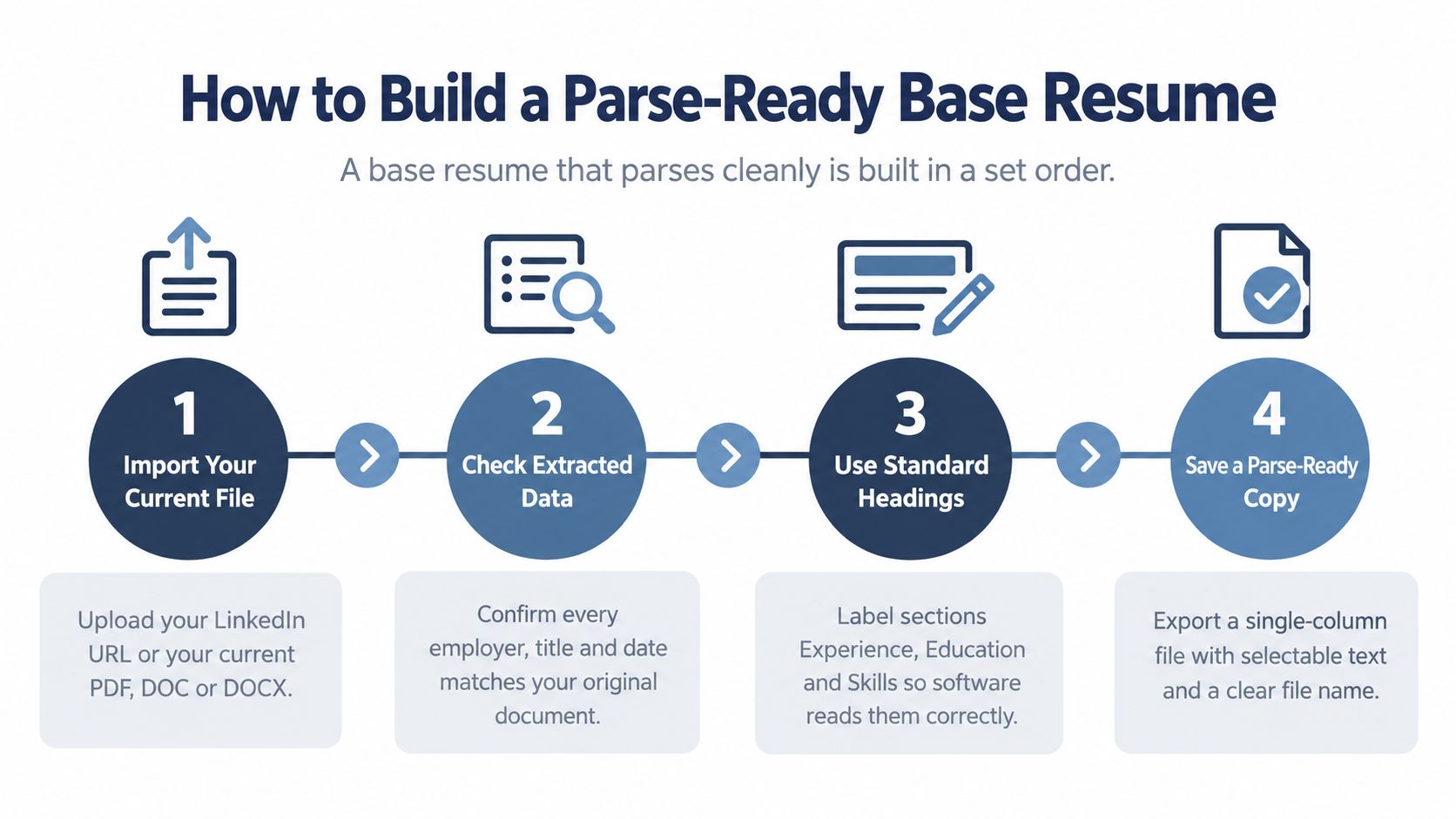
Build the structure before polishing sentences
- Import your existing material. Use your LinkedIn URL or current PDF, DOC or DOCX. The LinkedIn-to-resume guide explains that starting route if your profile is more complete than your document.
- Verify the extracted fields. Compare every employer, title and date against the original. Treat imported information as a draft, not an approved record.
- Choose a single-column layout. Keep graphics, text boxes, tables and extra columns out of the body to reduce extraction ambiguity.
- Use recognizable headings. Choose Professional Summary, Work Experience, Education, Skills and Certifications where applicable.
- Place contact details in the main body. Keep your name, phone, email and city out of headers and footers.
- Use ordinary fonts and selectable text. Arial, Calibri or Times New Roman are practical choices. Don't communicate essential information through images.
- Add a truthful target headline. Name the role you're pursuing without changing historical job titles or implying a credential you don't hold.
- Make experience bullets concrete. Start with an action verb, then explain the task, relevant tool and outcome. Quantify only when you have a defensible measurement.
Indeed's ATS resume guidance describes how recognizable sections help software identify career details and how decorative elements can interfere. That's a reason to simplify, not evidence that every unusual layout fails.
Design the opening for a person
The headline and opening bullets deserve particular care. Recruiter eye-tracking research involving 30 recruiters over 10 weeks reported about six seconds of initial review, concentrated on names, titles, employers, dates and education; later commentary notes a 2018 figure of 7.4 seconds and questions about generalizability.
Treat that as a prioritization benchmark, not a universal cutoff. Put relevant recent work where someone can understand it quickly, without compressing the document into unreadable text.
Save the approved base as a clearly named master DOCX. Keep it separate from application copies so edits for one vacancy don't accidentally overwrite your full career record.
How to Tailor Each Version to One Job Listing
Tailoring means matching the employer's language to your real evidence, not rewriting your background to resemble an ideal candidate. Start with the full listing rather than a remembered job title.
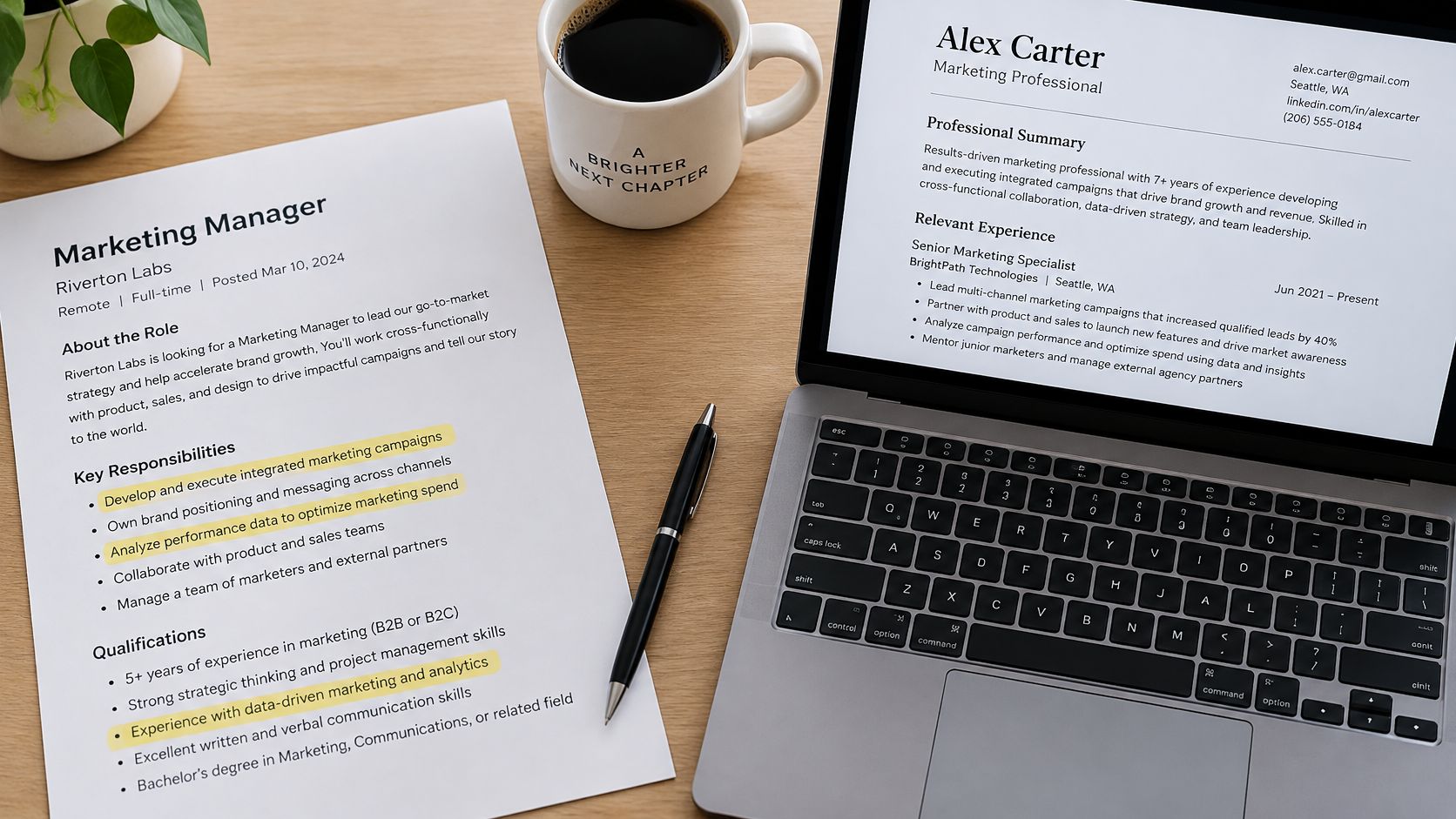
- Save the complete posting. Paste it into a working document so you can compare requirements while editing.
- Mark the must-haves. Prioritize explicit requirements, not just whichever items appear first.
- Collect relevant terminology. Indeed's practical guideline suggests approximately 25-30 relevant keywords, selected for the vacancy. Treat that as a rough reference, never a quota.
- Find supporting work. Locate the role, project or accomplishment that justifies each term.
- Adopt accurate wording. Match spelling and abbreviations where they describe your actual background.
- Distribute terms in context. Use the summary, skills and experience sections rather than an unexplained keyword pile.
- Save a separate version. Include the company and role in its file name.
Map requirements before accepting rewrites
The following is an illustrative worksheet, not a candidate case study. Replace every example with your own evidence, and only name Asana if that was genuinely the tool used.
| Job Requirement | Your Real Evidence | Wording to Use | Match Status |
|---|---|---|---|
| Project management software | Led a six-person rollout of a new task tracker | Asana, project planning, if accurate | Direct match |
| Stakeholder reporting | Built monthly dashboards for three department heads | stakeholder reporting, KPI dashboards | Direct match |
| Client portfolio ownership | Managed 40 small-business accounts as a bookkeeper | account management | Transferable, use only if the accounts were managed |
| SQL | Built Excel pivot reports but no SQL queries | Excel pivot reports | Missing, learn it or leave it off |
| Team leadership | Supervised two interns during a seasonal peak | team leadership | Direct match |
The status column prevents a common mistake: accepting a polished rewrite that turns adjacent experience into a qualification you don't have. An Excel reporting background can support analytical capability, but it doesn't establish SQL proficiency.
Indeed's keyword guidance emphasizes job-specific terms used accurately across the document. The job-description tailoring guide provides a practical way to apply that comparison.
If you can't explain what you did when an interviewer asks about a term, don't claim it.
For missing skills, decide whether to learn them, omit them, or be upfront about the gap. A course you plan to take isn't completed training, and interest in a tool isn't experience using it.
Presenting Career Changes, Gaps and Project Work
A bookkeeper moving toward account management may have relevant client experience without ever holding an account manager title. The right response is clearer evidence, not a larger keyword list. The same principle applies to returners after caregiving, freelancers and candidates whose strongest work came through projects or international roles.
Nonlinear experience needs a readable timeline and explicit context.

Translate capability without upgrading the facts
For a hypothetical bookkeeping-to-account-management transition, start with the underlying work. Did you own client relationships, resolve questions and coordinate recurring deliverables? If so, describe those responsibilities directly; don't imply sales ownership or commercial negotiation unless you really handled them.
- Choose core competencies. Identify the target role's central capabilities, such as relationship management, reporting and coordination.
- Find accomplishments. Use employment, freelance, volunteer or relevant family responsibilities only where they clearly demonstrate the capability.
- Make the context visible. Give project and freelance work a dated heading. Preserve official titles while explaining unfamiliar international responsibilities in plain English.
There's a practical reason to make skills explicit. TestGorilla research cited in 2025 reported that 85% of companies globally use skills-based hiring, up from 73% in 2023; related reporting found that 65% use AI in hiring, with 94% of those employers saying it improved their process. These findings don't guarantee acceptance of transferable experience, but they support presenting capabilities alongside titles.
Use the accompanying video as a pause to review how you're presenting your own experience.
Handle a gap with a brief, honest timeline entry or summary line if clarification helps. You can identify a caregiving break without sharing private medical details or inventing professional responsibilities.
A stronger description can make relevant experience easier to recognize. It can't replace the capability an employer may test through an assessment or interview.
Verify, Export and Decide Before You Apply
Run the full check on every application, not just your first finished resume. Tailoring changes content and length, so an approved base doesn't automatically mean the exported application copy is ready.
Checking tools are widely used, but usage isn't proof of accuracy. In Kickresume's 2025 analysis, approximately 773,000 job seekers, or 64% of the users analyzed, used AI to check or analyze resumes for ATS compatibility. You still need to inspect the result yourself.
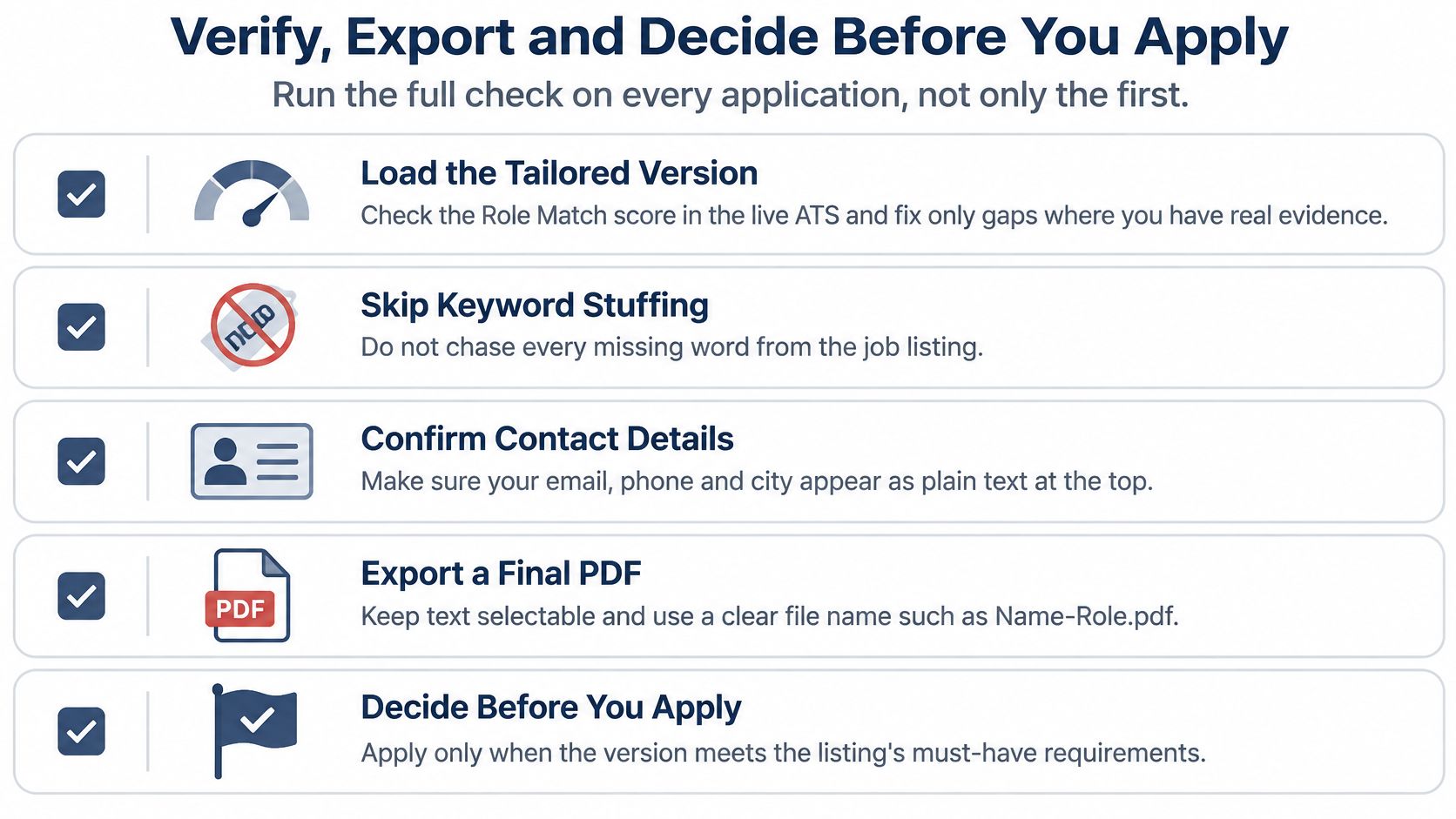
Check the document you'll actually send
- Review role alignment. Load the customized version into the live ATS Role Match tool where available. Investigate missing requirements, but only make additions supported by your experience.
- Run a parsing check. Use the free ATS resume checker to investigate extraction and keyword issues separately.
- Export from the final source. Create the PDF from the current DOCX or approved builder version, never an older downloaded draft. Follow the listing's file requirements, including Word when requested.
- Test the exported text. Reopen the file in another viewer, select text and search for critical terms.
- Inspect the details. Confirm that contact information, headings, dates and bullets survived the export.
The resume research and practical workflow reference supports prioritizing readable information and checking the exported document rather than trusting visual design alone. When the employer gives no format preference, retain DOCX as the conservative alternative; if you submit PDF, verify its text layer carefully.
| Check | Failure You See | Fix |
|---|---|---|
| Text is selectable | Copying returns garbled characters or nothing | Re-export from DOCX and remove flattened text boxes or image text |
| Contact details are readable | Name or email disappears in another viewer | Move contact lines into the main body |
| Dates and titles stay on one line | Dates merge or shift onto the wrong role | Keep each role's title, employer and month-year range together |
| Target keyword is searchable | A critical skill doesn't appear in search | Add the accurate term where the work happened, then re-export |
| Headings are recognized | Sections appear as unlabeled text in the preview | Use standard labels such as Work Experience and Skills |
| Final file name is clear | Similar “final” files make selection confusing | Include the company, role and date |
A failed search deserves investigation, not automatic keyword insertion. If you don't possess the skill, the correct fix isn't to add it.
Make a go-or-no-go decision
Before submitting, use a short decision checklist:
- Positioning is accurate. The headline identifies your target without misrepresenting your background.
- Requirements have support. Important claims point to work you can explain.
- The file is readable. Your single-column copy has selectable text and no unresolved parsing warnings.
- Eligibility answers are correct. Work authorization, location and required-license responses reflect your actual circumstances.
- The selected attachment is final. The employer receives the checked version, not the master or another company's copy.
Stop rule: If honest edits leave a weak match, reconsider the role before rewriting the resume again.
You don't need to satisfy every preference to make a reasonable application. Distinguish a preferred tool you could learn from a mandatory license you don't hold, and don't let a generic score make that decision for you.
A connected builder can keep import, listing analysis, tailoring, scoring and export together; a word processor plus manual comparison offers more control with more checking work. For a concentrated application period, the Pro 30-day pass offers unlimited tailoring and full scores without auto-renewal. Check current free access before paying for features you may not need.
Choose a live listing this week and complete the workflow. Then prepare another version for a closely related role, comparing what genuinely changes and what should remain stable.
GetTheCall brings profile or file import, job-specific tailoring, live role matching and PDF export into one workflow, with a free checker for parsing and keyword issues. Visit GetTheCall, check the current free-tier limits, and start with one real job listing and your existing resume.