Check if My Resume Is ATS Friendly: A Practical Guide
Learn how to check if my resume is ATS friendly with a simple two-pass audit, actionable fixes for format and keywords, and clear next steps.
You've probably got the same problem most job seekers run into, a résumé that looks polished in Word, then somehow feels invisible once it's uploaded to an application portal. That's frustrating, especially when you know the experience is real and the role fits. The right way to check if your resume is ATS friendly is to stop treating ATS as a magic gate and start testing two separate things, machine readability and job alignment.
Applicant tracking systems are pervasive in hiring. A Harvard Business School and Accenture study found that 92% of surveyed employers used recruiting systems to filter or rank high-skill candidates before human review, while 88% of executives believed qualified high-skill candidates were excluded because they didn't match exact screening criteria, compared with 94% for middle-skill roles (Hidden Workers research summary). That's why a résumé can be accurate and still underperform if the wording, headings, or structure don't line up with the vacancy.
Table of Contents
- What ATS Friendliness Means
- How to Run a Two-Pass ATS Audit
- Fixing Format, Headings, and Keywords
- How to Interpret Your ATS Check Results
- When to Use an ATS Resume Checker Tool
- Next Steps Before You Submit
What ATS Friendliness Means
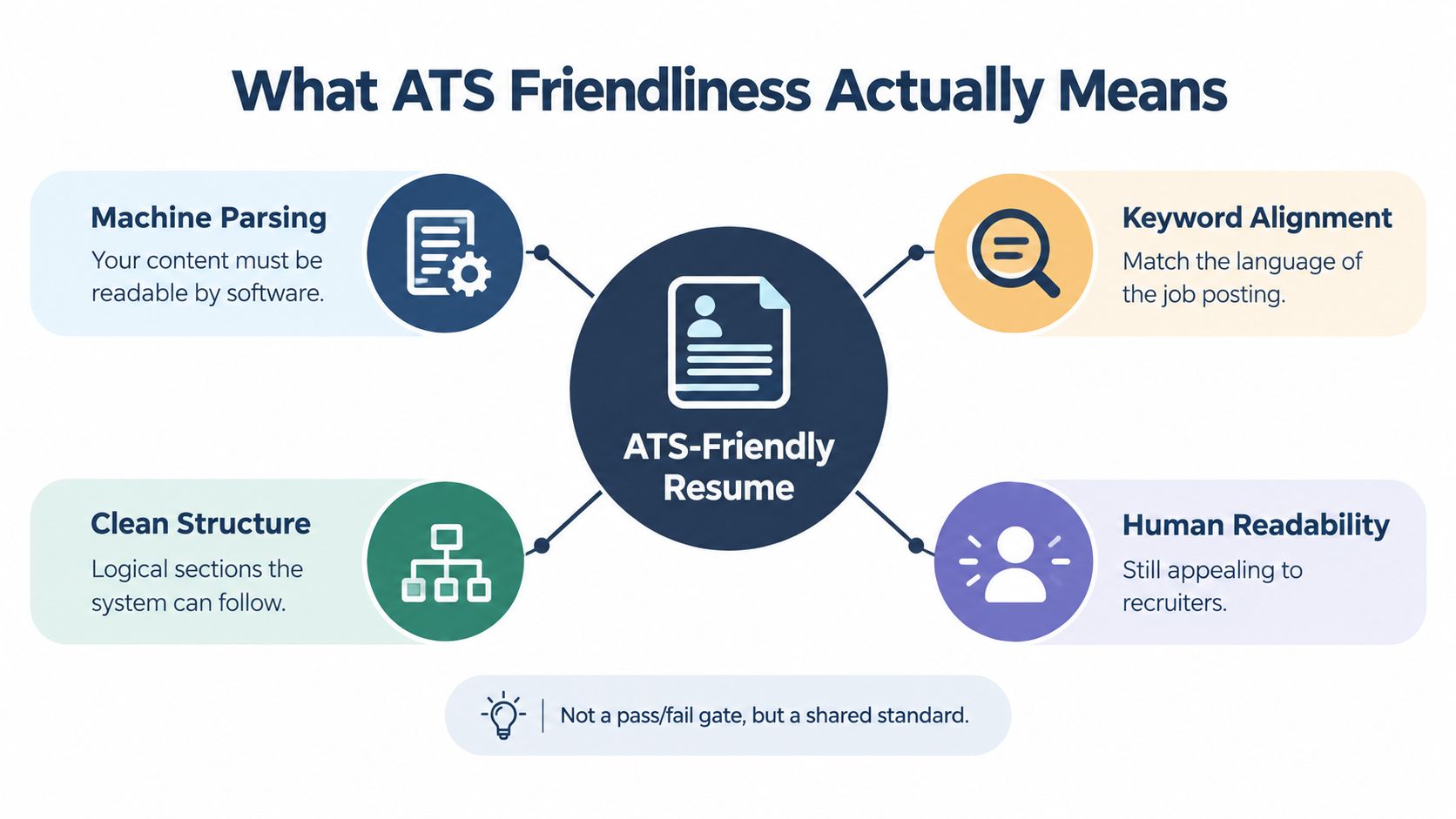
ATS friendliness means two things in practice, whether software can extract your details correctly, and whether those details match the language of the job. A résumé can look polished to you and still break at one of those points, which leaves the system with an incomplete version of your experience.
Parsing comes first
ATS software pulls structured fields from a file, including contact details, education, work history, dates, job titles, certifications, and language skills. A résumé can look clean to a person and still lose information if the parser gets confused by columns, text boxes, unusual placement, or decorative elements (field extraction overview). Clean layout matters before wording does.
Practical rule: If the software cannot read your history in order, the rest of the content does not get a fair shot.
Language fit comes second
A strong résumé uses the target job's terminology where it is truthful to do so. That does not mean stuffing keywords into every line. It means pairing terms with real experience so the match stays contextual, not mechanical. The strongest résumés read naturally to people and still give software clear signals about fit.
ATS-friendly formatting is a shared standard. The file should be easy to parse, easy to search, and easy for a recruiter to skim once it gets through. Keep those three goals in view, and the audit becomes much easier to run with judgment instead of guesswork.
How to Run a Two-Pass ATS Audit
Start with the file itself, not the wording. Export the résumé as a text-based PDF or DOCX, then copy the full contents into a plain-text editor and read it as raw text. If the name, contact details, section order, dates, and bullet points survive in the right sequence, you've cleared the first hurdle.
Pass one checks machine readability
A quick text extraction test will show whether the document is structurally stable. If a heading disappears, a job title shifts under the wrong employer, or a date lands in the wrong place, that's a parsing problem, not a content problem. This is also where single-column layouts tend to behave better, because the reading order is simpler for software to follow.
If the copied text looks scrambled, assume the ATS will struggle in the same way.
The safest habit is to test the file the same way a parser would. Keep the contact details in the body, confirm the headings are standard, and make sure nothing important is trapped inside formatting that software may skip. For a deeper role-by-role tailoring workflow, use a resume tailoring guide that compares your experience against the posting.
Pass two checks job alignment
After the file reads cleanly, compare it to the posting. Build a simple requirements matrix with columns for required skill, tool, credential, responsibility, and industry term, then mark whether each appears in your résumé with actual evidence. That gives you a much clearer picture than guessing based on a generic score.
A good matrix surfaces three things fast:
- Missing requirements: The role asks for something you haven't documented clearly enough.
- Weak evidence: You mention the term, but you don't show how you used it.
- Misplaced language: A key qualification exists, but it's buried where neither software nor a recruiter is likely to notice.
That second pass is where a lot of good candidates improve most. They already have the background, they just haven't made it visible in the language the job post uses. A résumé shaped this way is more likely to surface both in search and in human review.
Fixing Format, Headings, and Keywords
Most ATS problems come from avoidable structure issues, not from a lack of talent. The first fix is to use headings that the system recognizes without hesitation, such as Experience, Education, and Skills. Then keep the chronology conventional, because dates and titles are easier to parse when they appear in a straightforward order.
Clean structure beats clever design
Avoid placing important information in tables, text boxes, headers, footers, or graphics. Those elements can look polished, but they also make it easier for software to miss content or read it in the wrong sequence. The same goes for multi-column layouts when they interrupt the order of jobs, dates, or bullets.
A plain file format also helps. DOCX and text-based PDF files are generally safer than scanned or image-only PDFs, because scanned files contain pixels instead of selectable text (file-format guidance). If an employer asks for a specific format, follow that instruction even when it conflicts with general advice.
Keywords should sound like real work
Keyword tailoring works best when the wording matches the posting and the experience is real. If the role asks for stakeholder management, use that term only if you've done it, then show it in context with a responsibility or outcome. Matching the terminology is more precise than stuffing in unrelated phrases or chasing generic density (keyword tailoring guidance).
A simple way to tighten language is to place the strongest terms in the summary, skills, and experience sections, where both parser and recruiter are likely to look. Use singular and plural forms when they reflect your actual background, but don't invent variants just to fill space.

The goal isn't to game the system. It's to make sure the system can see what you've already done. Once the structure is stable and the wording is honest, you're working with the software instead of fighting it.
How to Interpret Your ATS Check Results
A good ATS check gives you more than a green light or a red one. It should tell you whether the file parsed correctly, whether the résumé covers the role's requirements, and whether the application looks competitive enough for a recruiter to keep moving. Those are separate questions, and mixing them up causes a lot of unnecessary panic.
Parsing success is not hiring success
If the document extracted cleanly, that only means the system could read it. It doesn't mean the applicant meets knockout filters such as location, work authorization, or required certifications. It also doesn't mean the recruiter will rank the application near the top.
That distinction matters because a match score can be useful without being predictive. A decent score can show that the résumé and job description overlap well, but it can't guarantee a callback. Treat it as a diagnostic, not a forecast.
Read gaps in context
A missing synonym shouldn't automatically worry you if the underlying experience is clearly documented. If you've managed budgets, led vendors, or handled reporting, the role-specific words can often be made more visible without changing the substance of the work. The mistake is assuming that one absent term means the résumé failed.
What matters more is whether the job's essential themes are visible in the right places. If your file parses correctly and the core requirements are supported by evidence, you've done the part of the work that ATS can evaluate. The final decision still depends on fit, experience, and how the recruiter reads the rest of the application.
A match score is a clue, not a verdict.
That's the mindset that keeps people from over-editing a résumé that was already sound. Use the result to improve clarity and coverage, then move on with a stronger application instead of endlessly chasing a number.
When to Use an ATS Resume Checker Tool
Manual review is still the best starting point when you want to understand the file on your own. You can catch obvious layout issues, see whether the wording feels true, and notice where your experience needs to be made more explicit. But software can speed up the dull parts of the audit, especially when you're applying to several similar jobs.
Manual review and tool-assisted checking do different jobs
A manual pass is better for judgment. You can tell whether a title makes sense, whether a bullet sounds inflated, and whether the document still reads like you. A checker is better for spotting parse loss, missing sections, and weak alignment against a specific posting.
That's why a focused ATS tool can be useful as a second opinion. Some tools, including GetTheCall's ATS résumé checker, accept PDF, DOC, or DOCX files and compare the résumé against a target role so you can see where the document reads cleanly and where the wording is thin. Used well, that kind of output is a diagnostic, not a shortcut.
Use the score as a trend line, not a trophy
A live score is most useful when you're changing the résumé and want to see whether the edits improved alignment. If a revision adds clearer job titles, better section order, or more role-specific language, the score should help you confirm that the document became easier to interpret. What you shouldn't do is rewrite your history just to push the number up.
When a tool and a human review agree, you usually have a decent sign that the résumé is both readable and relevant. When they disagree, the human review should win on truthfulness, and the tool should win on parsing. That balance keeps the résumé grounded in actual experience.
To see how that looks in practice, watch this walkthrough after you've reviewed the file manually.
If you use templates, keep them simple and easy to export cleanly across applications. The point is consistency, not decoration. A stable template reduces formatting drift when you tailor the résumé again for the next role.
Next Steps Before You Submit
Before you hit apply, export the file in the format the employer asked for, then check the contact details one more time. Confirm that the job's key terms appear with real supporting accomplishments, not just repeated phrases. A final plain-text copy test is worth the thirty seconds it takes.
One candidate I'd trust more on paper is the one who trims the fluff, keeps the chronology clear, and makes sure the role-specific evidence is easy to find. That kind of résumé doesn't promise an interview, but it does give the application a fair reading. If you're moving from a LinkedIn profile or an older CV, a guided transfer can save time, which is why a LinkedIn-to-résumé workflow is worth considering when you're tailoring for multiple openings.
Keep improving the document with each application instead of treating this as a one-time fix. A résumé that parses cleanly, aligns accurately, and reflects the actual posting gives you a much better chance of being seen for the work you've already done.
GetTheCall helps you turn a LinkedIn profile or existing résumé into a job-specific ATS-ready file, so you can check parsing, alignment, and role fit in one place. If you want a faster way to tailor without losing the truth of your experience, visit GetTheCall and start with the free ATS résumé checker.