8 ATS Resume Tips to Improve Your Applications
Use these 8 ATS resume tips to improve keywords, formatting, file types, parsing, and job-specific tailoring before you apply.

A résumé can be highly qualified and still fail before a recruiter reads it. In 2025, 97.8% of Fortune 500 companies had a detectable Applicant Tracking System on their career pages, compared with 98.4% in 2024 and 97.4% in 2023, while 99.7% of recruiters used ATS filters in the same reporting. Those figures show why ATS resume tips matter, but they also reveal the wrong focus. Passing an ATS isn't about stuffing a résumé with repeated keywords. It's about making genuine qualifications easy for software to parse and easy for recruiters to recognize. Historical ATS adoption and recruiter filtering data supports a simple priority order: make the document readable, match the role's language truthfully, and test the final file before submitting. The eight steps below turn that process into a practical pre-submission checklist. Different systems behave differently, so treat every application as a targeted document review rather than a one-time résumé project.
Table of Contents
- 1. Use Keywords from the Job Description
- 2. Optimize Your Formatting and File Structure
- 3. Tailor Your Résumé for Each Job Application
- 4. Structure Your Experience with Quantifiable Achievements
- 5. Create a Dedicated Skills Section with ATS-Friendly Language
- 6. Optimize Your Professional Summary or Headline
- 7. Use Standard Section Headers and Logical Organization
- 8. Test Your Résumé with an ATS Checker Tool Before Submitting
- 8-Point ATS Resume Tips Comparison
- Run the Checklist Before You Apply
1. Use Keywords from the Job Description
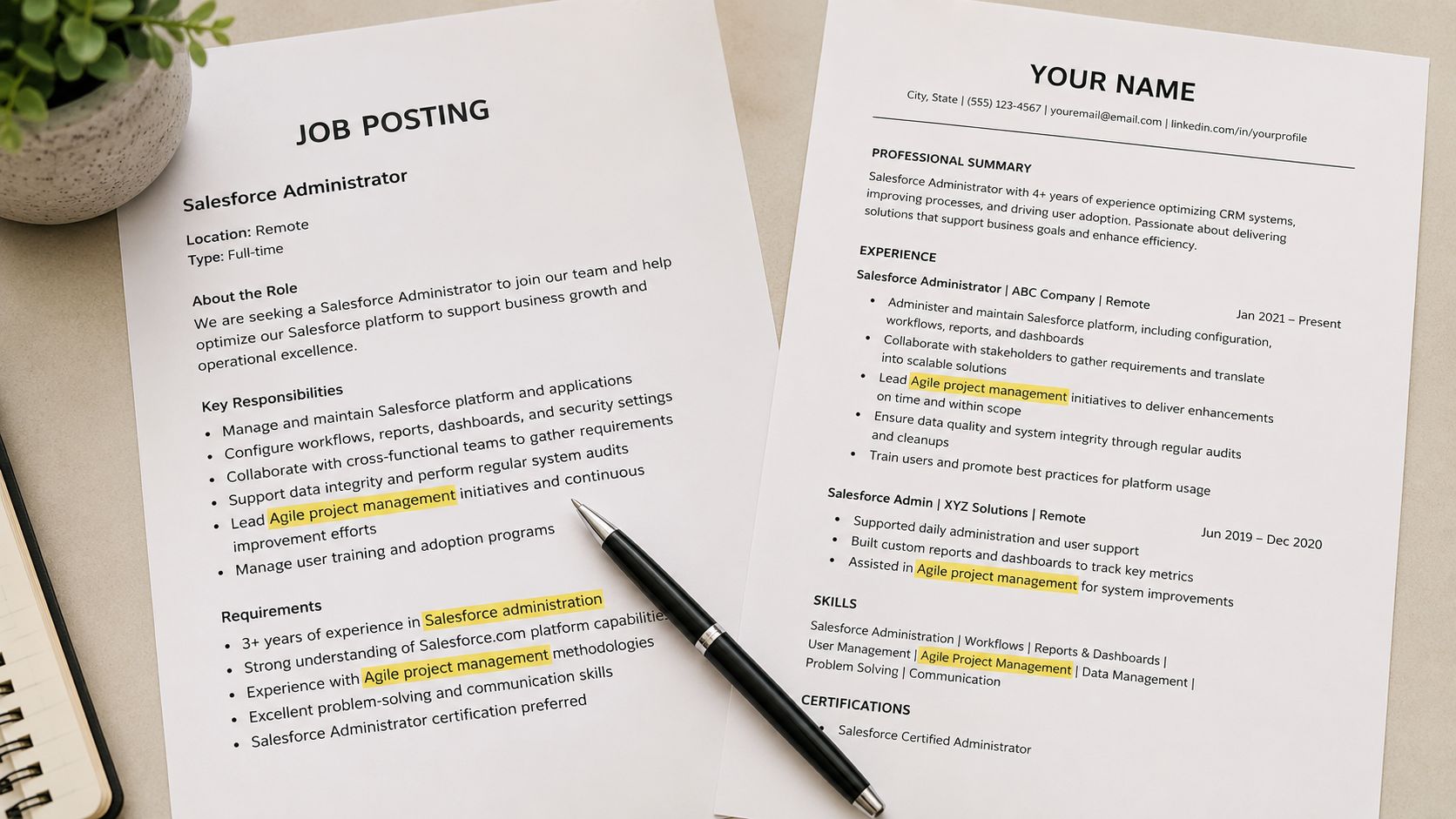
Applicant Tracking Systems compare résumé language with the requirements in a job posting. That makes the job description your most useful editing guide. Read the title, summary, responsibilities, required qualifications, and preferred qualifications. Mark repeated terms, named tools, certifications, methodologies, and exact job titles.
Use the employer's wording when it accurately describes your experience. If the posting asks for “Salesforce administration” and you've administered Salesforce, write that phrase in an experience bullet instead of relying only on “CRM management.” If the role requires “agile project management” and you've led sprints, use that phrase rather than describing the work only as “team leadership.” If the employer wants data visualization, name the tools you've used, such as Tableau or Power BI.
Keyword alignment can account for about 40% to 50% of an ATS score, according to ATS match-rate guidance. That makes relevance more important than decorative design or a long list of loosely related skills.
Practical rule: Add a keyword only when your work history can support it. A match may help software find your résumé, but unsupported claims can damage your credibility with the recruiter.
Place important terms where they carry evidence
Don't hide every keyword in a skills list. Put important terms in achievement bullets, project descriptions, and your summary when they fit naturally. “Managed Salesforce administration for a regional sales team and maintained user permissions” gives the term context. “Salesforce, Salesforce, Salesforce” gives it none.
Tools such as GetTheCall can parse a target listing and identify the terms worth prioritizing. Use that analysis as an editing aid, then check each suggested phrase against your actual background. The best ATS resume tips translate your experience into the employer's vocabulary without changing the facts.
2. Optimize Your Formatting and File Structure
A parser needs to extract names, dates, titles, skills, and bullets in the right order. Complex layouts can interrupt that process. Tables, text boxes, graphics, icons, embedded images, footers, and multi-column designs may look polished to a person while causing text to disappear or appear in the wrong sequence.
Use a single-column layout with left-aligned text and standard bullet points. Keep contact details in the main document body, not inside a header, footer, or floating text box. Replace icons that represent phone, email, or skills with written labels. Use familiar headings such as Experience, Skills, and Education, and keep spacing consistent.
Independent 2026 guidance reported a 4% parsing failure rate for plain DOCX files compared with 18% for PDF files, while single-column layouts reached 93% parsing accuracy compared with 86% for two-column layouts. The same guidance is summarized in format and keyword screening research. These results don't mean every PDF fails or every DOCX works. They do show why a simple source document is the safest place to edit.
Choose the export based on the application
The old rule that PDF always wins is no longer universal. A 2026 roundup reports that 53% of recruiters prefer a text-based PDF, 43% prefer Word, and 34% accept PDFs with light design elements, as documented in resume format statistics. Follow the employer's instructions first. If none are provided, keep a clean DOCX master and export a text-selectable PDF only after testing it.
Use an ATS-friendly template from GetTheCall or another provider only if the underlying structure stays simple. Visual polish matters after your résumé reaches a human, but it can't compensate for missing text during parsing.
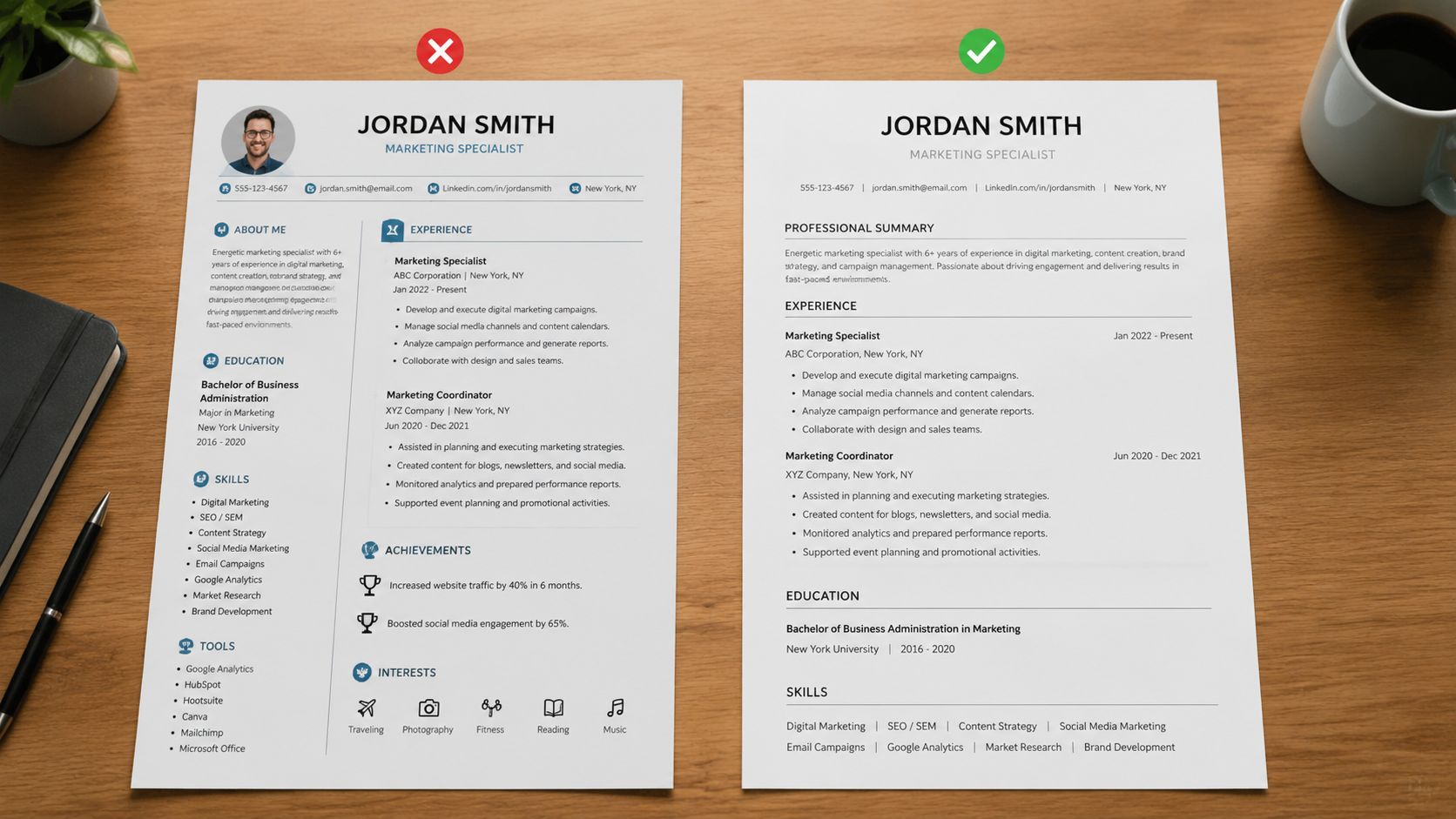
A short demonstration can help you spot layout choices that look attractive but create unnecessary parsing risk.
3. Tailor Your Résumé for Each Job Application
A generic résumé asks one document to represent every version of your career. A targeted résumé makes the relevant version obvious for one opening. Start with a master résumé that contains your verified experience, then create a focused copy for each role.
For a marketing manager opening centered on digital strategy, move content strategy achievements higher and emphasize marketing automation tools you've used. For a finance analyst role that highlights Excel, place relevant technical skills near the top and lead with spreadsheet-driven work. For a leadership position focused on team development, begin your experience bullets with mentorship, coaching, and team-building evidence.
Recent guidance treats ATS optimization as a per-application workflow, recommending that applicants rebuild the summary and skills section, rerun match checks, and distribute role-specific language naturally across the document. This guidance on ATS resume tailoring also identifies formatting, keyword mismatch, and encoding as separate failure risks. Fixing only the wording won't help if the exported file breaks the structure.
Make targeted edits, not fictional ones
Prioritize the terms that appear most important in the posting. Reorder your skills, adjust the summary, and rewrite bullets so they describe your real work using the target role's terminology. Don't add software you haven't used or claim responsibility for projects you didn't perform.
GetTheCall's Google-focused résumé workflow can help organize a version around a specific employer and role. Whether you use a tool or edit manually, preserve a clear boundary between reframing experience and inventing experience. Apply your effort to roles that genuinely fit instead of sending the same document everywhere.
4. Structure Your Experience with Quantifiable Achievements
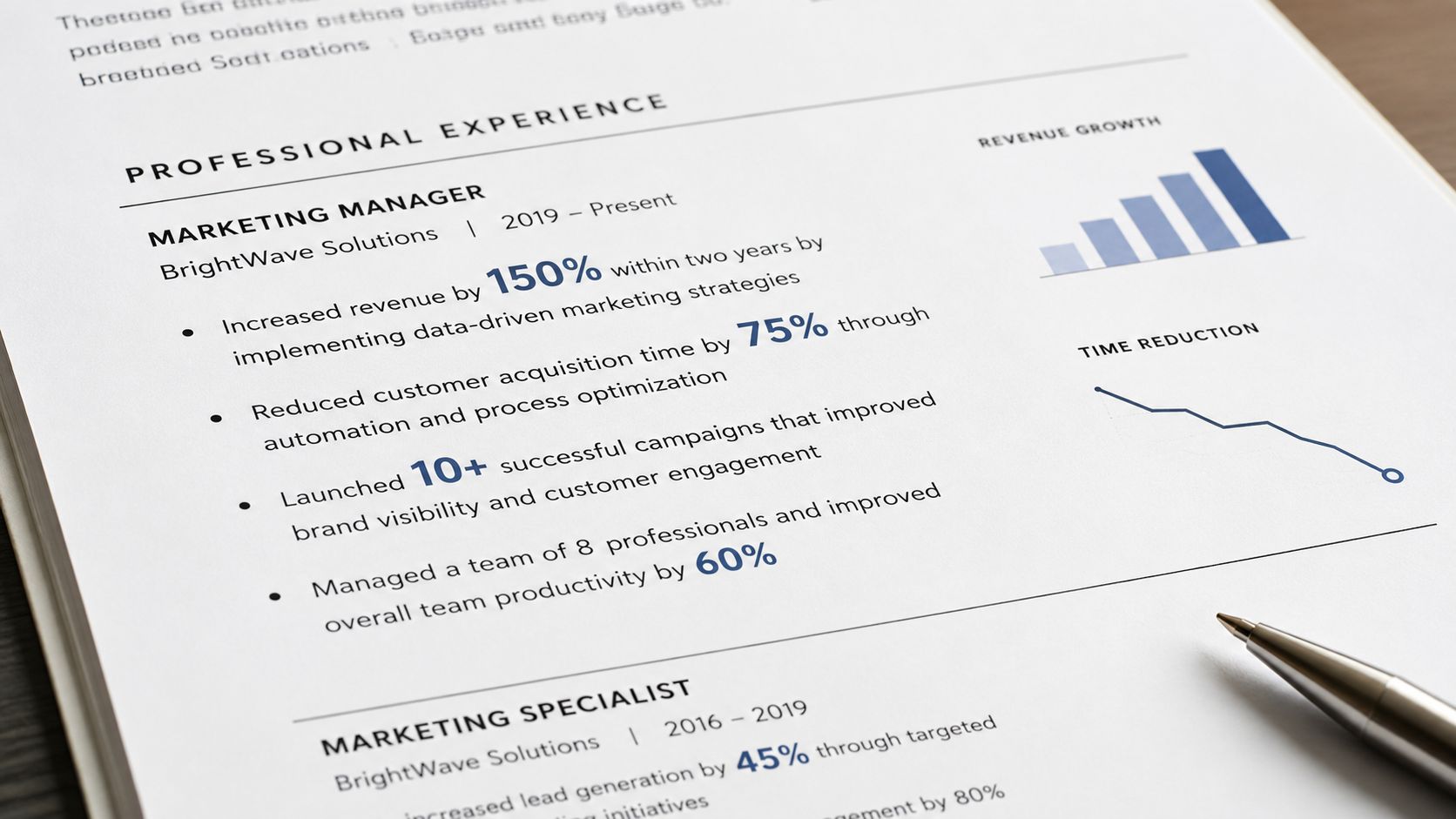
An ATS can identify terms, but a recruiter still needs to understand your contribution. Replace task descriptions with evidence. “Managed social media accounts” tells the reader what you were assigned. “Increased Instagram followers from 25K to 62.5K in eight months, driving a 40% uplift in website traffic” explains the outcome. Those figures are illustrative examples of strong résumé construction, not results to borrow unless they're yours.
Use a simple structure: action, scope or metric, result. “Implemented a new CRM system, reduced data-entry time by 25%, and saved $150K annually” is stronger when those figures are accurate and supported by your records. You can quantify team size, budget, customer volume, project count, turnaround time, or the scale of a process.
Find evidence in your own records
Review performance evaluations, project reports, dashboards, sales records, and planning documents. Use exact figures when you have them. If you don't, describe scope with terms such as “managed a regional portfolio,” “supported a cross-functional team,” or “processed high-volume requests.” Never turn a guess into a precise result.
A strong bullet doesn't need several numbers to work. One meaningful measure with context is better than a crowded line of disconnected figures. Explain what changed, how you contributed, and why the result mattered to the target role.
5. Create a Dedicated Skills Section with ATS-Friendly Language
A dedicated skills section gives the parser a clean place to find role requirements and gives recruiters a fast snapshot of your capabilities. Put it near the top, after your summary if you use one. Use plain text and group related terms in readable categories.
For a technical role, write Technical Skills: Python, SQL, Tableau, AWS, Git. For marketing, use Marketing Tools: Google Analytics, HubSpot, Mailchimp, SEMrush, Canva. For project management, list Project Management: Agile, Scrum, Jira, Asana, Risk Management, Stakeholder Communication.
Keep the list focused and defensible
List the skills most relevant to the target role, not everything you've encountered. A short, relevant section is easier to scan and easier to verify. Use the exact terminology in the posting when it matches your background. If the employer specifies Azure and you've used Azure, write Azure rather than only “cloud services.”
Separate items with commas and avoid visual devices such as rating bars, stars, or progress graphics. Then connect the most important skills to your experience bullets. If you list SQL, show where you used SQL. If you list stakeholder communication, describe the stakeholders, the project, or the decision you supported.
A skills section should make your evidence easier to find, not replace the evidence.
Remove skills you can't explain in an interview. An ATS may recognize a term, but a recruiter will notice when the rest of the résumé never demonstrates it.
6. Optimize Your Professional Summary or Headline
Your summary should identify the role you want, the expertise you bring, and the evidence that supports your fit. Keep it concise and specific. Start with a title or core specialization, then add relevant tools, industries, methods, or accomplishments.
A generic opening such as “Detail-oriented professional with a strong work ethic” uses valuable space without helping the reader understand your fit. A targeted version might say: “Product Manager specializing in SaaS platforms, Agile delivery, user research, and cross-functional collaboration.” Add an accomplishment only when it accurately reflects your background.
Career changers should connect previous work to the new role. For example, a finance professional moving into analytics can emphasize financial data analysis, SQL training, Tableau work, and the business context they already understand. The summary doesn't need to explain an entire career transition. It needs to show why the transition is credible.
Rewrite the opening for the posting
Change the target title, tools, and priorities for each application. If the posting emphasizes marketing automation, bring that language forward. If it highlights product discovery, lead with user research or roadmap work. Avoid “I” and “me,” and remove empty descriptors such as “hardworking,” “passionate,” and “team player.”
GetTheCall's LinkedIn-to-résumé guide can help you turn an existing profile into a stronger starting point. Review every generated or copied statement against your actual work before submitting it.
7. Use Standard Section Headers and Logical Organization
ATS software needs recognizable labels to categorize content. Use Professional Experience or Work Experience, not “Professional Journey.” Use Technical Skills or Core Competencies, not “Superpowers.” Use Education, not “Academic Credentials.” Creative headings may express personality, but they can make important information harder for software to classify.
Keep the order predictable: contact information, summary or headline, experience, skills, education, and certifications when relevant. Adjust the sequence when your situation calls for it. A recent graduate may place Education earlier. An experienced professional should usually lead with relevant Experience.
Make every section earn its place
Use consistent capitalization and formatting for all headings. Keep job titles, employers, locations, and dates easy to distinguish. Avoid filler sections that repeat information or distract from your qualifications. Career changers can add Projects, Certifications, or Relevant Skills when those sections provide concrete evidence for the new direction.
A guide to ATS-friendly résumé structure can help you review section order, headings, dates, and layout before you customize the content. GetTheCall templates also provide a pre-structured starting point, but inspect the final document yourself. A template is only useful when the exported text remains complete and readable.
8. Test Your Résumé with an ATS Checker Tool Before Submitting
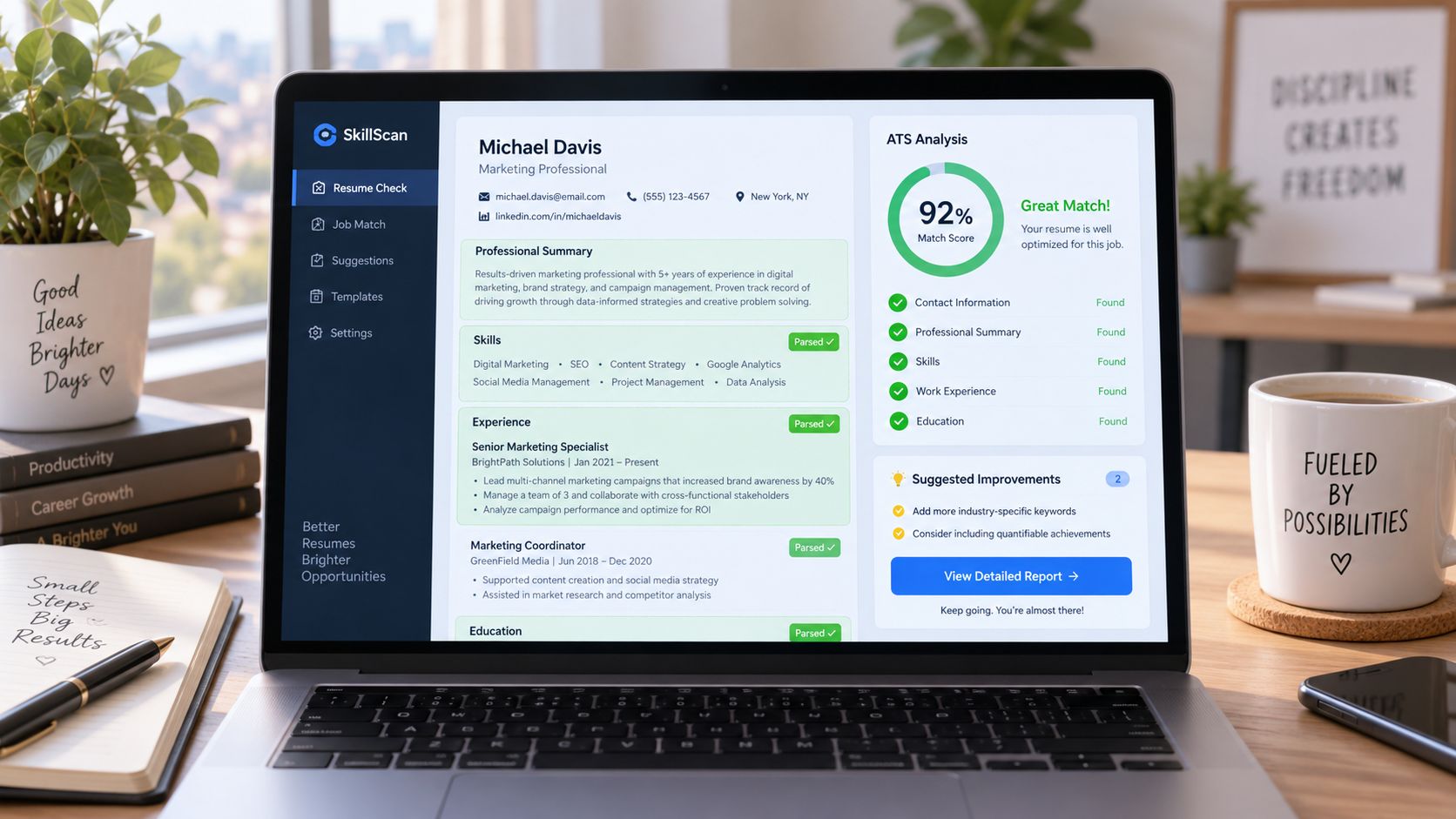
Testing is the final control before your application leaves your hands. Upload the actual résumé you plan to submit, not an earlier draft. Check whether the tool recognizes your contact information, summary, experience, skills, education, dates, and target title.
A useful checker should surface both parsing problems and keyword gaps. If it says the Skills section isn't detected, replace a creative label with “Skills” or “Technical Skills.” If the match is weak, return to the job description and add missing high-priority terms only where they describe genuine experience. If Education appears incorrectly, remove text boxes, tables, unusual indentation, or other layout features that may interrupt extraction.
Treat the score as feedback
ATS compatibility scores vary by system and shouldn't be treated as hiring guarantees. Industry guidance places useful thresholds in different bands, including 60%, 65%, 70%, and 75%, depending on the source and scoring method. One resume keyword scanner guide describes 60% or higher as generally good, with lower ranges requiring closer review. Use the score to find specific problems, not to chase an arbitrary number.
Test both your DOCX and final PDF when the application process may accept either. Open the PDF, select the text, copy it into a plain-text editor, and read the result in order. If headings vanish, columns merge, or symbols become unreadable, return to the editable file and simplify it before exporting again.
8-Point ATS Resume Tips Comparison
| Item | 🔄 Implementation Complexity | ⚡ Resource & Time | 📊 Expected Outcomes | 💡 Ideal Use Cases | ⭐ Key Advantages |
|---|---|---|---|---|---|
| Use Keywords from the Job Description | 🔄 Moderate, requires careful reading and phrasing | ⚡ Low–Moderate, small edits per posting | 📊 High ATS match; improves recruiter discovery | 💡 Role-specific applications and recruiter searches | ⭐ Direct keyword alignment; clearer role fit |
| Optimize Your Formatting and File Structure | 🔄 Moderate, reformatting and template selection | ⚡ Low, one-time setup, reuse templates | 📊 Fewer parsing errors; preserves content fidelity | 💡 Any online application where ATS parsing matters | ⭐ Ensures machine & human readability; consistent output |
| Tailor Your Résumé for Each Job Application | 🔄 High, customize bullets, order, emphasis | ⚡ Moderate–High, time per application (can be automated) | 📊 Very high match scores and relevance to hiring teams | 💡 Competitive roles or prioritized applications | ⭐ Demonstrates precise fit; improves selection chances |
| Structure Your Experience with Quantifiable Achievements | 🔄 Moderate, requires data collection and rewrite | ⚡ Moderate, time to pull metrics and verify | 📊 High impact on reviewer credibility and ATS keywording | 💡 Roles judged on results (sales, product, operations) | ⭐ Makes achievements concrete and memorable |
| Create a Dedicated Skills Section with ATS-Friendly Language | 🔄 Low, list and categorize skills clearly | ⚡ Low, quick to update per role | 📊 Improved keyword density and quick recruiter scan | 💡 Technical roles, career changers, keyword-driven searches | ⭐ Compact snapshot of capabilities; boosts parsing hits |
| Optimize Your Professional Summary or Headline | 🔄 Low–Moderate, concise, tailored wording | ⚡ Low, brief rewrites per target job | 📊 Better initial ATS ranking and recruiter attention | 💡 Senior roles, career transitions, role-first screening | ⭐ Sets context quickly; natural place for top keywords |
| Use Standard Section Headers and Logical Organization | 🔄 Low, adopt common header names and order | ⚡ Low, minimal time to implement | 📊 Reliable parsing and accurate data extraction | 💡 All applicants submitting to ATS systems | ⭐ Prevents misclassification; improves consistency |
| Test Your Résumé with an ATS Checker Tool Before Submitting | 🔄 Low, run scans and apply recommendations | ⚡ Low, quick checks; some iterations may be needed | 📊 Identifies parsing errors and keyword gaps pre-submission | 💡 Final review before applying; troubleshooting parsing issues | ⭐ Evidence-based fixes; reduces risk of rejection |
Run the Checklist Before You Apply
ATS optimization works best as a repeatable final pass, not as a design project you complete once. Start with the target listing and identify the role title, required skills, tools, certifications, and recurring phrases. Compare those requirements with your résumé, then use the employer's terminology wherever it accurately describes your experience.
Next, verify the evidence. Every important skill should connect to a project, responsibility, or achievement you can discuss. Rewrite vague bullets around actions and outcomes, but don't manufacture metrics, tools, titles, or credentials. Your résumé should be more relevant after tailoring, not less truthful.
Then inspect the structure from a parser's perspective. Confirm that the document uses a single column, standard headings, readable text, conventional bullets, and a logical order. Keep content in the main body instead of headers, footers, tables, or text boxes. Follow the employer's requested file format. If the instructions are silent, maintain a clean DOCX source and use a text-selectable PDF only after checking the export.
Finish with a live test. Run the final file through an ATS checker after significant edits and before each important application. Review missing keywords, section-detection errors, scrambled text, and encoding problems. A score is a diagnostic, not a promise. The strongest result comes from fixing the underlying issue and then testing again.
GetTheCall can support this workflow by importing an existing résumé or LinkedIn profile, analyzing a target job listing, tailoring content to the role, updating a live role match score as you edit, and exporting a submission-ready PDF. It also offers ATS checking, bullet rewriting suggestions, and multiple résumé layouts. Use it to reduce repetitive drafting, but review every recommendation so the final document remains accurate and sounds like you.
Use this order every time: parse first, align second, prove relevance third, test last. That approach protects your résumé from avoidable technical errors while giving recruiters a clear, truthful reason to keep reading.
Use GetTheCall to import your existing résumé or LinkedIn profile, match your experience to a target job listing, and review a live role match score before you apply. Visit GetTheCall to build and test a job-specific résumé with an ATS-readable export.