ATS Resume Software Compared and Chosen for Real Use
Compare top ATS resume software options side by side. See features, pricing, pros, cons, and real scenarios to pick the right tool for your job search.
You submit a résumé that accurately reflects your experience, yet it disappears into an online application portal and produces no response. The problem may not be your career history. It may be that the employer's applicant tracking system, or ATS, couldn't reliably read your layout or connect your wording with the job description.
That's why ATS resume software matters. The useful tools don't merely decorate a résumé or scatter keywords across a page. They help translate your actual experience into the language of a specific role while keeping the document readable for both software and recruiters.
Table of Contents
- Why ATS Software Has Become a Job Search Essential
- How ATS Software Actually Works Behind the Scenes
- The Features That Actually Matter in ATS Resume Software
- Comparing the Top ATS Resume Software Options in 2026
- Real World Use Cases for Different Job Seekers
- Which ATS Software Should You Actually Choose
- Quick Decision Checklist Before You Subscribe
Why ATS Software Has Become a Job Search Essential
Sarah is a marketing analyst with a strong record in campaign planning, reporting, and stakeholder communication. She applies for roles that match her background, yet her résumé uses a two-column layout, puts contact details in a header, and describes stakeholder management indirectly. Before a recruiter reviews her experience, the ATS may extract incomplete or disordered information and leave her application at a disadvantage.
That risk changes how you should approach online applications. An ATS is not just a digital filing cabinet. It converts résumé content into searchable fields such as names, job titles, skills, education, and contact details. Workable's explanation of how ATS software reads résumés identifies résumé parsing as a core function of current hiring systems.
The ATS market is established and still expanding. You do not need to identify the employer's specific system to respond appropriately. If you submit an application through a structured hiring portal, assume the résumé will be parsed before a person evaluates it.
The silent filtering problem
An independent benchmark of 2,417 ATS résumé scans found formatting issues in 62% of submitted résumés, while the average job-specific match score was 58 out of 100. Enterprise ATS platforms failed to parse nearly one in four résumés correctly. Two-column layouts were the most common formatting error, appearing in 38% of résumés and correlating with a 31% parsing failure rate. Review the full ATS resume study from ATSChecker.
A low score does not automatically reject an applicant. It does show how a capable résumé can lose visibility before a recruiter assesses its substance. Formatting creates the first risk. Wording creates the larger translation problem. You may have the required experience but miss a match because you write “working with leaders across the company” while the job advertisement uses stakeholder management.
Fix both problems deliberately. Use a practical guide to tailoring your résumé to a job description, then choose software that checks whether your wording, structure, and file type fit that application. A generic résumé builder improves appearance. ATS resume software should solve translation and submission readiness.
The right feature depends on the job seeker's situation:
| Job seeker situation | Main risk | Useful software capability |
|---|---|---|
| Career switcher | Relevant experience uses language from another field | Semantic translation and job-specific keyword suggestions |
| Mid-career professional | One résumé tries to cover several senior roles | Version control and detailed match reports |
| Student or recent graduate | Limited experience creates weak structure | Guided builder and skills-first organization |
| Career coach | Multiple clients need repeatable feedback | Scoring, comments, and shared review workflows |
Choose tools by the problem they correct. A career switcher needs help translating transferable experience. A mid-career professional needs controlled versions for distinct roles. A student needs structure without overstating limited experience. A coach needs repeatable review features across clients. That is a more useful decision than choosing a platform because it offers the most templates.
How ATS Software Actually Works Behind the Scenes
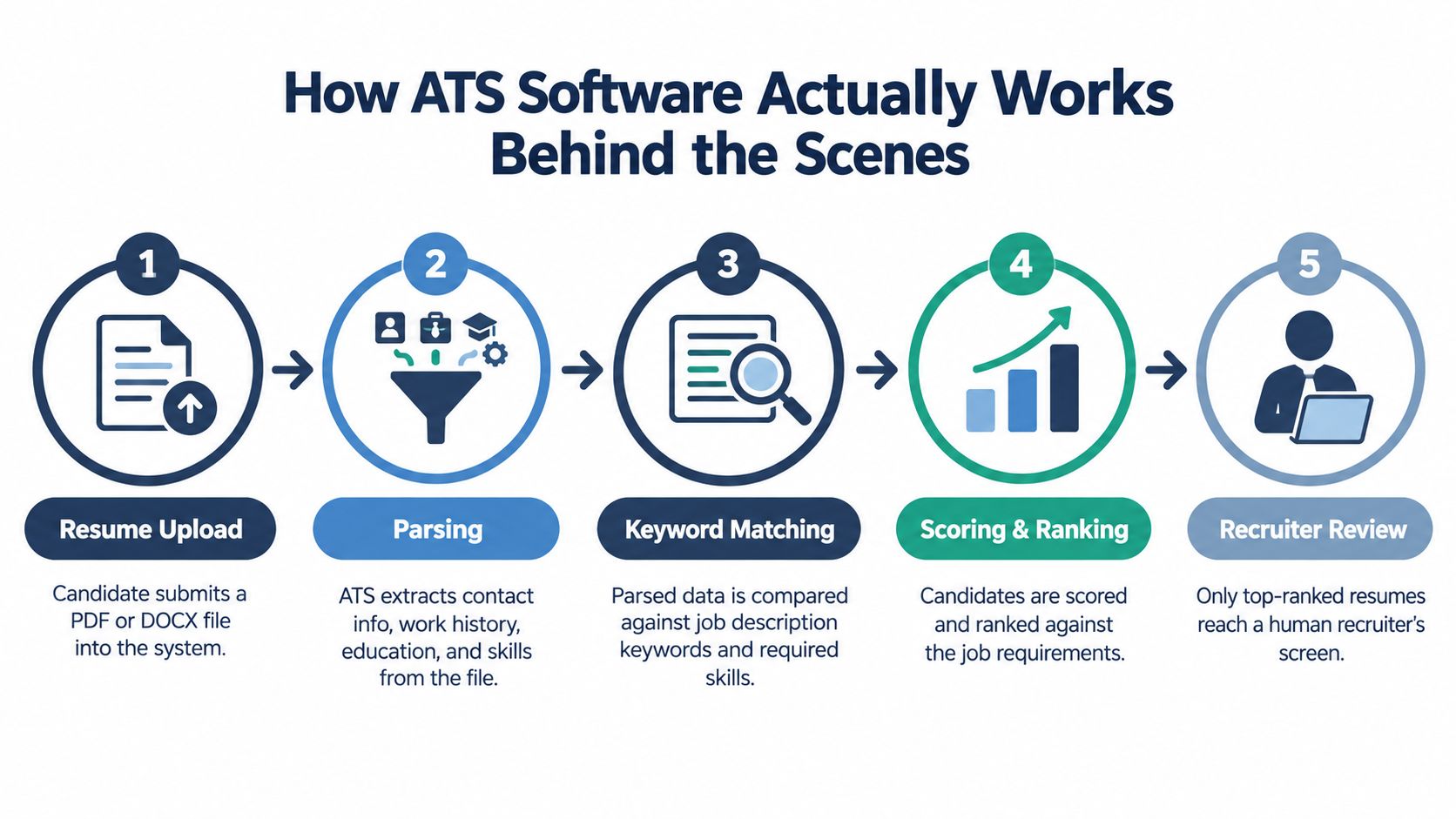
An ATS processes a résumé through a pipeline. Understanding that pipeline helps you judge tools by what they protect, not by how many templates appear on a pricing page.
Step one is parsing
The system first reads the uploaded file and extracts contact details, employers, dates, job titles, education, certifications, and skills. It then places that information into structured fields. Tables, text boxes, floating graphics, headers, and footers can interfere with the reading order, which is why a visually impressive template may perform badly in an application portal.
A neutral Indeed guide to automated résumé screening describes the broader sequence as parsing, field extraction, indexing, keyword comparison, and ranking or filtering. The important point is that keyword comparison happens after the system has tried to understand the file. A keyword that sits inside an image or an unreadable design element may not exist from the ATS's perspective.
Then the system compares your profile
After extraction, the ATS indexes your content and compares it with job-specific criteria. Those criteria can include skills, education, certifications, job titles, and terminology from the posting. Some systems rely heavily on exact matches, while others evaluate semantic relevance and context.
That distinction explains why translation matters more than keyword density. If your experience says “built performance dashboards” but the posting names Tableau or Power BI, a basic system may not connect the two. Strong candidate-side software should identify the gap and suggest a truthful way to express your existing work. It shouldn't invent a tool you haven't used.
The final stage is ranking. Recruiters see filtered dashboards and searchable profiles, often starting with candidates whose parsed information most closely aligns with the role. A résumé that never parses correctly or lacks the relevant role language can remain outside the recruiter's working shortlist.
Practical rule: Use ATS software to model the employer's workflow, but use your own judgment to verify every suggested keyword.
Candidate-side ATS tools should therefore do more than generate a document. They should simulate the sequence by producing a parse-friendly file, comparing it with a specific job ad, highlighting missing language, and showing where important terms appear. For file formats, ATSAlign's formatting guidance recommends a single-column structure, standard section labels, and a text-based PDF or DOCX according to the employer's instructions.
The Features That Actually Matter in ATS Resume Software
The best ATS resume software is usually less glamorous than the most heavily marketed option. Prioritize the features that protect parsing and improve job-specific relevance.
Start with file and layout compatibility
A tool should export a clean, single-column DOCX and a properly tagged, text-based PDF. It should preserve ordinary section labels such as Work Experience, Education, and Skills, and keep the reading order obvious. Indeed's AI résumé guidance recommends a simple single-column résumé and places priority terms in the opening summary, recent experience bullets, and skills section.
Don't choose a tool because its templates look creative. A plain structure that preserves text is more valuable than decorative columns, icons, skill bars, or embedded objects. Independent reporting cited a 4% parsing failure rate for DOCX compared with 18% for PDF, and 93% parsing accuracy for single-column layouts compared with 86% for two-column layouts, based on a 2025 analysis of 1,000 rejected résumés. Review the résumé screening analysis from One Hour Digital before deciding how much design risk to accept.
Demand job-specific analysis
A useful tool should compare your résumé with one actual job ad. It should show missing terms, awkward substitutions, weak sections, and placement problems. A generic “ATS score” without an explanation isn't enough.
Look for exact keyword visibility, context checks, role-title alignment, certification matching, and a way to retain a master résumé while creating adapted versions. ResumeFast's ATS guidance notes that some systems evaluate semantic relevance rather than exact strings alone. That makes natural repetition and contextual evidence more useful than stuffing a phrase into every section.
| Feature Category | Why It Matters | Priority Level | Red Flag If Missing |
|---|---|---|---|
| Parsing compatibility | Protects contact details, dates, headings, and experience fields | Essential | The tool can't show extracted text or reading order |
| Job-specific tailoring | Finds gaps against the role you actually want | Essential | It gives only a generic résumé score |
| Keyword placement | Shows whether important terms appear in useful sections | High | It counts terms without explaining context |
| Version control | Keeps multiple applications organized | High | You must rebuild every résumé from scratch |
| Export flexibility | Lets you follow the employer's requested format | Essential | Only a design-heavy export is available |
| Scoring simulator | Supports iterative improvement before submission | Useful | The score has no visible reasoning |
| Cover letter support | Reduces repetitive application work | Useful | It generates generic text unrelated to the posting |
| Decorative templates | Changes appearance but not fit or parsing | Low | Visual design takes priority over readable structure |
Use the ATS-friendly résumé guide from GetTheCall as a manual check alongside any software. AI-generated filler, grammar-only rewriting, and flashy templates are not substitutes for truthful experience mapping.
Comparing the Top ATS Resume Software Options in 2026
No tool wins for every applicant. Jobscan is built around comparison, Rezi emphasizes structured creation and keyword insertion, Teal combines tailoring with application tracking, Enhancv prioritizes presentation, Resume Worded focuses on feedback, and Zety guides beginners through the writing process.
These are editorial fit assessments, not universal rankings. Pricing, plan limits, and included features can change, so check each provider's current terms before subscribing.
| Tool | Best For | Standout Feature | Pricing Model | Free Plan |
|---|---|---|---|---|
| Jobscan | Applicants who want detailed job-to-résumé comparison | Match-rate benchmarking and reports | Subscription or limited access, verify current terms | Limited checks may be available |
| Resume Worded | People who want structured writing feedback | Résumé scoring and improvement suggestions | Free and paid access, verify current terms | Limited feedback available |
| Teal | Active applicants managing several applications | Application tracking with tailoring support | Free tier plus paid options, verify current terms | Core access available |
| Rezi | Students and first-time applicants | Guided builder and keyword insertion | Free and paid tiers, verify current terms | Limited builder access |
| Enhancv | Design-sensitive or presentation-led roles | Strong visual layouts | Paid options with current terms to confirm | Limited access may be available |
| Zety | Beginners who want step-by-step prompts | Guided résumé creation | Paid download or subscription model, verify current terms | Builder access may be limited |
Match the tool to the bottleneck
Choose Jobscan when you already have strong experience but need a precise comparison against a demanding posting. Its weakness is scope. It can help diagnose fit, but it isn't the most complete application workspace.
Choose Rezi when the main challenge is structure, especially early in your career. Its guided approach can help you organize thin experience sections, although its formatting can feel rigid. Teal makes more sense when your job search includes repeated applications and you need to track target roles, documents, and tailoring work in one place.
Enhancv is the sensible option for design-sensitive roles where presentation contributes to the human review, provided the exported file remains parse-friendly. Resume Worded suits applicants and coaches who want direct feedback on clarity, impact, and structure. Zety is approachable for beginners, but guided prompts can't replace careful tailoring to each job description.
One principle should govern the comparison: a tool that produces a beautiful generic résumé is less useful than one that helps you express genuine experience in the employer's language.
Real World Use Cases for Different Job Seekers
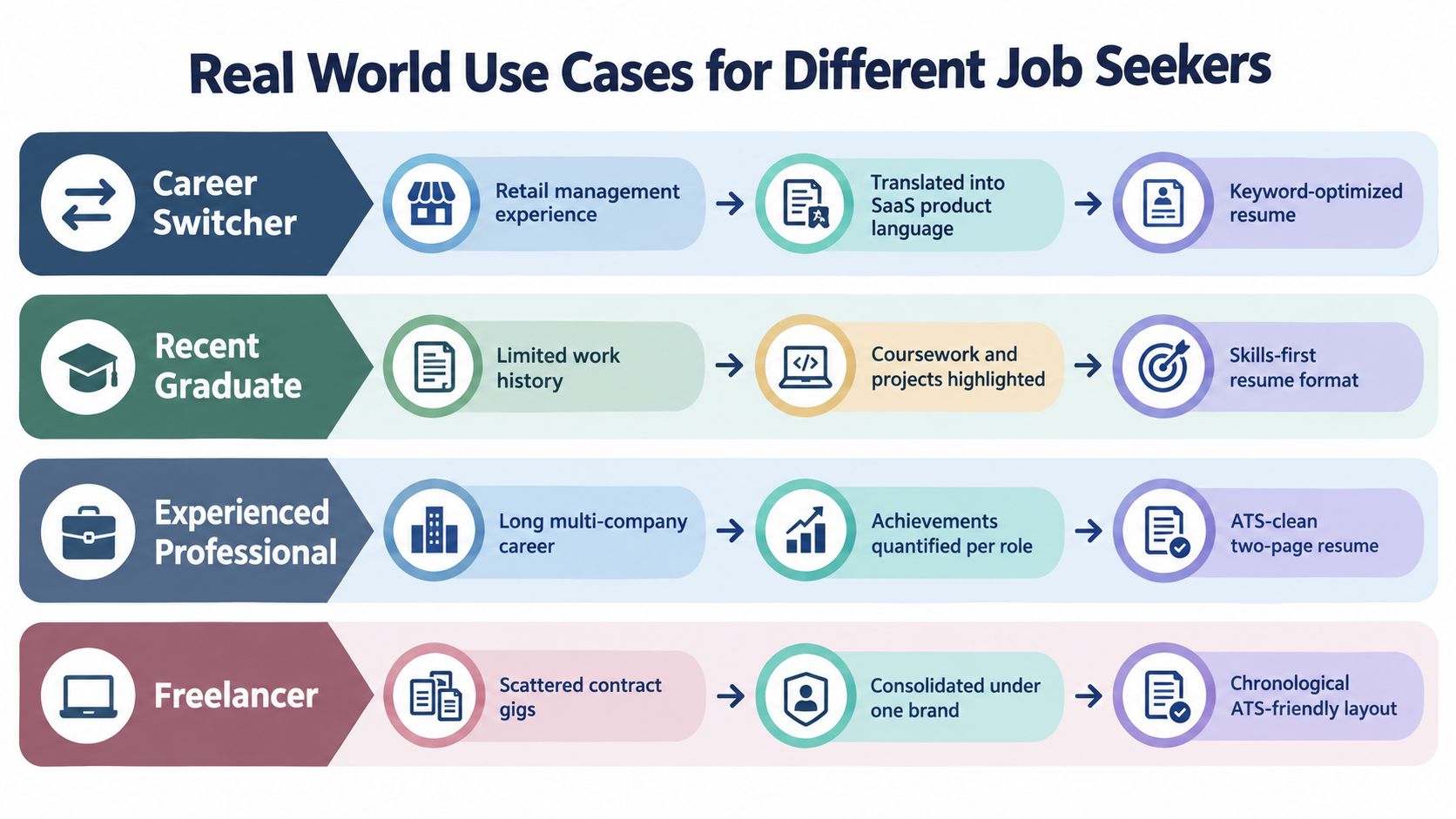
The right workflow depends on what is blocking your applications. A career switcher needs translation. A senior professional needs controlled variation. A student needs structure without exaggeration. A coach needs repeatable review.
Career switcher
A retail manager may have experience with forecasting, team performance, process improvement, and cross-functional coordination. A SaaS product role may describe related work through terms such as product operations, stakeholder management, customer feedback, or go-to-market coordination.
Teal can help surface language from the target posting while the candidate verifies every suggestion against real experience. The goal isn't to pretend retail management was product management. It's to explain transferable work in terms the new field recognizes.
Mid-career professional
An engineering manager applying for platform leadership, developer productivity, and infrastructure roles shouldn't send one master résumé unchanged. Jobscan is useful for comparing the same evidence against each posting and identifying which achievements deserve emphasis in each version.
The master file remains broad. Each version narrows the summary, skills, and recent achievements to the specific role. This approach protects accuracy while preventing a long career history from becoming an unfocused catalogue.
Student or recent graduate
A graduate with limited employment history needs organization, not inflated claims. Rezi's guided builder can help place coursework, projects, internships, tools, and relevant skills into recognizable sections.
A project should remain a project. Don't turn classroom work into professional employment. Clear headings and honest descriptions give the ATS usable information and give recruiters a credible reason to continue reading.
Career coach
A coach supporting many clients needs a repeatable process. Resume Worded can provide structured scoring and feedback, while the coach adds judgment about positioning, evidence, and career direction. For a closer formatting and keyword review, use an ATS résumé checker before a client submits an application.
A score is a diagnostic, not a hiring decision. The coach still has to decide whether the wording accurately represents the client.
Which ATS Software Should You Actually Choose
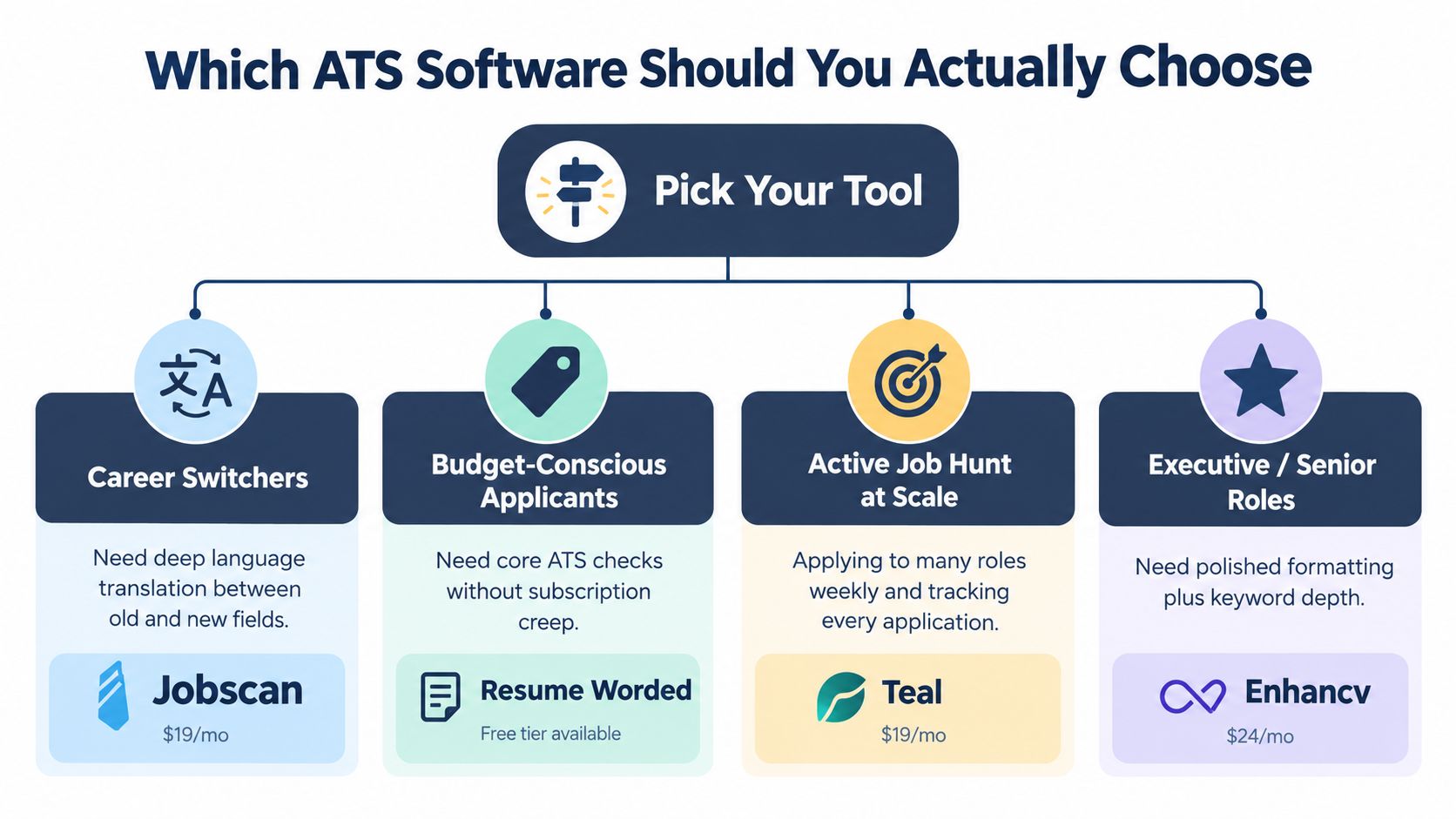
Choose the tool that fixes your specific failure, not the one with the longest feature list.
Career switchers should start with Teal's free tier. It gives you a practical way to organize applications and identify the language used in target roles without paying before you know whether the workflow suits you. Upgrade only when your application volume and tracking needs justify it. If the main problem is deeper translation between industries, add a comparison-focused tool rather than rewriting your history blindly.
Mid-career professionals should use Jobscan for role-specific reports. Pair it with Enhancv only when the target industry rewards polished presentation and the exported file remains structurally safe. Don't pay for design if your résumé is failing because the employer's system can't read it.
Students and first-time applicants should begin with Rezi. A guided builder is valuable when you need help deciding what belongs in a summary, project section, or skills list. Use the lowest paid tier only if the free access prevents you from producing a complete, editable résumé. The software should organize your evidence, not manufacture it.
Coaches and résumé writers should consider Resume Worded Premium when repeated scans, consistent feedback, and client workflows save meaningful review time. If you support only occasional clients, free access and manual review may be enough.
Budget matters, but time saved per application matters more. A subscription is justified when it helps you tailor accurately across the roles you pursue. It isn't justified by a large template library or an impressive score with no explanation.
Quick Decision Checklist Before You Subscribe
Run one real résumé and one real job description through the tool before paying. A polished demo tells you very little about how the software handles your actual file.
- Identify the bottleneck: Is your problem parsing failure, weak structure, or translation between your experience and the job ad?
- Test the exact file: Does the tool read your DOCX or text-based PDF in the right order, with contact details, dates, and headings intact?
- Run a real comparison: Does it identify relevant keywords and requirements from your target job title, rather than produce a generic score?
- Match the plan to volume: Does the free or paid limit cover how many applications you submit?
- Protect your master résumé: Can you create customized versions without rebuilding your career history each time?
- Check the commercial terms: Are the trial, refund, cancellation, data retention, and export policies clear?
Don't judge a tool by its score alone. Read the suggested changes and reject anything that adds a skill, title, certification, or achievement you can't defend in an interview.
If you're a career switcher, prioritize translation. If you're a mid-career professional, prioritize version control and role-specific reports. If you're a student, prioritize structure. If you're a coach, prioritize repeatable feedback and client management.
GetTheCall turns a LinkedIn profile or existing résumé into a job-specific, ATS-optimized document, compares it with a target listing, and provides a live role-match score while you edit. Try the GetTheCall free ATS résumé checker to find parsing and keyword issues before your next application.