ATS Resume Review How to Check and Improve Your Match
Learn what an ATS resume review is, how to run one, read your match report, and fix parsing and keyword issues to improve your ATS resume review score.
You've crafted your résumé, checked the spelling, and applied to a role that looks like a strong fit. Then the silence starts. No rejection email, no recruiter message, and no clear explanation of whether anyone ever saw your application.
An ATS resume review can make that process less mysterious. It doesn't guarantee an interview, but it can show whether your résumé is readable by applicant tracking software and whether its content reflects the role you're targeting. The most useful way to approach the review is as a two-pass diagnostic: check parseability first, then evaluate role match.
Table of Contents
- What an ATS Resume Review Actually Checks
- How to Get an ATS Resume Review Without Guesswork
- How to Read Your Match and Parse Report Like a Recruiter
- Fixing What the Review Finds From Formatting to Keywords
- Using GetTheCall to Tailor and Export an ATS Ready Resume
- Keep Your Resume ATS Ready for Every Application
What an ATS Resume Review Actually Checks
Applicant tracking systems are now standard infrastructure for large-scale hiring. A 2025 review of resume statistics reported detectable ATS usage on 97.8% of Fortune 500 career sites, equivalent to 489 of 500 companies. That means many applications for major employers pass through an automated parsing and ranking layer before a recruiter reviews them.
That doesn't mean a robot instantly rejects every imperfect résumé. A more recent analysis of ATS screening claims found that the widely repeated claim that 75% of resumes are automatically rejected isn't supported by a published dataset. The same review described ATS tools as part of a process that can combine parsing, ranking, and human judgment.
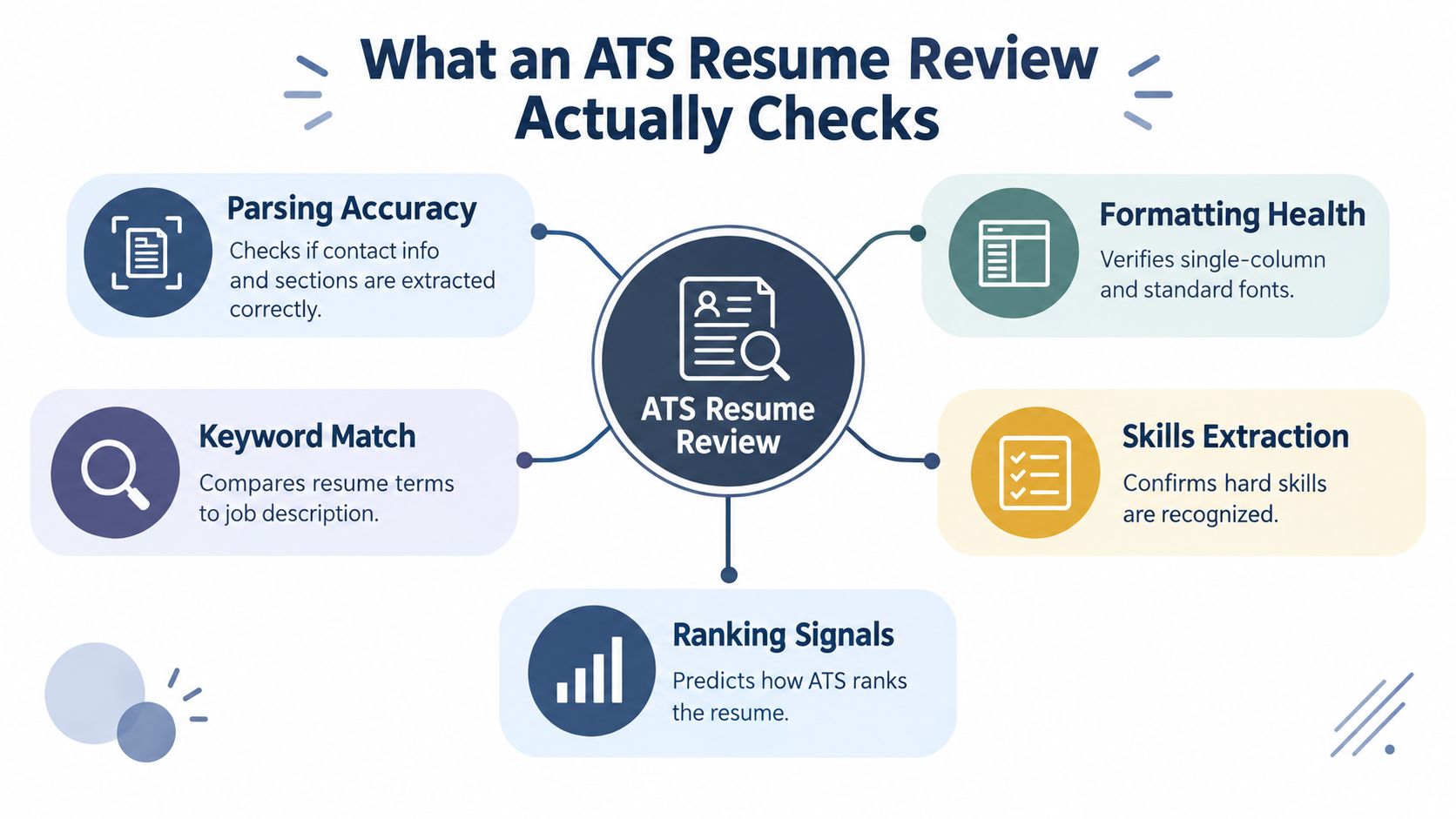
Consider what happens when a recruiter receives your application. The ATS may extract your name, email address, phone number, employers, job titles, employment dates, education, certifications, and skills. It may also identify section headings and compare the language in your résumé with the requirements in the job description.
The first question is whether the file can be read
A résumé can look polished on screen and still create problems during extraction. A two-column design may place dates beside the wrong employer. A table may cause skills to appear in an unexpected order. Contact details in a header or footer may not be associated with your main profile.
A strong review therefore checks more than whether the document opens. It should tell you whether:
- Contact information was extracted accurately.
- Work history appears under the correct employers and dates.
- Education and certifications were recognized as separate sections.
- Skills were identified as text rather than treated as decorative content.
- Headings and chronology make sense to the parser.
The second question is whether the content fits
Once the system can read the document, it can assess relevance. It may compare your job titles, technical skills, qualifications, and accomplishment language with the target posting. A résumé for a project manager might mention planning and coordination, but a posting may specifically ask for Agile, stakeholder management, or risk management. If those ideas are part of your experience, using the employer's language makes the connection easier to recognize.
That's why a useful ATS resume review should separate formatting health from semantic match. A clean file with weak role alignment needs different edits from a highly relevant résumé that the parser can't organize correctly. Treating both problems as “add more keywords” wastes time and can make the résumé less credible to the person who eventually reads it.
Practical rule: If the system can't identify your experience correctly, keyword tuning won't rescue the document.
How to Get an ATS Resume Review Without Guesswork
Start with the résumé you'd submit, not a simplified test version. Prepare a clean PDF or DOCX, then collect the target job URL or copy the complete job description into the review tool. The job-specific input matters because a generic scan can identify structural problems, but it can't judge whether your language fits a particular opening.
You can use a free ATS checker for an initial health check. That's useful when you're unsure whether your headings, dates, contact details, and skills are being extracted properly. A role-specific tool is more helpful when you're applying for a competitive position or changing industries, because it compares your document with the actual requirements instead of giving you a broad checklist.

A practical review routine looks like this:
- Upload the actual file: Use the PDF or DOCX version you plan to submit. Don't evaluate a Word document and then send a heavily designed PDF without checking it again.
- Add the target posting: Paste the job description or provide its URL when the tool supports job-listing parsing.
- Run the parse check: Confirm that names, employers, titles, dates, education, and skills appear in the right fields.
- Review the role match: Look for missing requirements, weak title alignment, and terminology that differs from the posting.
- Make one category of edits at a time: Fix layout problems before changing keywords. This makes it easier to understand which edit improved the report.
- Run the scan again: Recheck the same file after editing, then open the exported document yourself to confirm that it remains readable.
If you already keep your career history on LinkedIn, importing a profile URL can reduce retyping. Uploading an existing PDF or DOCX works well when the current résumé contains accurate dates and accomplishments. Whichever input you choose, verify the extracted information manually. Automated import saves effort, but it shouldn't replace your judgment.
For a direct job-specific check, you can use the GetTheCall ATS resume checker to review structure and match quality against a target description. The important point isn't the existence of a single score. It's whether the report gives you clear evidence about what the system read and which role requirements remain unsupported.
A short video can also help you see how a review fits into the broader application workflow.
Be cautious with any checker that treats its score as a hiring verdict. Different employers configure their systems differently, and a report is most useful as a diagnostic, not a promise. The best tools identify specific problems you can correct without encouraging hidden text, keyword stuffing, or claims you can't support.
How to Read Your Match and Parse Report Like a Recruiter
A recruiter won't read an ATS report as a single pass or fail result. They'll want to know two things: did the system capture the candidate accurately, and does the candidate appear relevant to this job? Read your report in that same order.
Start with parse health. If your name is missing, your phone number is attached to the wrong field, or your most recent employer has no dates, the rest of the report becomes less trustworthy. The same applies if the parser places your education inside your work history or fails to recognize a dedicated skills section.
Parse health shows whether the résumé survived extraction
Check each field against the original file:
| Report area | What to verify | Why it matters |
|---|---|---|
| Contact details | Name, email, phone, and location appear correctly | Recruiters need accurate contact and eligibility context |
| Work history | Employers, titles, dates, and bullets stay together | Misaligned data can distort your career progression |
| Education | Schools, degrees, and relevant certifications are recognized | Required qualifications need to be visible |
| Skills | Technical tools and competencies are extracted as text | Skills hidden in graphics may be missed |
| Section labels | Experience, Education, Skills, and Certifications are clear | Standard labels help systems classify content |
The 2026 ATS resume study illustrates why this first pass deserves attention. In a sample of 2,417 anonymized scans, formatting issues appeared in 62% of resumes, the average job-specific match score was 58 out of 100, and enterprise ATS platforms failed to parse nearly one in four résumés correctly. Those figures don't establish a universal hiring threshold. They show why a middling score may reflect either weak alignment or a document that wasn't read properly.
Semantic fit tells you what the employer may recognize
After parse health, inspect the match elements. Look for the target title, required tools, certifications, responsibilities, and industry terms. Separate must-have requirements from preferred qualifications. A missing preferred phrase may be worth addressing, but it shouldn't distract you from a missing license, authorization detail, or core skill that the posting treats as essential.
A good report may show an overall match score, keyword gaps, formatting flags, and section recognition. Use these as prompts for decisions:
- Low parse health: Rebuild the structure before editing language.
- Strong parse health, weak match: Tailor the résumé to the role.
- Good keyword coverage, weak evidence: Rewrite bullets so the skill appears in context.
- Missing eligibility information: Clarify location, work authorization, licenses, or minimum qualifications where relevant.
The resume tailoring guide from GetTheCall is useful for thinking beyond keyword totals. A term in a skills list can help recognition, but a related accomplishment in your experience section gives both the system and the recruiter stronger context.
Fixing What the Review Finds From Formatting to Keywords
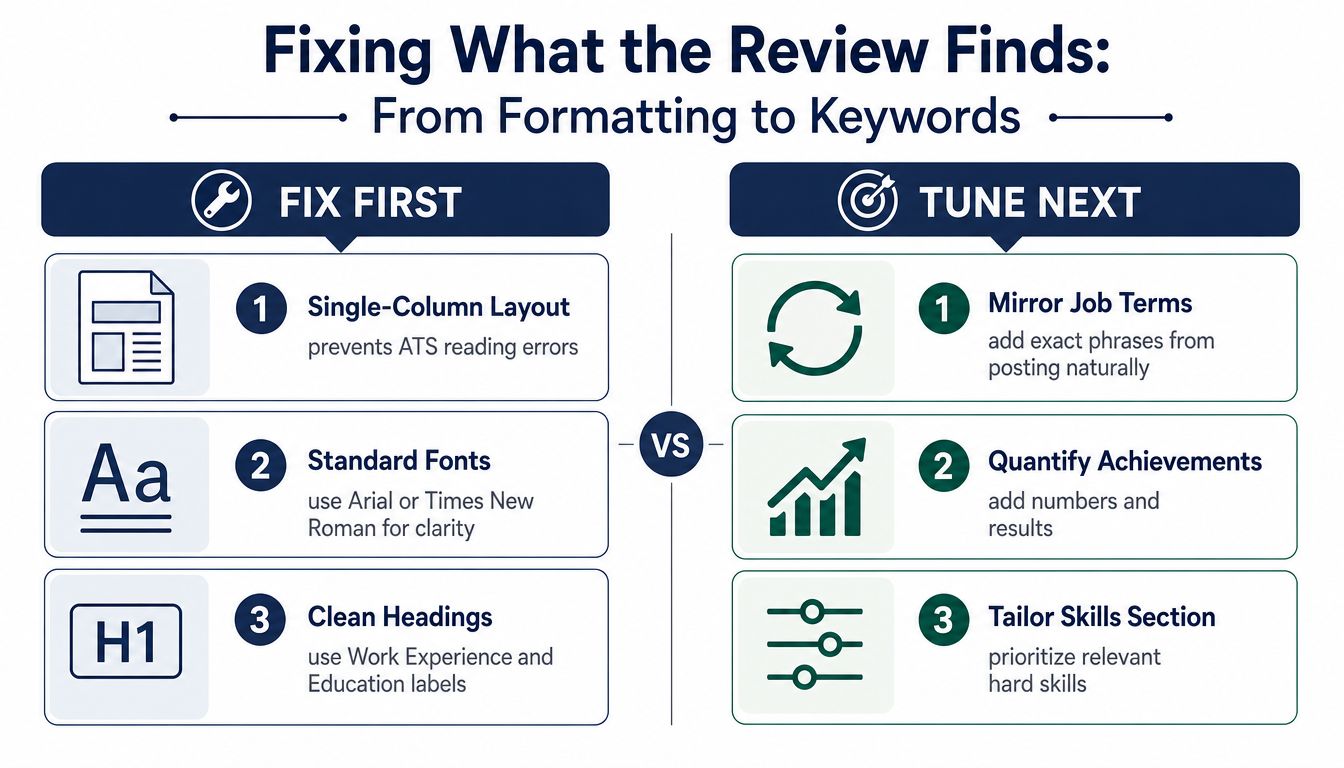
Fix the document in the order a parser experiences it. Start with the file structure, then improve the wording. This prevents you from spending time adding role terms to a résumé whose experience section is being extracted incorrectly.
Independent resume-scan data points to structural risks. A 10,000-resume ATS rejection analysis reported that 34% of rejected resumes had at least one critical format failure, with multi-column work history, tables, headers or footers, and graphics among the common issues. The same source reported that plain-text DOCX failed parsing at roughly 4%, compared with 31% or more for tables and multi-column layouts. These findings support a simple design choice: make the document easy to read from top to bottom.
Use a single-column layout, standard fonts such as Arial or Times New Roman, and conventional section labels including Work Experience, Education, and Skills. Chronological or hybrid formats are generally easier to interpret than designs that scatter dates and employers across visual panels. Keep critical contact information in the main body, not in a header or footer, and make sure the text can be selected and copied.
Common ATS Flags and Quick Fixes
| Review Flag | What It Means | Fix to Apply |
|---|---|---|
| Multi-column work history | The parser may read jobs and dates in the wrong sequence | Rebuild the experience section in one column |
| Tables in experience or skills | Text may be extracted cell by cell or omitted | Replace tables with plain text and bullets |
| Contact details in headers or footers | Contact fields may not be captured reliably | Move details into the main document body |
| Skills inside graphics or icons | The system may not recognize the words | Write each skill as selectable text |
| Creative section names | The system may not classify the section correctly | Use standard headings such as Experience and Education |
| Complex visual styling | Layout elements can interrupt extraction | Remove decorative boxes, images, and unusual structures |
The ATS-friendly resume guidance from CareerForge AI also recommends standard fonts, chronological or hybrid formats, relevant job-description keywords, and avoiding images or complex layouts. A clean design still has to work for a human reader, so use whitespace, restrained bolding, and consistent bullets rather than stripping away all visual hierarchy.
Tune language only after the structure works
Mine several postings for the same type of role instead of copying one description blindly. A 2026 keyword guide recommends reviewing 5 to 8 real postings and treating a word that appears in at least 3 of 5 postings as a core keyword. Separate recurring must-have terms from preferred language, then include only the concepts you can support.
One 2026 ATS keyword guide recommends using 15 to 25 total keywords, including 5 to 8 terms taken directly from the job description, with strong terms placed in the target title, summary, skills, and experience sections. Don't force every term into one paragraph. Spread them across relevant bullets and explain what you did with the tool, method, or responsibility.
For example:
- Before: “Managed projects and worked with different teams.”
- After: “Managed cross-functional project planning, tracked risks, and coordinated stakeholder updates across product and operations teams.”
The second version should only be used if it reflects your actual work. It adds recognizable role language while preserving meaning. Never claim experience with a platform, certification, or method just because a posting mentions it.
For more formatting and tailoring guidance, use this ATS-friendly resume guide as a reference, then validate the edited file with the same two-pass review.
Using GetTheCall to Tailor and Export an ATS Ready Resume
An integrated workflow can reduce the formatting drift that happens when you move between a profile, a writing tool, a design application, and a PDF exporter. GetTheCall is one example of a web-based option that imports a LinkedIn profile URL or an existing PDF, DOC, or DOCX, then uses the extracted career history as the basis for a targeted résumé.

The workflow starts with the source information. Importing a profile or uploading a résumé gives the tool existing roles, dates, skills, and accomplishments to work from. You should still check the imported details, especially employment dates, title wording, and older experience that may be incomplete online.
Next, provide the target job listing URL. The system can parse the posting for required skills, responsibilities, and keywords, then map those requirements against the experience in your source document. That distinction matters. A customized résumé should connect the role language to verified experience rather than generate unsupported claims.
Use the live score as an editing signal
As you revise the résumé, the ATS Role Match score updates with the edits and suggestions. Use that feedback to test specific changes:
- Does adding the exact target title improve alignment without misrepresenting your background?
- Does moving a relevant skill into an experience bullet make its context clearer?
- Does removing a decorative layout element improve parse health?
- Are required qualifications still missing after the wording changes?
The platform also provides AI-powered rewriting for bullets and sections, with prioritized suggestions. Treat those suggestions as drafts, not final statements. Keep the wording that accurately describes your contribution, and reject anything that adds an achievement, tool, or responsibility you didn't have.
Once the content is ready, you can switch among 20 plus professional templates with one-click style changes. Choose the layout that keeps the text structure simple and readable. A polished appearance is useful only when it doesn't compromise extraction.
The final stage is export. A high-quality PDF preserves the selected design while keeping the résumé suitable for ATS submission. Open the exported file, select text, check the reading order, and run the parse review again. That last verification catches problems introduced during rendering.
Keep Your Resume ATS Ready for Every Application
An ATS-ready résumé isn't a single permanent file. Each opening emphasizes different responsibilities, tools, eligibility conditions, and terminology, so a static document may undersell your experience even when the underlying qualifications are strong.
Use the same two-pass routine before each submission:
- Parse health: Confirm the file type, selectable text, contact details, standard headings, chronology, and skills extraction.
- Role match: Compare the target title, required qualifications, recurring keywords, responsibilities, location, and work authorization details with your résumé.
- Human readability: Read the document as a recruiter would. Every keyword should fit a clear sentence and support a credible accomplishment.
- Final validation: Re-run the review after edits and inspect the exported file, not just the editor view.
Eligibility deserves deliberate attention. Recent recruiter-facing evidence suggests that systems may apply filters for work authorization, licenses, minimum qualifications, or location, even when the résumé parses correctly, as discussed in this analysis of ATS filtering and eligibility constraints. If a requirement applies to you, make the relevant information clear and accurate rather than assuming keyword alignment will cover it.
Save versions for each role or employer so you don't overwrite a strong application. Students can use this routine to clarify projects and skills, career switchers can translate relevant experience into the target role's language, and mid-career professionals can emphasize the requirements that matter most for each opening. The habit is simple: make the file readable, make the fit visible, and verify both before you apply.
GetTheCall helps you import a LinkedIn profile or existing résumé, compare it with a target job listing, and refine the document using a live ATS Role Match score. Visit GetTheCall to run your next review and prepare a job-specific, ATS-ready PDF before submitting your application.