How to Build an ATS Resume Free in 2026
Build an ATS resume free in 2026 with our step-by-step guide. Learn formatting rules, free tools, and a quick ATS check before you apply.
You found a role you want. You wrote a few bullets, hit upload, watched the confirmation page appear, and then nothing happened. Days pass. Maybe weeks. You start wondering whether the company ghosted you or whether your résumé never really made it into the process at all.
That second possibility is more common than many think. If you're trying to build an ATS resume free, the first problem isn't sounding impressive. It's getting your file read correctly.
Most advice gets this backward. It starts with keywords, score badges, and optimization tricks. I think that's the wrong order. If the parser scrambles your experience, drops your contact info, or misreads your dates, your keyword score doesn't matter. A pretty PDF that looks sharp to you can still be structurally weak inside an ATS.
That matters because ATS use is basically standard in large-employer hiring. Jobscan's 2025 analysis found that 97.8% of Fortune 500 companies, or 489 out of 500, used an applicant tracking system according to Apply Mate's ATS statistics coverage. The same coverage also notes that the old claim that most résumés are auto-rejected isn't well supported, and a 2025 recruiter survey cited there found 92% of recruiters said their ATS does not auto-reject résumés. In plain English, the ATS usually sorts, parses, ranks, and routes. It doesn't need to reject you outright to hurt you.
A good ATS résumé is not a design project. It's a clean data file for software first, then a persuasive document for a recruiter second. Build it in that order and you'll avoid a lot of silent failures.
Table of Contents
- When Hitting Apply Does Not Actually Mean Applying
- What an ATS Actually Does to Your Resume
- Formatting Rules That Survive Any ATS
- Matching Your Resume to the Job Description
- Using a Free ATS Resume Checker the Right Way
- Handling Gaps and Career Switches Without Faking It
- Your Final Pre-Submit Pass
When Hitting Apply Does Not Actually Mean Applying
The moment after submission feels final. It isn't.
When you click Apply, you're usually starting the screening process, not finishing it. Your first reader is often software that has to extract your text, identify your sections, and map your content into fields a recruiter can search. If that process breaks, your application can become incomplete without you ever seeing an error.
Your résumé has two jobs
One document has to satisfy two very different readers:
- The parser first: It needs clear text, standard headings, stable dates, and a layout the system can read in order.
- The recruiter second: It needs relevance, fast readability, and evidence that you can do the job.
- The hiring team later: It needs a truthful, defensible record of your work.
Most rejected applications fail at the first job. Candidates obsess over wording while sending files with columns, tables, icons, and headers that turn clean experience into junk data.
Practical rule: If your résumé can't survive extraction, it can't compete on content.
Stop treating polished PDFs as inherently better
A visually polished PDF is not automatically the safest option. Human eyes like clean spacing and controlled layout. ATS software cares about whether the text can be extracted and classified without distortion.
This is why so many free résumé builders create trouble. They give you a modern template, a score, and a false sense of safety. The file looks finished. The structure often isn't.
A stronger approach is simple. Build the résumé as if you're engineering a document that has to pass a technical intake test. Once the structure is reliable, then tailor the language to the role.
That's the sequence that works. Parsing reliability first. Keyword alignment second.
What an ATS Actually Does to Your Resume
An ATS doesn't look at your résumé the way a recruiter does. It treats the file like incoming data.
A separate ATS guide lays out the core workflow: the system ingests the file, extracts text, identifies sections like Work Experience and Skills, maps keywords against the job description, and assigns a relevance score, as summarized by CV Review's explanation of ATS resume keywords.
Early in that process, structure matters more than phrasing.
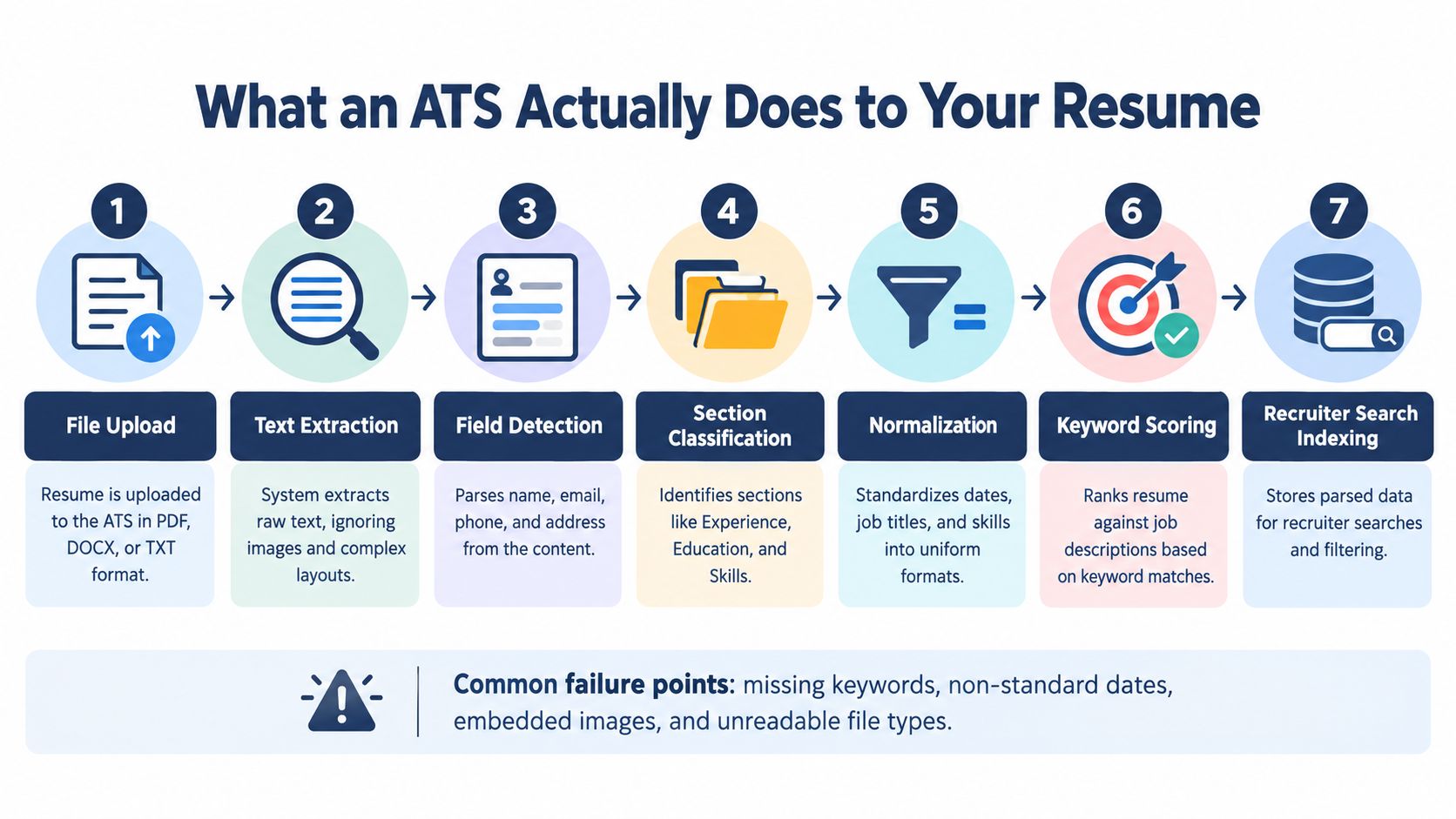
The seven things happening behind the upload button
File upload
You submit a PDF, DOCX, or text-based file into a platform like Workday, Taleo, Greenhouse, or iCIMS.Text extraction
The system pulls readable text from the document. If key content is trapped in an image, graphic, or awkward layout, extraction can already fail here.Field detection
It tries to find your name, email, phone, location, and other basic fields. If your phone number sits inside a header or a fancy contact block, it may get missed.Section classification
The parser looks for recognizable blocks such as Work Experience, Education, and Skills. Creative labels can confuse this step.Normalization
Dates, job titles, and skill phrases get standardized into formats the system can compare and search.Keyword scoring
Only now does the system compare your content to the posting language.Recruiter indexing
Your parsed data becomes searchable inside the employer's database.
Different platforms behave differently. Workday, Taleo, Greenhouse, and iCIMS don't all break on the same things, which is why generic free builders often miss the problem.
A short visual helps if you've never seen that pipeline laid out clearly:
Where resumes get damaged before scoring starts
The most common failures are structural:
- Images instead of text: Logos, icons, and design elements add visual polish but can hide content from extraction.
- Two-column layouts: A parser may read across columns in the wrong order and splice unrelated content together.
- Header and footer content: Contact info or links placed there can be skipped.
- Tables and text boxes: These often turn into broken fragments.
- Non-standard headings: Labels like “My Journey” or “What I Bring” may not map cleanly to expected fields.
Your résumé is not just a page. Inside an ATS, it's a block of structured text that either stays intact or falls apart.
If you remember one thing, remember that. Most “ATS resume free” advice starts at the scoring step. The parser starts earlier.
Formatting Rules That Survive Any ATS
If you want a reliable baseline, make the résumé boring in the best possible way. Clean wins.
A 2026 ATS study analyzing 2,417 anonymized scans found that formatting issues appeared in 62% of submitted resumes, the average job-specific match score was 58/100, and enterprise ATS platforms failed to parse nearly 1 in 4 resumes correctly, according to Resume Atlas's ATS parsing benchmark. That's why I tell candidates to stop chasing style before they've fixed structure.
The safest formatting baseline
Independent guidance across major markets points to the same failure points and the same safe defaults, as summarized in this ATS formatting research review.
Use this setup:
- Layout: Single column, left aligned
- File type: DOCX when the application allows it
- Section titles: Work Experience, Education, Skills
- Fonts: Arial, Calibri, or Georgia
- Bullets: Simple round bullets or hyphens
- Dates: One format throughout, such as MM/YYYY or Month YYYY
- Placement: Keep all essential information in the main document body
Avoid these completely:
- Tables
- Text boxes
- Headers and footers
- Graphics and photos
- Icon-only labels
- Creative section names
ATS-safe vs ATS-breaking formatting choices
| Element | Do This | Avoid This |
|---|---|---|
| Layout | Single-column structure | Two-column or sidebar templates |
| File type | DOCX if allowed, otherwise text-based PDF | Design-heavy PDF exports |
| Headings | Work Experience, Education, Skills | My Journey, Highlights, Toolbox |
| Contact info | Put it in the body at the top | Put it in header or footer |
| Bullets | Simple bullets or hyphens | Symbols, icons, custom glyphs |
| Dates | One consistent format | Mixed date styles |
| Content blocks | Plain text paragraphs and bullets | Tables, text boxes, floating elements |
DOCX versus PDF is not a style decision
A frequently missed issue in free ATS résumé advice is file type. Independent 2026 coverage reports that plain DOCX has about a 4% parsing failure rate versus 18% for PDFs, and single-column layouts outperform two-column layouts at 93% versus 86% parsing accuracy, according to Close the Gap Foundation's ATS format coverage. If the employer doesn't require PDF, send DOCX.
That doesn't mean PDF is always wrong. It means PDF is not your default when reliability matters.
If you want a practical formatting reference, this ATS-friendly resume guide aligns with the same machine-readable rules.
The fastest test most people skip
Paste your finished résumé into a plain text editor.
Then read it top to bottom and check three things:
- Order: Does everything appear in the right sequence?
- Labels: Are section headings obvious and standard?
- Dates and titles: Do they stay attached to the right jobs?
If the plain-text version looks scrambled, the ATS version probably will too.
Matching Your Resume to the Job Description
Once the structure is safe, then you tailor the language. Not before.
Keyword matching matters, but candidates usually do it lazily. They skim the posting, dump buzzwords into a skills block, and wonder why nothing changes. Good tailoring is narrower and more literal than that.
Pull the job post into plain text
Copy the full posting into a document and mark every repeated noun phrase tied to the actual work. Focus on these four groups:
- Hard skills: things like budgeting, forecasting, onboarding, SQL, procurement
- Tools and systems: software names, platforms, CRMs, ERPs, ticketing systems
- Credentials: licenses, certifications, formal training
- Behavioral terms: stakeholder management, cross-functional collaboration, client communication
Skip the fluffy opening paragraph. ATS scoring is driven by concrete terms, not employer branding language.
Run a quick keyword audit
I use a simple four-line audit with clients.
- Line one: hard skills named in the posting
- Line two: tools and platforms
- Line three: soft behaviors that repeat
- Line four: business outcomes or responsibilities that appear more than once
Then I compare that list against the résumé.
If the job asks for “customer success,” “QBRs,” and “renewal management,” but your résumé only says “client relationships,” you're making the ATS work too hard. Use the employer's wording when it's accurate.
Mirror the employer's language only when it's true. Tailoring is translation, not fiction.
Where to place matched terms
Don't rewrite the whole résumé every time. That's where people create messy, unnatural documents.
Put matched terms in the places that carry the most weight:
- Your headline or summary
- The first few bullets in your most recent role
- A dedicated Skills section
- Relevant certifications or tools blocks
Everything else can stay stable if it's already clear.
Here's the difference in practice:
- Weak: “Drove business growth across strategic relationships”
- Better: “Managed key accounts, led client renewals, and supported quarterly business reviews”
The second version is easier for both software and humans to interpret.
If you want a process for this, this guide on how to tailor your resume to a job description is the right kind of workflow. Start with exact-role language, then rewrite only the parts that need alignment.
Using a Free ATS Resume Checker the Right Way
A free ATS checker is a filter, not a writer.
That's where people misuse these tools. They upload a weak résumé, stare at the score, patch in a few missing words, and assume the file is now ready. A checker can't rescue a structurally bad document, and it definitely can't replace judgment.
What a checker should actually help you verify
Use the tool after you've already built and refined the résumé. Then review the output in this order:
- First, the parsed text preview: Make sure your name, email, dates, titles, and employers survived extraction.
- Second, the section mapping: Confirm Experience, Education, and Skills are recognized cleanly.
- Third, the keyword report: Treat it as a coverage map, not a pass/fail grade.
- Last, the warnings: Focus on anything structural before touching wording.
If a free tool hides the parsed output and only shows a score, I don't trust it much. A score without extraction visibility is decoration.
What to do when the score is low
If the score falls below 70 percent, the problem is usually missing exact-phrase terminology rather than weak prose. That's the practical threshold many job seekers should use when evaluating a checker result, but your response should still be manual.
Here's the fix:
- Pull five role-specific terms from the posting.
- Check whether each one appears verbatim in your résumé.
- Add only the ones you can support.
- Re-run the scan and inspect the parsing preview again.
The tool's job is to reveal gaps. Your job is to decide whether those gaps are structural, lexical, or both.
One option in this category is the GetTheCall ATS resume checker, which scans a résumé for parsing and keyword-alignment issues. Used properly, a tool like that is useful at the end of the workflow, not the beginning.
Skip vanity scoring
A lot of free checkers grade nonsense. “Power verbs.” “Impact words.” Cosmetic style penalties. Those may matter a little to a human reviewer, but they are not the first reason your file gets buried.
Use a checker that helps you answer these questions:
- Did the system read my file correctly?
- Did it recognize my sections?
- Did I cover the role's real terminology?
Everything else is secondary.
Handling Gaps and Career Switches Without Faking It
Candidates with non-linear careers usually hurt themselves by hiding the truth too aggressively. The ATS isn't offended by a gap. Recruiters are more concerned by confusion than by a clean explanation.
Recent ATS guidance aimed at handling employment gaps says gaps do not trigger automatic ATS rejection on their own. The same guidance emphasizes consistent month-year dates and suggests reframing longer breaks through verifiable activity such as freelance work, study, volunteering, or certifications, as covered in ATS Verification's employment gap guidance.
A cleaner way to present a gap
If you took time out for caregiving, health, relocation, or burnout recovery, say so briefly and move on.
For example:
Career break for caregiving, returned 2023.
That's enough. It preserves the timeline, keeps the parser happy, and signals honesty.
How career switchers should frame relevance
Let's say you worked in customer operations and now want an L&D role. Don't invent a training title you never had. Translate the work you did into the language of the target role.
You might structure it like this:
- Positioning statement: “Customer operations leader transitioning into learning and development, with experience building onboarding and internal training processes.”
- Functional heading: Customer Operations
- Transferable bullets: Built onboarding materials, documented workflows, coached new hires, improved team adoption of process changes
That gives the ATS the right vocabulary and gives a recruiter the through-line.
The fastest way to lose trust is to compress dates or inflate titles. Clean explanation beats clever concealment every time.
Your Final Pre-Submit Pass
Before you upload, run one short review in a fixed order. Not vibes. Not “one last glance.” A repeatable check.
Research on résumé review behavior shows recruiters spend 7.4 seconds on average scanning a resume, according to TalentTune's resume research. That makes final-mile clarity essential.
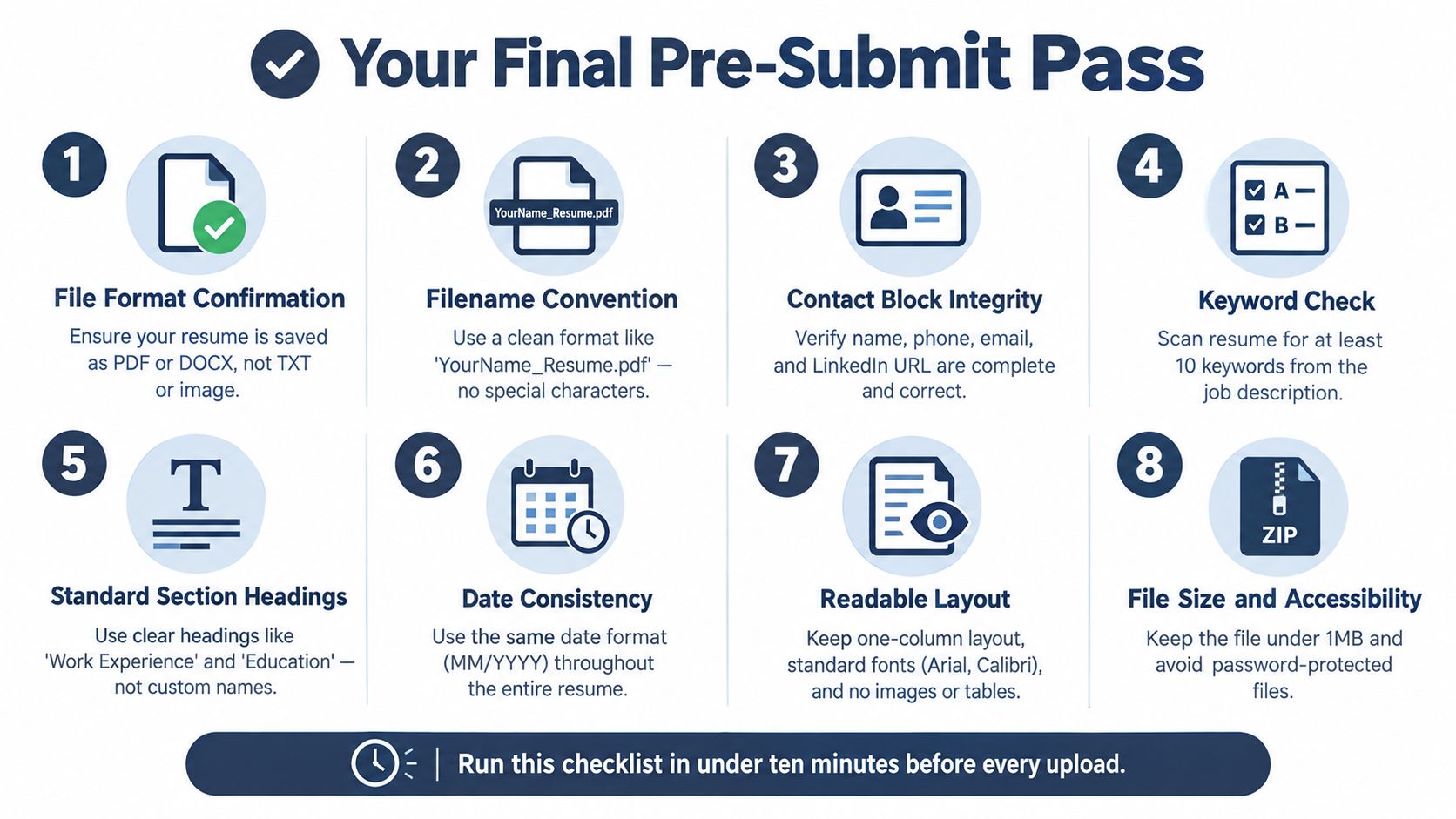
The exact order I recommend
Confirm the file type
Use DOCX when allowed. Use a text-based PDF only when the employer asks for PDF or the platform clearly handles it well.Check the filename
Keep it plain and professional, such as FirstName_LastName_Resume.Verify the contact block
Make sure your phone, email, and LinkedIn URL are current and readable in the main body.Check section headings
Use standard titles only. No branded headings, no clever labels.Run a quick keyword pass
Confirm the role's important terms appear where they naturally belong.Scan the bullets for readability
Your recent experience should make sense at a glance. Dense bullet walls lose attention.Paste into plain text
Look for scrambled order, stray symbols, broken spacing, or hidden formatting junk.Open the actual file you plan to send
This catches the embarrassing stuff. Tracked changes, wrong version, leftover template footer, outdated LinkedIn link, or the portfolio file instead of the résumé.
Common mistakes that still sink qualified people
- Tracked changes left on
- Template footer still visible
- Old phone number or dead LinkedIn URL
- Wrong file attached
- Header-based contact info
- A polished portfolio PDF uploaded instead of the résumé
The simplest rule in this entire article is still the one that matters most. Parsing reliability first, keyword alignment second.
If you want help applying that process without juggling five different tools, GetTheCall lets you import an existing résumé or LinkedIn profile, match it to a target job listing, and check for ATS parsing and keyword issues before you apply. It's built for the exact problem most candidates have: turning real experience into a cleaner, job-specific résumé that survives the system and still reads well to a recruiter.