ATS Optimization Tool Guide for 2026
Learn how an ATS optimization tool works, compare features, and use it to submit a tailored resume that passes automated screening and reaches recruiters.

An ATS optimization tool converts your current resume or LinkedIn profile into a job-specific, ATS-ready document and shows a live match score against the target job description. That matters because a 2025 audit found an ATS on 489 of all 500 Fortune 500 career websites, or 97.8%, making readable structure and relevant language basic application requirements, not optional polish (Fortune 500 ATS audit).
You may already know the frustration. You submit a resume that accurately reflects your experience, answer every application question, and then hear nothing. The silence doesn't necessarily mean you're unqualified. Your information may have been parsed poorly, classified under the wrong fields, or never matched strongly enough against the vacancy for a recruiter to open it.
Table of Contents
- Why Your Resume Disappears Before a Recruiter Sees It
- How ATS Optimization Tools Actually Work
- Core Features to Evaluate Before Choosing a Tool
- ATS Optimization Tools Versus Generic Resume Builders
- How to Choose and Use an ATS Optimization Tool Effectively
- Common Misconceptions About ATS Optimization
- Turning Optimization Into Better Interview Outcomes
Why Your Resume Disappears Before a Recruiter Sees It
A marketing manager applies for a senior growth role with strong campaign experience, analytics work, and team leadership. Her resume looks polished to a person, but the job description calls the function “demand generation,” her document says “pipeline marketing,” and her key skills sit inside a graphic sidebar. The system may fail to connect the equivalent experience or extract the sidebar content reliably.
That distinction changes how you approach an application. An ATS optimization tool isn't supposed to disguise weak qualifications or manufacture a career history. It helps translate genuine experience into a structure and vocabulary that software can process before a recruiter evaluates it. A practical ATS-friendly resume guide should therefore focus on clarity, evidence, and role-specific alignment.

The scale of the screening problem
Applicant tracking systems have been part of hiring technology since the late 1960s and early 1970s. Commercial systems became recognizable during the 1980s and 1990s, internet applications increased applicant volume in the late 1990s and early 2000s, and cloud delivery expanded access during the 2010s (ATS history and adoption audit).
The important point isn't the history lesson. It's that ATS use has remained above 97% of Fortune 500 career sites in every reported year from 2018 onward, including 98.2% in 2018, 98.8% in 2019, 97.4% in 2023, 98.4% in 2024, and 97.8% in 2025 (historical ATS adoption data). Large employers need software to organize applications across countries, departments, seniority levels, and job categories.
Practical rule: Treat your resume as both a human document and a structured data file.
The right mindset is not “How do I beat the robot?” It's “Can the system correctly identify my titles, employers, dates, skills, education, and credentials, then connect that evidence to this particular role?” Once you ask that question, layout and job-specific wording stop looking like cosmetic details.
How ATS Optimization Tools Actually Work
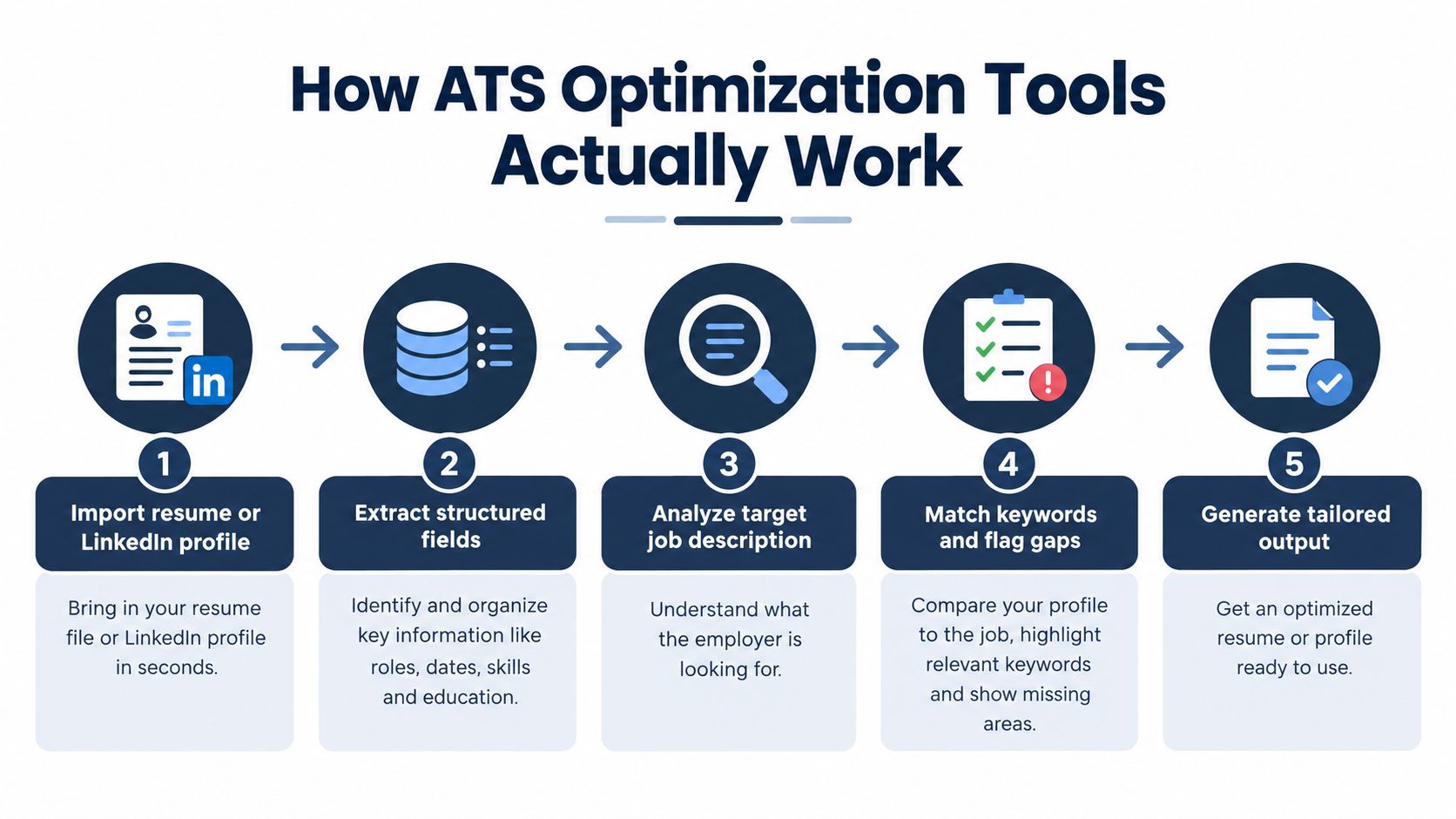
The workflow is easier to understand when you follow the data.
First, the tool imports a current resume, LinkedIn profile, or other career source. It parses the file into fields such as job titles, employers, employment dates, skills, education, and credentials. Next, it analyzes the target job description and extracts requirements that can be compared with those fields. Applicant tracking systems generally create this structured record before recruiters review the application, so extraction quality determines what the recruiter's search can find (resume parsing workflow).
Retrieval, not keyword stuffing
The useful analogy is structured information retrieval. The tool tries to retrieve the strongest evidence from your background for the requirements in a vacancy. It isn't merely counting repeated words.
Suppose the listing requests “Human Resource Information Systems,” while your resume says “HRIS.” A responsible tool can preserve the acronym and add the expanded form when your experience supports both. SHRM recommends placing relevant terms across the summary, experience, education, and credential sections because keyword searches may cover degrees and certifications as well as skills (SHRM resume guidance).
The placement matters. “Salesforce” in a skills list provides less context than a truthful experience bullet explaining how you used Salesforce in the role. The best systems connect a recommended term to verified evidence instead of asking you to paste a disconnected keyword list into the document.
What a live score can and can't tell you
A live role-match score is useful when it shows which requirements are covered, which are missing, and what changed after an edit. A candidate might discover that the problem isn't a missing skill at all. It could be an unclear job title, a date that wasn't recognized, or an achievement buried in a section the parser couldn't classify.
The score remains a diagnostic. ATS behavior varies by vendor, recruiter configuration, search habits, and screening rules. SHRM notes that systems and human behavior differ, so no scan guarantees selection (NLP and resume screening).
Watch this workflow in action before judging any tool's claims:
A stable score within one tool can help you compare edits. It can't predict whether a hiring manager will value your judgment, communication, or actual results.
Core Features to Evaluate Before Choosing a Tool
A polished template will not save a resume the parser cannot read. Evaluate the tool as an information retrieval system first, then judge how it looks.
1. Parsing accuracy
Upload a resume you have already used and compare the extracted data with the original file. The tool should keep the structure intact:
- Section headings: It should recognize common headings such as Summary, Experience, Education, and Skills.
- Employment relationships: Each employer should stay attached to the right job title, dates, and bullet points.
- Chronology: Dates should follow a consistent format and preserve the sequence of your work history.
- Text access: The content should be selectable and copyable, not embedded as an image or trapped in a design element.
Matching starts only after the system has identified what your resume says. If dates are broken, titles are separated from employers, or bullet points are skipped, relevant evidence disappears before a recruiter can search for it. Good tools check document structure, extraction quality, readable exports, and layout choices that interfere with parsing (ATS structure and diagnostic guidance).
2. Evidence-based tailoring
The tool should read the target job description and suggest edits that reflect your real background. That means showing where a requirement appears in your experience, distinguishing a true gap from a wording gap, and accepting reasonable variations instead of forcing one exact phrase.
I would reject any tool that encourages you to add software you have never used, inflate your level, or paste a block of disconnected keywords. Responsible optimization improves retrieval of truthful evidence. It does not manufacture qualifications. The best recommendations explain placement too, because a skill in a vague list carries less weight than the same skill supported by a clear accomplishment bullet.
3. Transparent scoring
A score can help if it is diagnostic rather than decorative. Look for categories such as skills, responsibilities, education, credentials, and structure, then check whether the score changes after an edit for a visible reason.
That explanation is the point. You should be able to see whether the issue is a missing requirement, an unclear title, a damaged date, or a bullet that failed extraction. Without that audit trail, the score invites blind keyword stuffing. With it, you can make narrower, defensible edits and leave unsupported requirements alone.
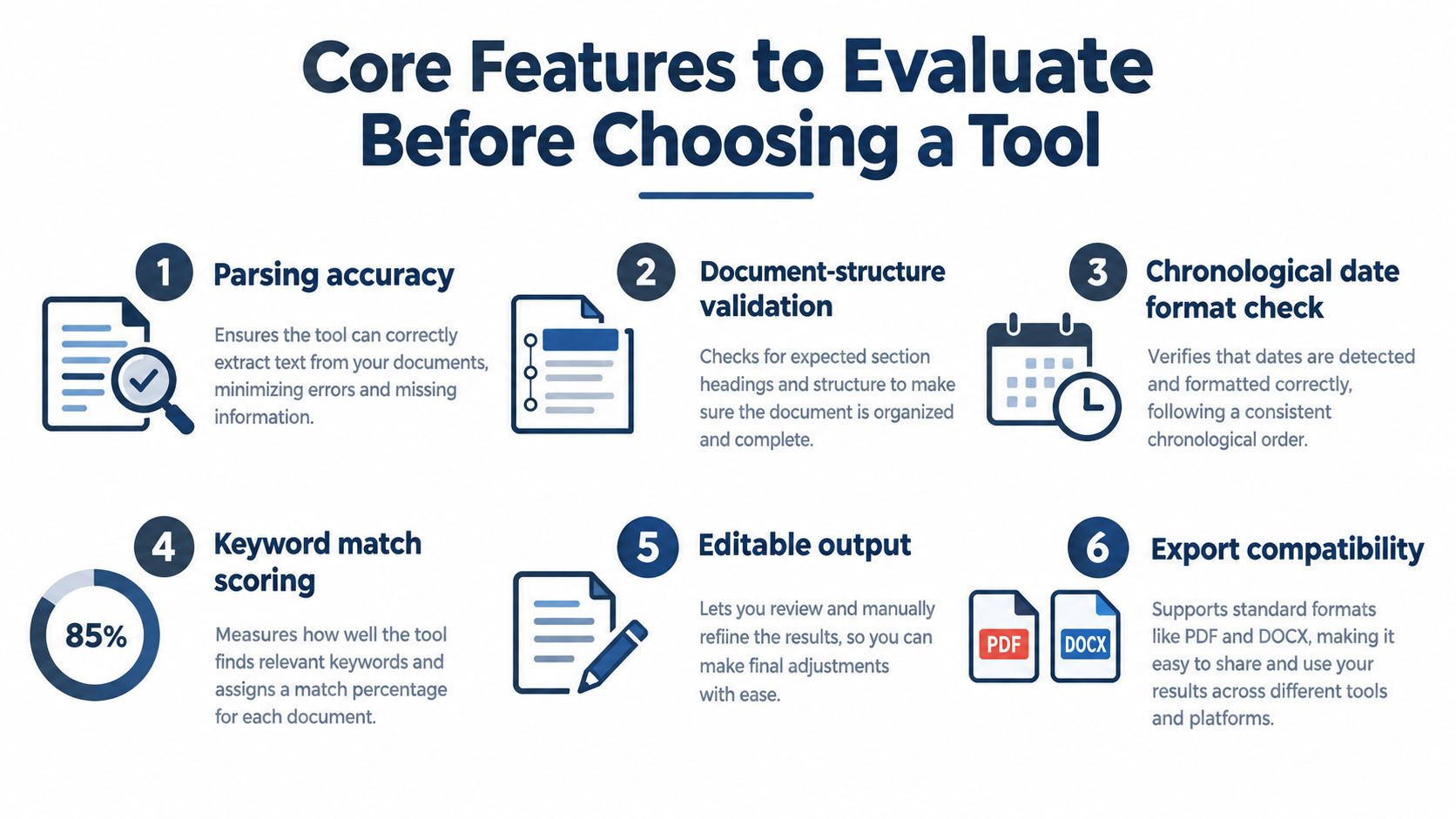
4. Controlled export
Export quality is a final check on accessibility. The file should remain readable when copied, uploaded, and opened on another device. Text-based PDF can be useful when you need formatting to stay consistent, but some older systems still process DOCX more reliably. Accepted formats can vary by platform, so file compatibility still deserves a manual check (file-format guidance).
Test the exported file yourself. Select the text, paste it into a plain document, and confirm that headings, bullets, dates, and ordering survive. That simple check tells you more than a template gallery ever will.
ATS Optimization Tools Versus Generic Resume Builders
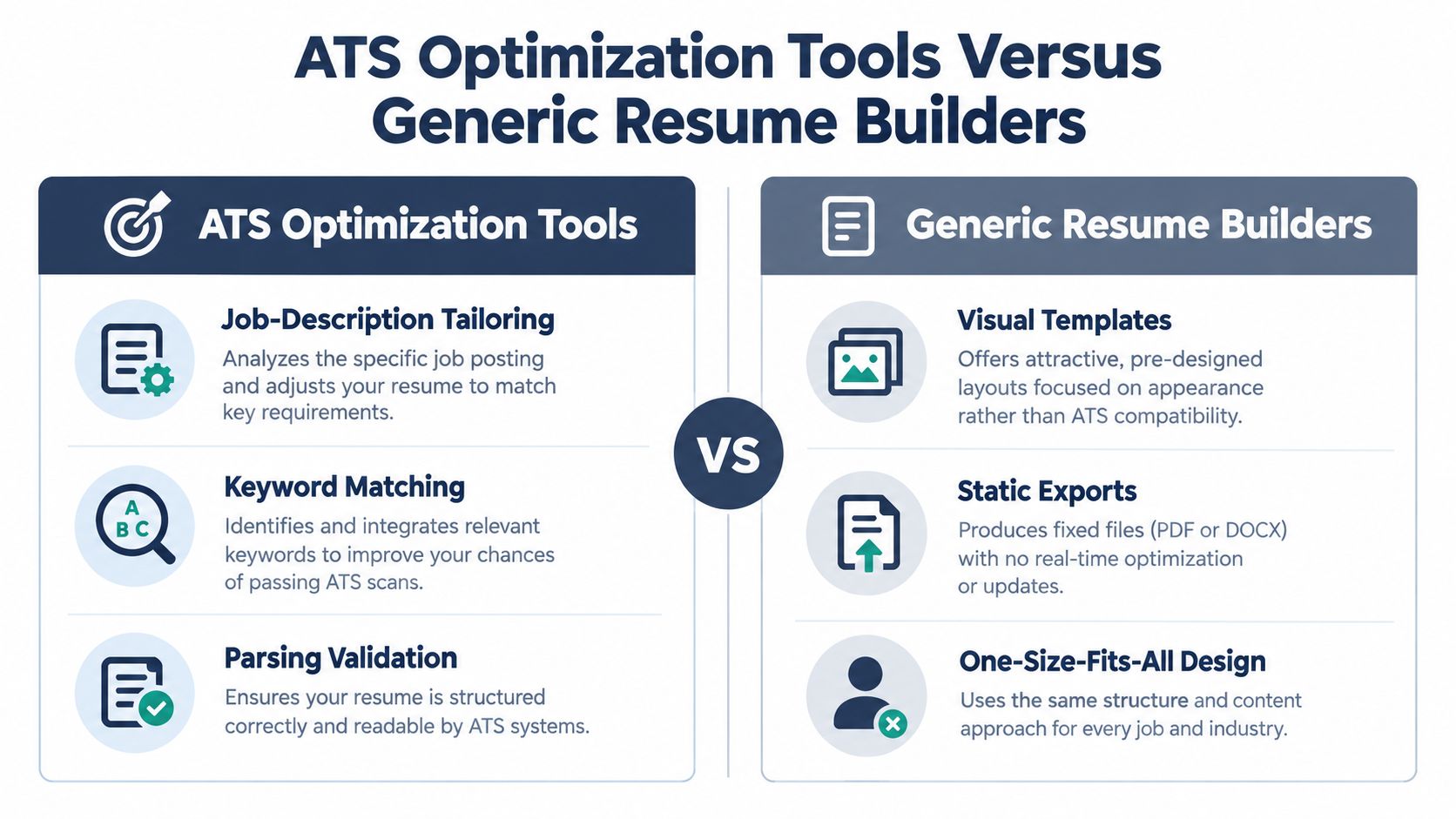
A generic resume builder begins with design. You choose a template, fill in sections, adjust colors, and download a static file. That can be useful when you need to create a document from scratch, especially if writing structure is your main obstacle.
An ATS optimization tool begins somewhere else. It imports your existing profile or resume, analyzes a target vacancy, identifies relevant requirements, checks extraction, and helps produce a role-specific version. The output is still a resume, but the workflow treats every application as a distinct retrieval problem.
| Capability | ATS optimization tool | Generic resume builder |
|---|---|---|
| Starting point | Existing resume or LinkedIn profile | Blank or template-based document |
| Tailoring | Target job description | Usually manual |
| Feedback | Live role-match and gap diagnostics | Often general writing advice |
| Layout | ATS-aware professional options | Design-led templates |
| Output | Tailored submission document | Static export |
| Editing boundary | Verified experience | Depends on the user |
GetTheCall converts an uploaded resume or LinkedIn profile into a job-specific PDF, analyzes the target listing, aligns supported skills and experience with the role, and provides a live match score. It also offers multiple layouts, one-click style switching, and a free ATS resume checker, while keeping the content tied to the user's actual background.
That doesn't make visual design irrelevant. Recruiters still need to scan the page quickly, understand the candidate's progression, and find evidence without friction. The trade-off is that visual hierarchy should support readability, not depend on graphics, hidden tables, text boxes, or a multi-column reading order that software may misunderstand.
A dedicated tool is most useful when you apply repeatedly to related but different roles. A builder may produce one attractive master resume. An optimization workflow helps you maintain a verified source profile while creating specific versions for each opening.
How to Choose and Use an ATS Optimization Tool Effectively
Begin with the source. Import your current resume or LinkedIn profile, then check every extracted title, employer, date, skill, credential, and education entry before accepting suggestions. If the import is wrong, pause there. Rewriting a bad extraction only makes the error more polished.
Next, add the target job description or listing URL. Read the tool's interpretation yourself. Separate required qualifications from preferred language, responsibilities from company descriptions, and genuine matches from terms that would overstate your background.
A practical application sequence
- Verify your evidence. Keep only experience you can support with your source profile, resume, portfolio, or interview examples.
- Map the role. Identify the responsibilities, tools, certifications, education, and job-title language that overlap with your background.
- Rewrite selectively. Place supported terms in the summary, relevant experience bullets, skills, education, or credential sections where they make semantic sense.
- Review the score by category. Ask whether a change improved evidence, terminology, structure, or only superficial repetition.
- Validate the document. Check headings, dates, employer associations, selectable text, reading order, and exported content.
- Submit the cleanest supported version. Use the format requested by the employer, and retain a copy of the exact version you submitted.
A resume tailoring workflow should leave you with a document you can explain naturally. If a recommendation makes the resume sound unlike you, reverse it or rewrite it in your own language.
A match score should make your decisions clearer, not make you surrender judgment.
Accessibility deserves its own check. A 2025 study of 99 resumes from job seekers with visual impairments found an average ATS parse rate of 84.22%, with results ranging from 40% to 100% (accessibility and ATS parsing study%20Resumes%20of%20job%20seekers%20w%20VI.pdf)). Review reading order, encoded headings, date interpretation, and screen-reader behavior, not just the visual appearance on your screen.
Common Misconceptions About ATS Optimization
A qualified candidate can do real damage by following bad ATS advice. I see it when someone pastes a wall of keywords into skills, exports a visually clever resume that breaks on extraction, then assumes a low match score means they are not competitive. ATS optimization works better when you treat it as structured information retrieval. The goal is to make relevant evidence easy to find, not to stuff terms into empty space.
Myth one: adding every keyword improves your chances. It usually weakens the document. A term with no supporting context can look artificial to a recruiter and may not signal a meaningful match in the system. Use exact language only where it truthfully reflects your work, then anchor it to a role, responsibility, tool, credential, project, or education entry.
SHRM advises placing relevant terminology in the sections where that evidence belongs, instead of isolating it in a keyword block (SHRM keyword placement guidance). That is retrieval logic, not gaming.
Myth two: one score predicts hiring. A score reflects alignment against a specific tool and a specific job description. It cannot see the employer's setup, the strength of the applicant pool, the recruiter's judgment, or what a hiring manager values in your examples. Use the score as a diagnostic, then inspect why it changed.
Myth three: the most attractive template wins. Readability matters, but structure matters first. Complex layouts, text boxes, hidden tables, scanned elements, vector text, macros, and unusual section labels can interfere with parsing, even when the file looks polished.
Myth four: an ATS-ready resume only needs to satisfy software. Recruiters still read it. If the document parses cleanly but repeats phrases awkwardly, makes vague claims, or implies experience you cannot defend, optimization has failed the human review.
AI screening adds another layer. Among surveyed employers using AI, 32.1% reported using it to screen applicants and resumes in 2025, compared with 11.6% in 2024 (2025 AI recruiting survey). That makes transparency more important. A useful tool should help you tell whether a weak result comes from missing evidence, wording, seniority, formatting, or the limits of the model itself.
Turning Optimization Into Better Interview Outcomes
The strongest use of an ATS optimization tool is not chasing an impressive number. It's building a repeatable application process that preserves your experience while making its relevance obvious.
Start with a verified source profile. Parse it and correct errors before tailoring. Then compare that clean record with each target job, add supported terminology where it clarifies an existing responsibility, and remove suggestions that would imply experience you don't have.
Keep the document readable after every automated rewrite. The summary should sound like a professional introduction, experience bullets should explain what you did, and skills should reinforce the evidence rather than replace it. Proofread names, dates, titles, credentials, and export formatting because software cannot take responsibility for a careless submission.
Import verified background. Align it to the role. Validate the structure. Export a clean file. Improve only what you can defend.
Accessibility belongs in the same loop. Check whether a screen reader follows the intended order, whether headings are encoded clearly, and whether copied text preserves the same meaning as the visual version. A document that works for parsing but fails for a human reader with an assistive technology is not fully optimized.
Finally, treat feedback as iteration, not judgment. A missing phrase may be easy to repair. A missing qualification may be a genuine gap that requires training or a different role. The tool can expose that distinction, but your professional judgment decides what to do next.
GetTheCall turns a LinkedIn profile or existing resume into a customized, ATS-ready PDF, analyzes a target job description, and shows live role-match feedback tied to your verified experience. Use the GetTheCall workflow to check structure, refine job-specific language, and prepare a clearer application before you submit.