ATS Keyword Optimization: A Practical 2026 Guide
Learn how ats keyword optimization actually works in 2026. Extract the right terms from job listings, place them for parsing, and avoid stuffing traps.
You submit a resume that looks polished, reads clearly, and matches the role on paper. Then the application disappears without an explanation. That experience is especially frustrating when the problem isn't your background, but the way software extracts your background before a recruiter can evaluate it.
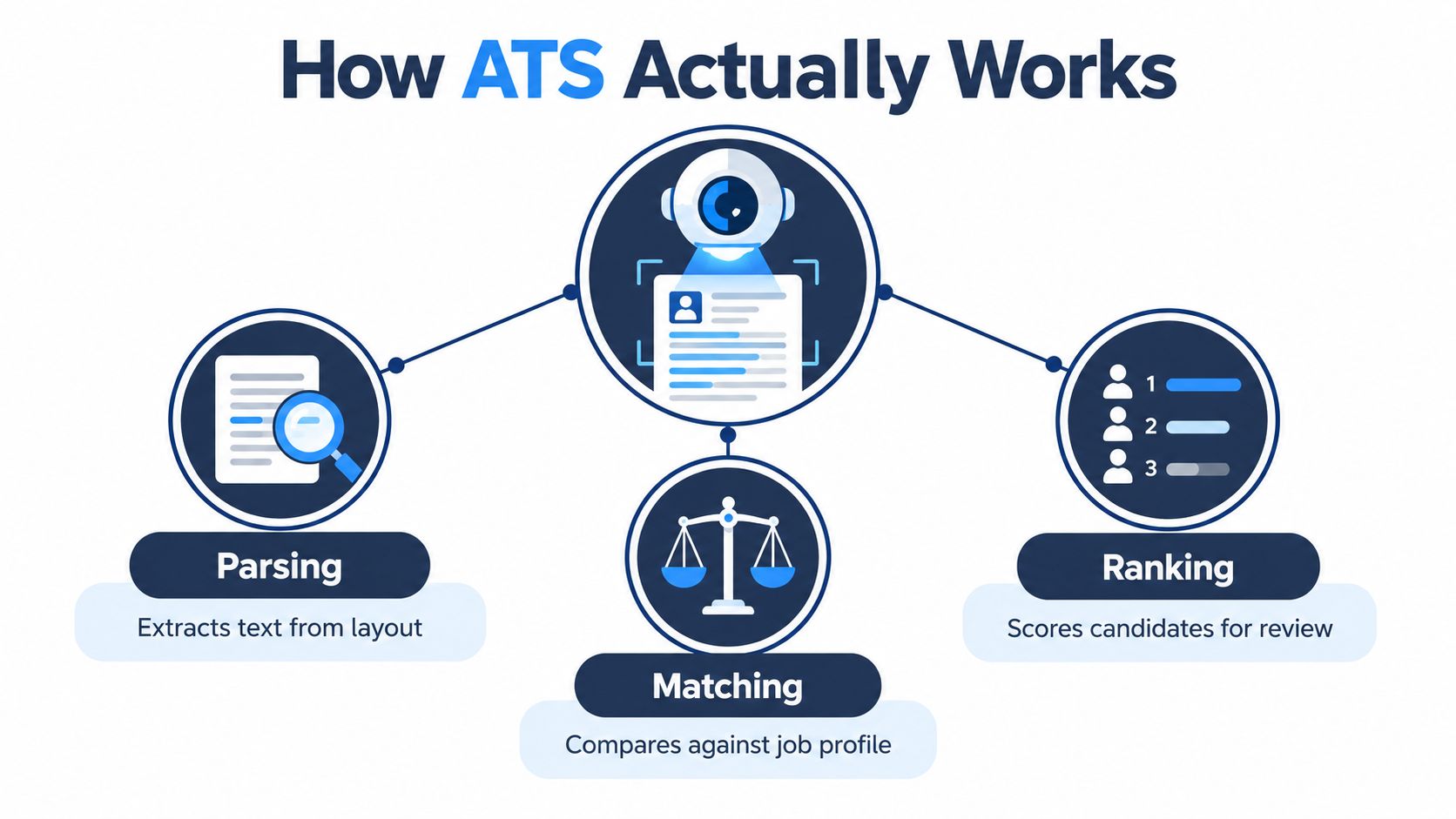
ATS keyword optimization is often treated as a contest to maximize a match score. That approach misses the practical issue. Your resume must first survive parsing, place important terms in recognizable fields, and then give a recruiter enough evidence to believe the claims.
Table of Contents
- Why Strong Candidates Still Get Filtered Out
- Reading the Job Posting the Way a Parser Does
- The Keyword Density Window That Actually Works
- Placing Keywords Where Parsers Actually Index Them
- Which Words to Mirror and Which to Ignore
- Formatting Checks Before You Hit Submit
- From Keyword Match to a Recruiter-Ready Resume
Why Strong Candidates Still Get Filtered Out
A senior product manager with 12 years of experience applies for a role she could run in her sleep. Her resume is clean, carefully written, and visually restrained. It uses a modern two-column template, puts contact details in the header, and organizes accomplishments in tables to save space.
The Fortune 500 company's applicant tracking system receives something different from what she sees. The columns may collapse into a scrambled reading order. The table may lose its headings. Her phone number and email may sit outside the system's indexable body because they're in a header or footer. A recruiter never gets the chance to assess her product launches, stakeholder work, or leadership.
The commonly repeated claim that 75% of resumes are rejected before a human reads them needs caution because the underlying figure is not supported by the verified evidence available here. The more defensible conclusion is simpler: many applications fail before human review because ATS software can't reliably extract or classify the document.
The parsing problem comes first
Parsing converts a file into fields such as name, contact information, job title, employer, education, skills, and experience. If the software can't identify those fields, keyword matching has less usable information to work with.
A resume can fail because:
- Columns collapse: Text from separate columns may merge into an unreadable sequence.
- Tables lose structure: Skills, dates, and headings can flatten into glued text.
- Headers and footers disappear: Contact details may not enter the main searchable record.
- Graphics hide content: Icons, logos, and text embedded in images may be invisible to the parser.
- Creative headings confuse classification: “My Journey” may not map as reliably as “Work Experience.”
This is why a free ATS resume checker can be useful as a diagnostic, provided you treat its output as a parsing check rather than a promise of an interview.
A resume has two audiences
Your document must satisfy a machine's extraction rules and a person's judgment. The parser needs plain structure and recognizable terms. The recruiter needs concise evidence that connects your experience to the role.
Practical rule: Don't optimize for software at the expense of meaning. Make the important information easy for both systems and people to find.
The verified benchmark data makes the screening pressure clear. 99.7% of recruiters use filters in ATS or similar software, and recruiters most often filter by resume skills, education, job titles, certifications or licenses, and years of experience, according to Jobscan's breakdown of recruiter filtering behavior. Your first task isn't to game the system. It's to make sure the system can read the qualifications you already have.
Reading the Job Posting the Way a Parser Does
Start with the posting, not your resume. A job description contains signals of unequal value, and the fastest way to miss them is to treat every sentence as equally important.
Build the term list in order
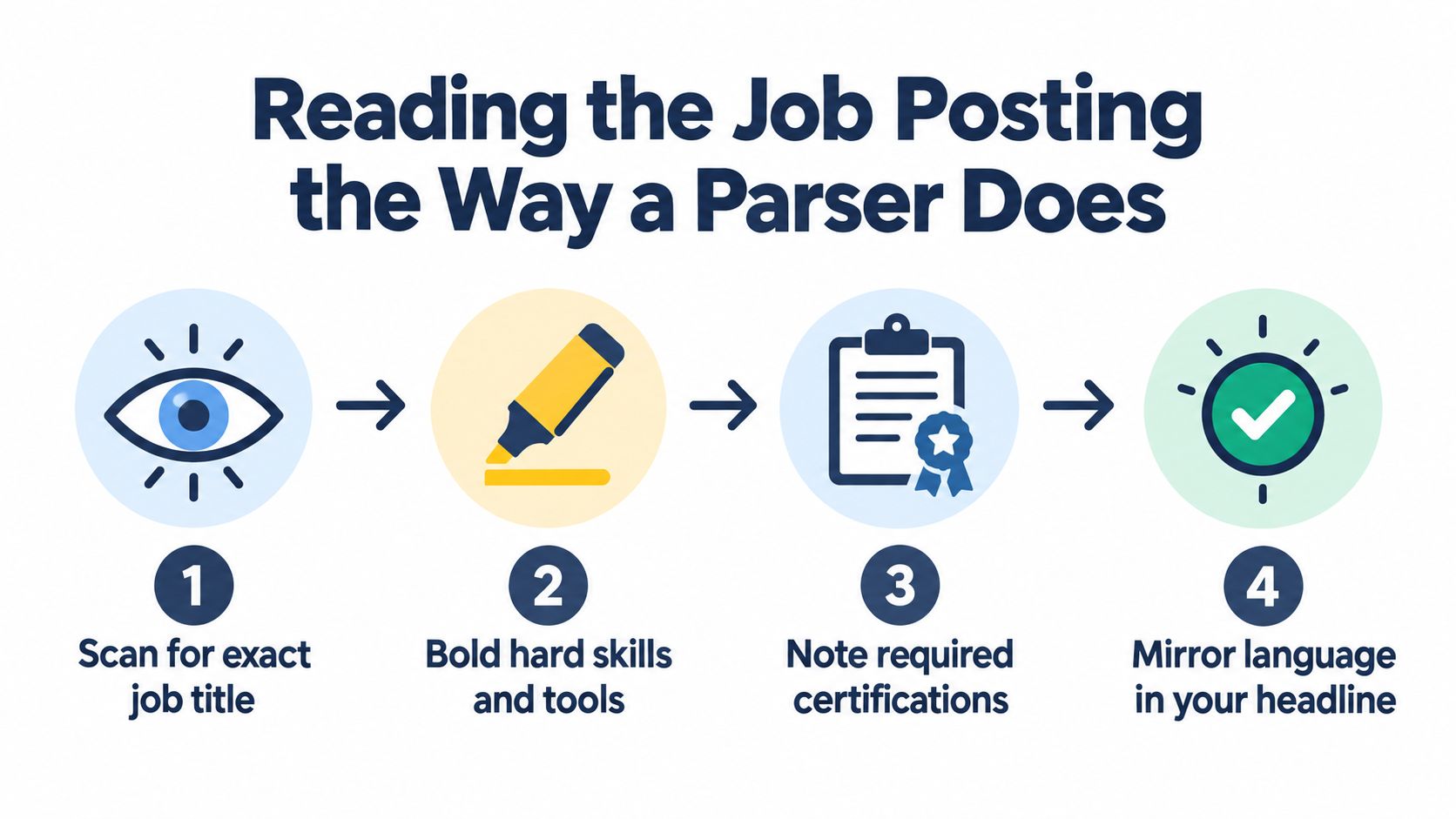
Copy the posting into a plain document and work from top to bottom. The parser processes text in a linear sequence, so your own extraction should preserve that order.
- Capture the exact job title. If the posting says “Senior Product Manager,” use that wording in your headline when it accurately describes your target. Don't replace it with a clever alternative such as “Product Growth Leader.”
- Read responsibilities as verb-object pairs. Pull phrases such as “manage product roadmaps,” “analyze customer insights,” or “lead cross-functional teams.” The verb shows the activity, while the object reveals the competency.
- Separate required from preferred terms. “Required,” “must have,” and “minimum qualifications” deserve priority over optional experience.
- Extract hard skills from qualifications. Record tools, methods, platforms, certifications, and technical nouns exactly as written.
- Preserve variants. Keep both an acronym and a spelled-out form when the posting uses both, such as “AWS” and “Amazon Web Services,” or “SQL” and “Structured Query Language.” Use only the versions that truthfully describe your experience.
MIT Career Advising recommends meaningfully using language from the job posting and describes the process as “copy + paste + personalize,” while Indeed advises extracting keywords, prioritizing repeated phrases, and placing them strategically. You can follow those principles through this guide to tailoring a resume to a job description, but the wording still has to reflect work you've actually done.
Find priority signals
After the first pass, inspect the posting for emphasis:
- Repeated phrases: A term used several times is more likely to represent a core requirement.
- Must-have bullets: Requirements language carries more weight than employer branding.
- Opening and closing sentences: Hiring teams often frame the central problem or desired outcome there.
- Tools beside outcomes: “Use Salesforce to manage pipeline” is more useful than “familiar with CRM.”
- Credential language: Certifications and licenses should remain exact because they're often screened as distinct fields.
Focus on nouns in requirements and qualifications. Guidance from Resume Atlas on keyword scanning distinguishes useful terms such as tools, certifications, methods, and job titles from softer descriptions like “passionate” or “fast-paced.”
Your final list should contain the job title, core responsibilities, required hard skills, tools, credentials, and credible variants. Then map each term to a place in your resume before you start rewriting. That step prevents the common mistake of producing a dense skills block while leaving the experience section vague.
The Keyword Density Window That Actually Works
Density is easy to calculate and easy to misuse. A 400-word resume with 12 targeted keyword mentions contains roughly 3% keyword density, while a 400-word resume with 40 mentions contains 10%, not a useful target. The point is that raw repetition doesn't tell you whether the terms appear in meaningful sections or support credible evidence.
Some ATS guidance reports that resumes with 25% to 35% keyword match reached the top quartile on Workday 73% of the time, while resumes below 15% match did so 9% of the time. The same benchmark says resumes under 15% keyword density fell into the bottom quartile 91% of the time, with 20% to 35% density performing best, and warns that density above 40% can be flagged as stuffing. See the ATS-friendly resume benchmark from Resume Optimizer Pro for that methodology and its limitations.
Those figures shouldn't turn your resume into a counting exercise. Density is a ceiling, not a target. A term belongs where it clarifies what you did, how you did it, or what changed as a result.
Compare the writing, not just the count
| Approach | Sample Bullet | Keyword Count | Parser Behavior |
|---|---|---|---|
| Stuffed | Project management professional using project management tools for project management planning, project management delivery, and project management reporting across project management teams. | 6 | Repetition adds little context and can read as artificial or spammy. |
| Tuned | Led project management for a cross-functional launch, built reporting in Jira, and improved delivery visibility for executive stakeholders. | 1 direct phrase, with related evidence | The term appears in context alongside a tool, activity, and audience. |
| Tuned with broader coverage | Managed project management workflows in Jira, coordinated launch dependencies, and reported delivery risks to senior leadership. | 2 direct phrases | Distinct bullets reinforce the competency without copying the same sentence. |
The strongest version doesn't hide the phrase. It connects it to an activity and an outcome. If “project management” is required, use it naturally in a title, skills list, or relevant achievement, then support it with tools, scope, and results.
Why repetition loses value
Modern parsers normalize whitespace and stop words, then evaluate term frequency within sections or proximity windows. That means repeating a phrase in six adjacent sentences can add less value than placing it once in a headline and once in an experience bullet that proves the skill.
A skills block is useful, but it rarely carries the whole argument. Recruiters need to see the skill attached to real work, and the parser benefits when the term appears in a recognizable experience field.
Evidence beats echo. A keyword tells the system what you may know. A specific bullet shows the recruiter how you used it.
Placing Keywords Where Parsers Actually Index Them
The same keyword can have different value depending on where it appears. A tool listed in a dedicated Skills section is easy to classify. The same tool inside an achievement bullet gives the recruiter context. Strong resumes use both placements when both are accurate.
Assign each term a destination
Use your extraction list as a placement map rather than a checklist to paste into one block.
- Hard skills: Put exact strings in a dedicated Skills section, then use the most relevant ones in experience bullets.
- Tools: Name the platform beside the work it supported. “Managed Salesforce pipelines of 120+ accounts” is stronger than listing Salesforce alone.
- Job titles: Mirror the target title where truthful, especially in the headline and the relevant Work Experience entry.
- Certifications: Give each credential its own line in a Certifications section, using the complete recognized name.
- Methods: Place methodologies in Skills and in bullets that show how you applied them.
- Industry terms: Use them where they describe a real responsibility, deliverable, customer, or compliance requirement.
The 120+ accounts example is permitted as a concrete phrasing example, not as a performance claim about a real candidate. If your actual scope differs, replace it with your own verified figure or remove the number.
Keep the structure machine-readable
Avoid putting important terms only in a paragraph-style summary. Some systems treat summary prose as unstructured text, while standard sections provide clearer field boundaries.
Independent guidance from Workable on how ATS reads resumes recommends text-based files and warns that headers, footers, tables, columns, WordArt, and unusual spacing can interfere with extraction. The placement problem is therefore technical as well as editorial.
| Keyword Type | Best Section | Placement Example |
|---|---|---|
| Job title | Headline and Work Experience | Senior Product Manager |
| Hard skill | Skills and Experience | SQL, used to analyze customer behavior |
| Tool | Skills and Experience | Salesforce, used to manage account pipelines |
| Certification | Certifications | Six Sigma Black Belt |
| Methodology | Skills and relevant bullet | Agile roadmap planning |
| Compliance term | Skills and Experience | HIPAA compliance in healthcare operations |
A keyword split between columns may be read in the wrong order. A term inside a text box may be dropped. A credential in a footer may never reach the candidate record. Placement discipline means using the right term, in the right section, in the right form.
Which Words to Mirror and Which to Ignore
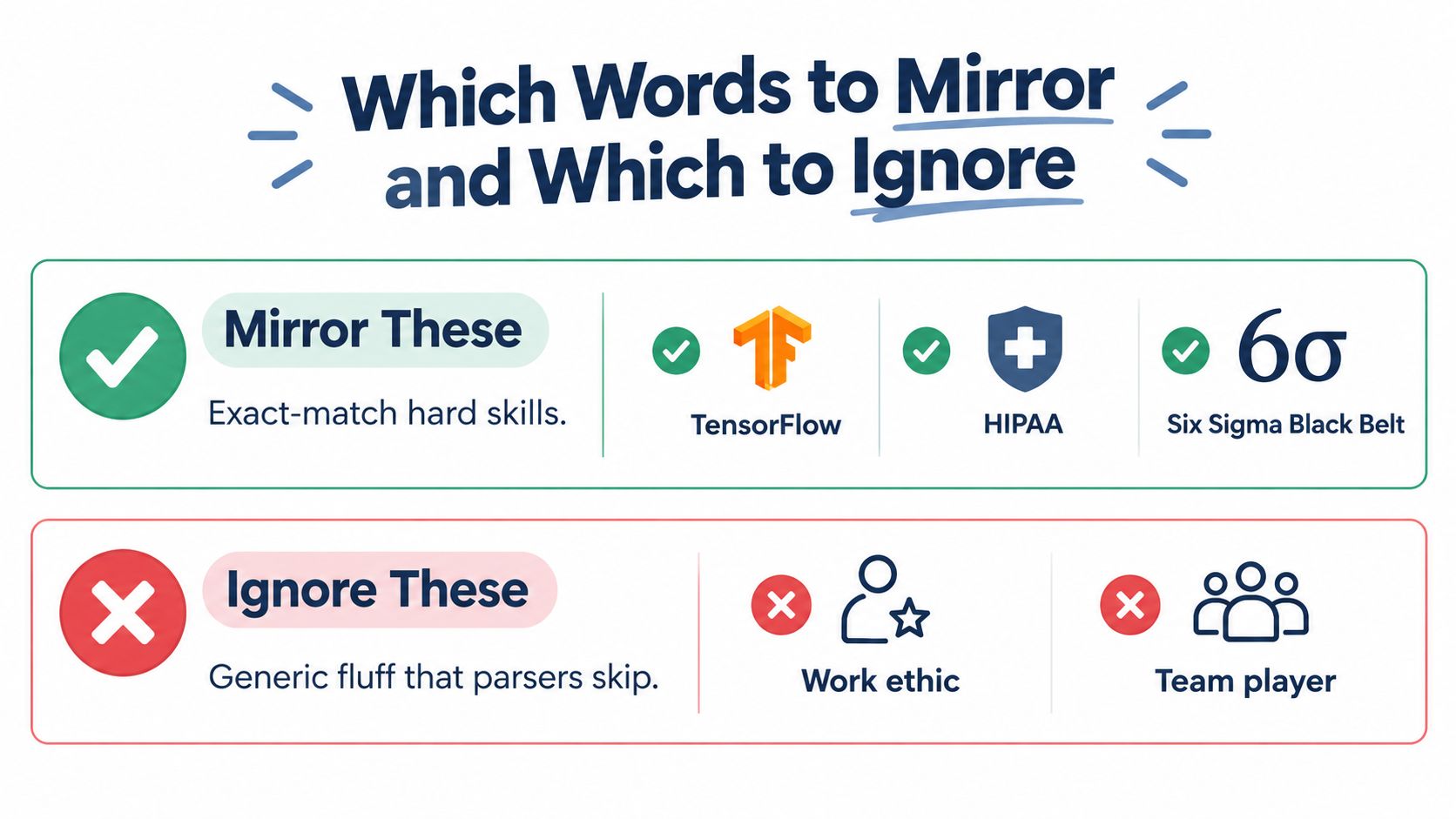
You don't need to mirror every noun in a job posting. The most valuable terms are usually exact-match hard skills, specific tools, certifications, methodologies, job titles, and technical requirements.
Examples include TensorFlow, HIPAA, P&Ls, and Six Sigma Black Belt. These terms identify concrete capabilities or credentials. By contrast, “passionate,” “driven,” and “dynamic” describe tone more than qualifications. “Rockstar” and “ninja” reflect company flavor, not a skill you should force into your resume.
Use a simple filter
Keep a term when it appears in the required qualifications or appears repeatedly across the description and represents a capability you have. Drop it when it appears once as a personality trait or generic cultural adjective.
Generic nouns such as “teamwork” and “communication” aren't useless, but they're weak without evidence. Replace them with the actual setting, method, or tool.
Before:
Passionate, dynamic team player with excellent communication and collaboration skills.
After:
Coordinated product, engineering, and sales teams through weekly roadmap reviews, documenting decisions in Jira and escalating delivery risks to leadership.
The second bullet still demonstrates collaboration and communication, but it prioritizes recognizable work, a named tool, and a clear operating method. That's more useful to a recruiter and more defensible in an interview.
Exact language needs honest context
If a posting asks for “Amazon Web Services,” don't assume “AWS” will always be treated as an equivalent match. Include both forms only when they accurately describe your background. The same applies to “Python” and “Python programming,” or “P&L management” and “profit and loss management.”
The goal isn't to create a keyword soup. It's to make the parser's job easy while giving the recruiter enough substance to distinguish experience from imitation.
Formatting Checks Before You Hit Submit
A parser can miss strong experience when the file structure hides key fields. Keep the design plain enough for extraction, then use the ATS-friendly resume guide for a fuller formatting review.
Run this checklist before submitting:
- File type: Use a text-based
.docxor plain-text PDF when the employer allows it. Avoid scanned PDFs and image-only files. - Layout: Use one column. Keep important details out of tables, text boxes, and decorative sidebars.
- Contact details: Place your name, email, phone, and location in the main body, not only in headers or footers.
- Section labels: Choose familiar headings such as “Work Experience,” “Education,” “Skills,” and “Certifications.” Labels such as “My Journey” can obscure the field.
- Typography: Select a readable font, including Arial, Calibri, or Garamond. ATS-focused guidance commonly recommends 10 to 12 points for body text and 14 to 16 points for headings, as summarized by Forbes Advisor's ATS formatting guidance.
- File name: Save it as
FirstName_LastName_Resume.pdf, changing the extension when you submit another file type.
A parser may flatten a skills table into unreadable text or assign content to the wrong field. Verified benchmark findings report that skills tables accounted for 42.8% of parsing failures in a live sample of 7,766 documents. Another benchmark found multi-column or table artifacts in 40.8% of resumes, with likely failure in 18.8% of cases. It also reported that 16.5% of 218 resumes did not produce a usable candidate record, while 7.8% lacked a cleanly extractable name and 5% to 6.9% lacked clean email or phone extraction. These findings appear in SkillSeek's ATS resume effectiveness data.
Run a plain-text troubleshooting test
Open the finished resume, copy everything, and paste it into a plain-text editor. Review the sequence of your name, contact details, headings, dates, skills, and employer information.
Check that every keyword remains beside the experience or skills field where it belongs. If text disappears, scrambles, or changes order, repair the layout before revising the wording. A polished page that loses its fields during intake is not ready to submit.
From Keyword Match to a Recruiter-Ready Resume
The objective isn't the highest possible ATS score. It's a resume that a recruiter can trust after the software has indexed it.
That document usually has a concise summary that identifies the target role, a Skills section that uses the posting's terminology, and experience bullets that connect each important competency to evidence. For each extracted hard skill, aim to show what you did, which tool or method you used, and what changed because of the work. Use real outcomes when you have them, and don't manufacture metrics to make a bullet look stronger.
Build the claim, keyword, and proof together
Consider the difference between these two approaches:
- Claim: Product manager with stakeholder management experience.
- Keyword: Stakeholder management appears in the Skills section.
- Proof: Led roadmap reviews with product, engineering, sales, and customer success, documenting decisions and resolving delivery conflicts.
The third line gives the first two credibility. It also creates several natural signals without repeating the same phrase mechanically. This layered structure supports the machine-readable fields and the human scan that follows.
A recent ATS-focused analysis reports formatting issues in 62% of scanned resumes, an average match score of 58 out of 100, and nearly one in four enterprise ATS parses failing. Those figures appear in CareerBldr's discussion of resume keyword optimization, but they should be treated as findings from that analysis, not universal benchmarks for every ATS.
Perform the hiring-manager read
After tailoring, read the resume as if you're deciding whether to interview the candidate. Ask:
- Does every required skill appear in a truthful, recognizable context?
- Can I understand the candidate's scope without decoding a keyword list?
- Do the bullets show decisions, tools, ownership, or outcomes?
- Is any line present only because it contains a phrase?
- Would I believe this resume if I asked for a detailed example?
Use a resume tailoring platform such as GetTheCall when you want to import an existing resume or LinkedIn profile, analyze a target job listing, map verified experience to required keywords, and review a live role-match score before exporting an ATS-ready PDF. It's one option for reducing manual comparison, but you should still verify every suggested phrase against your actual experience.
The final edit is usually subtractive. Keep the term that helps the parser identify a required competency, keep the evidence that helps a recruiter trust it, and cut anything that adds neither.
GetTheCall can analyze a target job listing, align your verified experience with role-specific keywords, and help check parsing issues before submission. Visit GetTheCall to turn your existing resume or LinkedIn profile into an ATS-ready application document.