AI Resume Rewriter: What It Actually Does
Learn how an AI resume rewriter actually works, what it can and cannot do, and how to use it to pass ATS screening without losing your authentic experience.

Most advice about an AI resume rewriter starts with the wrong promise: paste in your career history, press a button, and receive a perfect resume. That sounds convenient, but it confuses polished language with a credible application. A resume can read smoothly and still fail because the ATS can't parse its layout, or because a hiring manager can't connect its keywords to evidence from your actual work.
The useful role of AI is narrower and more valuable. It acts as a translation layer between your broad experience and the specific language of a target role. You supply the facts, context, tools, responsibilities, and outcomes. The software helps reorganize and phrase that evidence so both screening technology and people can understand it quickly. You remain responsible for accuracy, judgment, and the final file.
Table of Contents
- The Reality of AI Resume Rewriters
- How Applicant Tracking Systems Read Your File
- Tailoring Language Without Losing Authenticity
- Evaluating Different Types of AI Tools
- The Hidden Risk of Parsing Failures
- Building a Sustainable Application Workflow
- Moving From Automated Drafts to Real Interviews
The Reality of AI Resume Rewriters
An AI resume rewriter isn't a career-history generator. It's an editor that can identify patterns in your experience and express them in language closer to a job description. That distinction matters because a blank prompt invites invention. If the system doesn't know whether you managed a process, supported it, or merely observed it, it may produce a confident sentence that overstates your role.
The safest workflow begins with verified source material. Give the tool your existing resume, LinkedIn history, project notes, or a plain-language account of what you did. Then ask it to improve structure, clarity, relevance, and terminology without adding employers, tools, qualifications, responsibilities, or results. The tool should change the presentation, not the underlying record.
A large randomized controlled trial covering 480,948 jobseekers found that AI-assisted résumé writing increased hiring outcomes by 7.8%, according to the reported trial summary from JobCannon. The useful lesson isn't that automation guarantees interviews. It's that machine-assisted application text can affect real outcomes when it helps candidates refine and communicate their experience rather than replace it.
What the tool should translate
A strong rewrite connects three layers:
- Your evidence: the work you completed, the systems you used, the problems you handled, and the outcomes you can defend.
- The employer's language: the role's responsibilities, tools, certifications, domain terms, and expectations.
- The reader's decision: why your background is relevant enough to continue reviewing.
Suppose your original bullet says that you “supported customer onboarding.” A responsible rewriter might help you clarify whether you created documentation, coordinated implementation, handled escalations, or improved a handoff. It shouldn't transform support into ownership of an entire onboarding program unless your evidence supports that claim.
Survey data reported for 2026 indicates that 42.6% of Americans used AI in some form when updating their most recent résumé, while 7.5% said AI wrote most or all of it, according to the 2026 resume report from Novorésumé. The same dataset reported that 27.1% of workers submitted a fully AI-generated résumé without editing it. Those figures help explain the current problem: raw generation is easy, but personalization and human review determine whether the result remains believable.
Practical rule: Give AI permission to rearrange your proof, never permission to manufacture it.
Before submitting, read every line aloud and ask whether you could explain it in an interview without translating it back into plain English. If a bullet sounds more senior, technical, or measurable than your real experience, revise it. A slightly less impressive sentence that you can defend is stronger than a polished claim that collapses under a follow-up question.
How Applicant Tracking Systems Read Your File
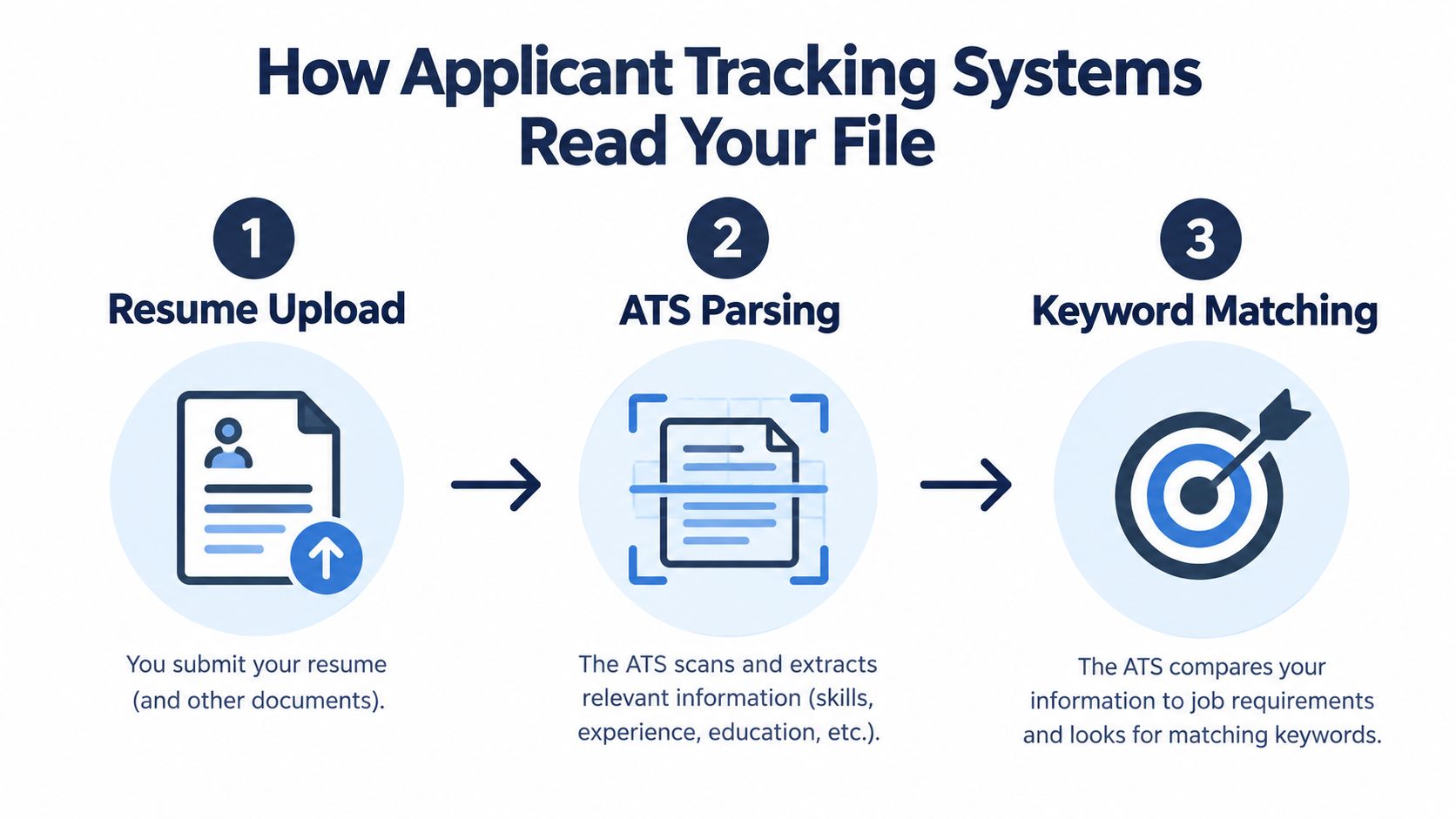
An Applicant Tracking System, or ATS, usually doesn't view your resume like a person does. It extracts text, identifies sections, scans for terms connected to the job description, and ranks or filters candidates according to match quality. Guidance on how resume keyword scanners work describes this plain-text extraction and keyword-matching process, which is why visual design can't compensate for missing or unreadable content.
The practical pipeline is straightforward:
- Resume upload: You submit a PDF, DOCX, or another accepted file.
- Text parsing: The system extracts names, dates, headings, employers, education, and skills.
- Keyword matching: It compares those fields with the job's requirements and may assign a match score before recruiter review.
Why attractive layouts can fail
A human can infer that a left-hand column contains dates and a right-hand column contains job titles. A parser may read those elements in the wrong order, merge unrelated fields, or skip text inside a design object. Tables, text boxes, icons, headers, footers, and decorative sidebars create similar risks.
That's why an AI tool that produces an impressive-looking layout without testing the exported file is incomplete. A resume can contain the right words and still lose them during extraction. Single-column structure, conventional headings, readable fonts, consistent dates, and a text-based export reduce ambiguity.
Use this ATS-friendly resume guide as a practical reference when checking structure. The point isn't to make every resume visually plain. It's to ensure that design supports hierarchy without hiding the information the ATS needs to identify.
Match the posting's actual terminology
Keyword alignment works best when it reflects the employer's wording naturally. If a posting uses both “customer relationship management” and “CRM,” include the term that accurately describes your experience and consider using both forms where they fit. Don't replace a specific qualification with a loose synonym just because the sentence sounds smoother.
A keyword is useful only when it points to proof. If you haven't used a platform, don't add it to satisfy a scan. If you used it in a limited context, describe that context accurately. The ATS may recognize the term, but the hiring manager will test whether your level of experience matches the role.
Tailoring Language Without Losing Authenticity
Tailoring starts with the job description, not with the rewrite button. Read it once for the broad purpose of the role, then pull out the terms that describe skills, responsibilities, tools, qualifications, and outcomes. Separate terms you can prove from terms that merely sound relevant.
A practical sequence looks like this:
- Mark hard skills. Note software, methods, platforms, certifications, and technical processes you've genuinely used.
- Identify responsibilities. Look for verbs such as manage, analyze, deliver, coordinate, improve, build, or advise.
- Find the role's business problem. Ask what the employer needs this person to accomplish.
- Map your evidence. Select existing bullets and projects that demonstrate those needs.
- Rewrite selectively. Ask the AI to mirror the posting's language while preserving every fact.
The resume-tailoring guide for job descriptions is useful for this mapping exercise, but the central discipline is simple: target the language, preserve the evidence.
A prompt that protects the truth
A good instruction might say:
Rewrite these existing bullets for the target job. Use only the experience, tools, responsibilities, and results provided. Don't add qualifications, metrics, employers, or technologies. Mirror the job description's terminology where it accurately describes my work. Flag any missing evidence instead of filling the gap.
That last sentence changes the tool's behavior. It tells the system that uncertainty should become a question, not an invented accomplishment.
Compare these two approaches:
- Weak: “Make my resume sound more impressive for this product manager role.”
- Useful: “Rewrite these three bullets to emphasize roadmap planning and stakeholder communication because those responsibilities appear in the posting. Keep my scope and results unchanged. Give me two versions, one concise and one more detailed.”
The second request gives the tool a defined translation task. It can reorganize the emphasis without pretending you held a different job.
Keyword density isn't the objective
A 2025 employer survey reported that 62% of employers say AI-generated resumes without customization are more likely to be rejected, according to Apply4Me's ATS tailoring checklist. That doesn't mean you should insert every phrase from a job posting. It means generic generation creates a credibility problem.
Keyword stuffing also damages human readability. A bullet that lists tools, methodologies, and responsibilities without showing what you did becomes difficult to trust. Preserve the accomplishment first, then use the employer's terminology to make its relevance clearer.
The strongest tailored resume doesn't contain the most keywords. It contains the clearest proof attached to the right keywords.
If a job asks for stakeholder management and you coordinated product, sales, and operations meetings, say so. If it asks for SQL and you used SQL to investigate reporting problems, describe that work. If the posting asks for a certification you don't have, don't imply that an adjacent experience is equivalent. Authentic tailoring makes the fit easier to see without changing the candidate.
Evaluating Different Types of AI Tools
A generic chatbot and a dedicated resume platform can both rewrite text, but they don't provide the same safeguards. A chatbot gives you flexibility and broad language capability. You decide what to paste, how to structure the prompt, how to compare versions, and how to turn the output into a final document.
That flexibility is useful when you're exploring a difficult bullet or trying to understand your own experience. It also leaves more room for forgotten context, inconsistent instructions, invented details, and formatting mistakes.
A dedicated platform usually connects the main stages of the task. It can import a LinkedIn profile or existing resume, analyze a target job listing, suggest role-specific revisions, provide a live match score, and export a structured PDF. GetTheCall is one example of this workflow. It imports career history, parses a target listing, rewrites bullets using the user's experience, offers ATS-oriented templates, and includes a free ATS resume checker.
| Feature | Generic AI Chatbot | Dedicated Resume Platform |
|---|---|---|
| Starting material | You paste or upload selected text manually | Imports a LinkedIn profile or existing resume |
| Job analysis | You provide the job description and identify priorities | Parses a target job listing and maps requirements |
| Context retention | Depends on your prompt and conversation | Keeps resume and role context within the workflow |
| Tailoring | Flexible, but usually manual | Produces role-specific suggestions and bullet rewrites |
| Formatting | You must move text into Word, Canva, or another editor | Provides structured templates and PDF export |
| Quality control | You create your own truth and parsing checks | May include match scoring and ATS readability checks |
| Best use | Exploring language and thinking through experience | Repeating a controlled application workflow |
Choose based on the failure you need to prevent
Use a chatbot when the problem is interpretation. You may need help turning a complicated project into a concise bullet, finding a clearer verb, or identifying the outcome hidden in your notes.
Choose an integrated platform when the problem is repetition and consistency. Multiple applications create opportunities for version mix-ups, formatting drift, and accidental keyword changes. A connected workflow reduces handoffs, but you still need to verify the generated content.
Neither tool removes judgment. A platform can preserve your source data more reliably, but it can still prioritize an irrelevant phrase or misread the seniority of a posting. A chatbot can produce an excellent rewrite, but it won't automatically know whether the PDF export remains parseable.
The right evaluation question isn't “Which tool writes the best sentence?” It's “Which tool helps me produce a truthful, job-specific, readable file with the fewest unverified steps?”
The Hidden Risk of Parsing Failures
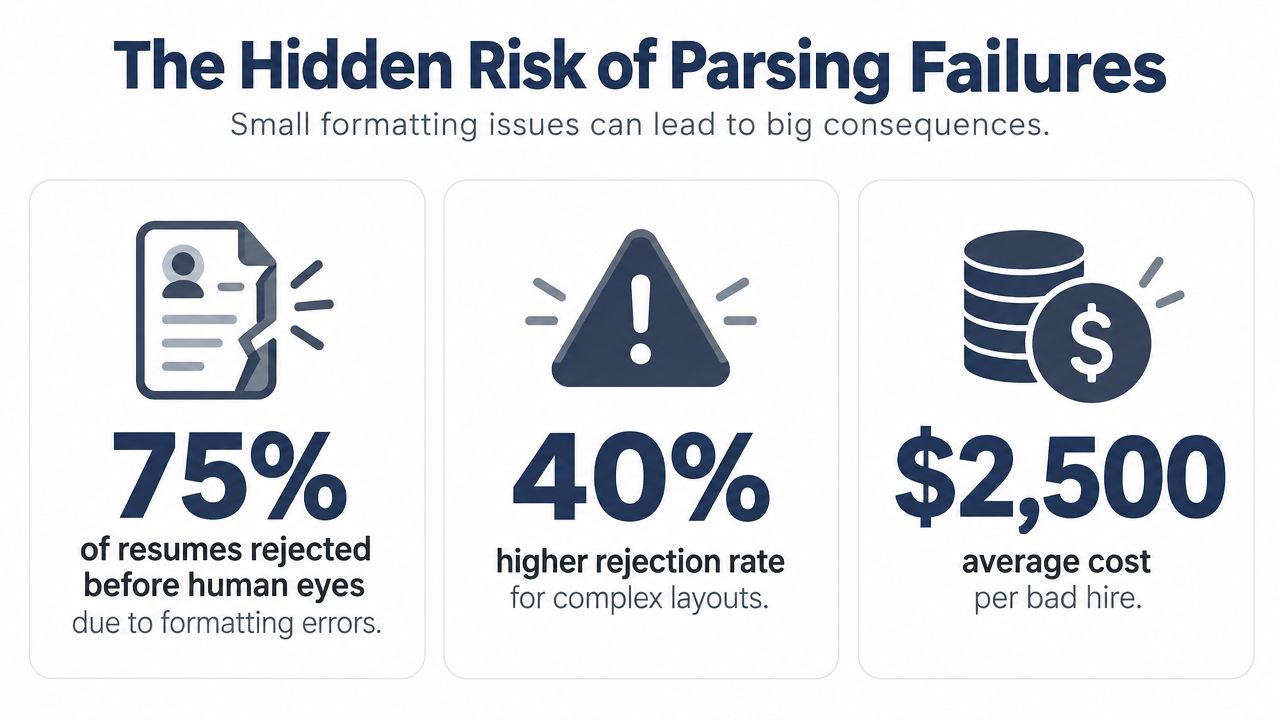
A strong match score cannot help if the ATS cannot convert your file into a usable candidate record. That failure often happens after the writing is finished. Columns, tables, text boxes, and decorative sidebars can scramble the experience, dates, and keywords that an AI resume rewriter helped you refine.
A 2026 benchmark reported that 16.5% of sampled resumes failed to produce a usable candidate record, while 40.8% were flagged for tables or column issues, according to the ATS resume parsing benchmark from ResumeAtlas. Use a single-column layout with clear headings, then test the exported file. The editor preview is not proof that the submitted version will parse correctly.
Treat export as a separate quality gate
The document on screen and the file sent to an employer can differ. Export may alter line breaks, reading order, embedded fonts, spacing, or section placement. Check the actual PDF or DOCX you intend to upload, not only the source document.
Run the file through a parser or ATS checker such as the free ATS resume checker and look for:
- Identity fields: Your name and contact details appear as readable text.
- Section order: Experience, education, and skills remain in the expected sequence.
- Dates and employers: Each date stays connected to the correct position.
- Skills: Important terms have not disappeared into graphics or sidebars.
- Bullet order: The parser reads each accomplishment from beginning to end.
- File behavior: The document opens cleanly and contains selectable text.
Independent testing found that some tools parsed at 88% to 96% across Workday, Greenhouse, Lever, and Taleo, while other visually stronger tools failed parsing 30% to 45% of the time, according to ATS Verification's 2026 review. Results vary by platform, so one successful check does not prove that every employer system will read the file correctly.
Before you trust a score: Verify the file that reaches the employer, not only the draft that looks good in the editor.
An ATS does not need to determine whether AI wrote a sentence. It needs to extract the structure, identify relevant terms, and evaluate qualifications. Formatting integrity therefore matters more than making the document appear artificially handwritten. Keyword stuffing creates a separate risk: a file may match terminology while sounding unnatural to a recruiter and offering weak evidence of ability.
Tools that reveal parsing output provide more useful feedback than tools showing only a generic match percentage. The practical question is whether the resume parses correctly for the role and system receiving it. Use AI as a translation layer, then verify both the machine-readable structure and the human credibility of the final document.
Building a Sustainable Application Workflow
Tailoring every resume from a blank page is exhausting, and exhaustion encourages careless submissions. Build a master resume instead. Keep every verified role, project, skill, certification, accomplishment, and result in one private source document, including details that don't belong on the final version.
The master document is not a submission file. It's an evidence bank. Store alternate descriptions of the same project, the tools involved, the audience served, the constraints you handled, and the outcomes you can substantiate. When a job emphasizes a less obvious part of your background, you'll have material to draw from without inventing anything.
A repeatable tailoring loop
Use this sequence for each serious application:
- Qualify the role first. Decide whether your experience meets the central requirements. Don't spend time optimizing a role that depends on qualifications you don't possess.
- Save the posting. Keep the job description with the application version so you can review the language later.
- Extract priorities. Mark the core responsibilities, must-have skills, and recurring terms.
- Select evidence. Pull the strongest matching bullets from your master resume.
- Rewrite with constraints. Ask the AI to mirror terminology, preserve facts, and flag unsupported claims.
- Review the human version. Remove stiff language, repeated verbs, and claims you wouldn't say in conversation.
- Run the file check. Test the exported document for structure, keywords, and readability.
- Save a distinct version. Keep the role, date, and final file connected in your records.
The most efficient workflow doesn't rewrite everything. It focuses attention where relevance changes the decision: the summary, skills section, and the experience bullets closest to the role. Less relevant history can remain stable unless the job requires a different emphasis.
Know when to stop editing
AI can generate endless alternatives, but more alternatives don't necessarily improve the application. After the resume accurately reflects the role, reads naturally, and passes a parsing check, stop polishing and spend the remaining energy on the cover letter, portfolio, referral message, or interview preparation.
A useful stopping test is this: can a recruiter identify your target role, strongest relevant capability, and supporting evidence during a quick scan? If yes, further word changes may have diminishing value. Your goal is not to produce the most elegant document in isolation. It's to produce a clear, defensible explanation of fit.
Moving From Automated Drafts to Real Interviews
An AI resume rewriter can handle repetitive language work, but it can't take responsibility for your career story. The candidate still decides which experiences matter, whether a claim is accurate, and whether the final document sounds like someone who did the work.
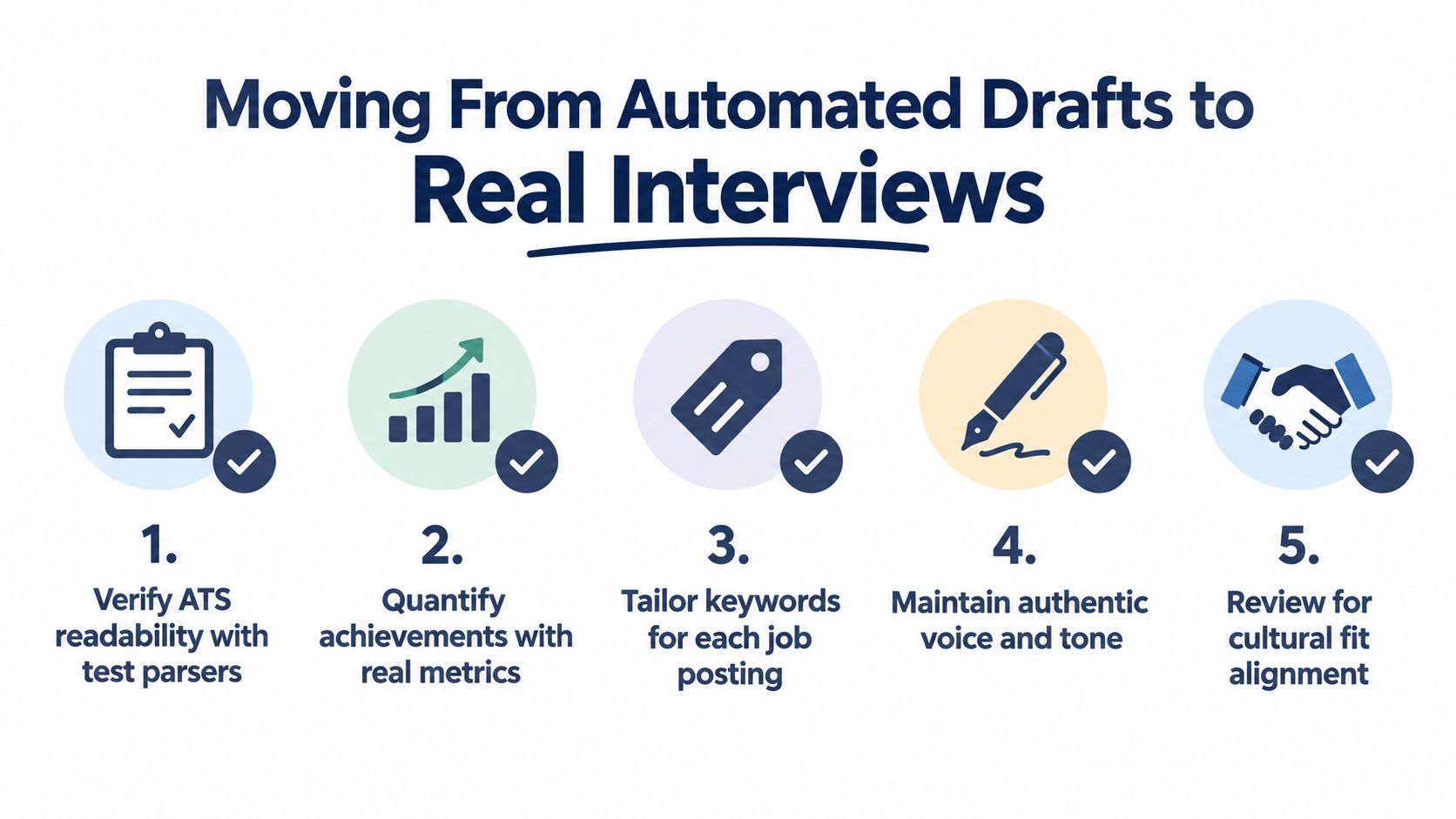
Use this final review before uploading:
- Verify ATS readability: Test the exact exported file and confirm that headings, dates, employers, and bullets appear in the correct order.
- Check role alignment: Make sure the summary, skills, and selected experience reflect the job's actual requirements.
- Protect authenticity: Remove inflated verbs, unfamiliar jargon, and statements you couldn't explain naturally.
- Confirm every keyword: Keep only tools, responsibilities, and qualifications you can defend in an interview.
- Read for human value: Ask whether the document shows decisions, contribution, context, and results, not just activity.
The best use of AI is neither total automation nor total rejection. It's controlled assistance. Let the tool identify relevant language, tighten a long bullet, reorganize evidence, and expose gaps. Then bring your own judgment to the final version.
A resume gets you considered, but interviews test whether the document's claims hold together. If your resume says you improved a process, be ready to explain the problem, your contribution, the choices you made, and what changed. If it names a tool, be prepared to describe how you used it and where its limits appeared.
The technology can help make your experience legible. Your evidence and your judgment make it credible.
GetTheCall turns a LinkedIn profile or existing résumé into a job-specific, ATS-oriented PDF, with job listing analysis, evidence-based bullet rewriting, live role-match scoring, templates, and a free ATS checker. Visit GetTheCall to build a customized version, verify its readability, and submit with confidence.